1. دستورالعمل های ایمنی مهم
Before beginning any exercise program, consult with your physician. This is especially important for individuals over the age of 35 or those with pre-existing health conditions. Read all instructions carefully before using the exercise bike.
- کودکان و حیوانات خانگی را از وسایل دور نگه دارید.
- Place the exercise bike on a flat, stable surface. Use a protective mat if necessary.
- قبل از هر بار استفاده، مطمئن شوید که تمام پیچ و مهرهها محکم بسته شدهاند.
- لباس و کفش ورزشی مناسب بپوشید. از پوشیدن لباسهای گشاد که ممکن است در قسمتهای متحرک گیر کنند، خودداری کنید.
- از حداکثر وزن کاربر 120 کیلوگرم تجاوز نکنید.
- اگر دچار سرگیجه، حالت تهوع، درد قفسه سینه یا هرگونه علائم غیرطبیعی دیگری شدید، فوراً تمرین خود را متوقف کرده و با پزشک مشورت کنید.
- طبق دستورالعملهای ذکر شده در این دفترچه راهنما، سرویس و نگهداری منظم را انجام دهید.
2. محتویات بسته
Carefully unpack all components and verify that you have received all parts listed below. If any parts are missing or damaged, contact customer support.
- فریم اصلی
- استابلایزر جلو و عقب
- پدال (چپ و راست)
- پایه صندلی و صندلی
- میله فرمان و دسته فرمان
- Monitor/Display Console
- Water Bottle Holder and Water Bottle
- یراق آلات مونتاژ (پیچ، واشر، مهره، ابزار)
- راهنمای کاربر
3. دستورالعمل مونتاژ
Follow these steps to assemble your Physionics Indoor Exercise Bike. It is recommended to have two people for assembly.
- تثبیت کننده ها را وصل کنید: Secure the front and rear stabilizers to the main frame using the provided bolts and washers. Ensure they are firmly attached for stability.
- نصب پدال: Identify the left (L) and right (R) pedals. The left pedal screws counter-clockwise, and the right pedal screws clockwise. Ensure they are fully tightened to prevent stripping.
- Mount Seat and Handlebars: Insert the seat post into the main frame and secure it at your desired height. Attach the seat to the seat post. Similarly, insert the handlebar post and attach the handlebars.
- اتصال مانیتور: Connect the sensor wires from the main frame to the monitor console. Mount the monitor onto the handlebar post. Insert batteries (not included) into the monitor.
- ضمیمه کردن لوازم جانبی: Install the water bottle holder and any other accessories.

Figure 3.1: Fully assembled Physionics Indoor Exercise Bike. This image shows the complete structure including the frame, seat, handlebars, pedals, and display console.
4. دستورالعمل های عملیاتی
4.1. Using the Display Console
The display console tracks your workout data. Insert two AAA batteries (not supplied) into the battery compartment on the back of the monitor.

Figure 4.1: Close-up of the display console showing various metrics. The display shows Time, Speed, Calories, Distance, Odometer, and Pulse.
- دکمه MODE: Press to cycle through different display functions (Time, Speed, Distance, Calories, Odometer, Pulse). Press and hold to reset values.
- اسکن: هر چند ثانیه یکبار به طور خودکار تمام عملکردها را مرور میکند.
- TIME: مدت زمان تمرین شما را نشان میدهد.
- سرعت: سرعت فعلی شما را نشان می دهد.
- فاصله: Displays the distance covered during your current workout.
- کالری: کالری سوزانده شده در طول تمرین را تخمین میزند.
- کیلومتر شمار: کل فاصله انباشته شده را نمایش می دهد.
- نبض: Shows your heart rate when holding the pulse sensors on the handlebars.
۵.۳ تنظیم مقاومت
The exercise bike features an adjustable resistance system to vary your workout intensity.

Figure 4.2: Diagram illustrating the resistance and brake system. Turning the red knob controls the resistance level, while pressing it activates the emergency brake.
- افزایش مقاومت: Turn the resistance knob clockwise to increase the workout intensity.
- کاهش مقاومت: Turn the resistance knob counter-clockwise to decrease the workout intensity.
- ترمز اضطراری: دکمه مقاومتی را محکم فشار دهید تا ترمز اضطراری درگیر شود و فلایویل فوراً متوقف شود.
4.3. ویژگی های خاص

شکل 4.3: تمام شده استview of additional features including the phone holder, water bottle, and foot straps. These features enhance user convenience during workouts.
- نگهدارنده تلفن: A convenient holder is integrated into the handlebars to secure your smartphone or tablet during your workout.
- نگهدارنده بطری آب: A dedicated holder keeps your water bottle within easy reach for hydration.
- بندهای پا: Adjustable foot straps on the pedals ensure your feet remain securely in place during intense cycling.
5. تنظیمات
Proper adjustment of the seat and handlebars is crucial for comfort and effective exercise.

Figure 5.1: Illustration showing the adjustable seat and handlebars. The seat can be adjusted horizontally and vertically, and the handlebars vertically.
- ارتفاع صندلی: Loosen the adjustment knob on the seat post. Raise or lower the seat until your leg has a slight bend at the knee when the pedal is at its lowest point. Tighten the knob securely.
- Seat Horizontal Position: Loosen the adjustment knob under the seat. Slide the seat forward or backward to find a comfortable position relative to the handlebars. Tighten the knob securely.
- ارتفاع دسته: Loosen the adjustment knob on the handlebar post. Raise or lower the handlebars to a comfortable height that allows for a relaxed upper body posture. Tighten the knob securely.
6. تعمیر و نگهداری
نگهداری منظم، طول عمر و عملکرد ایمن دوچرخه ثابت شما را تضمین میکند.
- تمیز کردن: دوچرخه را با تبلیغات پاک کنیدamp بعد از هر بار استفاده، برای پاک کردن عرق و گرد و غبار، از پارچه استفاده کنید. از پاککنندههای ساینده خودداری کنید.
- بررسی اتصالات: Periodically check all bolts, nuts, and screws to ensure they are tight. Tighten any loose connections.
- روغن کاری: Apply a small amount of silicone-based lubricant to moving parts (e.g., pedal axles, resistance mechanism) if you notice squeaking or stiffness.
- ذخیره سازی: دوچرخه را در جای خشک و خنک و دور از نور مستقیم خورشید و دمای شدید نگهداری کنید.

Figure 6.1: Image showing the transport wheels located at the front stabilizer. These wheels allow for easy relocation of the exercise bike.
To move the bike, tilt it forward onto the transport wheels and roll it to the desired location. Ensure the area is clear before moving.
7 عیب یابی
| مشکل | علت احتمالی | راه حل |
|---|---|---|
| نمایشگر کار نمی کند | باتریهای از کار افتاده، اتصال سست | Replace batteries, check monitor cable connection. |
| صدای جیرجیر در حین استفاده | Loose parts, lack of lubrication | Check and tighten all bolts. Apply lubricant to moving parts. |
| مقاومت تغییر نمی کند | مشکل مکانیزم دکمه مقاومت | Ensure the resistance knob is properly engaged. Contact customer support if the issue persists. |
| دوچرخه ناپایدار به نظر میرسد | سطح ناهموار، تثبیتکنندههای شل | Place on a flat surface. Check and tighten stabilizer bolts. |
8. مشخصات
- برند: فیزیک
- نام مدل: Vélo d'Appartement
- ابعاد (L x W x H): تقریباً ۲۸.۷ سانتیمتر × ۲۰.۸ سانتیمتر × ۰.۹ سانتیمتر
- وزن مورد: 27.65 کیلوگرم
- حداکثر وزن کاربر: 120 کیلوگرم
- وزن چرخ فلایویل: 10 کیلوگرم
- مواد: Steel frame; Other: ABS plastic, PU leather, and foam
- مکانیسم مقاومت: هوا
- منبع تغذیه (نمایشگر): Battery powered (batteries not included)
- رنگ: مشکی، قرمز

Figure 8.1: Diagram showing the dimensions of the exercise bike (105cm length, 47cm width, 100cm height) and highlighting the steel frame construction.
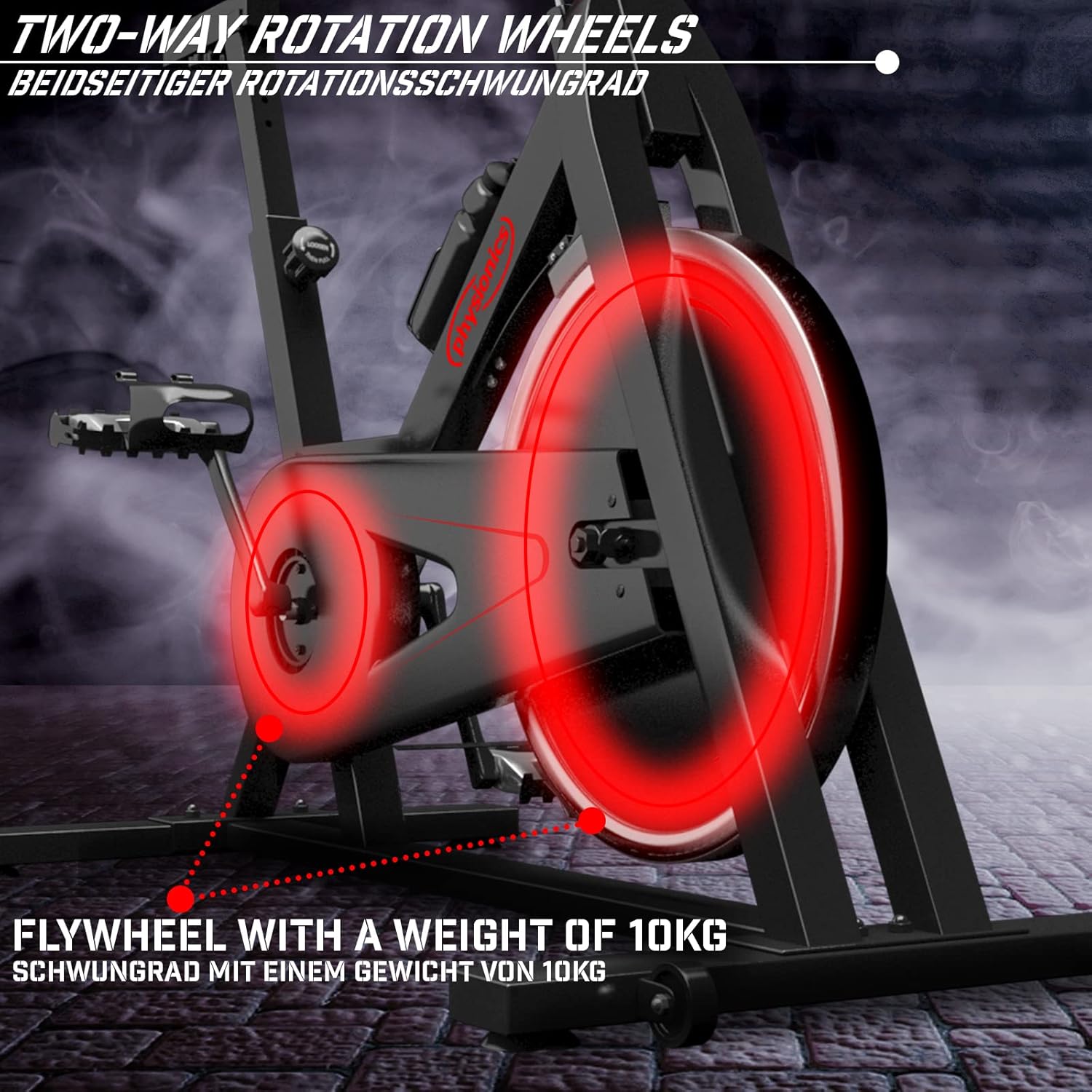
Figure 8.2: Close-up of the 10kg flywheel, indicating its two-way rotation capability.
9. گارانتی و پشتیبانی
For warranty information or technical support, please refer to the documentation included with your purchase or contact Physionics customer service. Keep your proof of purchase for warranty claims.
For further assistance, please visit the official Physionics webسایت یا با کانالهای پشتیبانی مشتری آنها تماس بگیرید.


