1. مقدمه
The AIWA KSTB6043 Network Video Player is designed to transform your existing television into a smart Android TV. This device allows you to access various network video services and play media content from external storage devices. It operates on Android 8.0 Oreo and supports HDMI 2.0 for high-definition video output.
Included accessories are a Bluetooth remote control, a 1.5m Premium HDMI cable, an instruction manual, and a warranty card.
2. محصول تمام شدview
2.1. اجزای دستگاه
Familiarize yourself with the various ports and components of your AIWA KSTB6043 Network Video Player.
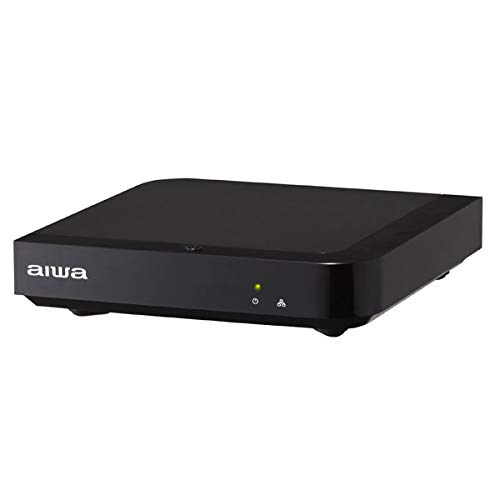
تصویر 1: جلو View. This image displays the front of the AIWA KSTB6043 unit, featuring the AIWA logo and indicator lights.

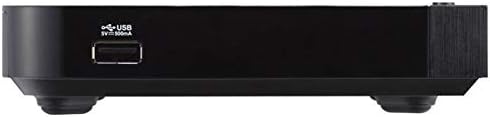
تصویر ۵.۱: کنار View. This image shows the side of the device, highlighting a USB port for connecting external storage.
تصویر 3: عقب View. This image illustrates the rear panel of the player, featuring the LAN port, HDMI output, S/PDIF port, power input (12V=1.5A IN), and a reset button.
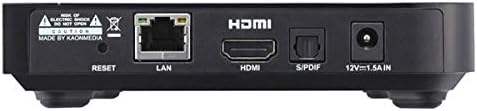
Image 4: Setup Exampله The player is shown connected to a television, with the remote control placed nearby, demonstrating a typical setup.
2.2. کنترل از راه دور
The included Bluetooth remote control allows for easy navigation and control of the network video player. Refer to the remote control diagram in the included physical manual for specific button functions.
3. راه اندازی
Follow these steps to set up your AIWA KSTB6043 Network Video Player:
- اتصال به تلویزیون: Use the provided Premium HDMI cable to connect the HDMI OUT port on the network video player to an HDMI input port on your television.
- اتصال برق: Plug the power adapter into the 12V=1.5A IN port on the back of the player, then plug the adapter into a wall outlet.
- روشن کردن: Press the power button on the remote control or the device. The indicator light on the front of the player will illuminate.
- ورودی را انتخاب کنید: On your TV, select the corresponding HDMI input source using your TV's remote control.
- راه اندازی اولیه: Follow the on-screen prompts for initial Android TV setup, including language selection, network connection (Wi-Fi or Ethernet), and Google account login.
3.1. Connection Demonstration Video
Video 1: Basic Connection and Media Playback. This video demonstrates how to connect a media player to a TV and play content from an SD card or USB drive. Note: The specific product shown in this video may differ from the AIWA KSTB6043, but the connection principles are similar.
Video 2: Detailed Port Overview and Setup. This video provides a closer look at the ports on a media player, including HDMI, USB, and power, and shows the connection process. It also demonstrates basic menu navigation. Note: The specific product shown in this video may differ from the AIWA KSTB6043, but the connection principles and interface navigation are generally applicable.
4. دستورالعمل های عملیاتی
4.1. Navigating the Android TV Interface
Once powered on and connected, the Android TV home screen will appear. Use the directional buttons (up, down, left, right) and the OK button on your remote control to navigate through apps, settings, and content.
- صفحه اصلی: Access your installed apps, recommended content, and system settings.
- برنامه ها: Select the 'Apps' icon to view و تمام برنامههای نصب شده را اجرا کنید.
- تنظیمات: Access network settings, display options, audio settings, and device preferences.
4.2. Playing Media from External Storage
The AIWA KSTB6043 supports playback of video, image, and music fileاز درایوهای USB یا کارتهای SD.
- درج فضای ذخیرهسازی: Insert your USB drive into a USB port or your SD card into the SD card slot on the device.
- دسترسی داشته باشید Files: Navigate to the 'File Manager' or 'Media Player' app on the Android TV interface.
- انتخاب محتوا: Browse your external storage for the desired video, image, or music files and select them for playback.
4.3. Using Network Services
With an internet connection, you can access various streaming services. The device supports Netflix, among others.
- اتصال به شبکه: Ensure your device is connected to Wi-Fi or via an Ethernet cable.
- راه اندازی برنامه: Select the desired streaming app (e.g., Netflix) from the home screen or app list.
- Login/Subscribe: Log in with your existing account or follow the prompts to subscribe to the service.
5. تعمیر و نگهداری
- تمیز کردن: برای تمیز کردن قسمت بیرونی دستگاه از یک پارچه نرم و خشک استفاده کنید. از پاک کننده های مایع یا مواد ساینده استفاده نکنید.
- به روز رسانی نرم افزار: Periodically check for system updates in the settings menu to ensure optimal performance and access to the latest features.
- تهویه: برای جلوگیری از گرم شدن بیش از حد، مطمئن شوید که دستگاه در محلی با تهویه مناسب قرار دارد. منافذ تهویه را مسدود نکنید.
6 عیب یابی
| مشکل | علت احتمالی | راه حل |
|---|---|---|
| بدون قدرت | کابل برق وصل نیست؛ پریز برق کار نمیکند | اتصال کابل برق را بررسی کنید؛ یک پریز برق دیگر را امتحان کنید |
| سیگنالی در تلویزیون وجود ندارد | Incorrect HDMI input selected; HDMI cable loose or faulty | Select correct HDMI input on TV; Reconnect or replace HDMI cable |
| کنترل از راه دور کار نمی کند | Batteries depleted; Obstruction between remote and device | Replace batteries; Ensure clear line of sight to the device |
| نمی توان به وای فای متصل شد | Incorrect password; Router issue; Device too far from router | Verify Wi-Fi password; Restart router; Move device closer to router |
7. مشخصات
| ویژگی | جزئیات |
|---|---|
| شماره مدل | KSTB6043 |
| سیستم عامل | اندروید 8.0 اوریو |
| نسخه HDMI | 2.0 |
| HDMI Port Count | 1 |
| فناوری اتصال | بلوتوث، HDMI |
| فرمت های صوتی پشتیبانی شده | Dolby Digital، DTS، PCM |
| خدمات اینترنتی | Netflix (and others via Android apps) |
| قطعنامه | 1920 x 1080 پیکسل (Full HD) |
| ابعاد محصول | 12.5 سانتی متر (L) x 12.5 سانتی متر (W) x 3 سانتی متر (H) |
| وزن | Approx. 760 g (packaged) |
| ویژگی ها | High-definition video output, Android TV compatible |
8. گارانتی و پشتیبانی
The AIWA KSTB6043 Network Video Player comes with a warranty. Please refer to the warranty card included in the product packaging for detailed terms and conditions, including the warranty period and coverage.
For technical support or inquiries, please contact AIWA customer service through the contact information provided in your warranty documentation or on the official AIWA webسایت


