1. مقدمه
This user manual provides comprehensive instructions for the setup, operation, and maintenance of your SHARP LC-32HI5012E HD Ready Smart LED TV. Please read this manual thoroughly before using your television to ensure proper functionality and safety.
The SHARP LC-32HI5012E is an 81 cm (32-inch) HD Ready Smart LED TV featuring Active Motion 200 technology for enhanced picture quality and a Triple Tuner for versatile reception options. It includes integrated Wi-Fi and a Harman/Kardon sound system for a complete entertainment experience.
2. محتویات بسته
هنگام باز کردن بسته، لطفاً بررسی کنید که تمام موارد زیر در آن موجود باشد:
- SHARP LC-32HI5012E Main Unit
- کنترل از راه دور (با باتری)
- راهنمای کاربر (این سند)

تصویر: جلو view of the SHARP LC-32HI5012E television, displaying a vibrant city skyline on its screen. This image shows the slim bezel design and the central SHARP logo.
3. راه اندازی
3.1 مونتاژ پایه
Carefully place the TV screen-down on a soft, flat surface to prevent damage. Attach the two stand feet to the designated slots at the bottom of the TV, securing them with the provided screws. Ensure the stand is firmly attached before proceeding.
3.2 اتصال لوازم جانبی
تلویزیون شما گزینههای اتصال مختلفی برای دستگاههای خارجی ارائه میدهد:
- پورتهای HDMI (x3): پخشکنندههای بلو-ری، کنسولهای بازی یا گیرندههای دیجیتال را وصل کنید.
- پورتهای USB (x2): برای پخش رسانه از درایوهای USB.
- Antenna In (RF): Connect your terrestrial antenna for DVB-T/T2HD reception.
- Sat In: دیش ماهواره خود را برای دریافت سیگنال DVB-S/S2 متصل کنید.
- RJ45 (LAN): برای اتصال به اینترنت سیمی.
- CI+ Port: برای ماژولهای دسترسی مشروط (CAM) به view کانال های رمزگذاری شده
- Mini Component/YPbPr, Mini AV Composite: برای دستگاههای آنالوگ قدیمیتر.
- خروجی صوتی نوری دیجیتال: برای اتصال به سیستمهای صوتی خارجی
- Audio out / Headphone: برای هدفون یا بلندگوهای خارجی.

تصویر: عقب view of the SHARP LC-32HI5012E television, highlighting the arrangement of various input and output ports for connecting external devices.
۴.۵ روشن کردن اولیه و راهاندازی اولیه
After connecting all necessary cables, plug the power cord into an electrical outlet. Press the power button on the remote control or the TV. The first-time setup wizard will guide you through:
- انتخاب زبان.
- Network connection (Wi-Fi or wired LAN).
- Channel scanning for DVB-C, DVB-S/S2, or DVB-T/T2HD.
- منطقه زمانی و سایر تنظیمات اولیه.
4. دستورالعمل های عملیاتی
۴.۱ عملکردهای اساسی تلویزیون
- روشن/خاموش برق: از دکمه پاور روی ریموت یا تلویزیون استفاده کنید.
- کنترل صدا: از دکمههای VOL +/- استفاده کنید.
- انتخاب کانال: Use CH +/- or number buttons.
- منبع ورودی: Press the SOURCE button to switch between HDMI, AV, TV, etc.
- پیمایش منو: Use arrow keys and OK button to navigate menus.
۴.۲ ویژگیهای تلویزیون هوشمند
Your SHARP LC-32HI5012E is equipped with integrated Wi-Fi and offers access to various smart features:
- برنامه های از پیش نصب شده: Access popular streaming services like Netflix and YouTube directly.
- Web مرورگر: مستقیماً از طریق تلویزیون خود در اینترنت جستجو کنید.
- Aquos Net+: Access additional online content and services provided by Sharp.
برای استفاده کامل از تلویزیون هوشمند، مطمئن شوید که تلویزیون شما به اینترنت متصل است.
4.3 سیستم صوتی
The integrated Harman/Kardon sound system provides a high-quality audio experience with excellent dynamics and clarity. Adjust audio settings in the TV menu to customize your sound preferences.
5. تعمیر و نگهداری
۶.۱ تمیز کردن صفحه نمایش
برای تمیز کردن صفحه نمایش، آن را به آرامی با یک پارچه نرم و بدون پرز پاک کنید. برای لکههای سرسخت، کمی ...ampپارچه را با آب یا یک پاککننده مخصوص صفحه نمایش بپوشانید. نکن مایع را مستقیماً روی صفحه نمایش اسپری کنید.
5.2 مراقبت عمومی
- تلویزیون را از نور مستقیم خورشید و منابع گرما دور نگه دارید.
- از تهویه مناسب در اطراف تلویزیون اطمینان حاصل کنید.
- در هنگام رعد و برق یا زمانی که برای مدت طولانی بدون مراقبت رها شده است، تلویزیون را از پریز برق جدا کنید.
6 عیب یابی
If you encounter any issues with your TV, please refer to the following common problems and solutions before contacting support.
| مشکل | علت احتمالی | راه حل |
|---|---|---|
| بدون قدرت | Power cord unplugged, power outlet issue. | اتصال سیم برق را بررسی کنید. پریز برق دیگری را امتحان کنید. |
| تصویر ندارد، اما صدا دارد | منبع ورودی نادرست، کابل معیوب. | Verify correct input source. Check HDMI/AV cable connections. |
| بدون صدا | صدا بیصدا یا خیلی کم است، مشکل سیستم صوتی خارجی. | Unmute volume, increase volume. Check external audio connections. |
| نمیتوان به وایفای وصل شد | Incorrect password, router issue, TV too far from router. | Re-enter password. Restart router. Move TV closer or use wired connection. |
7. مشخصات
| ویژگی | جزئیات |
|---|---|
| نام تجاری | تیز |
| شماره مدل | LC-32HI5012E |
| فناوری صفحه نمایش | LED |
| قطعنامه | HD Ready (1366 x 768 پیکسل) |
| مورب صفحه نمایش | 81.3 سانتی متر (32 اینچ) |
| نرخ تازه سازی | 60 هرتز |
| ویژگی خاص | Internet (Smart TV) |
| خدمات اینترنتی پشتیبانی شده | Netflix, YouTube, Browser |
| فناوری اتصال | USB, HDMI, LAN, Wi-Fi |
| تیونرها | DVB-C, DVB-S/S2, DVB-T/T2HD |
| سیستم صوتی | هارمن/کاردون |
| ابعاد محصول (W x H x D) | ۱۴۵.۱۷ × ۲۹.۰۲ × ۸۹.۷۵ سانتیمتر (با پایه) |
| وزن | 4.8 کیلوگرم |
| نوع نصب | پایه میز |
۵.۷ بهرهوری انرژی
The SHARP LC-32HI5012E has an energy efficiency rating of F. For detailed energy consumption information, please refer to the energy label and product information sheet.

Image: Energy efficiency label for the SHARP LC-32HI5012E television, showing its energy class F and power consumption details.
For more details, visit the official EPREL database: https://eprel.ec.europa.eu/qr/402565
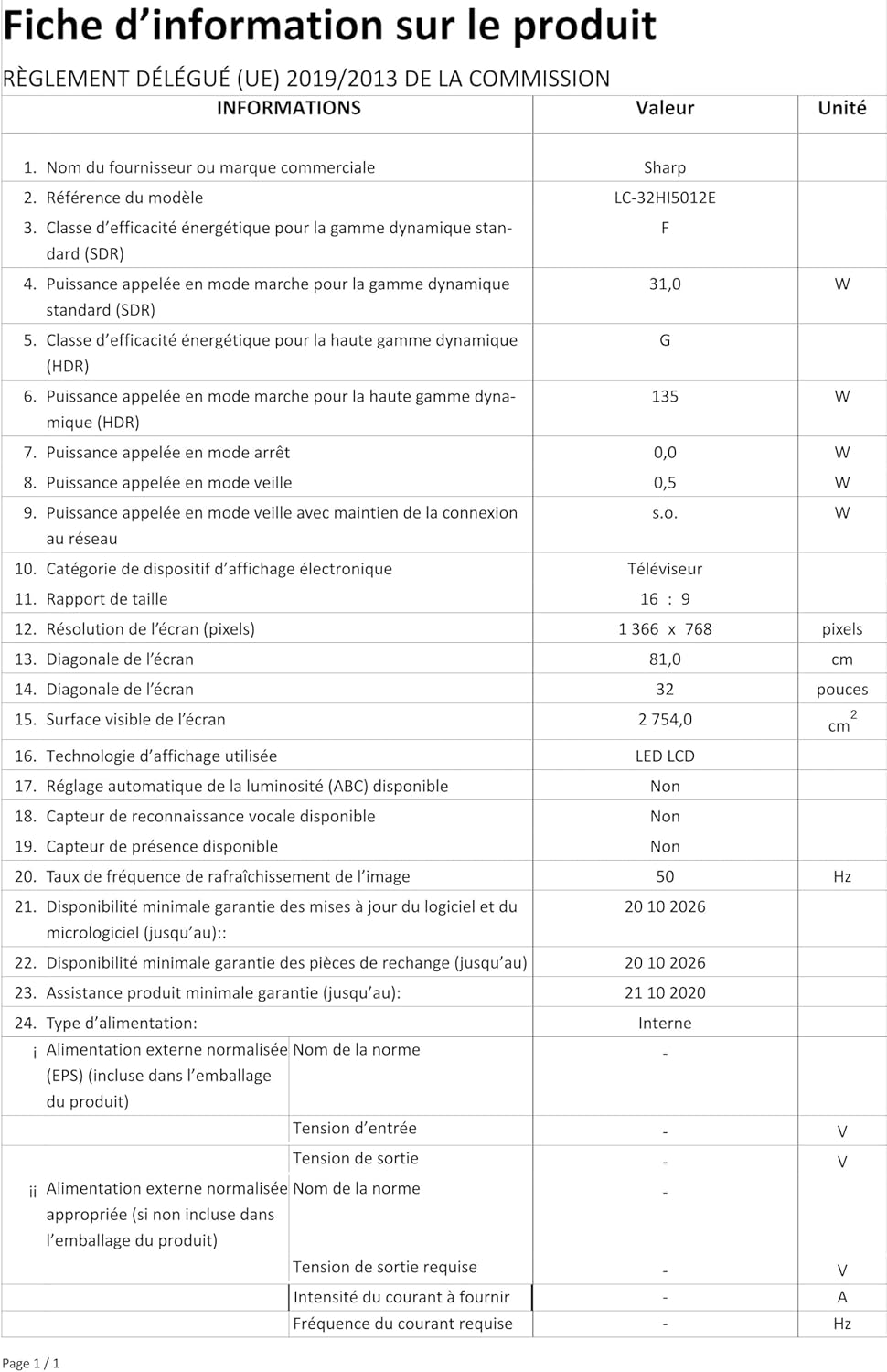
Image: Product information sheet detailing technical specifications and compliance information for the SHARP LC-32HI5012E television.
8. گارانتی و پشتیبانی
For warranty information, please refer to the warranty card included with your product or visit the official SHARP webرسید خرید خود را به عنوان مدرک خرید برای هرگونه ادعای گارانتی نگه دارید.
For technical support or service inquiries, please contact SHARP customer service. Contact details can typically be found on the SHARP official webسایت یا در بسته بندی محصول


