1. مقدمه
This instruction manual provides guidance for the Ring Spare Parts Kit specifically designed for the Ring Video Doorbell 2. This kit contains essential components and tools to replace lost or misplaced parts, ensuring the continued functionality and proper installation of your Video Doorbell 2. It is crucial to note that this kit is only compatible with the Ring Video Doorbell 2.
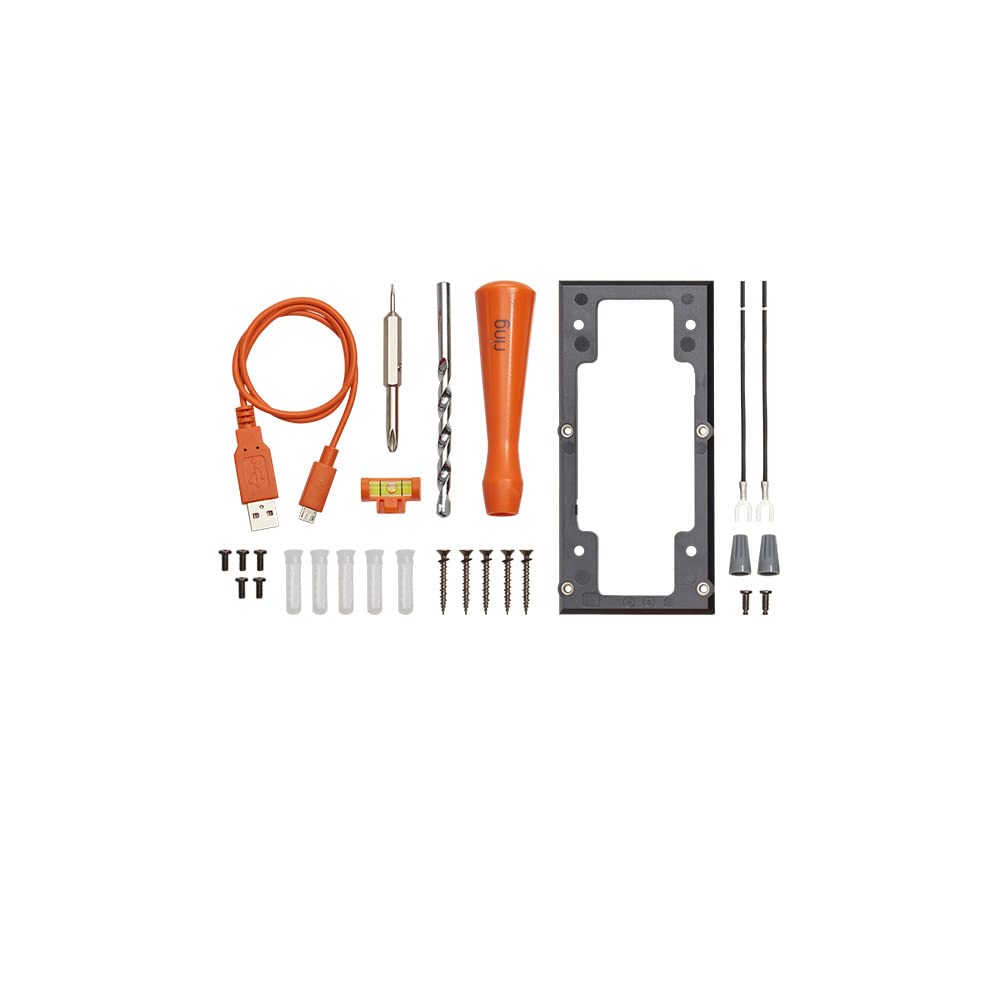
تصویر 1.1: تمام شدview of the Ring Spare Parts Kit for Video Doorbell 2, showing various components such as screws, tools, and cables.
2. راه اندازی و نصب
This section outlines the general steps for using the spare parts to set up or re-install your Ring Video Doorbell 2. Always refer to the original Ring Video Doorbell 2 installation guide for detailed instructions specific to your doorbell model.
2.1 محتویات کیت
The Ring Spare Parts Kit for Video Doorbell 2 includes the following items:
- صفحه آداپتور
- پیچ گوشتی
- مته
- سطح
- کابل شارژ
- Various screws (mounting screws, security screws)
- Wire extenders
- مهره های سیمی
- استیکرها
۴.۳ مراحل نصب عمومی
- Identify the Missing Part: Determine which component needs replacement or is required for your installation.
- سطح نصب را آماده کنید: If installing for the first time or relocating, use the provided drill bit and level to prepare the mounting holes.
- Attach the Adapter Plate (if needed): If your installation requires an adapter plate for proper fit or angle, secure it to the wall using the appropriate screws.
- سیم کشی را وصل کنید (در صورت وجود): Use the wire extenders and wire nuts to connect your doorbell's existing wiring to the Ring Video Doorbell 2, following the specific wiring diagram in your doorbell's main manual.
- زنگ در را نصب کنید: Secure the Ring Video Doorbell 2 to the adapter plate or directly to the wall using the provided mounting screws.
- فیس پلیت را ایمن کنید: Once the doorbell is mounted, attach its faceplate and secure it with the specialized security screw using the included screwdriver.
- شارژ باتری (در صورت وجود): Use the charging cable to ensure your doorbell's battery is fully charged before final installation.
Note: Always power off your existing doorbell system at the breaker before handling any electrical wiring.
3. Operating the Tools
This kit provides specific tools to assist with the installation and maintenance of your Ring Video Doorbell 2. Proper use of these tools ensures a secure and correct setup.
- پیچ گوشتی: This is a specialized screwdriver designed to fit the security screws on your Ring Video Doorbell 2. Use it to tighten or loosen these screws when attaching or removing the doorbell's faceplate.
- مته: Use this drill bit with a power drill to create pilot holes in your mounting surface for the screws. Ensure the drill bit size matches the recommended size in your doorbell's main installation guide.
- سطح: Place the level on the mounting plate or the doorbell itself during installation to ensure it is perfectly straight and aesthetically aligned.
- کابل شارژ: Connect this cable to the charging port on your Ring Video Doorbell 2 battery and a standard USB power adapter to charge the battery.
4. تعمیر و نگهداری
Proper maintenance of your Ring Video Doorbell 2 and its spare parts ensures longevity and reliable performance.
- Keep Spare Parts Organized: Store any unused spare parts in a safe, dry place to prevent loss or damage. The original packaging can be used for this purpose.
- نظافت منظم: Periodically clean the exterior of your Ring Video Doorbell 2 with a soft, damp پارچه. از پاککنندهها یا حلالهای ساینده خودداری کنید.
- مراقبت از باتری: If your doorbell uses a removable battery, ensure it is charged regularly according to Ring's recommendations. Use only the provided charging cable or a compatible replacement.
- Screw Integrity: Periodically check that all mounting and security screws are tight. Do not overtighten.
5 عیب یابی
This section addresses common issues related to the spare parts kit itself. For troubleshooting issues with the Ring Video Doorbell 2's functionality, refer to the doorbell's dedicated user manual or Ring's online support resources.
| مشکل | علت احتمالی | راه حل |
|---|---|---|
| Missing a specific part from the kit. | Part was misplaced or not included. | Verify all contents against the list in Section 2.1. If a part is genuinely missing from a new kit, contact Ring Support. If misplaced, this kit serves as a replacement source. |
| Screwdriver does not fit security screws. | Incorrect screwdriver or wrong doorbell model. | Ensure you are using the specialized screwdriver provided in this kit. Confirm your doorbell is a Ring Video Doorbell 2, as this kit is only compatible with that model. |
| Doorbell not mounting securely. | Incorrect screws used or mounting surface issues. | Use the appropriate mounting screws for your surface type. Ensure pilot holes are correctly drilled. If using an adapter plate, ensure it is securely fastened first. |
6. مشخصات
This spare parts kit is designed for specific compatibility and includes a defined set of components.
- سازگاری: Exclusively designed for the Ring Video Doorbell 2. Not compatible with other Ring doorbell models.
- اجزای شامل:
- 1x Adapter Plate
- 1x Screwdriver (specialized for Ring security screws)
- ۱ عدد مته
- 1x سطح
- 1 عدد کابل شارژ
- Assorted Mounting Screws
- Assorted Security Screws
- Assorted Wire Extenders
- Assorted Wire Nuts
- Assorted Stickers
- مواد: Various materials suitable for outdoor use and doorbell installation.
7. گارانتی و پشتیبانی
For detailed warranty information regarding your Ring Spare Parts Kit or the Ring Video Doorbell 2, please refer to the official Ring website. Ring provides comprehensive support resources, including FAQs, troubleshooting guides, and customer service contact options.
Official Ring Support: بازدید کنید the Ring Store on Amazon or the main Ring support website for the latest information and assistance.


