1. مقدمه
This manual provides comprehensive instructions for the setup, operation, and maintenance of your Google Chromecast 3 streaming device. Please read this guide thoroughly to ensure proper use and to maximize your device's capabilities.
۲. چه چیزهایی در جعبه است؟
- Google Chromecast 3 device
1.2. محصول تمام شدview
The Google Chromecast 3 is a media streaming device that plugs into the HDMI port of your television. It allows you to cast content from your mobile device or computer to your TV, enabling you to enjoy videos, music, and more on a larger screen.

شکل 1: جلو view of the Google Chromecast 3 device, showcasing its compact, circular design with the Google 'G' logo.
۱. دستورالعملهای راهاندازی
2.1. Connecting Your Chromecast
- اتصال به تلویزیون: Plug the Chromecast device into an available HDMI port on your television.
- اتصال به برق: Connect the USB power cable to the Chromecast device and then plug the other end into a power adapter (not included, typically a standard USB wall adapter) and into a wall outlet. Alternatively, you can plug the USB cable into an available USB port on your TV if it provides sufficient power.
- ورودی HDMI را انتخاب کنید: Turn on your TV and select the HDMI input that your Chromecast is connected to. You should see the Chromecast setup screen.
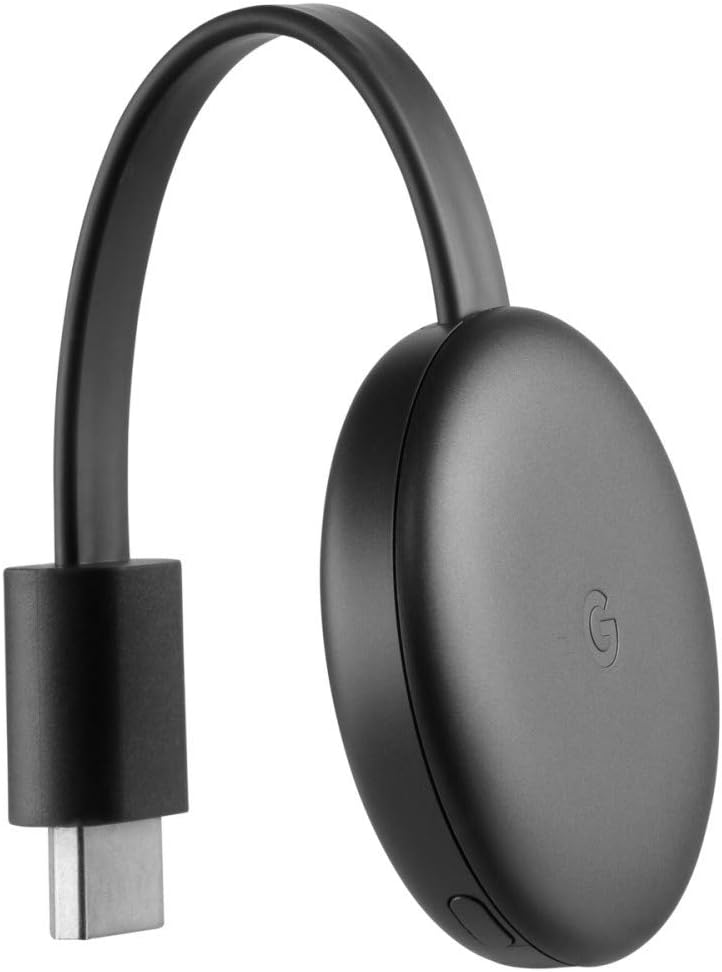
شکل 2: سمت view of the Google Chromecast 3, illustrating the integrated HDMI connector ready to plug into a television.

شکل 3: پایین view of the Google Chromecast 3, highlighting the micro-USB power input port and a small button.
2.2. پیکربندی اولیه
- دانلود اپلیکیشن گوگل هوم: در تلفن هوشمند یا تبلت خود، برنامه Google Home را از App Store (iOS) یا Google Play Store (Android) دانلود و نصب کنید.
- Open Google Home App: Launch the Google Home app and follow the on-screen instructions to set up your new device. Ensure your mobile device is connected to the same Wi-Fi network you intend to use for Chromecast.
- اتصال به وای فای: The app will guide you through connecting your Chromecast to your home Wi-Fi network.
- Link Google Account: You may be prompted to link your Google account to the Chromecast.
3. دستورالعمل های عملیاتی
۴.۳. پخش محتوا
Once setup is complete, you can begin casting content from compatible applications on your mobile device or computer.
- Open a Compatible App: Launch an application that supports Chromecast, such as Disney Plus, Netflix, Prime Video, Spotify, or YouTube.
- روی نماد ارسال ضربه بزنید: به دنبال نماد Cast باشید ▶︎ (a rectangle with a Wi-Fi signal in the corner) within the app. Tap this icon.
- کرومکست خود را انتخاب کنید: A list of available casting devices will appear. Select your Google Chromecast 3 (GA00439-DE) from the list.
- Start Casting: The content from your app will now appear on your TV screen. Your mobile device acts as a remote control.
3.2. کنترل پخش
Playback controls (play, pause, volume, skip) are typically available within the casting app on your mobile device. You can also use the Google Home app for basic controls.
4. تعمیر و نگهداری
4.1. تمیز کردن
To clean your Chromecast device, gently wipe it with a soft, dry, lint-free cloth. Do not use liquid cleaners or abrasive materials.
4.2. به روز رسانی نرم افزار
Chromecast devices automatically receive software updates when connected to the internet. Ensure your device remains connected to power and Wi-Fi to receive the latest features and security enhancements.
5 عیب یابی
۶. مسائل و راهحلهای رایج
- Chromecast Not Found:
- Ensure your mobile device is on the same Wi-Fi network as your Chromecast.
- Verify the Chromecast is powered on and connected to the correct HDMI input on your TV.
- Restart your Wi-Fi router, Chromecast, and mobile device.
- No Display on TV:
- Check that the Chromecast is securely plugged into the HDMI port.
- اطمینان حاصل کنید که تلویزیون روی ورودی HDMI صحیح تنظیم شده است.
- یک پورت HDMI دیگر را روی تلویزیون خود امتحان کنید.
- Casting Issues (Buffering, Disconnections):
- قدرت سیگنال وایفای خود را بررسی کنید. در صورت امکان، کرومکست را به روتر خود نزدیکتر کنید.
- مطمئن شوید که اتصال اینترنت شما پایدار و به اندازه کافی سریع برای پخش جریانی است.
- Close other applications on your mobile device that might be consuming bandwidth.
- تنظیم مجدد کارخانه: If issues persist, you can perform a factory reset. With the Chromecast powered on, press and hold the button on the side of the device for at least 15 seconds. The LED light will blink, then change color, and the TV screen will go blank as the device resets.
6. مشخصات
| ویژگی | جزئیات |
|---|---|
| شماره مدل | GA00439-DE |
| نام تجاری | گوگل |
| ابعاد محصول | 2.04 x 2.04 x 0.54 اینچ |
| وزن مورد | 1.4 اونس |
| فناوری اتصال | HDMI، وای فای |
| نوع رابط | HDMI |
| قطعنامه | 1080p |
| خدمات اینترنتی پشتیبانی شده | Disney Plus, Netflix, Prime Video, Spotify, YouTube |
| نوع کنترلر | کنترل برنامه |
| رنگ | مشکی |
7. گارانتی و پشتیبانی
برای اطلاعات گارانتی و پشتیبانی فنی، لطفاً به پشتیبانی رسمی گوگل مراجعه کنید website or contact Google customer service. Details regarding your product's warranty period and terms of service can typically be found on the manufacturer's webسایت
پشتیبانی آنلاین: support.google.com/chromecast


