مقدمه
The Bluesound Pulse 2i is a premium, high-resolution streaming music speaker designed to fill large spaces with rich, clear audio. As part of the Bluesound ecosystem, it offers unparalleled sound quality and versatile connectivity options for a seamless multi-room audio experience. This manual provides detailed instructions for setting up, operating, maintaining, and troubleshooting your Pulse 2i speaker.

شکل 1: جلو view of the Bluesound Pulse 2i Wireless Smart Speaker.
راهنمای راه اندازی
1. جعبه گشایی
تمام قطعات را با دقت از بستهبندی خارج کنید. جعبه باید شامل موارد زیر باشد:
- بلندگو
۳. جایگذاری اولیه
Place your Pulse 2i speaker on a stable, flat surface. For optimal sound performance, ensure it is not obstructed and has clear space around it. The speaker is designed to deliver powerful audio in large rooms.

Figure 2: The Pulse 2i speaker positioned on a surface, ready for use.
3. اتصال برق
Connect the provided power cable to the AC input on the back of the Pulse 2i speaker, then plug the other end into a wall outlet. The speaker will power on automatically.
4. اتصال به شبکه
The Pulse 2i supports both Wi-Fi and Gigabit Ethernet for network connectivity. For the most stable connection, especially when streaming high-resolution audio, a wired Ethernet connection is recommended.
- وای فای: The speaker features leading-class dual-band Wi-Fi to ensure zero dropouts or delays. Follow the instructions in the BluOS Controller App to connect to your wireless network.
- اترنت: Connect an Ethernet cable from your router or network switch to the LAN/USB port on the back of the speaker.
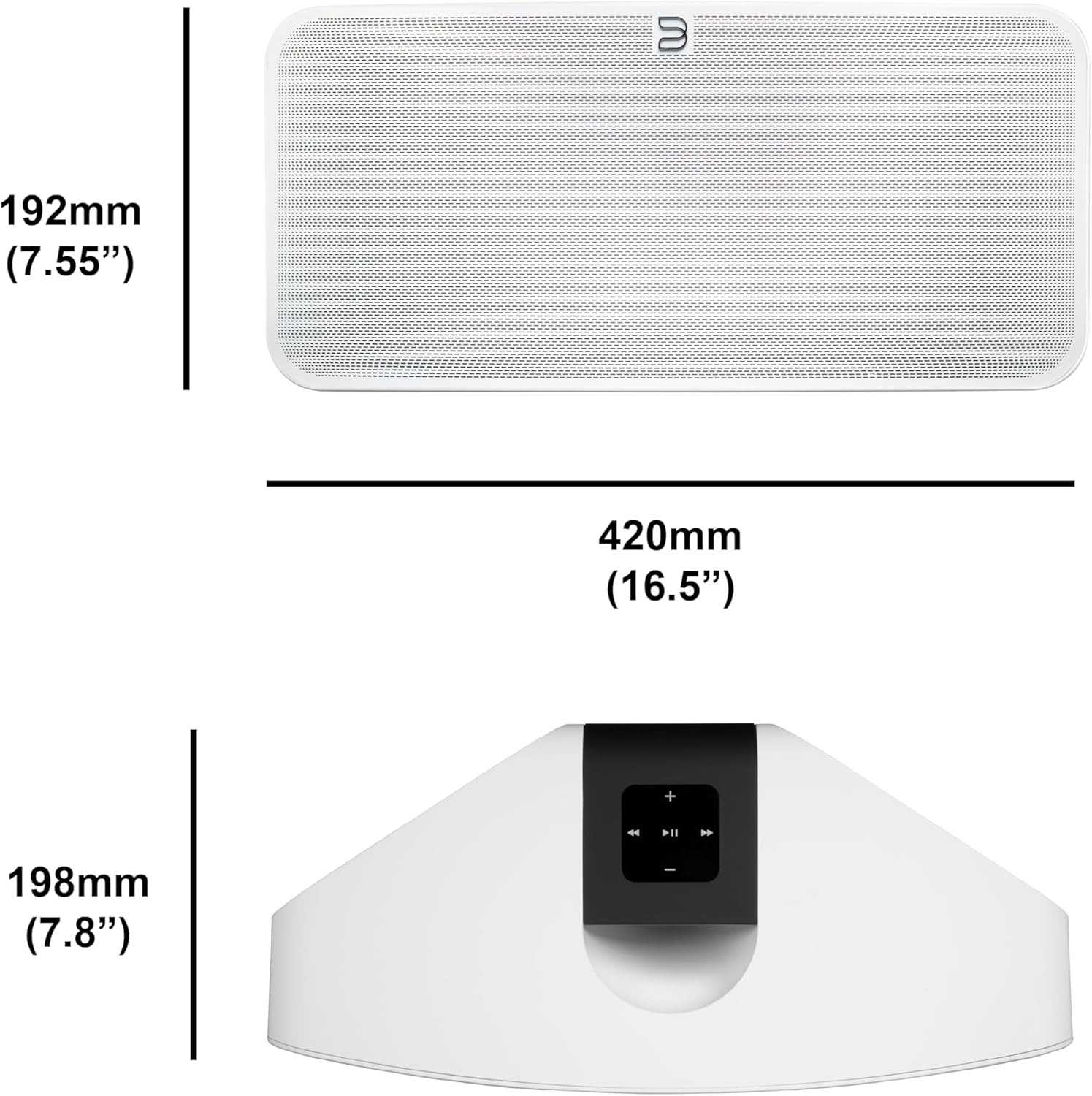
Figure 3: Rear panel of the Pulse 2i, highlighting the power input, LAN/USB, and optical/analog input ports.
محصول تمام شده استview ویدیو
Official product video demonstrating the features and capabilities of the Bluesound Pulse 2i speaker, including its design and connectivity options.
دستورالعمل های عملیاتی
1. BluOS Controller App
The primary method for controlling your Pulse 2i is through the BluOS Controller App, available for smartphones, tablets, and desktop computers. This app allows you to:
- Browse and play music from various streaming services (Spotify, Tidal, Amazon Music HD, Qobuz, etc.)
- Access your local music library and internet radio stations.
- Group multiple Bluesound players for a synchronized multi-room audio experience.
- Adjust volume, playback, and sound settings.

Figure 4: Top panel of the Pulse 2i with touch controls for playback, volume, and track navigation.
۵. پخش موسیقی
The Pulse 2i supports high-resolution audio playback up to 24-bit/192 kHz. You can stream directly from Apple devices using AirPlay 2 or connect via two-way Bluetooth with Qualcomm aptX HD for high-quality wireless audio.
3. کنترل صدا
The speaker is compatible with Amazon Alexa and Apple Siri, allowing for hands-free voice control of your music playback. Simply enable the Bluesound skill/action in your voice assistant app and link your account.
۴. صدای چند اتاقه
Expand your audio system by adding more Bluesound players throughout your home. Use the BluOS app to group speakers and play the same music in multiple rooms, or different music in each room.

Figure 5: The Pulse 2i seamlessly integrates into a kitchen environment, providing background music.

Figure 6: The Pulse 2i enhances the audio experience in a social setting.
نگهداری و مراقبت
To ensure the longevity and optimal performance of your Pulse 2i speaker, follow these care guidelines:
- تمیز کردن: Use a soft, dry cloth to wipe the exterior surfaces. Do not use liquid cleaners, aerosols, or abrasive chemicals, as they may damage the finish.
- قرار دادن: از قرار دادن بلندگو در معرض نور مستقیم خورشید، نزدیک منابع گرما یا در مناطقی با رطوبت بالا خودداری کنید.
- تهویه: برای جلوگیری از گرم شدن بیش از حد، از تهویه مناسب در اطراف بلندگو اطمینان حاصل کنید. هیچ یک از منافذ تهویه را مسدود نکنید.
- قدرت: در هنگام رعد و برق یا زمانی که برای مدت طولانی از دستگاه استفاده نمیشود، کابل برق را جدا کنید.
عیب یابی
If you encounter issues with your Pulse 2i speaker, refer to the table below for common problems and their solutions.
| مشکل | علت احتمالی | راه حل |
|---|---|---|
| برق نیست/چراغ نیست | Power cable disconnected or faulty outlet. | اتصال کابل برق را بررسی کنید. یک پریز برق دیگر را امتحان کنید. |
| صدا نداره | Volume too low, incorrect input selected, or network issue. | Increase volume. Verify correct input in BluOS app. Check network connection. |
| نمی توان به وای فای متصل شد | Incorrect Wi-Fi password, router too far, or network interference. | Re-enter Wi-Fi password. Move speaker closer to router. Reduce interference from other devices. |
| وقفههای پخش موسیقی | Weak Wi-Fi signal or network congestion. | Ensure strong Wi-Fi signal. Consider using a wired Ethernet connection. |
اگر پس از امتحان کردن این راهحلها مشکل همچنان ادامه داشت، لطفاً با پشتیبانی مشتری تماس بگیرید.
مشخصات فنی
| ویژگی | جزئیات |
|---|---|
| نام مدل | PULSE 2i WHT |
| نوع بلندگو | چند اتاق |
| فناوری اتصال | بلوتوث ، Wi-Fi |
| حالت خروجی صدا | استریو |
| حداکثر توان خروجی بلندگو | 25 وات |
| وزن مورد | 11.11 پوند |
| ابعاد محصول | 16 اینچ × 8 اینچ × 7 اینچ |
| دستگاه های سازگار | گوشی هوشمند |
| روش کنترل | صدا |
| سازنده | گروه لنبروک |
اطلاعات گارانتی
The Bluesound Pulse 2i comes with a limited warranty. Please refer to the warranty card included with your product or visit the official Bluesound webبرای مشاهده شرایط و ضوابط دقیق مربوط به پوشش گارانتی و خدمات، به سایت مراجعه کنید.
پشتیبانی مشتری
For further assistance, technical support, or service inquiries, please contact Bluesound customer support through their official website or the contact information provided in your product packaging. Ensure you have your model number (PULSE 2i WHT) and serial number ready when contacting support.


