1. مقدمه
Thank you for choosing the La Crosse Technology WS6825 Weather Station. This device provides accurate indoor and outdoor temperature and humidity readings, along with a weather forecast, time, and date. This manual will guide you through the setup, operation, and maintenance of your new weather station to ensure optimal performance.
The WS6825 features a clear, colorful display and includes three wireless outdoor sensors for comprehensive environmental monitoring.
2. محتویات بسته
لطفاً قبل از ادامه تنظیمات، از وجود همه اجزا اطمینان حاصل کنید:
- 1 x Display Unit (Main Station)
- 3 x Temperature/Humidity Sensors (Wireless Outdoor Sensors)
- 1 x USB Cable (for optional power)
- ۱ عدد دفترچه راهنما (این سند)

Image 1: La Crosse Technology WS6825 Weather Station with main display unit and three wireless outdoor sensors.
3. محصول تمام شدview
3.1 واحد نمایشگر اصلی
The main display unit shows all collected data, including indoor and outdoor temperatures, humidity, time, date, and weather forecast. It features a color screen for easy readability and several control buttons.
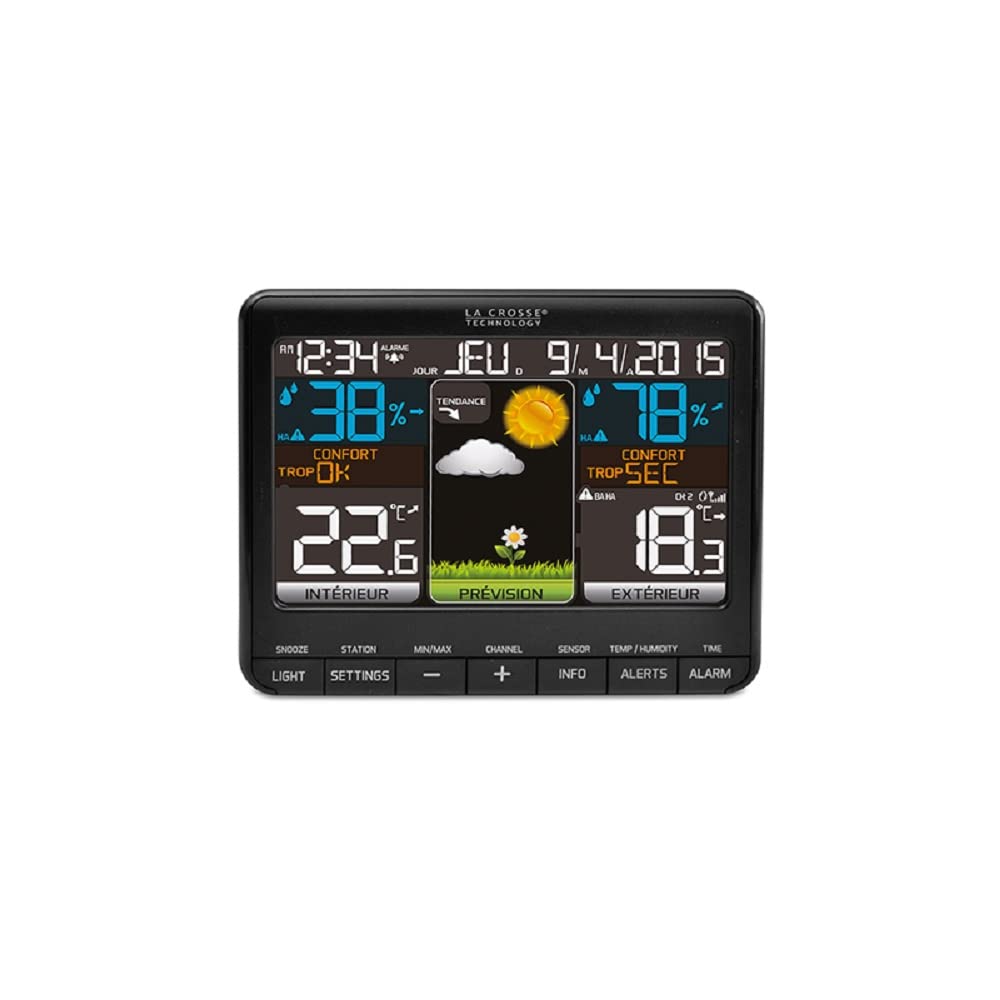
تصویر ۲: نمای نزدیک view of the WS6825 main display unit, illustrating various data points.
۳.۲ حسگرهای بیسیم فضای باز
The three wireless sensors transmit temperature and humidity data to the main unit via 433 MHz radio frequency. Each sensor can be placed in a different location to monitor various outdoor conditions.
3.3 دکمه کنترل
The main unit features several buttons for configuration and data access:
- SNOOZE / LIGHT: Activates snooze for alarms or adjusts backlight.
- تنظیمات: Enters setup mode for time, date, and other preferences.
- MIN / MAX: Displays minimum and maximum recorded values.
- 🇧🇷 Adjusts values during setup or navigates channels.
- کانال: Switches between data from different outdoor sensors.
- سنسور: Manually searches for outdoor sensors.
- اطلاعات: Displays additional information like heat index or dew point.
- هشدارها: Sets temperature/humidity alerts.
- زنگ خطر. هشدار: Sets and activates time alarms.
4. راه اندازی
۳.۱ روشن کردن واحد اصلی
- Insert 3 AAA batteries (not included) into the main display unit, observing polarity.
- Alternatively, connect the provided USB cable to the main unit and a power adapter (not included) for continuous power.
- The display will light up and begin searching for sensors.
4.2 Installing Batteries in Outdoor Sensors
- Open the battery compartment on each of the three outdoor sensors.
- Insert 2 AA batteries (not included) into each sensor, observing polarity.
- محفظه های باتری را محکم ببندید.
۴.۲ جفت شدن حسگرها
The main unit should automatically detect and pair with the outdoor sensors once they are powered on. If pairing does not occur within a few minutes:
- Ensure the sensors are within range (up to 100 meters in open air).
- را فشار دهید سنسور button on the main unit to initiate a manual search.
- On each outdoor sensor, there is a small reset button (often labeled 'TX' or 'RESET'). Press this button to force a signal transmission.
4.4 Initial Settings (Time, Date, Units)
- را فشار داده و نگه دارید تنظیمات دکمه برای ورود به حالت تنظیم.
- استفاده کنید +/- buttons to adjust values (e.g., hour, minute, year, month, day).
- را فشار دهید تنظیمات دوباره برای تأیید هر تنظیم و رفتن به تنظیم بعدی.
- You can typically set 12/24-hour format, Celsius/Fahrenheit units, and language preference during this process.
- Exit setup mode by pressing تنظیمات repeatedly until the normal display returns, or wait for it to time out.
4.5 قرار دادن سنسور
برای اندازهگیری دقیق دمای بیرون از منزل، موارد زیر را در نظر بگیرید:
- Place sensors in a shaded area, away from direct sunlight, to prevent inaccurate temperature readings.
- Ensure sensors are protected from direct rain or snow.
- Mount sensors vertically to allow for proper drainage.
- Avoid placing sensors near large metal objects, electrical appliances, or sources of heat/cold that could interfere with readings or transmission.
- Keep sensors within the effective transmission range of the main unit.
۳. راهاندازی ایستگاه هواشناسی
5.1 نمایش اطلاعات
The display is divided into several sections, showing:
- زمان و تاریخ: زمان فعلی، روز هفته و تاریخ.
- شرایط داخلی: دما و رطوبت داخلی.
- شرایط فضای باز: Outdoor temperature and humidity from the selected sensor.
- پیش بینی آب و هوا: Icons representing predicted weather conditions (e.g., sunny, cloudy, rainy).
- سطح راحتی: An indicator of indoor comfort based on temperature and humidity.
- شاخص های روند: Arrows showing if temperature or humidity is rising, falling, or stable.
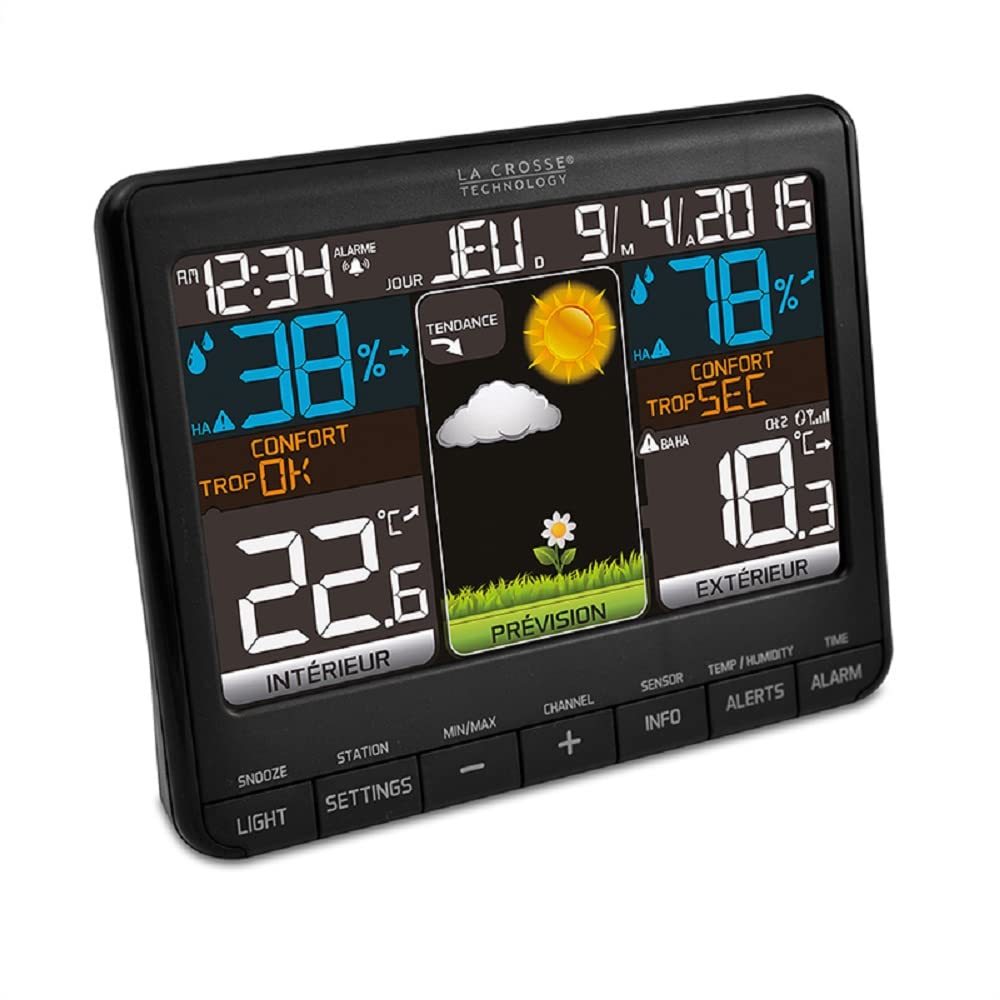
تصویر ۳: زاویهدار view of the WS6825 display, showing the clear segmentation of information.
5.2 Viewاستفاده از چندین حسگر خارجی
را فشار دهید کانال button to cycle through the readings from the three connected outdoor sensors (CH1, CH2, CH3). The display will indicate which channel's data is currently shown.
۵.۵ حداقل/حداکثر مقادیر خوانده شده
را فشار دهید حداقل / حداکثر را فشار دهید تا view the highest and lowest recorded indoor and outdoor temperatures and humidity levels since the last reset. Press again to cycle through MIN, MAX, and current readings. To reset the MIN/MAX values, press and hold the حداقل / حداکثر دکمه while viewوارد کردن آنها
۵.۲ تنظیم هشدارها
- را فشار دهید آلارم را فشار دهید تا view زمان هشدار
- را فشار داده و نگه دارید آلارم دکمه برای ورود به حالت تنظیم زنگ.
- استفاده کنید +/- دکمههایی برای تنظیم ساعت و دقیقه.
- را فشار دهید آلارم برای تأیید هر تنظیم
- را فشار دهید آلارم once more to activate or deactivate the alarm (an alarm icon will appear/disappear).
۳.۵ هشدارهای دما/رطوبت
The station may support setting high/low alerts for temperature and humidity. Refer to the on-screen prompts or the هشدارها button functionality for detailed instructions on setting these thresholds.
6. تعمیر و نگهداری
6.1 تعویض باتری
- وقتی نشانگر باتری کم روی صفحه نمایش ظاهر شد، باتریهای دستگاه اصلی و حسگرها را تعویض کنید.
- همیشه تمام باتریهای یک دستگاه را همزمان با باتریهای نو از همان نوع تعویض کنید.
- باتری های قدیمی را طبق مقررات محلی مسئولانه دور بیندازید.
6.2 تمیز کردن
صفحه نمایش و حسگرها را با یک پارچه نرم و لطیف پاک کنید.amp cloth. Do not use abrasive cleaners or solvents, as these may damage the surfaces or electronic components.
6.3 ملاحظات زیست محیطی
Periodically check the placement of your outdoor sensors to ensure they remain protected from extreme weather and are still providing accurate readings. Clear any debris that may accumulate around the sensors.
7 عیب یابی
| مشکل | راه حل ممکن |
|---|---|
| هیچ اندازهگیری دما/رطوبتی در فضای باز انجام نمیشود. |
|
| قرائت نادرست دما/رطوبت. |
|
| صفحه نمایش خالی یا کم نور است. |
|
| زمان/تاریخ نادرست است. |
|
8. مشخصات
| ویژگی | جزئیات |
|---|---|
| شماره مدل | WS6825BLA+2 |
| نام تجاری | فناوری لا کراس |
| ابعاد محصول | ۲۶ × ۲۶ × ۱۱ سانتیمتر (واحد اصلی) |
| وزن | 0.3 g (Main Unit) |
| محدوده دما | 0 درجه سانتی گراد تا 50 درجه سانتی گراد (32 درجه فارنهایت تا 122 درجه فارنهایت) |
| محدوده دما در فضای باز | -40 درجه سانتی گراد تا 60 درجه سانتی گراد (-40 درجه فارنهایت تا 140 درجه فارنهایت) |
| محدوده رطوبت داخلی | 1% تا 99% RH |
| محدوده رطوبت در فضای باز | 1% تا 99% RH |
| فناوری اتصال | Radio Frequency (433 MHz) |
| منبع تغذیه (واحد اصلی) | Battery Powered (3x AAA, not included) or USB Cable |
| منبع تغذیه (سنسورها) | Battery Powered (2x AA per sensor, not included) |
| مواد | کونستستوف (پلاستیک) |
| ویژگی های خاص | Color Display, Time & Date, Alarm with Snooze, Calendar, Min/Max Records, Trend Indicators, Weather Forecast, Comfort Level, Heat Index, Dew Point |
9. گارانتی و پشتیبانی
La Crosse Technology products are designed for reliability and performance. For specific warranty information, please refer to the warranty card included with your purchase or visit the official La Crosse Technology website. If you encounter any issues not covered in this manual, please contact La Crosse Technology customer support for assistance.
لطفاً رسید خرید خود را برای هرگونه ادعای گارانتی نگه دارید.


