1. مقدمه
This manual provides essential information and instructions for the safe and efficient use of your Nokia 8 Sirocco TA-1005 smartphone. Please read this guide thoroughly before operating your device to ensure optimal performance and longevity. This device is designed for use with GSM, 3G, and 4G LTE networks. Compatibility with CDMA networks, including Verizon, Sprint, and US Cellular, is not supported. Verify network compatibility with your service provider prior to use.
۲. چه چیزهایی در جعبه است؟
Upon unboxing your Nokia 8 Sirocco TA-1005, verify that all components are present:
- Nokia 8 Sirocco TA-1005 Device
- کابل USB Type-C
- آداپتور برق
- هدست
- ابزار اجکتور سیم کارت
- راهنمای شروع سریع
- اطلاعات ایمنی و ضمانت
3. طرح بندی دستگاه
Familiarize yourself with the physical components of your Nokia 8 Sirocco TA-1005.
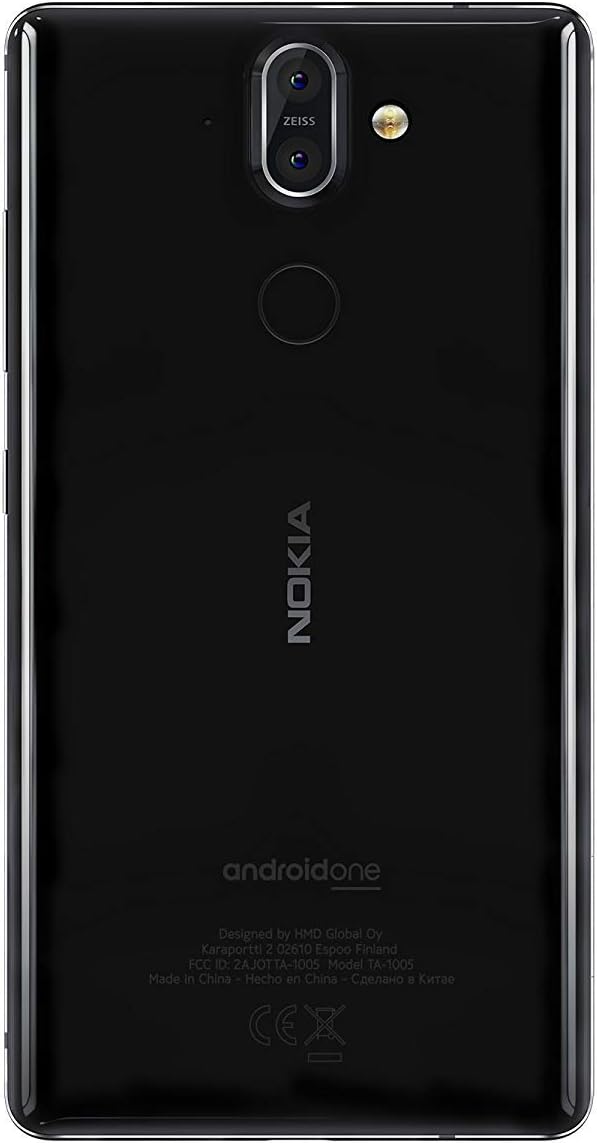
شکل 3.1: عقب view of the Nokia 8 Sirocco TA-1005. This image displays the dual camera setup with ZEISS optics, the circular fingerprint sensor below the camera, and the Nokia logo centrally placed. The 'androidone' branding is visible towards the bottom.
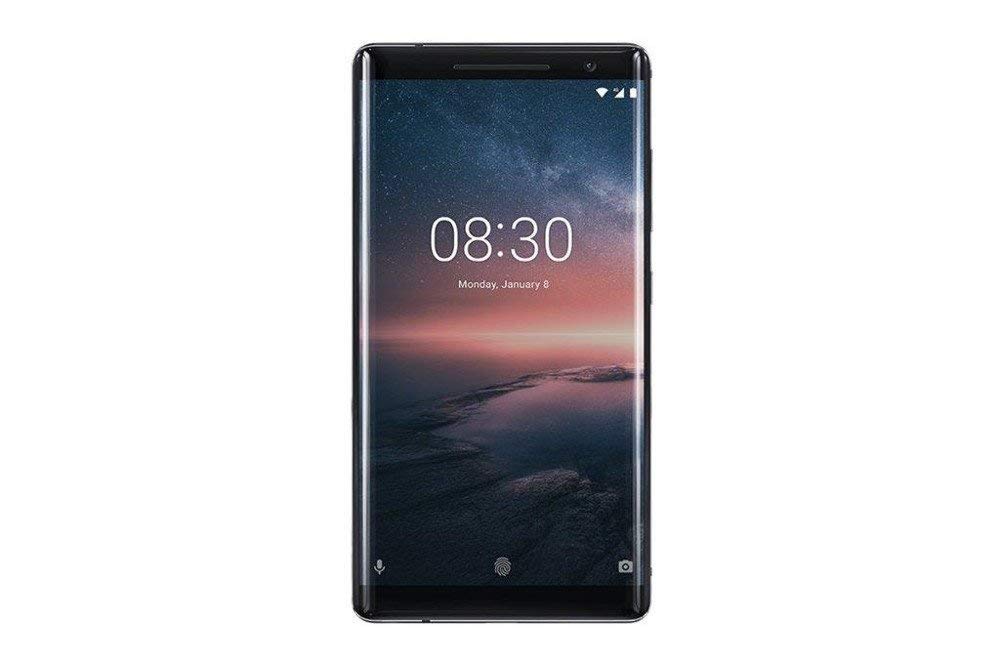
شکل 3.2: جلو view of the Nokia 8 Sirocco TA-1005. The image highlights the 5.5-inch P-OLED curved display, the front-facing camera at the top, and the on-screen navigation buttons. The device features minimal bezels.

شکل 3.3: سمت view of the Nokia 8 Sirocco TA-1005. This image illustrates the slim profile of the device, with the power button and volume rocker located on the right side for easy access.
اجزای کلیدی:
- دوربین جلو: در بالای نمایشگر قرار دارد.
- گوشی: For calls, located above the display.
- نمایش: 5.5-inch P-OLED capacitive touchscreen.
- دکمه های صدا: On the right side, to adjust audio levels.
- دکمه روشن/خاموش/قفل: On the right side, to power on/off or lock/unlock the screen.
- پورت USB Type-C: در پایین، برای شارژ و انتقال داده.
- میکروفون: Located at the bottom and top.
- سخنران: در پایین قرار دارد.
- سینی سیم کارت/کارت حافظه: On the side, for inserting SIM cards.
- دوربین های عقب: Dual cameras with ZEISS optics on the back.
- فلش: Dual-tone flash next to the rear cameras.
- حسگر اثر انگشت: On the back, below the rear cameras.
4. راه اندازی
۴.۱. قرار دادن سیم کارت
- سینی سیم کارت را در کنار دستگاه خود پیدا کنید.
- ابزار خارج کردن سیم کارت را در سوراخ کوچک روی سینی قرار دهید تا باز شود.
- Place your Nano-SIM card(s) into the designated slot(s) on the tray, ensuring the gold contacts face downwards.
- سینی را با دقت به دستگاه فشار دهید تا در جای خود کلیک کند.
توجه: This device does not support external memory cards.
4.2. روشن و خاموش کردن
- روشن کردن: Press and hold the Power/Lock button until the Nokia logo appears.
- برای خاموش کردن: Press and hold the Power/Lock button until the power options menu appears, then select "Power off".
4.3. راه اندازی اولیه
Upon first power-on, the device will guide you through the initial setup process. This includes selecting your language, connecting to a Wi-Fi network, setting up your Google account, and configuring security features like fingerprint unlock or a PIN/pattern.
5. دستورالعمل های عملیاتی
5.1. برقراری تماس
- Open the "Phone" application.
- شماره تلفن را با استفاده از صفحه شماره گیری وارد کنید یا مخاطبی را از دفترچه آدرس خود انتخاب کنید.
- برای شروع تماس، روی نماد تماس ضربه بزنید.
5.2. ارسال پیام
- Open the "Messages" application.
- روی نماد «شروع چت» یا «پیام جدید» ضربه بزنید.
- شماره گیرنده را وارد کنید یا از مخاطبین انتخاب کنید.
- پیام خود را در قسمت متن تایپ کنید.
- روی آیکون ارسال ضربه بزنید.
5.3. استفاده از دوربین
- برنامه «دوربین» را باز کنید.
- سوژه خود را روی صفحه قاب کنید.
- برای گرفتن عکس روی دکمه شاتر ضربه بزنید.
- Switch between photo and video modes, or access advanced settings like portrait mode or panorama, as desired.
5.4. اتصال به اینترنت
- وای فای: رفتن به تنظیمات > شبکه و اینترنت > وایفای. Turn Wi-Fi on and select an available network. Enter the password if required.
- داده های موبایل: رفتن به تنظیمات > شبکه و اینترنت > شبکه تلفن همراه. Ensure "Mobile data" is enabled.
5.5. ویژگی های امنیتی
Your Nokia 8 Sirocco TA-1005 offers various security options:
- باز کردن اثر انگشت: ثبت اثر انگشت از طریق Settings > Security & Location > Fingerprint.
- قفل صفحه: Set a PIN, pattern, or password via Settings > Security & Location > Screen lock.
6. تعمیر و نگهداری
6.1. تمیز کردن دستگاه
Use a soft, lint-free cloth to clean your device. Avoid using harsh chemicals or abrasive materials, which can damage the screen or finish.
6.2. مراقبت از باتری
- Charge your device using only Nokia-approved chargers and cables.
- از قرار دادن دستگاه در معرض دمای شدید خودداری کنید.
- اجازه ندهید باتری مرتباً کاملاً خالی شود.
6.3. به روز رسانی نرم افزار
مرتباً بهروزرسانیهای نرمافزاری را بررسی و نصب کنید تا مطمئن شوید دستگاه شما از جدیدترین ویژگیها، وصلههای امنیتی و بهبودهای عملکرد برخوردار است. به تنظیمات > سیستم > بهروزرسانی سیستم.
7 عیب یابی
اگر با دستگاه خود با مشکل مواجه شدید، به راهحلهای رایج زیر مراجعه کنید:
| مشکل | راه حل |
|---|---|
| دستگاه روشن نمی شود | مطمئن شوید که باتری شارژ شده است. حداقل ۱۵ دقیقه آن را به شارژر وصل کنید. اگر شارژ نشد، با نگه داشتن دکمه پاور به مدت ۱۰ تا ۱۵ ثانیه، گوشی را به زور ریستارت کنید. |
| سیگنال شبکه ضعیف | Check SIM card insertion. Move to an area with better network coverage. Restart the device. Verify network settings in تنظیمات > شبکه و اینترنت > شبکه تلفن همراه. |
| Applications are crashing | حافظه پنهان برنامه را پاک کنید (تنظیمات > برنامهها و اعلانها > [نام برنامه] > ذخیرهسازی و حافظه پنهان > پاک کردن حافظه پنهانبرنامه را از فروشگاه گوگل پلی بهروزرسانی کنید. اگر مشکل همچنان ادامه داشت، برنامه را حذف نصب و دوباره نصب کنید. |
| باتری به سرعت تخلیه می شود | روشنایی صفحه را کاهش دهید. برنامههای پسزمینه بلااستفاده را ببندید. وقتی از Wi-Fi، بلوتوث و GPS استفاده نمیشود، آنها را غیرفعال کنید. میزان مصرف باتری را در ... بررسی کنید. تنظیمات > باتری برای شناسایی برنامههای پرمصرف |
| دستگاه پاسخگو نیست | Perform a force restart by holding the Power button for 10-15 seconds. If the issue continues, consider a factory reset (تنظیمات > سیستم > گزینههای بازنشانی > پاک کردن همه دادهها (بازنشانی کارخانه)). هشدار: تنظیم مجدد کارخانه تمام اطلاعات دستگاه شما را پاک میکند. قبل از ادامه، از اطلاعات مهم خود نسخه پشتیبان تهیه کنید. |
8. مشخصات
Detailed technical specifications for the Nokia 8 Sirocco TA-1005:
| ویژگی | جزئیات |
|---|---|
| نام مدل | 8 Sirocco |
| شماره مدل | TA-1005 |
| سیستم عامل | اندروید ۸.۰ (اوریو) |
| پردازنده | Qualcomm MSM8998 Snapdragon 835, Octa-core (4x2.5 GHz Kryo & 4x1.8 GHz Kryo) |
| پردازنده گرافیکی | آدرنو 540 |
| RAM | 6 گیگابایت |
| ذخیره سازی داخلی | 128 گیگابایت |
| نمایش | 5.5 inches, P-OLED capacitive touchscreen, 1440 x 2560 pixels, Corning Gorilla Glass 5 |
| دوربین عقب | 12MP Wide (f/1.7) + 13 MP Tele (f/2.6), dual-tone flash |
| دوربین جلو | 5 مگاپیکسل |
| ظرفیت باتری | 3250 میلی آمپر ساعت |
| شارژ کردن | پشتیبانی از شارژ سریع |
| قابلیت اتصال | Wi-Fi 802.11a/b/g/n, Bluetooth, USB Type-C |
| ابعاد | 43.36 × 43.17 × 0.75 سانتی متر |
| وزن | 181 گرم |
| نوع سیم کارت | نانو سیم کارت |
| پشتیبانی شبکه | 2G GSM, 3G, 4G LTE (Note: Not compatible with CDMA networks) |
9. Safety and Warranty Information
9.1. دستورالعمل های ایمنی
- از دستگاه در مناطق ممنوعه مانند هواپیما یا بیمارستان استفاده نکنید.
- از قرار دادن دستگاه در معرض آب یا رطوبت بیش از حد خودداری کنید.
- فقط از لوازم جانبی اصلی یا تأیید شده استفاده کنید.
- سعی نکنید خودتان دستگاه را جدا کنید یا تعمیر کنید.
- دستگاه و باتری آن را طبق مقررات محلی، مسئولانه دور بیندازید.
9.2. اطلاعات گارانتی
Your Nokia 8 Sirocco TA-1005 is covered by a limited manufacturer's warranty. Please refer to the separate warranty document included in your product packaging or visit the official Nokia support webبرای مشاهده شرایط و ضوابط دقیق به سایت مراجعه کنید. رسید خرید خود را برای موارد گارانتی نگه دارید.


