1. مقدمه
ممنون از خریدتونasing the Sharp HT-SB140MT 2.0 150W Soundbar. This soundbar is designed to enhance your audio experience, providing clear and powerful sound for your television, music, and other media. With its sleek design and versatile connectivity options, including Bluetooth, HDMI ARC/CEC, Optical, and Auxiliary inputs, it integrates seamlessly into any home entertainment setup. This manual provides essential information for safe and effective use, including setup, operation, maintenance, and troubleshooting.
2. اطلاعات ایمنی
- منبع تغذیه: از حجم منبع تغذیه اطمینان حاصل کنیدtage matches the requirements specified on the soundbar. Use only the provided power cable.
- تهویه: Do not block any ventilation openings. Maintain adequate space around the soundbar for proper airflow.
- آب و رطوبت: Do not expose the soundbar to dripping or splashing water. Do not place objects filled with liquids, such as vases, on the apparatus.
- گرما: Do not place the soundbar near heat sources such as radiators, heat registers, stoves, or other apparatus (including ampزنده کننده ها) که گرما تولید می کنند.
- تمیز کردن: Unplug the soundbar from the power outlet before cleaning. Use a dry, soft cloth for cleaning. Do not use liquid cleaners or aerosol cleaners.
- سرویس دهی: سعی نکنید خودتان این محصول را سرویس دهید. کلیه خدمات را به پرسنل خدمات واجد شرایط ارجاع دهید.
- باتری ها: The remote control uses a CR2 battery. Ensure correct polarity when inserting batteries. Do not mix old and new batteries.
3. محتویات بسته
لطفا بررسی کنید که همه اقلام در بسته موجود باشند:
- Sharp HT-SB140MT Soundbar
- کنترل از راه دور
- کابل برق
- راهنمای کاربر (این سند)
4. محصول تمام شدview

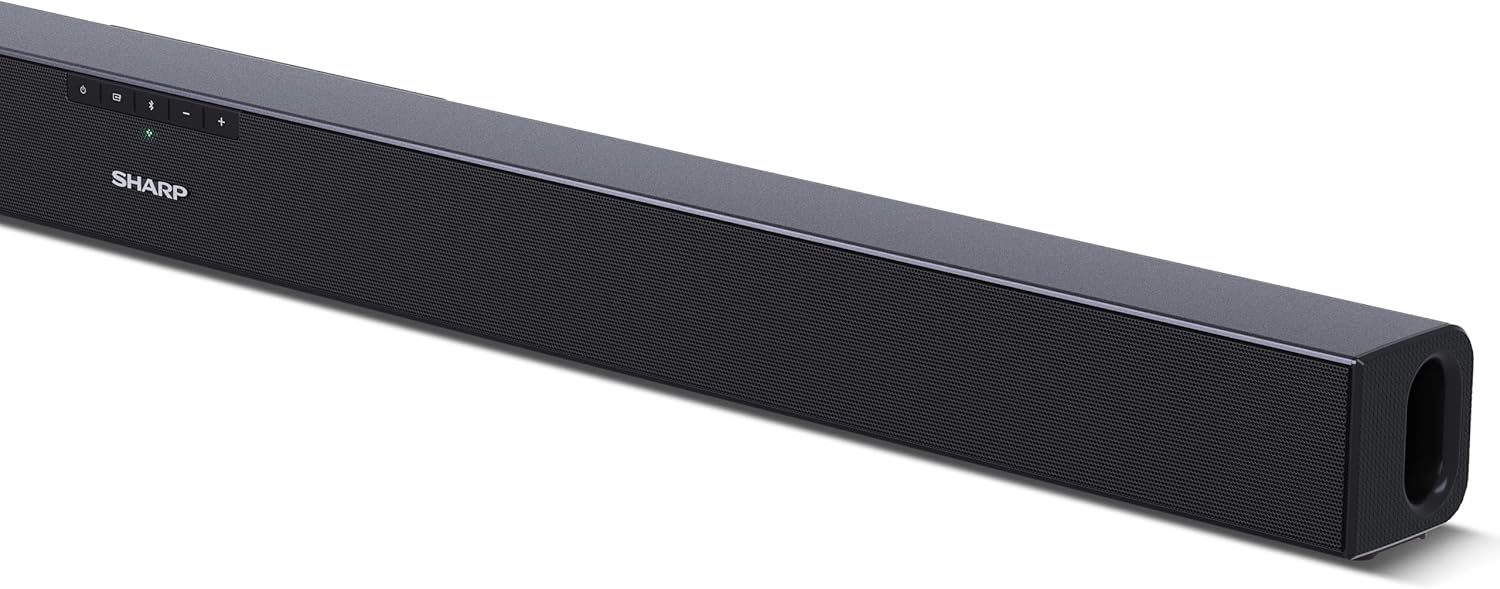
شکل 4.1: جلو View
The front of the soundbar features the Sharp logo and LED indicators for source selection and status. Control buttons for power, input, and volume are located on the top panel.
شکل 4.2: عقب View (اتصالات)
The rear panel provides all necessary connection ports: HDMI ARC, Optical (S/PDIF), and Auxiliary (3.5mm) input, along with the power input.

شکل 4.3: کنترل از راه دور
The included remote control allows for convenient operation of the soundbar, including power, input selection, volume, bass, and treble adjustments.
5. راه اندازی
5.1 قرار دادن
The Sharp HT-SB140MT Soundbar can be placed on a flat surface, such as a TV stand, or wall-mounted. Its slim profile of 6 cm allows it to fit easily under most TV screens without obstructing the view.

Figure 5.1: Soundbar Placement
The soundbar is ideally positioned directly in front of your television for optimal sound projection.
۳.۲ اتصال به تلویزیون
یکی از روش های اتصال زیر را انتخاب کنید:
- HDMI ARC/CEC (Recommended): Connect an HDMI cable (not included) from the HDMI ARC port on your TV to the HDMI ARC port on the soundbar. This allows your TV remote to control the soundbar's volume and power. Ensure HDMI ARC/CEC is enabled in your TV's settings.
- Digital Optical Audio (S/PDIF): Connect an optical cable (not included) from the Optical Out port on your TV to the OPTICAL IN port on the soundbar. Select the Optical input on the soundbar.
- کمکی (AUX): Connect a 3.5mm audio cable (not included) from the headphone jack or AUX Out port on your TV to the AUX IN port on the soundbar. Select the AUX input on the soundbar.
5.3 اتصال برق
After connecting the audio cable, plug the power cable into the soundbar's power input and then into a wall outlet (220-240V / 50Hz).
6. دستورالعمل های عملیاتی
6.1 روشن/خاموش
برای روشن یا خاموش کردن دستگاه، دکمه روشن/خاموش روی ساندبار یا کنترل از راه دور را فشار دهید.
6.2 انتخاب منبع
Press the Input button on the soundbar or the remote control repeatedly to cycle through the available input sources: HDMI ARC, Optical, AUX, and Bluetooth. The LED indicator on the soundbar will change to reflect the selected source.
6.3 تنظیم صدا
Use the Volume Up (+) and Volume Down (-) buttons on the soundbar or the remote control to adjust the sound level.
6.4 جفت شدن بلوتوث
برای اتصال یک دستگاه بلوتوث:
- Select Bluetooth input on the soundbar. The Bluetooth LED indicator will flash, indicating pairing mode.
- در دستگاه هوشمند خود (گوشی هوشمند، تبلت و غیره)، بلوتوث را فعال کنید و دستگاههای موجود را جستجو کنید.
- Select "SHARP HT-SB140MT" from the list of devices.
- Once connected, the Bluetooth LED indicator will stop flashing and remain solid. You can now stream audio wirelessly to the soundbar.
۵.۴ حالتهای صدا (اکولایزر)
The soundbar features an equalizer with different sound modes to optimize audio for various content types. Use the EQ button on the remote control to cycle through these modes (e.g., Movie, Music, News). You can also adjust Bass and Treble levels using dedicated buttons on the remote.
7. تعمیر و نگهداری
7.1 تمیز کردن
To clean the soundbar, unplug it from the power outlet. Use a soft, dry, lint-free cloth to wipe down the surfaces. Do not use abrasive cleaners, waxes, or solvents as they may damage the finish.
7.2 ذخیره سازی
If you plan to store the soundbar for an extended period, disconnect it from the power supply and store it in a cool, dry place, away from direct sunlight and extreme temperatures.
8 عیب یابی
اگر با ساندبار خود با مشکل مواجه شدید، به مشکلات و راهحلهای رایج زیر مراجعه کنید:
| مشکل | علت احتمالی | راه حل |
|---|---|---|
| صدایی از نوار صوتی پخش نمی شود. | ساندبار خاموش یا بیصدا است. منبع ورودی نادرست انتخاب شده است. کابلها به درستی وصل نشدهاند. تنظیمات خروجی صدای تلویزیون نادرست است. | مطمئن شوید که ساندبار روشن است و صدای آن قطع نشده است. Select the correct input source (HDMI ARC, Optical, AUX). Check all cable connections (HDMI, Optical, AUX). Verify your TV's audio output settings are set to external speakers or the correct digital output. |
| دستگاه بلوتوث نمیتواند متصل شود. | ساندبار در حالت جفتسازی نیست. دستگاه خارج از محدوده است. تداخل از دستگاههای دیگر. | Ensure the soundbar is in Bluetooth input mode and the LED is flashing. Move your Bluetooth device closer to the soundbar (within 10 meters). سایر دستگاههای بلوتوث اطراف را خاموش کنید. اتصال را قطع و دوباره وصل کنید. |
| کنترل از راه دور کار نمی کند. | Battery is low or inserted incorrectly. مانع بین ریموت و ساندبار. کنترل از راه دور معیوب است. | باتری CR2 را تعویض کنید و از قطب صحیح آن اطمینان حاصل کنید. Remove any obstructions between the remote and the soundbar's sensor. اگر مشکل همچنان ادامه داشت، با پشتیبانی مشتری تماس بگیرید. |
9. مشخصات
| نام مدل | HT-SB140 (MT) |
| نوع بلندگو | نوار صدا |
| پیکربندی کانال صدای فراگیر | 2.0 |
| حداکثر توان خروجی بلندگو | 150 وات |
| پاسخ فرکانس | 60 هرتز |
| فناوری اتصال | Bluetooth, HDMI ARC/CEC, Digital Optical Audio (S/PDIF), 3.5mm Auxiliary (AUX) |
| فناوری ارتباطات بی سیم | بلوتوث |
| حداکثر برد (بلوتوث) | 10 متر |
| روش کنترل | کنترل از راه دور |
| منبع تغذیه | برق شهری (AC) |
| حجم ورودیtage | ولتاژ 220-240 |
| رنگ | مشکی |
| مواد | پلاستیک، فلز |
| نوع نصب | پایه دیواری، رومیزی |
| ابعاد محصول (L x W x H) | 95 × 6 × 6 سانتی متر |
| وزن مورد | 1.5 کیلوگرم |
| اجزای شامل | کنترل از راه دور |
| باتری مورد نیاز است | 1 باتری CR2 |
| ضد آب | خیر |
| در دسترس بودن قطعات یدکی | 5 سال |
| بهروزرسانیهای نرمافزار تضمین شده تا | اطلاعات در دسترس نیست |
10. گارانتی و پشتیبانی
The Sharp HT-SB140MT Soundbar comes with a Limited Warranty. Please refer to the warranty card included in your package for specific terms and conditions. Spare parts are available for up to 5 years from the date of purchase.
For technical support, service, or warranty claims, please contact Sharp customer service through their official website or the contact information provided in your product documentation. When contacting support, please have your product model number (HT-SB140(MT)) and purchase details ready.


