1. محصول تمام شدview
The Sharp EL-531TG-GY is a scientific calculator designed for students and professionals requiring advanced mathematical functions. It features a 2-line display and Multi-Line Playback, facilitating the input and review of complex equations. This model is suitable for general math, algebra, geometry, trigonometry, statistics, biology, chemistry, and general science applications.
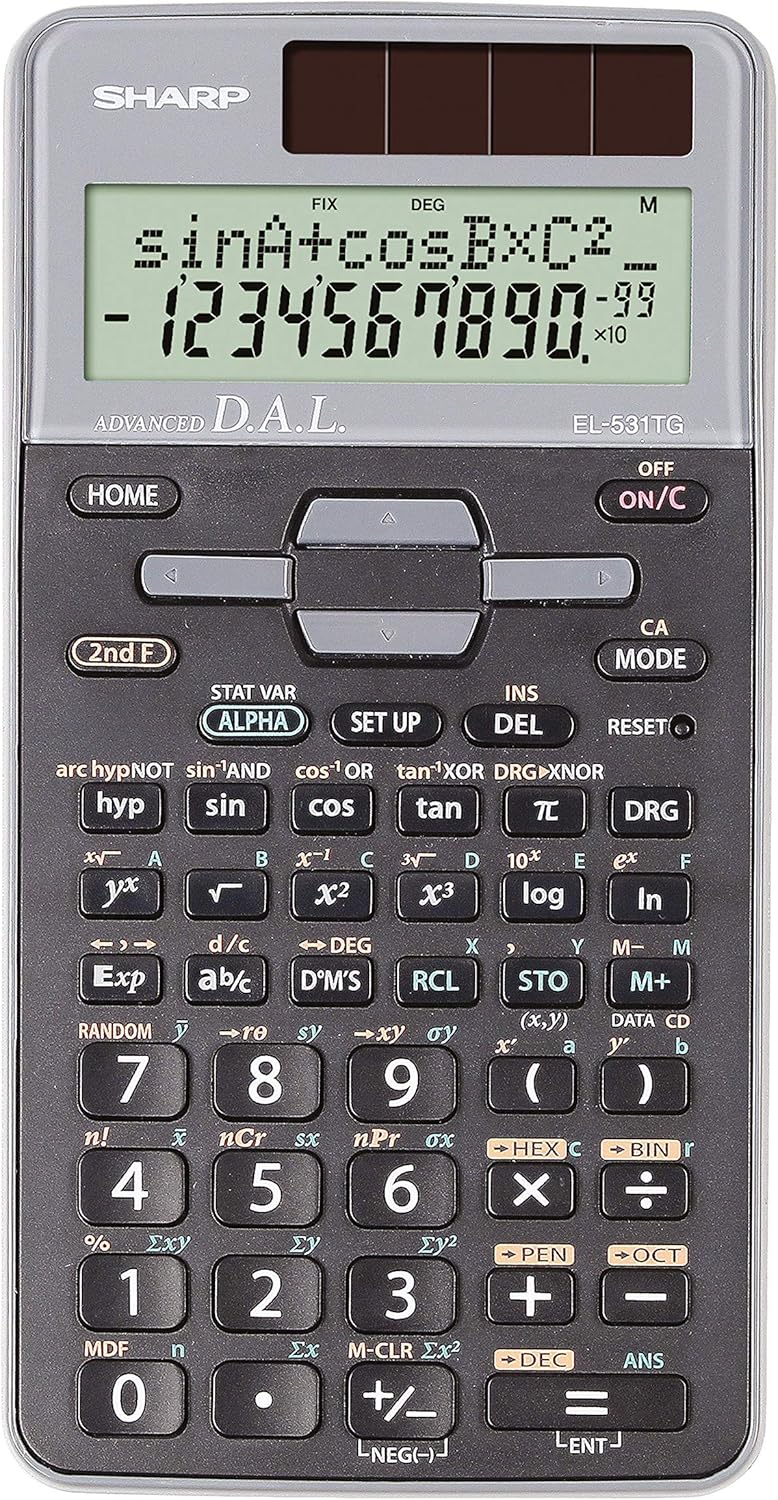
شکل 1: جلو view of the Sharp EL-531TG-GY Scientific Calculator, showing the display, keypad, and solar panel.
۴. راهاندازی و استفاده اولیه
2.1 منبع تغذیه
The EL-531TG-GY calculator operates using both solar power and a single LR44 button cell battery. The solar panel provides power in well-lit environments, while the battery ensures operation in low-light conditions or when solar power is insufficient. An LR44 battery is included with the calculator.
2.2 روشن/خاموش کردن
- برای چرخاندن ماشین حساب ONرا فشار دهید ON/C کلید
- برای چرخاندن ماشین حساب خاموشرا فشار دهید دوم اف کلید به دنبال خاموش key (which is typically the same as ON/C).
2.3 Initial Display Settings
Upon first use or after a reset, the calculator will typically default to certain settings (e.g., DEG for angle units). Refer to Section 3.3 for details on changing mode settings.
3. دستورالعمل های عملیاتی
۳.۱ عملیات حسابی پایه
اعداد را با استفاده از صفحه کلید عددی وارد کنید. از +, -, ×، و ÷ به ترتیب کلیدهای جمع، تفریق، ضرب و تقسیم. را فشار دهید = to obtain the result.
۳.۳ توابع علمی
The calculator performs over 273 advanced scientific functions. Many functions are accessed by pressing the دوم اف key before the desired function key.
- توابع مثلثاتی: استفاده کنید گناه, cos, برنزه. Inverse functions (گناه⁻¹, cos⁻¹, برنزه⁻¹) از طریق آنها قابل دسترسی هستند دوم اف.
- توابع لگاریتمی: استفاده کنید ورود به سیستم (پایه ۱۰) و ln (لگاریتم طبیعی).
- توانها و ریشهها: استفاده کنید ایکس², √, ایکس³, ³√.
- کسری: استفاده کنید d/c کلید برای ورود و تبدیل کسر.
3.3 Mode Settings (DEG/RAD/GRAD)
To change the angle unit mode (Degrees, Radians, Gradians):
- را فشار دهید DRG کلید
- مکرر فشار دهید DRG to cycle through DEG (Degrees), RAD (Radians), and GRAD (Gradians). The current mode is indicated on the display.
۴.۴ عملکردهای حافظه
The calculator includes memory functions for storing and recalling values.
- STO (Store): را فشار دهید STO followed by a variable key (e.g., A, B) to store the displayed value.
- RCL (فراخوان): را فشار دهید RCL followed by the variable key to recall the stored value.
- M+ (Memory Plus): مقدار نمایش داده شده را به حافظه مستقل اضافه میکند.
- M- (منهای حافظه): مقدار نمایش داده شده را از حافظه مستقل کم میکند.
3.5 Multi-Line Playback
The 2-line display allows for Multi-Line Playback, enabling users to review previous calculations and expressions. Use the directional arrow keys (up/down) to scroll through past entries and results. This feature is useful for checking work or re-using parts of previous calculations.
4. تعمیر و نگهداری
4.1 تمیز کردن
To clean the calculator, wipe the surface gently with a soft, dry cloth. Do not use abrasive cleaners, solvents, or excessive moisture, as these can damage the display or internal components.
4.2 تعویض باتری
The calculator uses one LR44 button cell battery. If the display becomes dim or erratic in low-light conditions, the battery may need replacement. To replace the battery:
- مطمئن شوید که ماشین حساب خاموش است.
- محفظه باتری را در پشت ماشین حساب پیدا کنید.
- پوشش محفظه را با دقت باز کنید.
- باتری قدیمی LR44 را برداشته و باتری جدیدی را وارد کنید، از قطبیت صحیح (+/-) اطمینان حاصل کنید.
- درپوش محفظه باتری را محکم ببندید.
4.3 ذخیره سازی
When not in use, store the calculator in a cool, dry place away from direct sunlight and extreme temperatures. The hard cover included with the calculator provides protection from scratches and minor impacts.
5 عیب یابی
5.1 مشکلات نمایش
- صفحه نمایش خالی یا کم نور: Ensure sufficient light for the solar panel. If the issue persists, replace the LR44 battery.
- Erratic Display: This may indicate a low battery. Replace the LR44 battery.
۵.۳ نتایج نادرست
- Check Mode Settings: Verify that the angle unit (DEG, RAD, GRAD) is set correctly for trigonometric calculations.
- خطای ورودی: Review your input using the Multi-Line Playback feature to ensure the expression was entered correctly.
- Memory Contents: If using memory functions, ensure the stored values are correct.
۴.۳ ماشین حساب پاسخ نمیدهد
اگر ماشین حساب از کار افتاد، آن را ریست کنید. تنظیم مجدد button (often a small recessed button requiring a thin object like a paperclip to press). Pressing this button will clear all memory and return the calculator to its factory default settings.
6. مشخصات

شکل 2: جلو view of the Sharp EL-531TG-GY Scientific Calculator, illustrating its dimensions.
| ویژگی | توضیحات |
|---|---|
| شماره مدل | SH-EL531TGGY |
| نوع نمایشگر | 2-line LCD with Multi-Line Playback |
| توابع | Over 273 advanced scientific functions |
| منبع تغذیه | باتری خورشیدی و ۱ عدد باتری LR44 (شامل میشود) |
| مواد | پلاستیک |
| ابعاد (L x W x H) | ۱۲۳.۴۱ در ۷۵.۸ در ۲۳.۷ سانتیمتر (تقریباً) |
| وزن | 100 گرم (تقریبا) |

شکل 3: سمت view of the Sharp EL-531TG-GY Scientific Calculator, showing its slim profile.
7. گارانتی و پشتیبانی
7.1 اطلاعات گارانتی
This product is covered by a manufacturer's warranty. Please refer to the warranty card included with your purchase or visit the official Sharp webبرای مشاهده شرایط و ضوابط دقیق گارانتی مخصوص منطقه خود، به سایت مراجعه کنید.
7.2 پشتیبانی مشتری
For technical assistance, troubleshooting not covered in this manual, or service inquiries, please contact Sharp customer support. Contact information can typically be found on the Sharp official webدر محل یا روی بستهبندی محصول.


