1. مقدمه
This manual provides comprehensive instructions for the assembly, operation, and maintenance of your Zinus Tresa Metal Desk with Storage and Monitor Stand, Large. Designed for home office or den use, this desk features a durable metal frame, an espresso wood-like finish tabletop, a movable monitor stand, a hanging hook, a side storage tray, and a built-in cable organizer. Please read all instructions carefully before assembly and use to ensure proper function and safety.

Figure 1: Zinus Tresa Metal Desk, Large. This image shows the assembled desk with a monitor, lamp, and small plant, highlighting its functional design.
2. اطلاعات ایمنی
برای جلوگیری از آسیب یا جراحت به محصول، لطفاً نکات ایمنی زیر را رعایت کنید:
- همیشه میز را طبق دستورالعملهای ارائه شده مونتاژ کنید.
- از حد مجاز وزن تجاوز نکنید 100 پوند (45 کیلوگرم).
- قبل از استفاده، از محکم و ایمن بودن میز کار اطمینان حاصل کنید.
- Keep the work area clear of obstacles to prevent accidents.
- روی میز کار نایستید و ننشینید.
- هنگام مونتاژ قطعات کوچک را از کودکان دور نگه دارید.
3. محتویات بسته
قبل از شروع مونتاژ، از وجود همه قطعات اطمینان حاصل کنید. در صورت مفقود شدن یا آسیب دیدن هر قطعه، لطفاً با پشتیبانی مشتری تماس بگیرید.

Figure 2: Product Packaging. The desk components are efficiently packed in one compact box for shipping.
اجزای شامل:
- Desk Tabletop (Espresso Finish)
- Desk Legs and Frame (Steel)
- پایه مانیتور
- Side Storage Tray
- قلاب آویزان
- Cable Management Organizer
- سخت افزار مونتاژ (پیچ، مهره و غیره)
- Assembly Tools (ratchet tool)
- راهنمای دستورالعمل
4. دستورالعمل مونتاژ
Assembly is designed to be straightforward and typically takes under 30 minutes with one person. All necessary tools are included.
- باز کردن قطعات: تمام قطعات را با دقت از بستهبندی خارج کرده و برای جلوگیری از خراشیدگی، آنها را روی یک سطح تمیز و نرم قرار دهید. بررسی کنید که تمام قطعات مطابق با فهرست محتویات بستهبندی باشند.
- پایهها را به قاب وصل کنید: Securely attach the desk legs to the main frame using the provided hardware. Ensure all connections are tight but do not overtighten.
- میز نصب: Carefully place the tabletop onto the assembled frame. Align the pre-drilled holes and secure the tabletop using the designated screws.
- نصب لوازم جانبی: Attach the monitor stand, side storage tray, hanging hook, and cable organizer to their respective positions as indicated in the detailed assembly diagram (refer to the included printed manual for specific diagrams).
- بررسی نهایی: Once assembled, gently lift and move the desk to its desired location. Ensure all connections are secure and the desk is stable before placing any items on it.
5. استفاده
پایه مانیتور
The movable monitor stand helps elevate your screen to an ergonomic height, reducing neck and back strain. It can be positioned anywhere on the desk surface to suit your setup.
Side Storage Tray
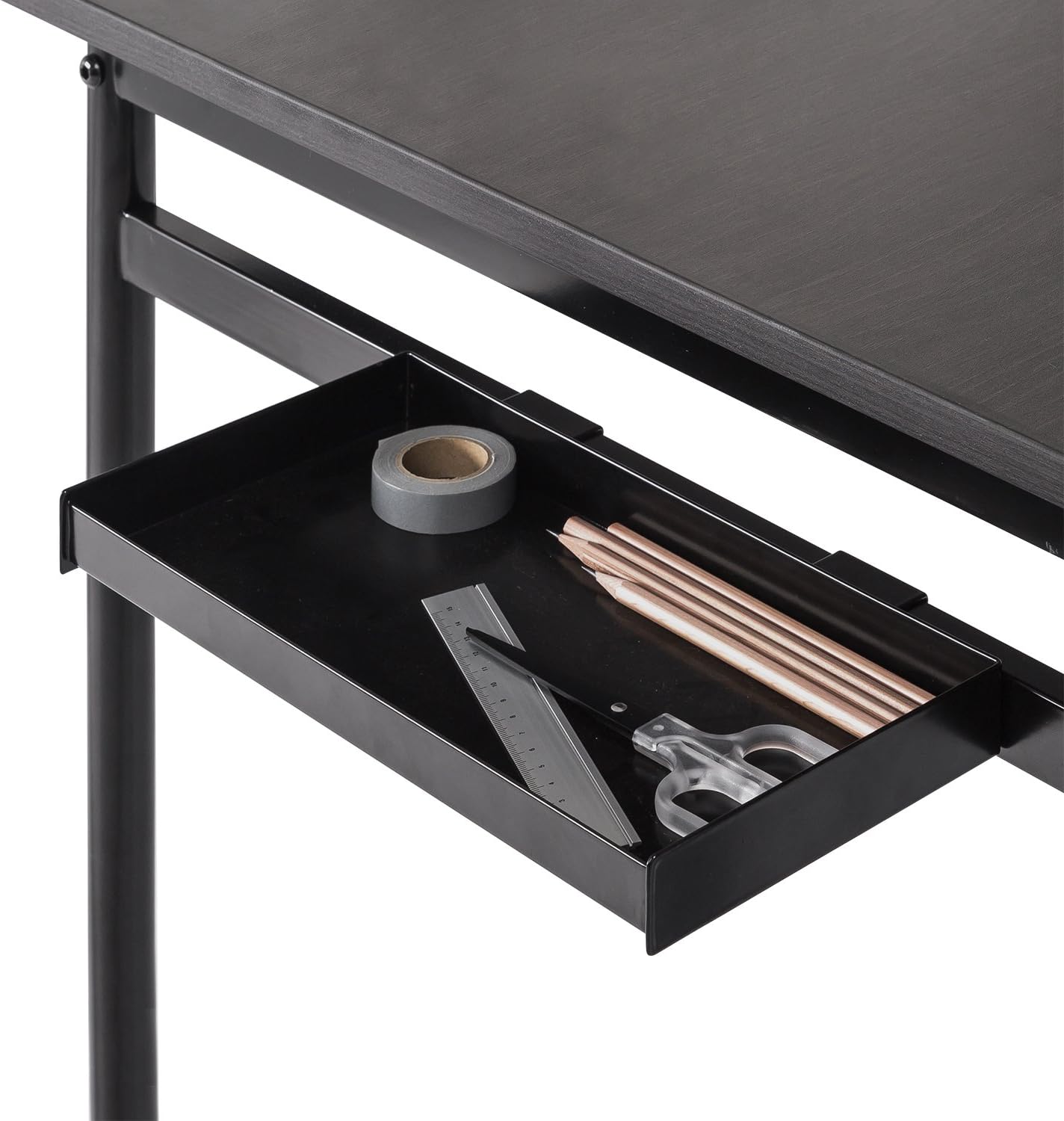
Figure 3: Side Storage Tray. This tray provides convenient access for small office supplies like pens, pencils, and rulers.
The integrated side storage tray is ideal for keeping small office essentials, such as pens, pencils, and other accessories, within easy reach.
قلاب آویزان

Figure 4: Hanging Hook. A bag is shown hanging from the hook, demonstrating its use for personal items.
Utilize the hanging hook to keep bags, headphones, or other items off the floor and within easy access, helping to maintain a tidy workspace.
Cable Management Organizer

Figure 5: Cable Management Organizer. This image illustrates how cables can be routed through the organizer to keep them neat and prevent tangling.
The built-in cable organizer helps manage and route power cords and other cables, preventing clutter and ensuring a clean, organized desk surface.
6. تعمیر و نگهداری
To maintain the appearance and longevity of your Zinus Tresa Metal Desk, follow these simple care instructions:
- تمیز کردن: سطوح میز را با تبلیغات پاک کنیدamp پارچه. از استفاده از مواد شیمیایی قوی یا پاککنندههای ساینده که میتوانند به روکش آسیب بزنند، خودداری کنید.
- بازرسی: به صورت دورهای تمام پیچها و اتصالات را بررسی کنید تا از سفت بودن آنها اطمینان حاصل شود. در صورت لزوم، آنها را دوباره محکم کنید.
- اجتناب از رطوبت بیش از حد: Do not expose the desk to excessive moisture or direct sunlight for prolonged periods.
7 عیب یابی
اگر با میز خود با هرگونه مشکلی مواجه شدید، به راهحلهای رایج زیر مراجعه کنید:
- میز متزلزل است: Ensure all bolts and screws are securely tightened. Check that the desk is on a level surface. If the floor is uneven, consider using furniture pads to stabilize.
- قطعات گم شده: If any parts were missing upon unboxing, please contact Zinus customer support immediately for assistance.
- آسیب در حین مونتاژ: If a part was damaged during assembly, cease assembly and contact customer support.
8. مشخصات

Figure 6: Desk Dimensions. This image provides a visual representation of the desk's key measurements in centimeters.
| ویژگی | جزئیات |
|---|---|
| نام تجاری | زینوس |
| نام مدل | Tresa |
| شماره مدل | OLB-DS-PL55 |
| ابعاد محصول (L x W x H) | ۹.۶ اینچ عمق × ۴ اینچ عرض × ۹.۱ اینچ ارتفاع (تقریباً ۲۴.۴ سانتیمتر × ۱۰.۲ سانتیمتر × ۲۳.۱ سانتیمتر) |
| وزن مورد | ۰.۴۵ پوند (تقریباً ۰.۴ کیلوگرم) |
| حداکثر وزن توصیه شده | ۰.۴۵ پوند (تقریباً ۰.۴ کیلوگرم) |
| نوع مواد | Engineered Wood, Steel |
| نوع پایان | Steel frame, Espresso wood-like tabletop |
| ویژگی های خاص | Adjustable Monitor Stand, Side Storage Tray, Hanging Hook, Cable Organizer |
| مونتاژ مورد نیاز است | Yes (Tools included, 1 person recommended) |
| نوع اتاق | Dormitory, Office, Study Room |
9. ضمانت و پشتیبانی
اطلاعات گارانتی
The Zinus Tresa Metal Desk is covered by a ۲ سال گارانتی بدون دردسر از تاریخ خرید. این گارانتی شامل نقصهای تولیدی در مواد و نحوه ساخت میشود. لطفاً فاکتور خرید خود را برای موارد گارانتی نگه دارید.
پشتیبانی مشتری
For any questions, missing parts, or warranty claims, please contact Zinus customer support. Refer to the contact information provided in your product packaging or visit the official Zinus webسایت برای کمک


