1. مقدمه
Thank you for choosing the HTC USB Type-C Hi-Res Earphones, Model 99H20317-00. These earphones are designed to provide a high-quality audio experience with their advanced features and ergonomic design. This manual provides essential information for the proper setup, operation, maintenance, and troubleshooting of your new earphones.
ویژگی های کلیدی عبارتند از:
- Concert hall design for unparalleled sound.
- Larger 13mm speakers for a fuller sound profile.
- Enhanced port optimization for improved bass reproduction.
- Lighter and thinner aerospace polymer diaphragm to increase sound frequency response.
- Ergonomic design for maximum comfort during extended use.
2. اطلاعات ایمنی
Please read and follow these safety guidelines to ensure safe and optimal use of your earphones:
- حفاظت شنوایی: برای جلوگیری از آسیب شنوایی، از گوش دادن طولانی مدت با صدای بلند خودداری کنید.
- آگاهی زیست محیطی: Do not use earphones in situations where the inability to hear ambient sounds could be dangerous, such as while driving, cycling, or walking in traffic.
- تمیز کردن: Clean the earphones regularly with a soft, dry cloth. Do not use liquid cleaners or solvents.
- قرار گرفتن در معرض آب: این هدفونها ضد آب نیستند. از قرار گرفتن در معرض آب یا رطوبت بیش از حد خودداری کنید.
- کودکان: به دلیل وجود قطعات کوچک که ممکن است خطر خفگی داشته باشند، دور از دسترس کودکان خردسال نگهداری شود.
3. محتویات بسته
بررسی کنید که همه اقلام در بسته شما موجود باشد:
- HTC USB Type-C Hi-Res Earphones (Model: 99H20317-00)
- Additional ear tips (if included)
- راهنمای کاربر (این سند)
4. راه اندازی
These earphones are designed for simple plug-and-play operation.
- اتصال: Insert the USB Type-C connector of the earphones into the USB Type-C port of your compatible device (Smartphone, Laptop, Tablet).
- تشخیص دستگاه: Your device should automatically recognize the earphones. If prompted, select the earphones as the audio output device.
- تنظیم صدا: Begin playback at a low volume and gradually increase to a comfortable listening level.
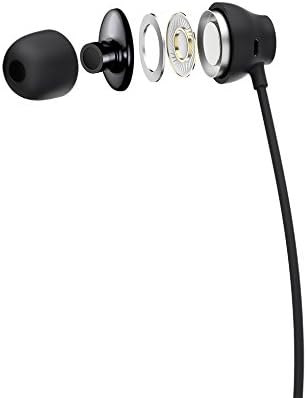
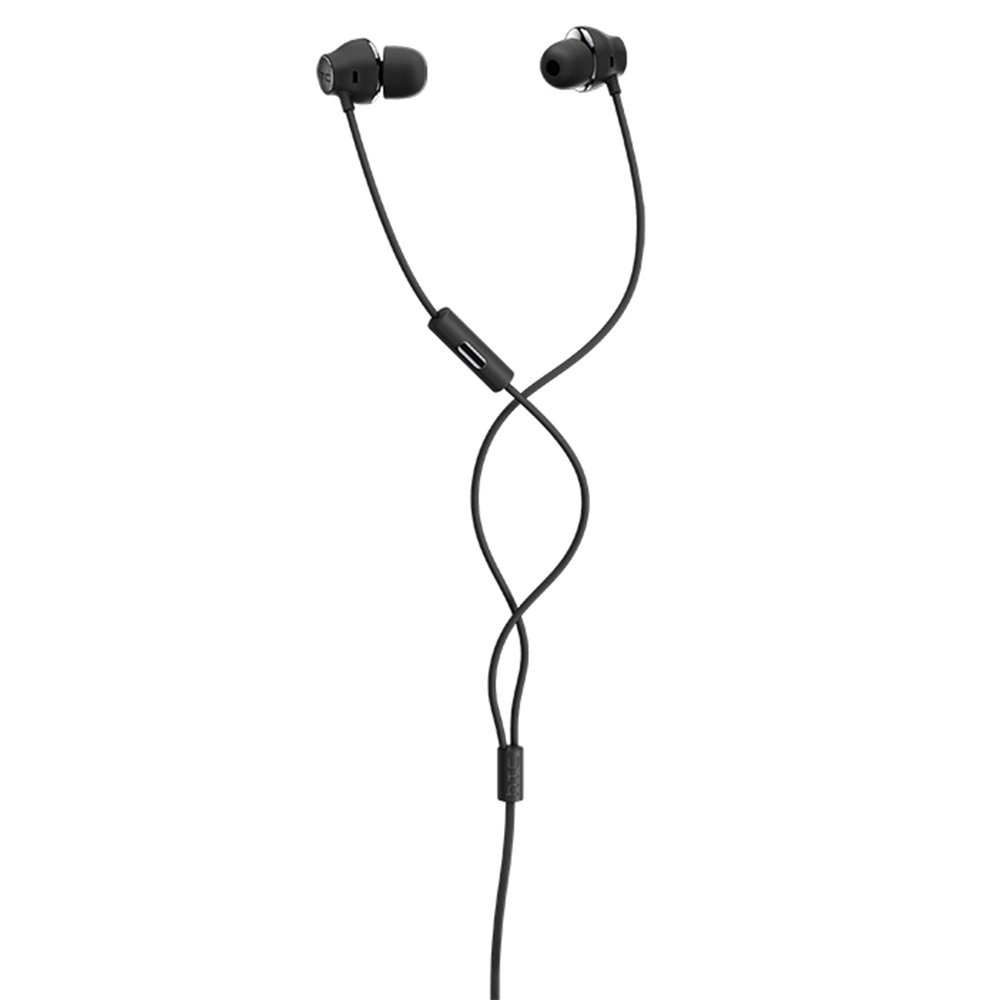
Figure 1: HTC USB Type-C Hi-Res Earphones connected to a device.
5. دستورالعمل های عملیاتی
Once connected, your earphones are ready for use.
- پخش صدا: Play audio from your connected device. The sound will be routed through the earphones.
- مدیریت تماس: For devices supporting call functions, you can typically answer/end calls using the device's interface.
- کنترل برنامه: This model supports control via an application. Refer to your device's app store for any official HTC audio control applications that may offer additional features or sound customization.
6. نگهداری و مراقبت
Proper care extends the lifespan of your earphones:
- نکات تمیز کردن گوش: Gently remove ear tips and clean them with a mild soap solution and water. Ensure they are completely dry before reattaching.
- تمیز کردن بدنه گوشی: Wipe the earphone body and cable with a soft, dry, lint-free cloth. Do not use abrasive materials or harsh chemicals.
- ذخیره سازی: When not in use, store the earphones in a clean, dry place, preferably in a protective pouch to prevent tangling and damage.
- مدیریت کابل: Avoid tightly winding the cable or subjecting it to sharp bends, which can damage internal wires.
شکل 2: منفجر شد view of earphone components, highlighting the 13mm speaker and aerospace polymer diaphragm.
7 عیب یابی
اگر با مشکلی مواجه شدید، به مشکلات و راهحلهای رایج زیر مراجعه کنید:
| مشکل | علت احتمالی | راه حل |
|---|---|---|
| صدا نداره | Earphones not properly connected; device volume too low; incorrect audio output selected on device. | Ensure the USB Type-C connector is fully inserted. Increase device volume. Check device audio settings to confirm earphones are selected as output. |
| کیفیت صدای ضعیف | Dirty ear tips; damaged cable; low-quality audio source. | Clean ear tips. Inspect the cable for visible damage. Try a different audio source or file. |
| Earphones uncomfortable or fall out | اندازه نادرست نوک گوش. | Try different sized ear tips (if provided) to find the best fit for your ears. |
8. مشخصات
| ویژگی | جزئیات |
|---|---|
| نام تجاری | HTC |
| شماره مدل | 99H20317-00 |
| فناوری اتصال | سیمی (USB Type-C) |
| اندازه بلندگو | 13 میلی متر |
| مواد | Synthetic leather (ear tips/housing accents) |
| وزن | 50 گرم |
| ابعاد محصول | 0.1 x 0.1 x 0.1 cm (packaging/shipping dimensions, actual earphone size is compact) |
| روش کنترل | برنامه |
| پشتیبانی از بلوتوث | خیر |
| باتری های مورد نیاز | خیر |
| دستگاه های سازگار | Smartphone, Laptop, Tablet with USB Type-C audio output |
| رنگ | خاکستری تیره |
| قرار دادن گوش | داخل گوش |
9. گارانتی و پشتیبانی
For warranty information and technical support, please refer to the documentation provided with your purchase or visit the official HTC support webسایت. فاکتور خرید خود را برای موارد گارانتی نگه دارید.


