1. مقدمه
ممنون از خریدتونasing the Sony Signature Series Audio Component Amplifier TA-ZH1ES. This high-resolution headphone amplifier is designed to deliver exceptional audio quality, featuring advanced technologies such as Sony's enhanced S-Master HX digital amplifier and DSD Remastering Engine. This manual provides essential information for the proper setup, operation, and maintenance of your device.
2. اطلاعات ایمنی
Please read all safety instructions carefully before using the ampزنده کننده این راهنما را برای مراجعات بعدی نگه دارید.
- منبع تغذیه: Connect the unit only to the AC power outlet specified in the specifications.
- تهویه: برای جلوگیری از گرمای بیش از حد، از تهویه مناسب در اطراف دستگاه اطمینان حاصل کنید. منافذ تهویه را مسدود نکنید.
- رطوبت: دستگاه را در معرض باران یا رطوبت قرار ندهید تا خطر آتش سوزی یا برق گرفتگی را کاهش دهد.
- اشیاء خارجی: هیچ جسمی را وارد منافذ دستگاه نکنید.
- سرویس دهی: تمام مراحل سرویس را به پرسنل خدمات واجد شرایط ارجاع دهید. خودتان سعی نکنید دستگاه را باز یا تعمیر کنید.
- قرار دادن: Place the unit on a stable, level surface away from direct sunlight, heat sources, and excessive dust or vibrations.
3. محصول تمام شدview
3.1 صفحه جلو
The front panel provides various headphone output connections and essential controls for operation.

شکل 3.1: طرح بندی پنل جلو
This image displays the front panel of the TA-ZH1ES amplifier, highlighting the various headphone output jacks and the volume control knob. From left to right, you can see the XLR4 balanced output, multiple 4.4mm and 3.5mm balanced outputs, and 6.3mm and 3.5mm unbalanced outputs. The large rotary knob on the right is for volume control, and a Walkman/Xperia USB input is also visible.
- دکمه پاور: دستگاه را روشن یا خاموش می کند.
- انتخاب ورودی: بین منابع ورودی موجود گردش میکند.
- Output Selector: Selects the desired output mode.
- نمایش: تنظیمات و وضعیت فعلی را نشان میدهد.
- دکمه منو/بازگشت: Navigates menu options or returns to the previous screen.
- دکمه Enter: انتخاب ها را تایید می کند.
- Gain Button: Adjusts the output gain for different headphone impedances.
- کلید تنظیم صدا: صدای خروجی را کنترل می کند.
- خروجی هدفون:
- Balanced Connections: 4.4mm, 3.5mm x 2, XLR4
- Unbalanced Connections: 6.3mm, 3.5mm
- Walkman/Xperia USB Input: For connecting compatible portable devices.
3.2 پنل عقب
The rear panel houses various input and output terminals for connecting to other audio components and the power supply.
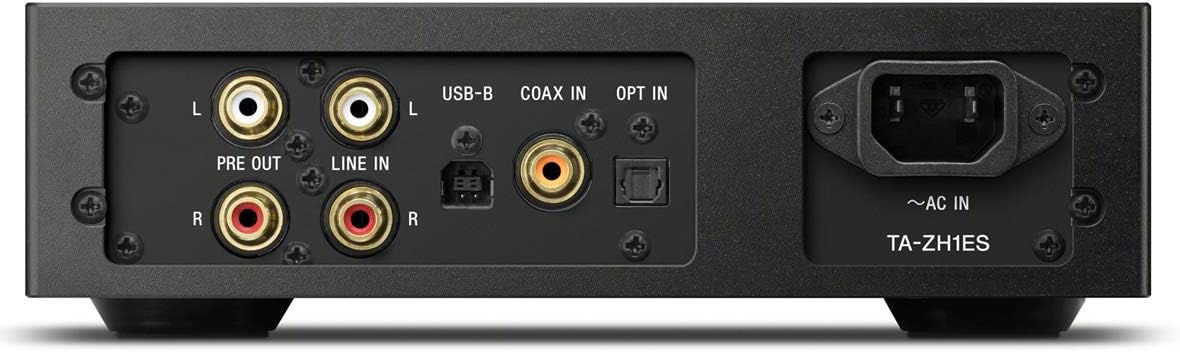
شکل 3.2: چیدمان پنل عقب
This image illustrates the rear panel of the TA-ZH1ES amplifier, detailing the various connectivity options. Visible ports include RCA Line In (L/R), RCA Pre Out (L/R), USB-B input, Coaxial input, Optical input, and the AC power inlet. Each port is clearly labeled for easy identification.
- LINE IN (RCA L/R): Analog audio input for connecting external devices.
- PRE OUT (RCA L/R): Analog audio output for connecting to a power ampزنده کننده یا بلندگوهای فعال
- ورودی USB-B: For connecting to a computer or other digital audio sources.
- COAX IN: ورودی صدای دیجیتال کواکسیال
- شرکت در: ورودی صدای دیجیتال اپتیکال.
- ~AC IN: Power input for the AC power cord.
4. راه اندازی
Follow these steps to set up your TA-ZH1ES ampزنده تر
4.1 قرار دادن
قرار دهید amplifier on a flat, stable surface with adequate space for ventilation. Avoid placing it near heat sources or in direct sunlight.

شکل 4.1: Ampمحل قرار دادن آبگیر
This image shows the Sony TA-ZH1ES amplifier positioned on a flat surface, demonstrating a typical setup environment. Ensure the unit has sufficient space around it for proper airflow.
۷.۱ اتصال منابع صوتی
Connect your audio sources to the appropriate input terminals on the rear panel.
- Digital Sources (Computer, CD Player, etc.):
- For a computer, connect a USB-B cable from your computer to the ورودی USB-B.
- For a CD player or other digital audio device, use a coaxial cable for the COAX IN or an optical cable for the انتخاب کنید.
- Analog Sources (Turntable with pre-amp, etc.): Connect RCA cables from your analog source to the ورودی خط (RCA چپ/راست) پایانه ها
- Portable Devices (Walkman/Xperia): Connect compatible portable devices to the Walkman/Xperia USB Input on the front panel. This input also supports charging for Walkman devices.
۵.۴ اتصال هدفون یا هدفون خارجی Ampزنده تر
- هدفون: Connect your headphones to the appropriate balanced (4.4mm, 3.5mm x 2, XLR4) or unbalanced (6.3mm, 3.5mm) output jacks on the front panel.
- قدرت خارجی Amplifier/Active Speakers: If using the TA-ZH1ES as a DAC or pre-amplifier, connect RCA cables from the PRE OUT (RCA L/R) terminals on the rear panel to your power ampزنده کننده یا بلندگوهای فعال
4.4 اتصال برق
سیم برق متناوب ارائه شده را به ~AC IN terminal on the rear panel, then plug the other end into a wall outlet.
5. دستورالعمل های عملیاتی
5.1 عملیات اساسی
- روشن کردن: Press the Power button on the front panel.
- ورودی را انتخاب کنید: Use the Input Selector button to choose the desired audio source (e.g., USB-B, COAX, OPT, LINE IN).
- اتصال هدفون: Plug your headphones into the appropriate jack.
- تنظیم صدا: Slowly turn the Volume knob clockwise to increase the volume to a comfortable listening level.

شکل ۴.۱: کنترلهای پنل بالایی
این تصویر یک نمای بالا به پایین ارائه میدهد view of the TA-ZH1ES amplifier, clearly showing the power button, input/output selectors, display screen, menu navigation buttons (Menu/Back, Enter), and the Gain button. These controls are used for basic operation and feature adjustments.
5.2 DSD Remastering Engine
The DSD Remastering Engine converts all PCM audio sources to DSD 11.2MHz, aiming to provide a more natural and analog-like sound experience. This feature can be enabled or disabled through the unit's menu settings.
5.3 DSEE HX
DSEE HX (Digital Sound Enhancement Engine HX) upscales compressed audio files to near high-resolution quality. This feature is particularly effective for improving the sound of lower-resolution files, such as those from streaming services or older recordings. Access DSEE HX settings via the unit's menu.
۶.۱ تنظیمات بهره
را amplifier features adjustable gain settings to optimize performance with various headphone impedances. Press the به دست آوردن button on the front panel to cycle through available gain levels (e.g., Low, Mid, High). Select the setting that provides sufficient volume without distortion for your specific headphones.
6. تعمیر و نگهداری
مراقبت مناسب، طول عمر و عملکرد بهینه شما را تضمین میکند ampزنده تر
- تمیز کردن: دستگاه را با یک پارچه نرم و خشک پاک کنید. از پدهای ساینده، پودرهای پاک کننده یا حلالهایی مانند الکل یا بنزن استفاده نکنید.
- تهویه: Periodically check that the ventilation openings are free from dust and obstructions.
- ذخیره سازی: اگر دستگاه را برای مدت طولانی انبار میکنید، آن را از پریز برق جدا کرده و در جای خشک و تمیز نگهداری کنید.
7 عیب یابی
اگر با مشکل خود مواجه شدید ampبرای رفع مشکل، به مشکلات و راهحلهای رایج زیر مراجعه کنید.
| مشکل | علت / راه حل احتمالی |
|---|---|
| بدون قدرت | Ensure the AC power cord is securely connected to both the unit and the wall outlet. Check if the power outlet is functional. |
| صدا نداره |
|
| صدای مخدوش |
|
| Unit becomes hot | Ensure adequate ventilation around the unit. Do not block the ventilation openings. If overheating persists, discontinue use and contact service. |
اگر پس از امتحان کردن این راهحلها مشکل همچنان ادامه داشت، لطفاً با پشتیبانی مشتریان سونی تماس بگیرید.
8. مشخصات
| ویژگی | جزئیات |
|---|---|
| شماره مدل | TA-ZH1ES |
| ابعاد محصول (W x H x D) | ۴.۷۴ × ۲.۶۴ × ۱.۴۹ اینچ (تقریباً ۱۲۰.۴ × ۶۷.۰ × ۳۷.۸ میلیمتر) |
| وزن مورد | ۳.۷۴ پوند (تقریباً ۱.۷ کیلوگرم) |
| امپدانس هدفون | 12-600 اهم |
| خروجی های هدفون | Balanced: 4.4mm, 3.5mm x 2, XLR4 Unbalanced: 6.3mm, 3.5mm |
| ورودی های دیجیتال | USB-B, Coaxial, Optical, Walkman/Xperia USB |
| ورودی های آنالوگ | RCA Line In (L/R) |
| خروجی های آنالوگ | RCA Pre Out (L/R) |
| سازنده | سونی |
| تاریخ برای اولین بار در دسترس است | 1 سپتامبر 2016 |
توجه: مشخصات بدون اطلاع قبلی قابل تغییر است.
9. گارانتی و پشتیبانی
برای اطلاعات دقیق در مورد گارانتی، لطفاً به کارت گارانتی ارائه شده همراه محصول خود مراجعه کنید یا از پشتیبانی رسمی سونی دیدن کنید. website for your region. For technical assistance, product registration, or service inquiries, please contact Sony customer support.
پشتیبانی سونی Webسایت: https://www.sony.com/electronics/support


