1. مقدمه
This manual provides instructions for the safe and effective use of your Disney Frozen Bluetooth Speaker. This portable wireless speaker allows you to stream audio from Bluetooth-enabled devices or connect via a 3.5mm audio cable. It features a built-in microphone for speakerphone functionality and a rechargeable battery for portability.
2. محتویات بسته
لطفا مطمئن شوید که همه اقلام در بسته موجود است:
- Disney Frozen Bluetooth Speaker
- کابل شارژ USB
- کابل صوتی 3.5 میلی متری
3. ویژگی های محصول
- Wireless audio streaming via Bluetooth
- Wired audio connection via 3.5mm headphone port
- Integrated microphone for speakerphone calls
- باتری قابل شارژ داخلی
- USB chargeable
۴.۱ کنترلها و پورتها

تصویر 1: جلو view of the speaker with control buttons on the top panel.
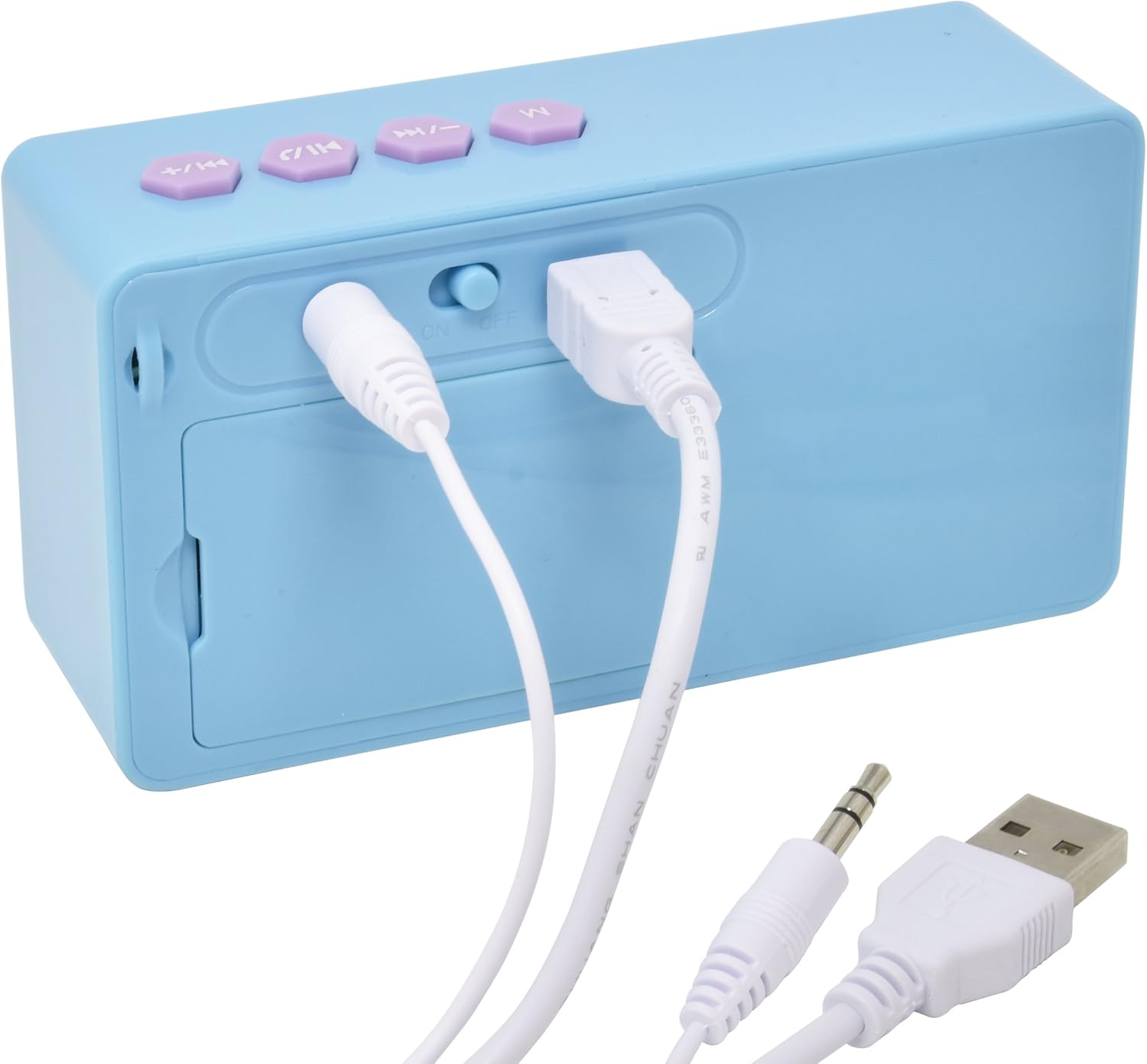
تصویر 2: عقب view of the speaker showing the power switch and connection ports.
کنترل پنل بالا:
- دکمه M: Mode selection (Bluetooth/AUX).
- دکمه آهنگ قبلی / کاهش صدا: Press once for previous track, press and hold to decrease volume.
- دکمه پخش/مکث/تماس: Press once to play/pause music, press to answer/end calls.
- دکمهی آهنگ بعدی / افزایش صدا: Press once for next track, press and hold to increase volume.
پورت های پنل عقب:
- کلید روشن/خاموش: بلندگو را روشن یا خاموش میکند.
- پورت شارژ USB: Connect the USB cable for charging.
- ورودی AUX 3.5mm: Connect the 3.5mm audio cable for wired playback.
5. شارژ بلندگو
Before first use, fully charge the speaker. The speaker charges quickly when connected to a USB port.
- Locate the USB Charging Port on the rear of the speaker (refer to Image 2).
- Connect the small end of the included USB charging cable to the speaker's USB port.
- سر بزرگتر کابل شارژ USB را به یک پورت USB دارای برق (مثلاً کامپیوتر، آداپتور دیواری USB) وصل کنید.
- چراغ نشانگر شارژ روشن خواهد شد. پس از اتمام شارژ، ممکن است رنگ چراغ تغییر کند یا خاموش شود.
توجه: Do not use damaged cables or chargers. Ensure the charging port is dry before connecting the cable.
6. اتصال بلوتوث
برای اتصال بیسیم بلندگو به دستگاه دارای بلوتوث:
- از شارژ بودن اسپیکر اطمینان حاصل کنید.
- را بلغزانید کلید ON/OFF on the rear of the speaker to the 'ON' position. The speaker will power on and enter Bluetooth pairing mode, indicated by a flashing LED light and an audible prompt.
- On your Bluetooth-enabled device (smartphone, tablet, computer), go to the Bluetooth settings menu.
- جستجو برای available devices. The speaker will appear as "Disney Frozen Speaker" or a similar name.
- Select the speaker from the list to pair. Once successfully paired, the LED indicator will stop flashing, and you will hear a confirmation tone.
- اکنون میتوانید صدای دستگاه خود را از طریق بلندگو پخش کنید.
توجه: If prompted for a password, enter "0000". The speaker will automatically attempt to reconnect to the last paired device when powered on.
۴. اتصال سیمی (AUX)
To connect your speaker using the 3.5mm audio cable:
- مطمئن شوید که اسپیکر روشن است.
- Connect one end of the included 3.5mm audio cable to the ورودی AUX 3.5mm port on the rear of the speaker (refer to Image 2).
- Connect the other end of the 3.5mm audio cable to the headphone jack or AUX output of your audio device.
- را فشار دهید دکمه M on the top panel to switch to AUX mode if the speaker does not automatically detect the wired connection.
- صدا را از دستگاه خود پخش کنید.
توجه: When using the AUX connection, playback controls (play/pause, track skip) on the speaker may not function, and you will need to control playback directly from your connected device.
8. Using as a Speakerphone
When connected via Bluetooth to a smartphone, the speaker can be used to handle phone calls.
- پاسخگویی به تماس: وقتی تماسی دریافت شد، دکمه را فشار دهید Play/Pause / Call Button یک بار برای پاسخ دادن.
- پایان دادن به تماس: در طول تماس ، دکمه را فشار دهید Play/Pause / Call Button once to end the call.
- رد تماس: را فشار داده و نگه دارید Play/Pause / Call Button برای رد تماس ورودی، تقریباً ۲ ثانیه نگه دارید.
Audio will be routed through the speaker, and the built-in microphone will capture your voice.
9. تعمیر و نگهداری
- بلندگو را با یک پارچه نرم و خشک تمیز کنید. از پاک کننده ها یا حلال های ساینده استفاده نکنید.
- بلندگو را از آب، رطوبت و دمای شدید دور نگه دارید.
- سعی نکنید خودتان بلندگو را جدا یا تعمیر کنید. این کار گارانتی را باطل میکند.
- در صورت عدم استفاده طولانی مدت از بلندگو، آن را در جای خشک و خنک نگهداری کنید.
10 عیب یابی
| مشکل | راه حل ممکن |
|---|---|
| بلندگو روشن نمی شود | Ensure the speaker is charged. Connect to a power source using the USB cable. Check the ON/OFF switch. |
| جفتسازی از طریق بلوتوث امکانپذیر نیست. | Ensure the speaker is in pairing mode (flashing LED). Make sure Bluetooth is enabled on your device. Move the speaker closer to your device. Forget the device from your Bluetooth list and try pairing again. |
| صدا نداره یا صداش کمه. | Increase the volume on both the speaker and your connected device. Ensure the correct input mode (Bluetooth or AUX) is selected. Check if the audio cable is fully inserted for wired connections. |
| اتصال بلوتوث مرتباً قطع میشود. | Ensure there are no obstructions between the speaker and your device. Move closer to the speaker. Avoid interference from other wireless devices. |
| میکروفون در حین تماس کار نمیکند. | Ensure the speaker is connected via Bluetooth and not AUX. Check your phone's audio output settings during a call to ensure it's routed to the Bluetooth speaker. |
11. مشخصات
| ویژگی | جزئیات |
|---|---|
| شماره مدل | 057-00-3417 |
| فناوری اتصال | بلوتوث، USB (برای شارژ) |
| ویژگی خاص | Portable, Built-in Microphone |
| منبع تغذیه | دارای باتری (قابل شارژ) |
| حداکثر توان خروجی بلندگو | 3 وات |
| ابعاد محصول | 6.2 x 6.1 x 2.3 اینچ |
| وزن مورد | 9.1 اونس |
| UPC | 092298925264 |
12. اطلاعات گارانتی
این محصول تحت پوشش الف 1 YEAR FACTORY WARRANTY. Please retain your proof of purchase for warranty claims. For support or warranty inquiries, please refer to the contact information provided with your purchase documentation.


