1. مقدمه
The Monoprice Maker Select 3D Printer v2 is designed to bring your ideas and designs from digital files to physical objects. This printer offers a large build volume and compatibility with various filament types, making it suitable for both beginners and experienced users. This manual provides essential information for the safe and effective operation, maintenance, and troubleshooting of your 3D printer.
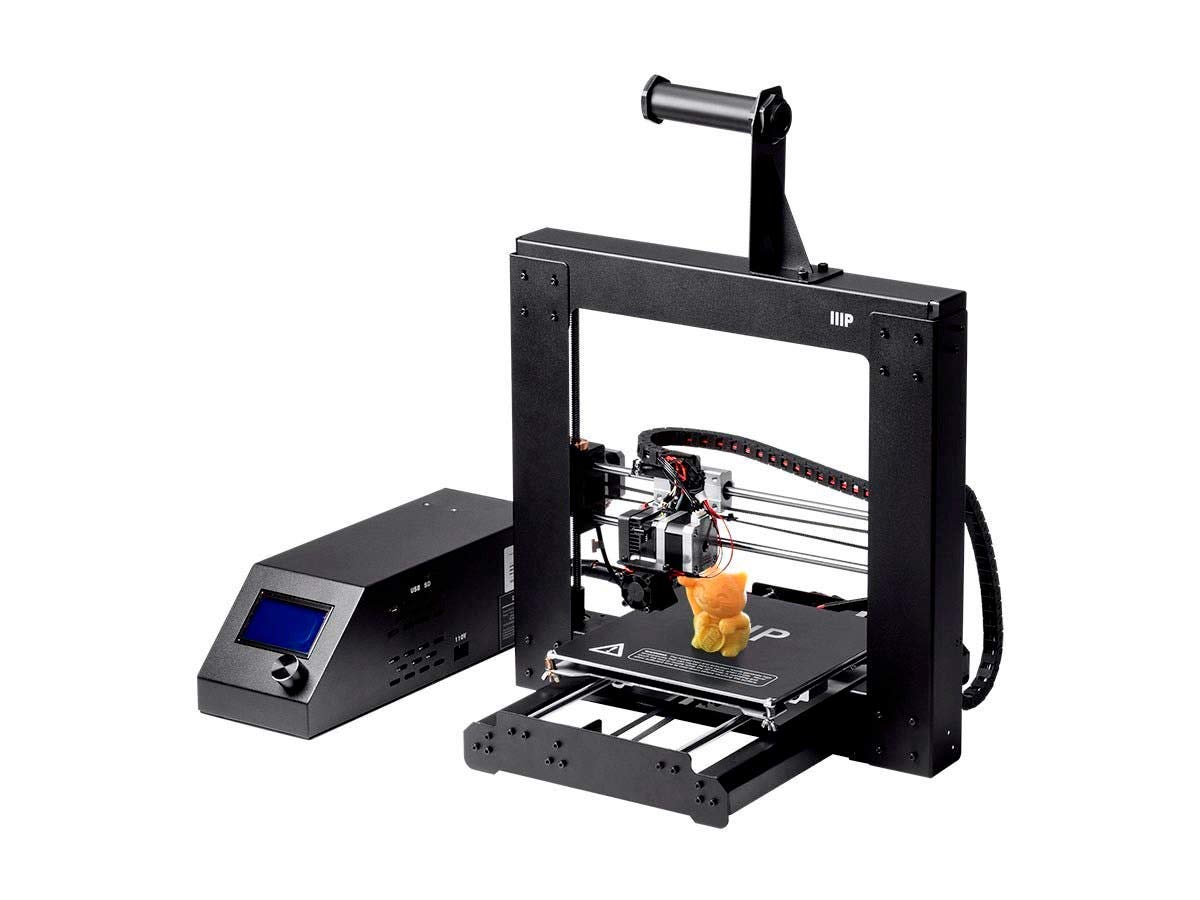
تصویر 1.1: جلو view of the Monoprice Maker Select 3D Printer v2, showing the main printer frame and the separate control box.
2. اطلاعات ایمنی
WARNING: The heated bed and extrusion nozzle generate high temperatures that can cause serious injury when in use. Never touch the bed or nozzle while the 3D Printer is operating and allow sufficient time to cool down before touching the surface.
- همیشه چاپگر را در مکانی با تهویه مناسب روشن کنید.
- در حین کار، دستها و لباسهای گشاد خود را از قطعات متحرک دور نگه دارید.
- Do not leave the printer unattended while it is operating.
- مطمئن شوید که منبع تغذیه به درستی وصل شده و اتصال زمین دارد.
- در حین کار، کودکان و حیوانات خانگی را از چاپگر دور نگه دارید.
3. محتویات بسته
بررسی کنید که آیا همه اقلام در بسته موجود است یا خیر:
- Monoprice Maker Select 3D Printer v2 unit
- جعبه کنترل
- نگهدارنده رشته
- Sample PLA Filament
- 2GB MicroSD Card (preloaded with printable 3D models)
- کابل برق
- کابل USB
- Tools for assembly and maintenance
4. راه اندازی
The Monoprice Maker Select 3D Printer v2 is designed for quick assembly, requiring only 6 screws to be tightened before you can begin printing.
- باز کردن بسته بندی: تمام قطعات را با دقت از بستهبندی خارج کنید. در حین حمل و نقل، هرگونه آسیبدیدگی را بررسی کنید.
- مونتاژ قاب: Attach the gantry frame to the base unit using the provided screws. Ensure all connections are secure.
- نصب نگهدارنده فیلامنت: Mount the filament holder onto the designated slot on the printer frame.
- اتصالات کابل: Connect the main cable from the printer unit to the control box. Connect the power cable to the control box and then to a power outlet.
- روشن کردن: Turn on the printer using the power switch on the control box.
- تراز کردن تخت: Before your first print, it is crucial to level the print bed. Follow the on-screen instructions or refer to the detailed manual for the bed leveling procedure. Proper bed leveling is essential for successful prints.

تصویر 4.1: عقب view of the printer, illustrating the connection points for the power supply and control box.
Video: Monoprice 13860 Maker Select 3d Printer V2 Overview
ویدئوی ۲.۱: یک مقام رسمی از کنار ما گذشتview of the Monoprice Maker Select 3D Printer V2, demonstrating its features and basic setup.
5. دستورالعمل های عملیاتی
This section details the steps for preparing and initiating a 3D print.
- آماده سازی نرم افزار: The printer is compatible with various slicing software such as Cura, Repetier-Host, or Simplify3D. Use your preferred software to convert your 3D model (e.g., STL file) into G-code, which the printer understands.
- بارگذاری رشته:
- قرقره فیلامنت را روی نگهدارنده فیلامنت قرار دهید.
- Feed the filament into the extruder mechanism.
- Heat the nozzle to the appropriate temperature for your filament type (e.g., PLA: 190-220°C, ABS: 220-250°C).
- پس از گرم شدن، فیلامنت را از طریق اکسترودر فشار دهید تا از نازل خارج شود.
- Loading Print File:
- کد G خود را ذخیره کنید file onto the provided MicroSD card.
- Insert the MicroSD card into the slot on the control box.
- Navigate the printer's menu using the control knob and LCD screen to select your print file.
- Starting a Print: Select 'Print' from the menu. The printer will automatically heat the bed and nozzle to the set temperatures, then begin the printing process.
- Monitoring the Print: Observe the first few layers to ensure proper adhesion to the heated build plate. The heated build plate allows for high-reliability printing of slow cooling materials, such as ABS, as well as PLA and PLA blends.
- تکمیل چاپ: Once the print is finished, allow the bed and nozzle to cool down before carefully removing the printed object.

تصویر ۲: نمای نزدیک view of the control panel and LCD screen, used for navigating menus and initiating prints.
6. تعمیر و نگهداری
نگهداری منظم، عملکرد بهینه و طول عمر چاپگر سه بعدی شما را تضمین میکند.
- صفحه ساخت را تمیز کنید: After each print, clean the build plate to remove any residue. Use isopropyl alcohol for best results.
- تمیز کردن نازل: Periodically clean the nozzle to prevent clogs. A small brass brush or needle can be used for this purpose.
- روغن کاری: Lubricate the smooth rods and lead screws with appropriate grease or oil every few weeks, depending on usage. Pay particular attention to the bearings under the print bed, as they are subject to wear.
- Tighten Belts and Screws: Check and tighten all belts and screws regularly to maintain print accuracy and prevent vibrations.
- به روز رسانی سیستم عامل: Check the Monoprice website for any available firmware updates to improve printer functionality.
7 عیب یابی
This section addresses common issues you might encounter during 3D printing.
| مشکل | علت احتمالی | راه حل |
|---|---|---|
| فیلامنت اکسترود نمیشود | گرفتگی نازل، دمای نامناسب، گره خوردن فیلامنت | Clean nozzle, verify temperature settings, untangle filament |
| چاپ به تخت نمیچسبد | Bed not level, incorrect bed temperature, dirty bed | Re-level bed, adjust bed temperature, clean build plate |
| کیفیت چاپ پایین (جابجایی لایهها، رشته رشته شدن) | Loose belts, incorrect print speed/temperature, G-code error | Tighten belts, adjust print settings in slicer, check G-code file for corruption |
| چاپگر پاسخ نمیدهد | Power issue, software error, MicroSD card issue | Check power connections, restart printer, reformat/replace MicroSD card |
If you encounter issues, ensure that the G-code file is complete and not corrupted. Always check the original model file for integrity.
8. مشخصات
| ویژگی | جزئیات |
|---|---|
| شماره مدل | 113860 |
| حجم ساخت | 200 × 200 × 180 میلی متر (8 × 8 × 7 اینچ) |
| Heated Build Plate | بله |
| Max. Extruder Temperature | 260 درجه سانتی گراد (500 درجه فارنهایت) |
| رشته های سازگار | ABS, PLA, XT Copolyester, PET, TPU, TPC, FPE, PVA, HIPS, Jelly, Foam, Felty |
| نرم افزار سازگار | Cura, Repetier-Host, Simplify3D |
| سازگاری سیستم عامل | Windows, Mac OS X, Linux |
| ابعاد محصول | 19.7 x 18.9 x 11.2 اینچ |
| وزن مورد | 0.04 Kilograms (Note: This weight seems incorrect based on typical 3D printer weights and product dimensions. Please refer to product packaging for accurate weight.) |
| دمای عملیاتی محیط | +15 – +30°C (+59 - +86°F) |
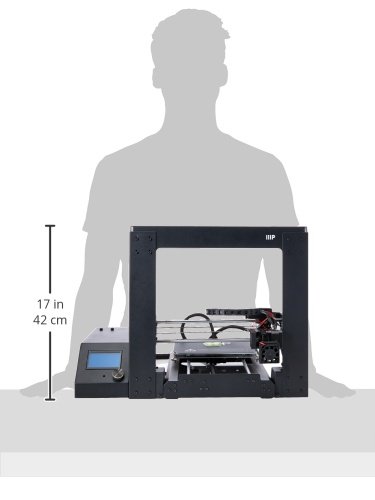
Image 8.1: Diagram showing the approximate dimensions of the Monoprice Maker Select 3D Printer v2.
9. گارانتی و پشتیبانی
برای اطلاعات گارانتی و پشتیبانی فنی، لطفاً به سایت رسمی Monoprice مراجعه کنید. website or contact their customer service directly. Monoprice support is known to be helpful for addressing product-related inquiries and issues.
You can also find a wealth of community support and resources online, particularly in forums dedicated to this printer model (often referred to as the Wanhao Duplicator i3, which is a rebadged version).


