1. مقدمه
This manual provides essential information for the safe and efficient use of your InFocus IF195a Touch Pad. Please read this manual thoroughly before operating the device and retain it for future reference.
2. اطلاعات ایمنی
- دستگاه را در معرض دمای بسیار بالا، نور مستقیم خورشید یا رطوبت زیاد قرار ندهید.
- از افتادن یا قرار دادن دستگاه در معرض ضربه های شدید خودداری کنید.
- Use only the charger provided or approved by InFocus.
- خودتان اقدام به جداسازی یا تعمیر دستگاه نکنید. تمام مراحل سرویس را به پرسنل متخصص ارجاع دهید.
- دستگاه را از آب و سایر مایعات دور نگه دارید.
- دستگاه و باتری آن را طبق مقررات محلی، مسئولانه دور بیندازید.
3. محصول تمام شدview
The InFocus IF195a is a 20-inch Android-powered touch pad designed for interactive use. Familiarize yourself with its components.
3.1 جلو View

شکل 1: جلو view of the InFocus IF195a Touch Pad. This image shows the large 20-inch display with the Android operating system interface, including various app icons and the Google search bar. The device features a sleek bezel around the screen.
- نمایش: 20-inch multi-touch screen.
- دوربین جلو: Located at the top center bezel.
- میکروفون: برای ورودی صوتی یکپارچه شده است.
3.2 سمت View و بنادر
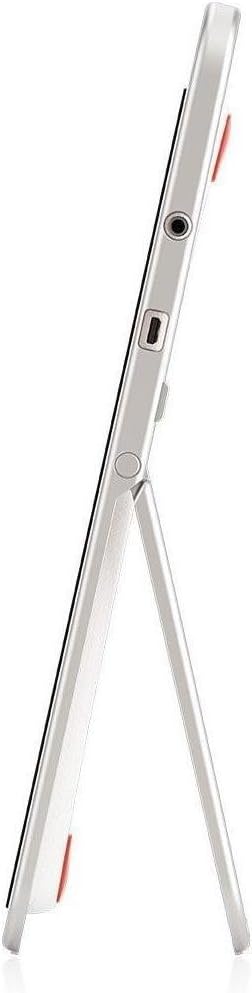
شکل 2: سمت view of the InFocus IF195a Touch Pad. This image highlights the device's slim profile and the integrated kickstand, which allows for upright positioning. Visible ports include a headphone jack and a USB port.
- دکمه پاور: Used to turn the device on/off or put it to sleep.
- دکمه های صدا: خروجی صدای دستگاه را تنظیم کنید.
- جک هدفون (3.5 میلی متر): برای اتصال دستگاه های صوتی خارجی
- پورت Micro-USB: برای شارژ و انتقال اطلاعات
- پایه یکپارچه: Allows the device to stand upright.
4. راه اندازی
۴.۱ جعبهگشایی و شارژ اولیه
- Carefully remove the InFocus IF195a Touch Pad and all accessories from the packaging.
- Connect the provided power adapter to the Micro-USB port on the device and plug it into a power outlet. Allow the device to charge fully before first use. The charging indicator will typically show a full battery when complete.
4.2 روشن/خاموش کردن
- روشن کردن: Press and hold the Power button until the InFocus logo appears on the screen.
- برای خاموش کردن: Press and hold the Power button until a power-off menu appears. Select "Power off" and confirm.
- برای خوابیدن/بیدار شدن: دکمه روشن/خاموش را به طور خلاصه فشار دهید تا دستگاه در حالت خواب قرار گیرد یا از حالت خواب خارج شود.
۳.۴ راهنمای راهاندازی اولیه
پس از اولین روشن کردن، دستگاه شما را در فرآیند راهاندازی اولیه راهنمایی میکند:
- انتخاب زبان: زبان مورد نظر خود را انتخاب کنید
- اتصال وای فای: Select your Wi-Fi network from the list and enter the password. A stable internet connection is required for many features.
- حساب کاربری گوگل: Sign in with an existing Google account or create a new one. This is necessary to download apps from the Google Play Store and access Google services.
- تاریخ و زمان: Set the correct date and time or allow the device to set it automatically via the network.
- تنظیمات حریم خصوصی: Review و تنظیمات حریم خصوصی را به دلخواه تنظیم کنید.
5. راه اندازی دستگاه
5.1 اشاره های لمسی
- ضربه بزنید: Touch the screen once to select an item or open an application.
- لمس کنید و نگه دارید: برای دسترسی به منوهای متنی یا کشیدن موارد، روی یک مورد فشار داده و نگه دارید.
- کش رفتن: برای پیمایش در لیستها یا جابجایی بین صفحات اصلی، انگشت خود را روی صفحه بکشید.
- زوم با دو انگشت (یا نیشگون گرفتن برای بزرگنمایی): برای بزرگنمایی یا کوچکنمایی تصاویر، نقشهها یا ... از دو انگشت استفاده کنید web صفحات
۲.۱ صفحه اصلی و ناوبری
- دکمه خانه: Returns you to the main home screen.
- دکمه برگشت: به صفحه قبلی برمیگردد یا برنامه فعلی را میبندد.
- دکمه برنامه های اخیر: Displays a list of recently used applications for quick switching.
- پنل اطلاع رسانی: برای دسترسی به اعلانها و تنظیمات سریع، از بالای صفحه به پایین بکشید.
۵.۲ نصب و مدیریت برنامهها
- فروشگاه Google Play: Open the "Play Store" app to browse and download applications. A Google account is required.
- نصب برنامه ها: Select an app and tap "Install." Follow on-screen prompts for permissions.
- حذف نصب برنامهها: رفتن به تنظیمات > برنامه ها, select the desired app, and tap "Uninstall." Alternatively, touch and hold an app icon on the home screen and drag it to the "Uninstall" option (if available).
۴.۱ اتصال به دستگاههای خارجی
- هدفون: هدفون های 3.5 میلی متری را به جک هدفون وصل کنید.
- دستگاه های USB: Connect compatible USB devices (e.g., flash drives, keyboards) to the Micro-USB port using an appropriate adapter if necessary. The device supports USB On-The-Go (OTG).
6. تعمیر و نگهداری
6.1 تمیز کردن دستگاه
- از یک پارچه نرم و بدون پرز برای تمیز کردن صفحه نمایش و بدنه دستگاه استفاده کنید.
- برای علائم سرسخت، کمی dampپارچه را با آب یا یک پاککننده صفحه نمایش که مخصوص لوازم الکترونیکی طراحی شده است، بپوشانید.
- از استفاده از مواد شیمیایی قوی، پاککنندههای ساینده یا اسپریهای آئروسل خودداری کنید.
6.2 مراقبت از باتری
- برای افزایش طول عمر باتری، از خالی شدن کامل باتری به طور مکرر خودداری کنید.
- پس از شارژ کامل، دستگاه را برای مدت طولانی به شارژر متصل نگذارید.
- اگر مدت زیادی از دستگاه استفاده نمیکنید، آن را در جای خشک و خنک نگهداری کنید، در حالی که باتری آن حدود ۵۰٪ شارژ داشته باشد.
6.3 به روز رسانی نرم افزار
برای اطمینان از عملکرد و امنیت بهینه، مرتباً بهروزرسانیهای نرمافزار را بررسی کنید. به تنظیمات > درباره تبلت > بهروزرسانیهای سیستم to check for and install available updates. Ensure your device is connected to Wi-Fi and has sufficient battery charge before starting an update.
7 عیب یابی
| مشکل | راه حل ممکن |
|---|---|
| دستگاه روشن نمیشود. | Ensure the device is charged. Connect the charger and wait a few minutes before attempting to power on again. If unresponsive, perform a hard reset by holding the power button for 10-15 seconds. |
| مشکلات اتصال وای فای. | بررسی کنید که آیا Wi-Fi در تنظیمات فعال است یا خیر. روتر Wi-Fi خود را مجدداً راه اندازی کنید. شبکه را فراموش کنید و دوباره متصل شوید. مطمئن شوید که در محدوده سیگنال Wi-Fi هستید. |
| برنامهها از کار میافتند یا هنگ میکنند. | Close and restart the application. Clear the app's cache (تنظیمات > برنامهها > [نام برنامه] > ذخیرهسازی > پاک کردن حافظه پنهاناگر مشکل همچنان ادامه داشت، برنامه را حذف و دوباره نصب کنید. |
| صفحه نمایش پاسخ نمی دهد. | Restart the device. Ensure the screen is clean and free of debris. If the issue continues, contact support. |
| عملکرد کند. | Close unnecessary background applications. Clear cache for frequently used apps. Check available storage (تنظیمات > فضای ذخیره سازی) and free up space if needed. Consider a factory reset as a last resort. |
7.1 تنظیم مجدد کارخانه
ریست فکتوری تمام اطلاعات دستگاه شما را پاک میکند و آن را به تنظیمات اولیه کارخانه برمیگرداند. قبل از ادامه، از تمام اطلاعات مهم خود نسخه پشتیبان تهیه کنید.
- رفتن به تنظیمات > پشتیبانگیری و بازنشانی > بازنشانی به تنظیمات کارخانه.
- Read the warning message carefully.
- Tap "Reset tablet" and then "Erase everything" to confirm.
- دستگاه دوباره راه اندازی می شود و فرآیند تنظیم مجدد آغاز می شود.
8. مشخصات فنی
| ویژگی | مشخصات |
|---|---|
| مدل | IF195a |
| نام تجاری | InFocus |
| اندازه نمایشگر | 20 اینچ |
| حداکثر وضوح | 1600×900 |
| پردازنده | ARM Cortex-A15 Quad-Core 1.8 GHz |
| ظرفیت RAM | 2 گیگابایت |
| ظرفیت ذخیره سازی | 16 گیگابایت |
| سیستم عامل | Android 4.4 KitKat |
| وضوح دوربین عقب | 5 مگاپیکسل |
| ابعاد (L x W x H) | 61.6 × 47 × 8.6 سانتی متر |
| وزن | 3.7 کیلوگرم |
| رنگ | خاکستری |
9. گارانتی و پشتیبانی
For warranty information, please refer to the warranty card included with your product or visit the official InFocus website. For technical support, product registration, or service inquiries, please contact InFocus customer service through their official channels.
Please note that warranty terms may vary by region and retailer. Keep your proof of purchase for warranty claims.


