مقدمه
This manual provides essential instructions for the installation, operation, and maintenance of your Brother LC10E Extra High Yield Ink Cartridge Set. This set includes one Cyan (LC10EC), one Magenta (LC10EM), and one Yellow (LC10EY) ink cartridge, designed for compatible Brother inkjet printers.
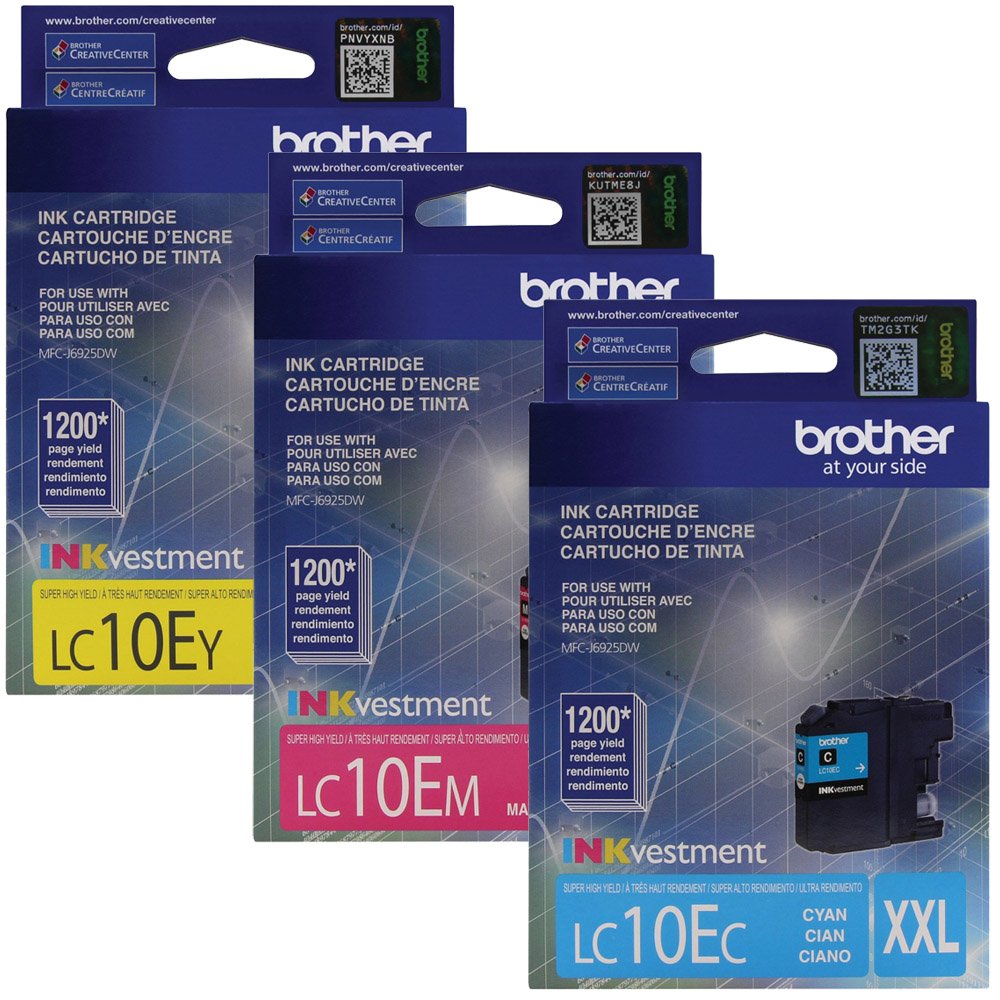
Image: Brother LC10E Extra High Yield Ink Cartridge Set, showing the Cyan, Magenta, and Yellow cartridges.
راه اندازی و نصب
Follow these steps to correctly install your new Brother LC10E ink cartridges into your compatible Brother inkjet printer.
- آماده سازی چاپگر: Ensure your printer is turned on. Open the ink cartridge cover or access door. Refer to your printer's specific manual for exact location.
- کارتریجهای قدیمی را بردارید: If replacing existing cartridges, gently press the release lever for the old cartridge and pull it out. Dispose of used cartridges responsibly.
- کارتریج جدید را از بستهبندی خارج کنید: Carefully remove the new LC10E ink cartridge from its sealed packaging. نکن touch the electrical contacts or the print head nozzle.
- درپوش محافظ را بردارید: Locate and remove the protective yellow or orange cap/tape from the cartridge. Be careful not to shake or squeeze the cartridge excessively.
- کارتریج جدید را وارد کنید: Insert the new cartridge into the correct slot, matching the color (Cyan, Magenta, or Yellow). Push it firmly until it clicks into place.
- بستن پوشش: Close the ink cartridge cover or access door. The printer will typically perform an initialization process.
- چاپ صفحه آزمایشی: After installation, it is recommended to print a test page or perform a nozzle check from your printer's utility software to ensure proper ink flow and print quality.
دستورالعمل های عملیاتی
Once installed, your Brother LC10E ink cartridges are ready for use. Here are some general operating guidelines:
- چاپ اسناد: Select your Brother printer from your computer's print dialogue. Choose desired print settings (e.g., paper type, print quality).
- نظارت بر سطح جوهر: Regularly check ink levels through your printer's display panel or the Brother printer utility software on your computer. Replace cartridges when indicated by the printer.
- کیفیت چاپ: For best results, use Brother genuine paper and ensure your printer drivers are up to date.
تعمیر و نگهداری
Proper maintenance helps ensure optimal performance and longevity of your ink cartridges and printer.
- چاپ معمولی: برای جلوگیری از خشک شدن جوهر در نازلهای هد چاپ، حداقل هفتهای یک بار چاپ کنید.
- تمیز کردن نازل: If print quality degrades (e.g., streaks, missing colors), perform a nozzle cleaning cycle using your printer's maintenance utility. Do not perform excessive cleaning cycles as this consumes ink.
- ذخیره سازی: کارتریجهای جوهر باز نشده را در بستهبندی اصلی و پلمپ شده خود در مکانی خنک و تاریک نگهداری کنید. از دمای شدید خودداری کنید.
- رسیدگی: Always handle cartridges carefully to avoid damage to the print head or electrical contacts.
عیب یابی
Here are solutions to common issues you might encounter with your ink cartridges.
- پیام «جوهر کم است» یا «جوهر خالی است»:
- Verify the cartridge is correctly installed and clicked into place.
- If the message persists after installing a new cartridge, ensure you have removed all protective caps/tapes.
- Replace the indicated cartridge if it is genuinely empty.
- Poor Print Quality (Streaks, Faded Colors, Missing Lines):
- Perform a nozzle check and print head cleaning cycle from your printer's maintenance utility.
- مطمئن شوید که از کارتریجهای جوهر اصلی برادر استفاده میکنید.
- Check if the paper type setting in your printer driver matches the paper loaded.
- کارتریج شناسایی نشده است:
- Remove the cartridge and reinsert it firmly until it clicks.
- Gently wipe the electrical contacts on the cartridge and inside the printer with a lint-free cloth.
- مطمئن شوید که میانافزار چاپگر بهروز است.
مشخصات
| ویژگی | جزئیات |
|---|---|
| نام مدل | LC10E |
| نام تجاری | برادر |
| رنگ جوهر | Cyan, Magenta, Yellow (CMY) |
| تعداد آیتم ها | 3 (one of each color) |
| ویژگی خاص | Extra High Yield |
| دستگاه های سازگار | Brother inkjet printers (refer to your printer's manual for specific compatibility) |
| بازده صفحه | Up to 2400 pages per cartridge (approximate, varies by usage) |
| وزن مورد | Approximately 1 pound (for the set) |
| ابعاد بسته بندی | 4.5 x 4.25 x 3.75 اینچ |
| پایه جوهر | آب |
گارانتی و پشتیبانی
For specific warranty information and technical support regarding your Brother LC10E ink cartridges or compatible Brother printer, please refer to the documentation included with your printer or visit the official Brother support webشرایط گارانتی ممکن است بسته به منطقه و فروشگاه متفاوت باشد.
شما اغلب میتوانید منابع پشتیبانی، سوالات متداول و اطلاعات تماس را در اینجا پیدا کنید. پشتیبانی برادر Webسایت.


