مقدمه
This manual provides comprehensive instructions for the installation, operation, and maintenance of your Alcatel-Lucent 4018 Extended Edition IPTouch VoIP Phone. Please read this manual carefully before using the device to ensure proper functionality and to prevent damage.
اطلاعات ایمنی
برای کاهش خطر آتشسوزی، برقگرفتگی و آسیبدیدگی، اقدامات احتیاطی ایمنی زیر را رعایت کنید:
- فقط از آداپتور برقی که همراه گوشی ارائه شده است استفاده کنید.
- گوشی را در معرض آب یا رطوبت قرار ندهید.
- از قرار دادن گوشی در نزدیکی منابع گرما یا نور مستقیم خورشید خودداری کنید.
- خودتان اقدام به باز کردن یا تعمیر تلفن نکنید. تمام مراحل سرویس را به پرسنل متخصص بسپارید.
- از تهویه مناسب اطراف دستگاه اطمینان حاصل کنید.
محتویات بسته
بررسی کنید که بسته شما حاوی موارد زیر باشد:
- Alcatel-Lucent 4018 Extended Edition IPTouch VoIP Phone
- گوشی
- سیم گوشی
- کابل اترنت
- آداپتور برق (در صورت وجود)
- راهنمای شروع سریع
محصول تمام شده استview
The Alcatel-Lucent 4018 Extended Edition IPTouch VoIP Phone is designed for efficient communication. Familiarize yourself with its components:
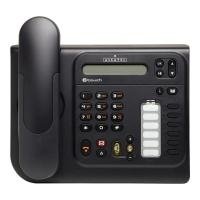
جلو view of the Alcatel-Lucent 4018 Extended Edition IPTouch VoIP Phone, showing the display, keypad, and function buttons.
اجزای کلیدی:
- صفحه نمایش: اطلاعات تماس، منوها و وضعیت را نشان میدهد.
- کلیدهای زمینهای: Buttons below the display that change function based on the current menu.
- کلیدهای ناوبری: For scrolling through menus and options.
- صفحه شماره گیری: صفحه کلید عددی استاندارد برای شماره گیری.
- کلیدهای عملکرد: Dedicated buttons for features like voicemail, hold, transfer, and speakerphone.
- گوشی: برای مکالمات خصوصی.
- بلندگو: برای ارتباط بدون دخالت دست.
راه اندازی
۱. اتصال تلفن
- Connect the handset cord to the handset and the designated port on the phone base.
- یک سر کابل اترنت را به پورت LAN در پشت تلفن و سر دیگر را به سوئیچ شبکه یا روتر خود وصل کنید.
- If Power over Ethernet (PoE) is not available, connect the power adapter to the phone's power port and then to an electrical outlet.
2. پیکربندی اولیه
Upon first power-up, the phone will attempt to connect to your network and register with your VoIP server. This process may require network credentials or specific server settings, which are typically provided by your IT administrator.
- برای تنظیمات اولیه، هرگونه دستورالعمل روی صفحه را دنبال کنید.
- Contact your system administrator for specific IP address, subnet mask, gateway, and DNS server settings if manual configuration is required.
دستورالعمل های عملیاتی
برقراری تماس:
- گوشی را بلند کرده یا فشار دهید بلندگو دکمه
- با استفاده از صفحه کلید شماره تلفن مورد نظر را شماره گیری کنید.
- را فشار دهید شماره گیری کنید contextual key or wait for the call to connect automatically.
پاسخگویی به تماس:
- وقتی تلفن زنگ میخورد، گوشی را بردارید یا دکمه بلندگو دکمه
- متناوبا، را فشار دهید پاسخ دهید contextual key.
پایان دادن به تماس:
- گوشی را در جای خود قرار دهید یا دکمه را فشار دهید پایان تماس contextual key or بلندگو دکمه
پست صوتی:
- اختصاصی را فشار دهید پست صوتی button (often indicated by an envelope icon).
- Follow the audio prompts to access and manage your messages.
Hold and Transfer:
- در حین تماس فعال ، را فشار دهید نگه دارید دکمه برای قرار دادن تماس در حالت انتظار.
- To transfer a call, press the انتقال دکمه را فشار دهید، شماره جدید را بگیرید و سپس فشار دهید انتقال again or hang up (consult your system's specific transfer method).
تعمیر و نگهداری
- تمیز کردن: Use a soft, dry cloth to clean the phone's surface. Do not use liquid cleaners or aerosols directly on the phone.
- ذخیره سازی: اگر تلفن را برای مدت طولانی انبار میکنید، آن را از برق و شبکه جدا کنید و در جای خشک و خنک نگهداری کنید.
- به روز رسانی نرم افزار: Firmware updates are typically managed by your IT department. Do not attempt to update the firmware without guidance from your administrator.
عیب یابی
| مشکل | علت احتمالی | راه حل |
|---|---|---|
| تلفن روشن نمیشود. | اتصال برق وجود ندارد یا آداپتور برق معیوب است. | Check power cable connection. Ensure power adapter is functional. If using PoE, verify network cable and switch. |
| امکان برقراری یا دریافت تماس وجود ندارد. | Network connectivity issue or VoIP registration failure. | Check Ethernet cable connection. Restart the phone. Contact your IT administrator to verify VoIP server settings and registration status. |
| بدون شماره گیری | گوشی به درستی وصل نشده یا تلفن ثبت نشده است. | Ensure handset cord is securely connected. Verify phone is registered to the VoIP server (check display for status). |
| کیفیت صدای ضعیف | Network congestion or faulty handset/speaker. | Check network connection. Try restarting the phone. If problem persists, contact support. |
For issues not listed here, please contact your IT support or the product manufacturer.
مشخصات
| ویژگی | جزئیات |
|---|---|
| شماره مدل | 3GV27063DB |
| دستگاه های سازگار | Internet, computers, VoIP services |
| نوع تلفن | طناب دار |
| مواد | پلاستیک |
| منبع تغذیه | کابل برق |
| نوع شماره گیر | صفحه کلید تکی |
| نوع سیستم پاسخگویی | دیجیتال |
| وزن مورد | 4.52 پوند |
| شناسه تماس گیرنده | بله |
| باتری های مورد نیاز | Non-standard battery requires batteries (Note: This usually implies a backup battery or specific type, not standard AA/AAA) |
گارانتی و پشتیبانی
For warranty information, technical support, or service inquiries, please contact your vendor or IT administrator. Alcatel-Lucent provides support through authorized channels.
Spare parts availability: Information unavailable on spare parts.
Software updates guaranteed until: Information not available.


