1. بیش ازview
The Sony STR-DN1050 is a 7.2 Channel Hi-Res 4K AV Receiver designed to deliver superior audio and video performance for your home entertainment system. It features built-in Wi-Fi, Bluetooth, and AirPlay for seamless music streaming. With 165 watts of power across 7.2 channels, high-resolution audio compatibility, 4K resolution pass-through and upscaling, and 10 HD inputs, this receiver provides a robust foundation for music, Blu-ray movies, and games.
ویژگی های کلیدی:
- 7.2 Channel A/V Receiver with 165W x 7 (at 6 ohms, 1 kHz, THD 0.9%)
- Optimized chassis and internal circuitry for enhanced audio performance
- Built-in Wi-Fi with DLNA and AirPlay compatibility for wireless streaming
- اتصال بلوتوث برای جفت شدن آسان با دستگاه های سازگار
- 4K resolution pass-through and upscaling for high-quality video
- High-Resolution Audio support for superior sound reproduction
- Multiple HD inputs and support for 2 separate powered zones
2. راه اندازی
2.1 باز کردن بسته بندی و قرار دادن
Carefully remove the receiver from its packaging. Place the receiver on a stable, flat surface with adequate ventilation to prevent overheating. Ensure there is sufficient space around the unit for airflow.
2.2 اتصال بلندگوها
The STR-DN1050 supports a 7.2 channel speaker configuration. Connect your speakers to the corresponding terminals on the rear panel. Ensure correct polarity (+ to + and - to -) for optimal sound. Refer to the impedance guidelines printed on the rear panel for compatible speaker setups (6-16 ohms).

Figure 1: Rear panel connections of the Sony STR-DN1050, highlighting speaker terminals and various inputs.
For speaker connections, use appropriate speaker wire. For a 7.2 channel setup, connect front left/right, center, surround left/right, and surround back left/right speakers. Subwoofers connect via RCA cables to the dedicated SUBWOOFER PRE OUT ports.
۳.۳ اتصال دستگاههای صوتی/تصویری
Connect your audio and video sources (e.g., Blu-ray player, game console, cable box) to the HDMI inputs on the rear panel. Connect your TV to the HDMI OUT (TV ARC) port for audio return channel functionality. The receiver also provides optical, coaxial, and analog audio inputs for other devices.
۴.۲ روشن کردن اولیه و تنظیمات شبکه
After connecting all devices and speakers, plug the receiver into a power outlet. Follow the on-screen instructions on your TV for initial setup, including network configuration for Wi-Fi and AirPlay. This process typically involves connecting to your home network and performing any available software updates.
3. دستورالعمل های عملیاتی
3.1 روشن/خاموش
را فشار دهید I/O button on the front panel or the POWER button on the remote control to turn the receiver on or off. The receiver supports smart turn-on technology, automatically activating when a connected HDMI device is powered on.
3.2 انتخاب ورودی
استفاده کنید انتخابگر ورودی dial on the front panel or the input buttons on the remote control (e.g., BD/DVD, GAME, SAT/CATV) to switch between connected audio/video sources.
3.3 کنترل صدا
تنظیم سطح صدا با استفاده از حجم مستر dial on the front panel or the VOLUME +/- buttons on the remote control.
3.4 جفت شدن بلوتوث
To pair a Bluetooth device, press the جفت شدن BLUETOOTH button on the remote or navigate to the Bluetooth pairing option via the receiver's menu. Select the receiver from your device's Bluetooth settings to establish a connection.
۵.۲ حالت مستقیم خالص
فعال کنید خالص مستقیم mode by pressing the corresponding button on the front panel or remote. This mode switches off unnecessary processing circuitry to provide the cleanest possible signal path with minimized electronic interference, enhancing audio clarity and detail.
3.6 Speaker Zone Control
The receiver supports multiple speaker zones. Use the کنترل منطقه button to manage audio output to different areas. You can select between Speaker A, Speaker B, or both (A+B) depending on your setup and listening preferences.
4. اتصالات
The Sony STR-DN1050 offers a variety of input and output options to integrate with your home theater system.
4.1 HDMI Inputs/Outputs
- ورودی HDMI: Connect up to 9 HDMI source devices (e.g., Blu-ray player, game console, streaming device).
- HDMI OUT (تلویزیون ARC): Connect to your television for video output and Audio Return Channel (ARC) functionality.
4.2 ورودی های صوتی
- نوری: Digital audio input for devices like CD players or older TVs.
- هم محور: ورودی صدای دیجیتال برای دستگاههای سازگار
- Analog Audio IN: Multiple RCA stereo inputs for analog audio sources.
- USB: Front-panel USB port for media playback from USB storage devices.
- MHL: Mobile High-Definition Link input for connecting compatible smartphones.
- فونو: Dedicated input for turntables (requires a built-in phono pre-amp or external pre-amp).
4.3 Speaker Terminals
Screw-type terminals for connecting up to 7 speakers (Front L/R, Center, Surround L/R, Surround Back L/R). Ensure proper impedance matching (6-16 ohms) as indicated on the rear panel.
۵.۶ اتصال به شبکه
- اترنت: Wired network connection for stable internet access and firmware updates.
- وای فای: Built-in wireless connectivity for network features and streaming.
4.5 سایر پورت ها
- هدفون: Front-panel 6.3mm jack for private listening.
- Pre-out (Subwoofer): RCA outputs for connecting external powered subwoofers.
- Auto Calibration Mic: Port for connecting the supplied calibration microphone for automatic speaker setup.
۵. ادغام رسانهای
۲.۵ تصاویر محصول
Below are images of the Sony STR-DN1050 receiver, showcasing its design and connectivity options.

شکل 2: جلو view of the Sony STR-DN1050 AV Receiver.
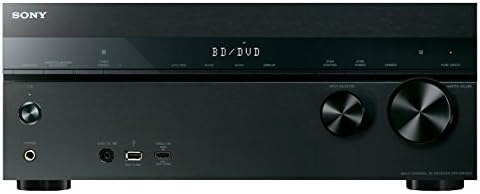
شکل ۲: نمای زاویهدار view of the Sony STR-DN1050.
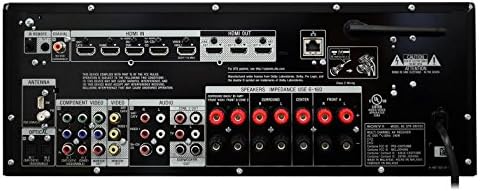
Figure 4: Close-up of the front panel.
۴.۵ ویدیوهای رسمی محصول
Watch these official videos from Sony for more information on the STR-DN1050's features and sound quality.
Video 1: Demonstrating the sound quality of the Sony STR-DN1050.
ویدیوی ۱: تمام شدview of the Sony STR-DN1050 7.2 Channel Hi-Res 4K AV Receiver.
6. تعمیر و نگهداری
To ensure the longevity and optimal performance of your Sony STR-DN1050 receiver, follow these maintenance guidelines:
- تمیز کردن: برای تمیز کردن قسمت بیرونی از یک پارچه نرم و خشک استفاده کنید. از پاک کننده ها یا حلال های ساینده خودداری کنید.
- تهویه: Ensure the receiver has adequate ventilation. Do not block the ventilation holes on the top, sides, or rear of the unit.
- قدرت: اگر قرار است برای مدت طولانی از دستگاه استفاده نشود، سیم برق را از پریز برق جدا کنید.
- محیط زیست: Avoid exposing the receiver to extreme temperatures, humidity, dust, or direct sunlight.
7 عیب یابی
If you encounter issues with your receiver, try the following basic troubleshooting steps:
- بدون برق: بررسی کنید که سیم برق محکم وصل شده باشد و پریز برق کار کند.
- بدون صدا: Verify all speaker connections are secure and correctly polarized. Ensure the correct input source is selected and the volume is turned up. Check the TV ARC connection if using your TV as a source.
- بدون عکس: Confirm HDMI cables are securely connected to both the source device and the TV. Ensure the correct HDMI input is selected on the receiver and the TV.
- مشکلات اتصال بلوتوث: Ensure the receiver is in pairing mode and your device's Bluetooth is enabled and discoverable. Try restarting both the receiver and your Bluetooth device.
- هنگ کردن/عدم پاسخگویی سیستم: Disconnect the receiver from the power outlet for a few minutes, then reconnect and power on. This can resolve temporary software glitches.
For more detailed troubleshooting, refer to the comprehensive online instruction manual or contact Sony customer support.
8. مشخصات
| ویژگی | ارزش |
|---|---|
| ابعاد محصول | 19.61 x 15.67 x 9.53 اینچ |
| وزن مورد | 21 پوند |
| سازنده | سونی |
| شماره مدل کالا | STRDN1050 |
| تاریخ برای اولین بار در دسترس است | 14 آوریل 2014 |
| فناوری اتصال | HDMI, Component Video input, Composite input, Optical, Coaxial, Analogue Audio in, USB, MHL, Ethernet, Composite Monitor Out, Component Monitor Out, Headphone, Pre-out (subwoofer) |
| نوع کنترلر | iOS یا اندروید |
| ویژگی خاص | کالیبراسیون خودکار |
| دستگاه های سازگار | گوشی هوشمند، اسپیکر |
| مجموع پورت های HDMI | 9 |
| نوع رابط | HDMI, USB, Composite input, Optical, Coaxial, Headphone, Pre-out (subwoofer) |
| حالت خروجی صدا | استریو |
| پیکربندی کانال صدای فراگیر | 7.2 کانال |
| رمزگذاری ویدیو | H.264 |
9. گارانتی و پشتیبانی
برای اطلاعات مربوط به گارانتی و پشتیبانی فنی، لطفاً به مستندات ارائه شده همراه محصول خود مراجعه کنید یا از پشتیبانی رسمی سونی دیدن کنید. website. You can find detailed guides, FAQs, and contact information for customer service.


