1. مقدمه
Welcome to the user manual for your new Salora SM508 mobile phone. This guide provides essential information to help you set up, operate, maintain, and troubleshoot your device. Please read this manual carefully to ensure proper use and to maximize the performance and longevity of your phone.
2. محصول تمام شدview
The Salora SM508 is a compact and reliable basic mobile phone designed for essential communication. It features a color display, a comfortable keypad, and dual SIM support.
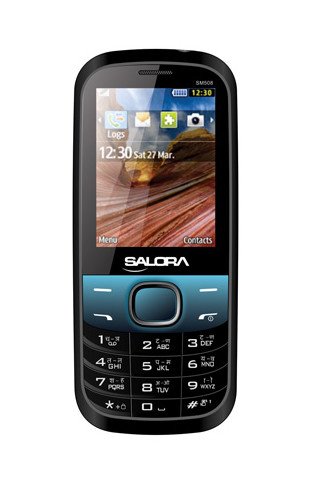
این تصویر نمای جلو را نشان میدهد view of the Salora SM508 mobile phone. It features a color display at the top, a central navigation button, and a standard alphanumeric keypad below. The phone has a black body with blue accents around the navigation cluster.
3. راه اندازی
۱.۳ قرار دادن سیم کارت (ها)
- گوشی را خاموش کنید و قاب پشتی را بردارید.
- باتری را با دقت خارج کنید.
- Locate the SIM card slots. The Salora SM508 supports dual SIM cards.
- Insert your SIM card(s) into the designated slot(s) with the gold contacts facing down. Ensure they are securely seated.
3.2 Inserting Battery
- Align the battery contacts with the contacts in the phone's battery compartment.
- Gently press the 1800 mAh Li-Ion battery into place until it clicks.
- قاب پشتی را در جای خود قرار دهید و مطمئن شوید که محکم بسته شده است.
3.3 Inserting Memory Card (Optional)
- With the back cover and battery removed, locate the memory card slot.
- Insert a microSD card (up to 8GB) into the slot with the gold contacts facing down.
- باتری و درب پشتی را تعویض کنید.
3.4 شارژ کردن دستگاه
- شارژر را به پورت شارژ گوشی خود وصل کنید.
- شارژر را به پریز برق وصل کنید.
- The battery indicator on the screen will show the charging status. Charge the phone fully before first use.
3.5 Initial Power On/Off
- روشن کردن: دکمه پاور/پایان تماس را فشار داده و نگه دارید تا صفحه نمایش روشن شود.
- برای خاموش کردن: دکمه روشن/خاموش/پایان تماس را فشار داده و نگه دارید تا گزینههای خاموش کردن ظاهر شوند، سپس «خاموش کردن» را انتخاب کنید.
4. دستورالعمل های عملیاتی
4.1 ناوبری اولیه
- برای حرکت در منوها و گزینهها از کلیدهای جهتنما (بالا، پایین، چپ، راست) استفاده کنید.
- Press the central 'OK' or 'Select' button to confirm a selection.
- برای بازگشت به صفحه قبل یا حذف کاراکترها، از دکمههای «بازگشت» یا «پاک کردن» استفاده کنید.
4.2 برقراری و دریافت تماس
- برای برقراری تماس: شماره تلفن را با استفاده از صفحه کلید وارد کنید و دکمه سبز تماس را فشار دهید.
- برای دریافت تماس: وقتی تلفن زنگ خورد، برای پاسخ دادن، دکمه سبز تماس را فشار دهید.
- برای پایان دادن به تماس: دکمه قرمز پایان تماس را فشار دهید.
۴.۴ ارسال و دریافت پیامک
- به منوی «پیامها» بروید.
- «نوشتن پیام» یا «پیامک جدید» را انتخاب کنید.
- پیام خود را با استفاده از صفحه کلید وارد کنید.
- شماره گیرنده را اضافه کنید یا از مخاطبین انتخاب کنید.
- «ارسال» را فشار دهید.
۵.۵ استفاده از دوربین
- از منوی اصلی به برنامه دوربین دسترسی پیدا کنید.
- The phone features a 1.3 MP primary (rear) camera.
- با استفاده از صفحه نمایش، عکس خود را کادربندی کنید.
- Press the 'OK' or 'Capture' button to take a photo.
۵.۶ چندرسانهای و اتصال
- جک صوتی: The phone includes a 3.5 mm audio jack for connecting headphones or external speakers.
- بلوتوث: Enable Bluetooth from the settings menu to connect to compatible devices for file transfer or hands-free communication.
- GPRS: The phone supports GPRS for basic internet connectivity. Consult your network provider for data plan details.
5. تعمیر و نگهداری
5.1 تمیز کردن دستگاه
- برای تمیز کردن صفحه نمایش و بدنه گوشی از یک پارچه نرم، خشک و بدون پرز استفاده کنید.
- از استفاده از مواد شیمیایی خشن، حلال های پاک کننده یا شوینده های قوی خودداری کنید.
- Do not allow water or liquids to enter the phone.
5.2 مراقبت از باتری
- از قرار دادن باتری در معرض دمای بسیار بالا (گرم یا سرد) خودداری کنید.
- باتری را سوراخ نکنید، از هم جدا نکنید یا اتصال کوتاه نکنید.
- If the battery is damaged or swollen, discontinue use immediately and replace it with an authorized Salora battery.
5.3 ذخیره سازی
- گوشی را در جای خشک و خنک و دور از نور مستقیم خورشید و رطوبت نگهداری کنید.
- اگر برای مدت طولانی باتری را انبار میکنید، برای حفظ طول عمر آن، مطمئن شوید که باتری تا حدی (حدود ۵۰٪) شارژ شده است.
6 عیب یابی
If you encounter issues with your Salora SM508, please refer to the following common solutions:
- روشن نشدن گوشی:
مطمئن شوید که باتری شارژ شده است. شارژر را وصل کنید و قبل از تلاش برای روشن کردن، چند دقیقه صبر کنید. بررسی کنید که آیا باتری به درستی وارد شده است یا خیر. - سیگنال شبکه وجود ندارد:
Check if your SIM card is correctly inserted. Ensure you are in an area with network coverage. Try restarting the phone. - نمیتوان تماس برقرار/دریافت کرد:
Verify that your SIM card is active and has sufficient balance/plan. Check network signal strength. Ensure call barring or flight mode is not enabled. - مشکلات شارژ:
Ensure the charger is properly connected to both the phone and the power outlet. Try using a different compatible charger. Check the charging port for any debris. - صفحه کلید پاسخگو نیست:
Restart the phone. If the issue persists, ensure no physical damage to the keypad.
If the problem persists after trying these steps, please contact Salora customer support.
7. مشخصات
Below are the detailed technical specifications for the Salora SM508 mobile phone:
| ویژگی | مشخصات |
|---|---|
| نام تجاری | سالورا |
| مدل | SM508 |
| سیستم عامل | Android 5.1, Android v5 1 OS (Note: This specification appears to be an error in the source data for a basic phone with a keypad interface. The phone operates on a proprietary feature phone OS.) |
| اندازه صفحه نمایش | 6.1 Centimetres (2.4" TFT Screen) |
| قطعنامه | 320 x 240 پیکسل |
| دوربین اصلی | ۵ مگاپیکسل (عقب) |
| باتری | 1800 میلی آمپر ساعت، Li-Ion |
| ظرفیت ذخیره سازی حافظه | قابل ارتقا تا 8 گیگابایت |
| پشتیبانی از سیم کارت | دو سیم کارت |
| فن آوری های اتصال | Bluetooth, GPRS |
| جک صوتی | 3.5 میلی متر |
| رابط دستگاه - اصلی | صفحه کلید |
| فاکتور فرم | نوار |
| رنگ | مشکی، آبی |
| وزن مورد | 140 گرم |
| ابعاد بسته بندی | 14 × 9.4 × 6.2 سانتی متر |
| تاریخ برای اولین بار در دسترس است | 18 فوریه 2014 |
8. گارانتی و پشتیبانی
8.1 اطلاعات گارانتی
The Salora SM508 comes with a 1 سال گارانتی سازنده برای دستگاه از تاریخ خرید. لوازم جانبی داخل جعبه، از جمله باتریها، تحت پوشش بیمه هستند. 6 ماه گارانتی سازنده از تاریخ خرید. این ضمانتنامه شامل نقصهای تولیدی و مشکلات ناشی از استفاده عادی میشود.
لطفا رسید خرید خود را به عنوان مدرک خرید برای درخواست گارانتی نگه دارید.
8.2 پشتیبانی مشتری
For any technical assistance, warranty claims, or further inquiries regarding your Salora SM508 mobile phone, please contact Salora customer support directly. Refer to the packaging or the official Salora webسایتی برای جدیدترین اطلاعات تماس.


