1. محصول تمام شدview
The SALORA CR612 is a compact digital alarm clock radio designed for bedside use. It features a large LED display, dual alarm functionality, AM/FM radio tuning, and convenient snooze and sleep timer functions. This manual provides detailed instructions for its operation.

تصویر: زاویه دار view of the SALORA CR612 Digital Alarm Clock Radio, showing the green LED display and top control buttons.
کنترل ها و نمایش
Familiarize yourself with the main controls and display elements:
- نمایشگر LED بزرگ: زمان، وضعیت هشدار و فرکانس رادیویی را نشان میدهد.
- دکمه پاور: دستگاه را روشن/خاموش می کند.
- دکمه تعویق: موقتاً صدای آژیر را قطع میکند.
- دکمه تنظیم زمان: برای تنظیم زمان فعلی استفاده می شود.
- Alarm 1/Alarm 2 Buttons: Used to set and activate individual alarms.
- Tuning/Volume Knobs: Adjust radio frequency and sound volume.
- دکمه باند: بین باندهای رادیویی AM و FM جابجا میشود.
- Memory/Preset Buttons: Save and recall radio stations.
2. راه اندازی
2.1 اتصال برق
The SALORA CR612 operates primarily on AC power with a battery backup feature to retain time and alarm settings during power outages
- برق AC را وصل کنید: سیم برق AC را به یک پریز دیواری استاندارد وصل کنید.
- نصب باتری پشتیبان: Open the battery compartment located at the bottom or rear of the unit. Insert 2 x AAA batteries (not included) according to the polarity markings. These batteries are for backup only and will not power the display or radio functions continuously.

تصویر: عقب view of the SALORA CR612, highlighting the power cable connection and the battery compartment for backup.
2.2 راه اندازی آنتن
For optimal FM radio reception, extend the built-in wire antenna fully. For AM reception, the unit has a built-in ferrite bar antenna; try rotating the unit for better signal.
3. دستورالعمل های عملیاتی
3.1 تنظیم زمان
- را فشار داده و نگه دارید تنظیم زمان دکمه. ارقام ساعت شروع به چشمک زدن میکنند.
- استفاده کنید TUNING/VOLUME knob (or +/- buttons if present) to adjust the hour. Pay attention to AM/PM indicators if applicable.
- را فشار دهید تنظیم زمان دوباره دکمه را فشار دهید. ارقام دقیقه چشمک خواهند زد.
- استفاده کنید TUNING/VOLUME knob to adjust the minutes.
- را فشار دهید تنظیم زمان برای تأیید و خروج از حالت تنظیم زمان، یک بار دیگر دکمه را فشار دهید.
3.2 Setting Alarms (Dual Alarm)
The CR612 features two independent alarms (Alarm 1 and Alarm 2).
- برای تنظیم زنگ هشدار ۱: را فشار داده و نگه دارید زنگ هشدار 1 دکمه. ارقام ساعت زنگدار چشمک میزنند.
- استفاده کنید TUNING/VOLUME knob to set the desired alarm hour.
- را فشار دهید زنگ هشدار 1 دوباره دکمه را فشار دهید. ارقام دقیقه زنگ هشدار چشمک خواهند زد.
- استفاده کنید TUNING/VOLUME knob to set the desired alarm minutes.
- را فشار دهید زنگ هشدار 1 button again to select the alarm source (Buzzer or Radio). The corresponding indicator will light up.
- را فشار دهید زنگ هشدار 1 button once more to confirm and activate Alarm 1. An alarm indicator (e.g., a bell icon or 'A1') will appear on the display.
- فرآیند را با استفاده از زنگ هشدار 2 دکمه تنظیم زنگ هشدار 2.
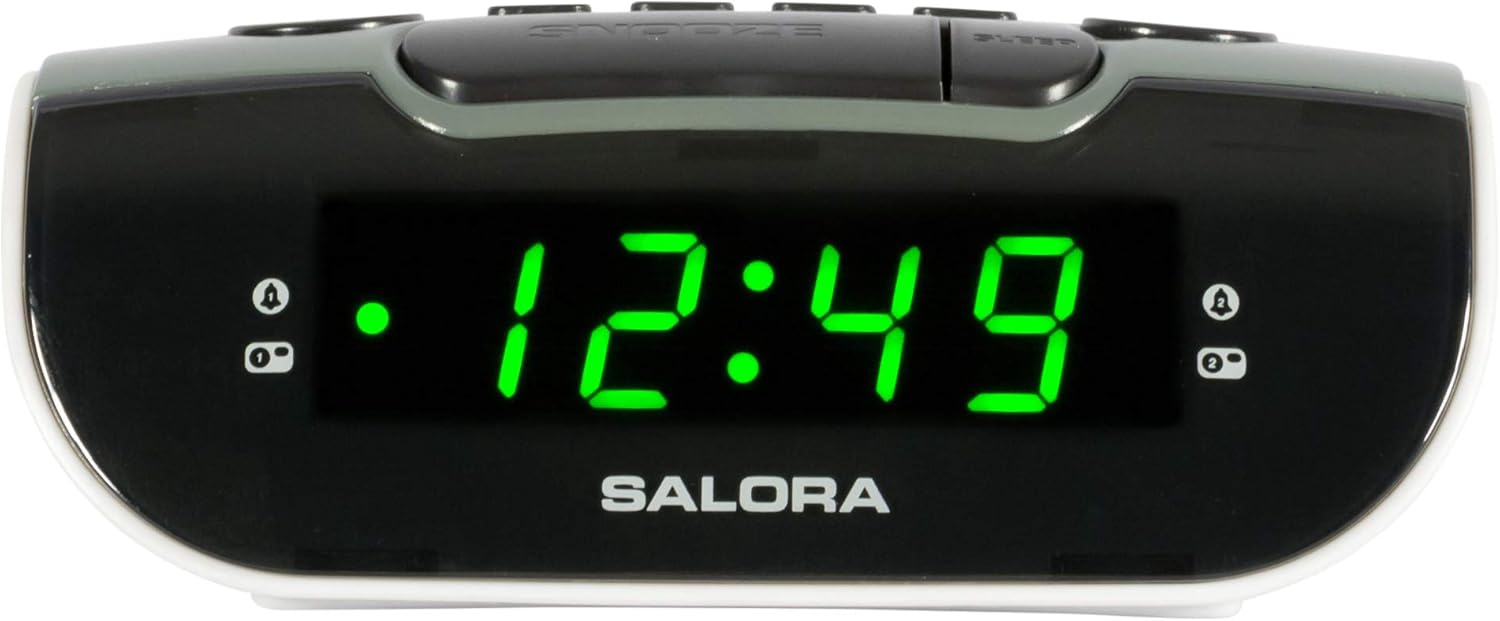
Image: Close-up of the SALORA CR612 display, showing the time '12:49' and active alarm indicators.
3.3 عملکرد تعویق
وقتی زنگ هشدار به صدا در میآید، دکمه را فشار دهید چرت زدن button to temporarily silence it. The alarm will sound again after approximately 9 minutes. To cancel the snooze and turn off the alarm completely, press the قدرت دکمه
3.4 عملیات رادیویی
- Turn On Radio: را فشار دهید قدرت دکمه برای روشن کردن واحد.
- انتخاب باند: را فشار دهید باند button to switch between AM and FM frequencies.
- ایستگاه تنظیم: استفاده کنید تنظیم برای تنظیم دستی ایستگاه رادیویی مورد نظر خود، دکمه را فشار دهید.
- تنظیم صدا: استفاده کنید VOLUME دکمه برای تنظیم سطح صدا.
- ذخیره تنظیمات از پیش تعیین شده: To save a station, tune to it, then press and hold the حافظه button until the display flashes. Use the از پیش تعیین شده buttons (or tuning knob) to select a preset number, then press حافظه دوباره برای تایید
- فراخوانی تنظیمات از پیش تعیین شده: را به طور خلاصه فشار دهید از پیش تعیین شده دکمهها برای جابجایی بین ایستگاههای ذخیره شده.
3.5 تایمر خواب
تایمر خواب به رادیو اجازه میدهد تا قبل از خاموش شدن خودکار، برای مدت زمان مشخصی پخش داشته باشد.
- هنگام پخش رادیو، دکمه بخواب برای تغییر زمانهای خواب موجود (مثلاً ۱۵، ۳۰، ۶۰، ۹۰ دقیقه یا خاموش)، دکمه را مکرراً فشار دهید.
- رادیو پس از زمان انتخاب شده به طور خودکار خاموش میشود.
4. تعمیر و نگهداری
4.1 تمیز کردن
To clean the unit, wipe it with a soft, dry cloth. Do not use abrasive cleaners, waxes, or solvents as these can damage the finish. Ensure the unit is unplugged before cleaning.
4.2 تعویض باتری
Replace the backup batteries (2 x AAA) annually or if the time and alarm settings are lost after a power interruption. Ensure correct polarity when inserting new batteries.
5 عیب یابی
- خاموش/روشن نشدن صفحه نمایش:
- اطمینان حاصل کنید که سیم برق متناوب به طور ایمن به یک پریز برق وصل شده است.
- بررسی کنید که آیا دکمه پاور فشرده شده است یا خیر.
- زنگ هشدار به صدا در نمی آید:
- Verify that the alarm is set and activated (check for the alarm indicator on the display).
- Ensure the alarm volume is not set to minimum if using radio alarm.
- Confirm the alarm time is correctly set (AM/PM).
- دریافت ضعیف رادیو:
- آنتن سیم FM را به طور کامل گسترش دهید.
- For AM, rotate the unit to find the best signal.
- دستگاه را از سایر دستگاههای الکترونیکی که ممکن است باعث تداخل شوند، دور نگه دارید.
- Time/Settings Lost After Power Outage:
- Check and replace the backup batteries if necessary.
- مطمئن شوید که باتریها با قطب صحیح وارد شدهاند.
6. مشخصات
| ویژگی | جزئیات |
|---|---|
| نام تجاری | سالورا |
| شماره مدل | CR612 |
| ابعاد محصول | 11.5 × 13 × 4.8 سانتی متر |
| وزن | 320 گرم |
| منبع تغذیه | AC Power (with 2x AAA battery backup) |
| نوع نمایشگر | LED دیجیتال |
| باندهای رادیویی | AM/FM PLL Tuner |
| ویژگی های خاص | زنگ هشدار دوگانه، چرت زدن، تایمر خواب |
| نوع اتاق | اتاق خواب |
| رنگ | Grey (with black and white accents) |
7. گارانتی و پشتیبانی
7.1 اطلاعات گارانتی
This product is covered by a standard manufacturer's warranty. For specific details regarding warranty duration and terms, please refer to the warranty card included with your purchase or contact your retailer. If you wish to return a product within 30 days of receipt because you have changed your mind, please consult the retailer's return policy. If you have received a defective or damaged product, please consult the retailer's help page on returns and refunds.
7.2 پشتیبانی مشتری
For further assistance, technical support, or inquiries not covered in this manual, please contact SALORA customer service through their official website or the retailer where the product was purchased. Please have your model number (CR612) and purchase information ready when contacting support.


