1. مقدمه
Thank you for choosing the TFA 30.5027.02 Digital Thermometer/Hygrometer. This device is designed to accurately measure and display indoor temperature and humidity, providing a clear indication of the comfort level in your environment. Its ultra-flat design and high-gloss surface make it a discreet and functional addition to any room. Please read this manual carefully to ensure proper setup and operation.
2. اطلاعات ایمنی
- این کتابچه راهنمای دستورالعمل را برای مراجعات بعدی نگه دارید.
- این دستگاه فقط برای استفاده در فضای داخلی در نظر گرفته شده است.
- Do not expose the device to extreme temperatures, direct sunlight, moisture, or strong vibrations.
- دستگاه را در آب یا مایعات دیگر غوطه ور نکنید.
- سعی نکنید دستگاه را باز کنید یا تغییر دهید. این کار گارانتی را باطل میکند.
- باتری ها را دور از دسترس کودکان قرار دهید. در صورت بلعیده شدن، فورا به دنبال مراقبت های پزشکی باشید.
- باتری های مستعمل را طبق مقررات محلی دور بیندازید.
- دستگاه را با نرم، دamp پارچه از پاک کننده ها یا حلال های ساینده استفاده نکنید.
3. محتویات بسته
لطفاً بررسی کنید که همه اجزا موجود و بدون آسیب باشند:
- 1x TFA 30.5027.02 Digital Thermometer/Hygrometer
- 1x CR2 Lithium Battery (pre-installed or separate)
- ۲ عدد دفترچه راهنما (این سند)
4. محصول تمام شدview
The TFA 30.5027.02 features a clear digital display showing current temperature and humidity. It also includes a comfort level indicator and a maximum/minimum value memory function.

شکل 1: جلو view of the TFA 30.5027.02 Digital Thermometer/Hygrometer. The display shows temperature in Celsius and relative humidity percentage, along with a comfort level icon.
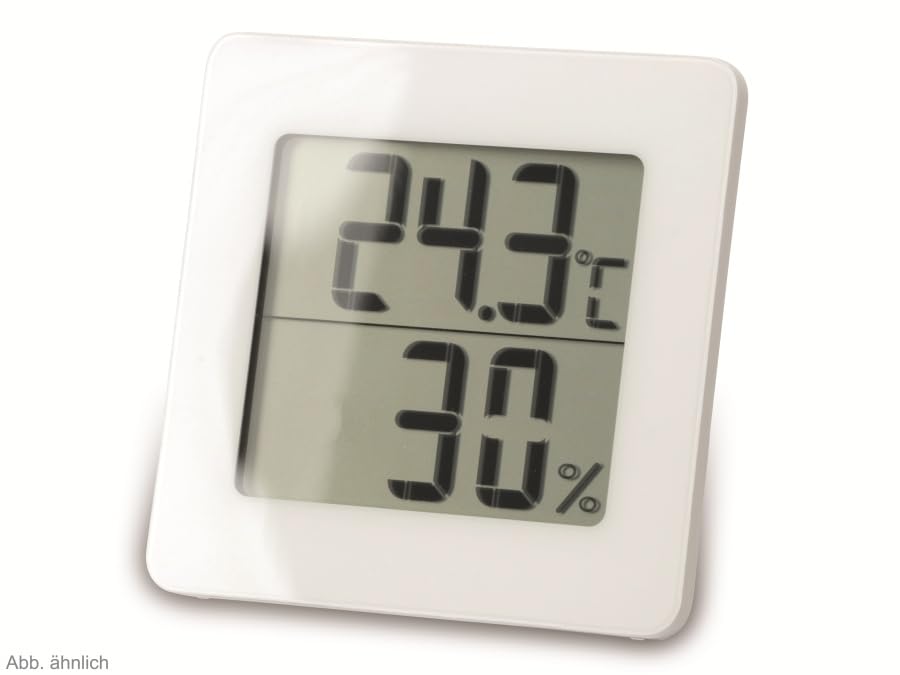
شکل 2: جایگزین view of the TFA 30.5027.02 showing different temperature and humidity readings, demonstrating the device's clear digital display.
ویژگی های کلیدی:
- Digital display for temperature (°C) and humidity (% RH)
- Ultra-flat design with high-gloss finish
- Comfort level indicator (smiley icon)
- Maximum and minimum value memory function
- قابل نصب روی دیوار
5. راه اندازی
5.1 نصب باتری
- پوشش محفظه باتری را در پشت دستگاه پیدا کنید.
- با کشیدن یا به آرامی باز کردن، پوشش را بردارید.
- Insert one CR2 Lithium battery, ensuring the correct polarity (+/-) as indicated inside the compartment.
- درپوش محفظه باتری را به طور ایمن تعویض کنید.
- The device display should activate, showing current temperature and humidity readings.
۲.۱ جایگذاری اولیه
For accurate readings, place the thermometer/hygrometer in a location free from direct sunlight, drafts, or heat sources. The device can be placed on a flat surface or mounted on a wall using the integrated mounting hole on the back.
- نصب دیواری: Use a small screw (not included) suitable for your wall type. Hang the device securely.
- قرار دادن روی میز: Ensure the device is stable on a flat, level surface.
6. دستورالعمل های عملیاتی
6.1 نمایش بیش از حدview
The large digital display shows two main values:
- نمایشگر بالایی: Current temperature in degrees Celsius (°C).
- نمایشگر پایین: Current relative humidity in percentage (% RH).
- نشانگر سطح راحتی: A small icon (e.g., a smiley face) indicates the current indoor climate comfort level based on temperature and humidity.
6.2 عملکرد حداکثر/دقیقه
The device records the maximum and minimum temperature and humidity values measured since the last reset. To access these values:
- را فشار دهید MAX/MIN button (if present, typically on the back or side). The display will show the maximum recorded temperature and humidity.
- را فشار دهید MAX/MIN دوباره به view حداقل دما و رطوبت ثبت شده
- را فشار دهید MAX/MIN button a third time to return to current readings.
To reset the MAX/MIN values, press and hold the MAX/MIN button for a few seconds while viewing the MAX or MIN values. The memory will clear, and new maximum and minimum values will begin recording from that point.
6.3 Comfort Level Indicator
The comfort level indicator provides a quick visual reference for indoor climate conditions:
- چهره شاد: Indicates optimal comfort (e.g., 20-25°C and 40-70% RH).
- چهره خنثی: Indicates acceptable but not optimal conditions.
- چهره غمگین: Indicates uncomfortable conditions (e.g., too dry, too humid, too hot, or too cold).
Note: Specific ranges for comfort levels may vary slightly by model. Refer to the device's display for the exact icon representation.
7. تعمیر و نگهداری
7.1 تمیز کردن
دستگاه را با یک d نرم و کمی تمیز کنیدamp cloth. Do not use abrasive cleaning agents, solvents, or alcohol, as these can damage the surface and display.
7.2 تعویض باتری
When the battery power is low, a low battery indicator (if available) will appear on the display. Replace the battery as follows:
- درب محفظه باتری در پشت دستگاه را باز کنید.
- باتری لیتیومی CR2 قدیمی را بردارید.
- Insert a new CR2 Lithium battery, observing the correct polarity (+/-).
- درپوش محفظه باتری را ببندید.
Note: After battery replacement, the device may reset, and MAX/MIN values will be cleared.
8 عیب یابی
| مشکل | علت احتمالی | راه حل |
|---|---|---|
| بدون صفحه نمایش یا صفحه نمایش ضعیف | باتری از کار افتاده یا به اشتباه وارد شده است. | Replace the battery with a new CR2 Lithium battery, ensuring correct polarity. |
| قرائت های نادرست | Device is placed in an unsuitable location (e.g., near a window, heat source, or vent). | Relocate the device to a stable indoor environment away from direct influences. Allow 15-30 minutes for readings to stabilize. |
| Comfort indicator always shows the same face | Environmental conditions are consistently outside or within a specific comfort range. | This indicates the device is functioning correctly. Adjust your indoor environment if desired. |
9. مشخصات
- شماره مدل: 30.5027.02
- برند: TFA
- رنگ: سفید
- ابعاد محصول (L x W x H): 10 x 1.2 x 8.2 سانتیمتر (3.94 x 0.47 x 3.23 اینچ)
- وزن مورد: 70 گرم (2.47 اونس)
- باتری: 1 x CR2 Lithium (included)
- نوع نصب: پایه دیواری
- Operational Humidity Range: 20% تا 95% RH
- Upper Rated Temperature: 50 درجه سانتی گراد (122 درجه فارنهایت)
- دقت دما: ± 1 درجه سانتیگراد
- دقت خواندن دما: ± 1 درجه سانتیگراد
10. گارانتی و پشتیبانی
For warranty information and customer support, please refer to the terms and conditions provided by your retailer or contact the manufacturer directly. Keep your proof of purchase for any warranty claims.
سازنده: TFA Dostmann GmbH & Co. KG
For further assistance, please visit the official TFA webسایت یا با بخش خدمات مشتریان آنها تماس بگیرید.


