1. مقدمه
The Genius GX-Gaming SW-G2.1 3000 is a 2.1 channel speaker system designed to enhance audio experiences for gaming, music, and movies. It features a powerful subwoofer for deep bass and two satellite speakers for clear mid and high-range sounds. The system includes a dedicated control box for convenient adjustments and multiple input options for various devices.
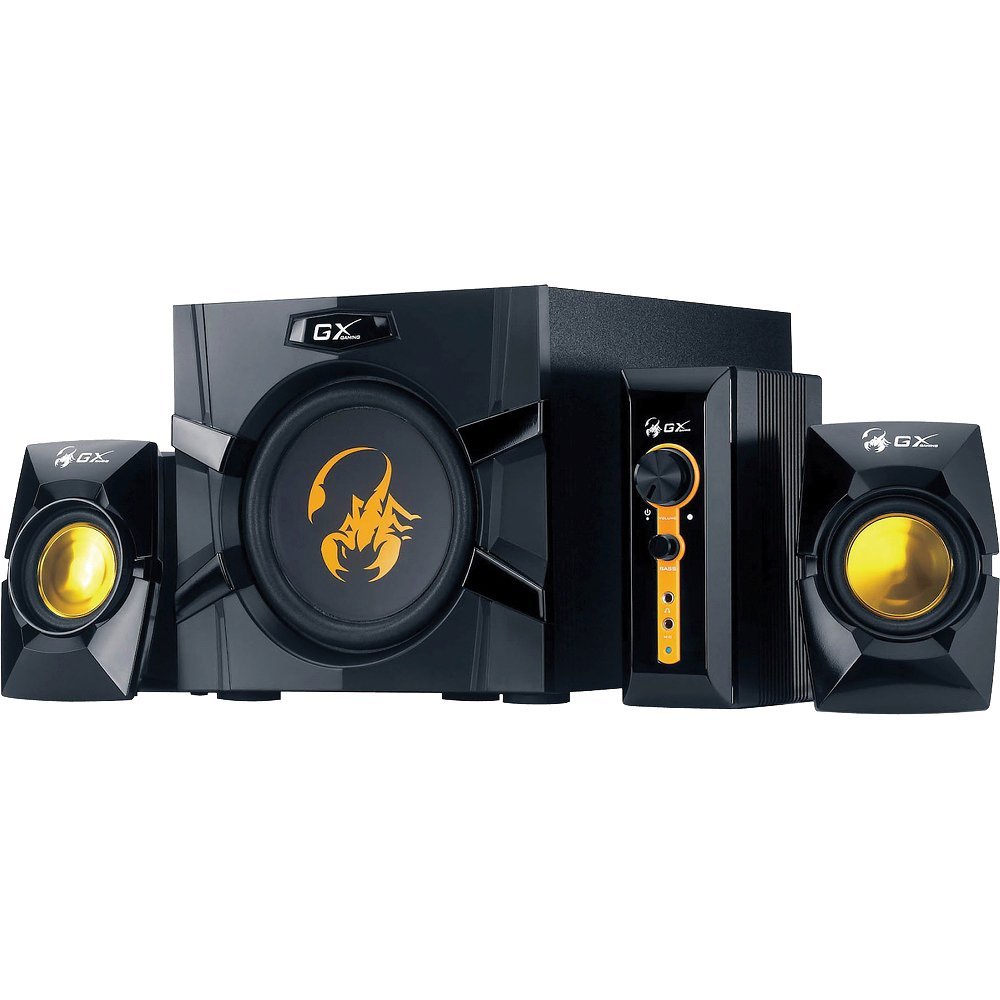
An image showing the Genius GX-Gaming SW-G2.1 3000 speaker system, featuring the subwoofer, two satellite speakers, and the control unit.
2. محتویات بسته
لطفاً بررسی کنید که تمام موارد ذکر شده در زیر در بسته شما موجود باشد:
- One (1) Wooden Cabinet Subwoofer
- دو (2) بلندگوی ماهوارهای
- One (1) Control Box
- One (1) Stereo RCA to 3.5mm Audio Cable
- One (1) 3.5mm Plug Audio Cable
- One (1) Microphone Jack Cable
- One (1) Headphone Jack Cable
- One (1) Multi-language User Manual
3. ویژگی های محصول
- کل توان خروجی: 70 وات (RMS)
- ساب ووفر: Wooden cabinet with a 6.5-inch driver for deep bass
- بلندگوهای ماهوارهای: Two curvaceous speakers with 3-inch metal drivers for clear mid and high tones
- جعبه کنترل: Independent controls for volume and bass adjustment
- قابلیت اتصال: Two input jacks (3.5mm standard and two RCA) for PC, TV, DVD, and game devices
- جکهای صوتی: Dedicated microphone jack for online communication and headphone jack for private listening
- پاسخ فرکانس: 35 Hz ~ 20K Hz
- نسبت سیگنال به نویز: 85 دسی بل
- حالت ذخیره انرژی: Automatically enters sleep mode after 1 minute of inactivity. To resume, ensure audio input device volume is at least 50%.
۱. دستورالعملهای راهاندازی
- تعیین موقعیت سخنرانان: Place the subwoofer on a stable surface, preferably on the floor, for optimal bass. Position the satellite speakers on either side of your listening area, facing you.
- بلندگوهای ماهوارهای را وصل کنید: Connect the cables from the two satellite speakers to the corresponding output ports on the subwoofer.
- جعبه کنترل را وصل کنید: Plug the control box cable into the designated port on the subwoofer.
- منبع صوتی را وصل کنید:
- For PC, MP3/CD players: Use the 3.5mm audio cable to connect your device's audio output to the 3.5mm input on the control box.
- For Game Consoles, DVD Players, TV: Use the stereo RCA to 3.5mm cable. Connect the RCA ends to your device's audio output and the 3.5mm end to the corresponding input on the control box.
- اتصال برق: Plug the subwoofer's power cord into a standard electrical outlet (110V or 220V AC, depending on your region).
- روشن کردن: Turn on the power switch, usually located on the subwoofer. The system is now ready for use.
5. دستورالعمل های عملیاتی
- کنترل صدا: Use the large knob on the control box to adjust the overall volume of the speaker system.
- کنترل باس: Use the dedicated bass knob on the control box to increase or decrease the subwoofer's bass output.
- استفاده از میکروفون: Connect a microphone to the MIC jack on the control box for online communication.
- استفاده از هدفون: Plug your headphones into the headphone jack on the control box for private listening. This will mute the speakers.
- حالت ذخیره انرژی: If the system enters sleep mode due to inactivity, ensure your audio input device's volume is set to 50% or higher, then adjust the system's volume using the control box to resume audio.
6. تعمیر و نگهداری
- تمیز کردن: Use a soft, dry cloth to clean the surfaces of the speakers and control box. Avoid using liquid cleaners or abrasive materials.
- قرار دادن: بلندگوها را از نور مستقیم خورشید، منابع گرما و رطوبت بیش از حد دور نگه دارید. از تهویه مناسب در اطراف ساب ووفر اطمینان حاصل کنید.
- مدیریت کابل: مطمئن شوید که همه کابلها محکم وصل شدهاند و در هم پیچیده یا فشرده نشدهاند تا از آسیب جلوگیری شود.
- ذخیره سازی: اگر سیستم را برای مدت طولانی انبار میکنید، آن را از برق بکشید و در جای خشک و خنک نگهداری کنید.
7 عیب یابی
- بدون صدا:
- Ensure the power cable is securely plugged in and the power switch is on.
- Check all audio cables are correctly connected between the source device, control box, and subwoofer.
- Verify the volume knob on the control box is turned up.
- Ensure the audio source device (PC, TV, etc.) is playing audio and its volume is not muted or too low.
- If in Power Saving Mode, increase the audio source device's volume to at least 50%.
- صدای مخدوش:
- Reduce the volume on both the speaker system and the audio source device.
- Adjust the bass level on the control box.
- Ensure speaker cables are not damaged or loosely connected.
- یکی از بلندگوها کار نمیکند:
- اتصال بلندگوی ماهوارهای غیرفعال به ساب ووفر را بررسی کنید.
- Test with another audio source or swap the satellite speaker connections (if possible) to isolate the issue.
8. مشخصات فنی
| توان خروجی کل | 70 وات (RMS) |
| Satellite Power | 2 15 XNUMX وات |
| قدرت ساب ووفر | 40 وات |
| واحدهای راننده | Satellites: 2 x 3 inches, Subwoofer: 1 x 6.5 inches |
| پاسخ فرکانس | 35 Hz ~ 20K Hz |
| نسبت سیگنال به نویز | 85 دسی بل |
| ابعاد ساب ووفر (WxHxD) | 230 x 314 x 215 میلیمتر (تقریباً 9 x 12.4 x 8.5 اینچ) |
| Satellite Dimensions (WxHxD) | 99 × 115 × 143 میلی متر |
| Controller Dimensions (WxHxD) | 60 × 154 × 170 میلی متر |
| وزن سیستم | 4.66 کیلوگرم (تقریباً 10.27 پوند) |
| منبع تغذیه | 110 ولت یا 220 ولت AC |
| دستگاه های سازگار | Personal Computer, Television, DVD Players, Game Consoles, MP3/CD players |
| جک های ورودی | 3.5mm standard input, two RCA jacks |
| روش کنترل | Knobs/Buttons (listed as 'Touch' in some specifications) |
9. گارانتی و پشتیبانی
This Genius GX-Gaming SW-G2.1 3000 speaker system comes with a گارانتی محدود. For specific details regarding warranty coverage, duration, and terms, please refer to the warranty card included in your product packaging or visit the official Genius webسایت
For technical support, troubleshooting assistance, or service inquiries, please contact Genius customer support through their official website or the contact information provided in your product documentation. When contacting support, please have your product model number (SW-G2.1 3000) and purchase information readily available.


