مقدمه
This manual provides essential information for the safe and effective use of your Sony Cyber-shot DSC-WX50 digital camera. Please read it thoroughly before operating the camera and retain it for future reference. The DSC-WX50 is a compact digital camera featuring a 16.2 MP Exmor R CMOS sensor, 5x optical zoom, and Full HD 1080/60i video recording capabilities.
آنچه در جعبه است
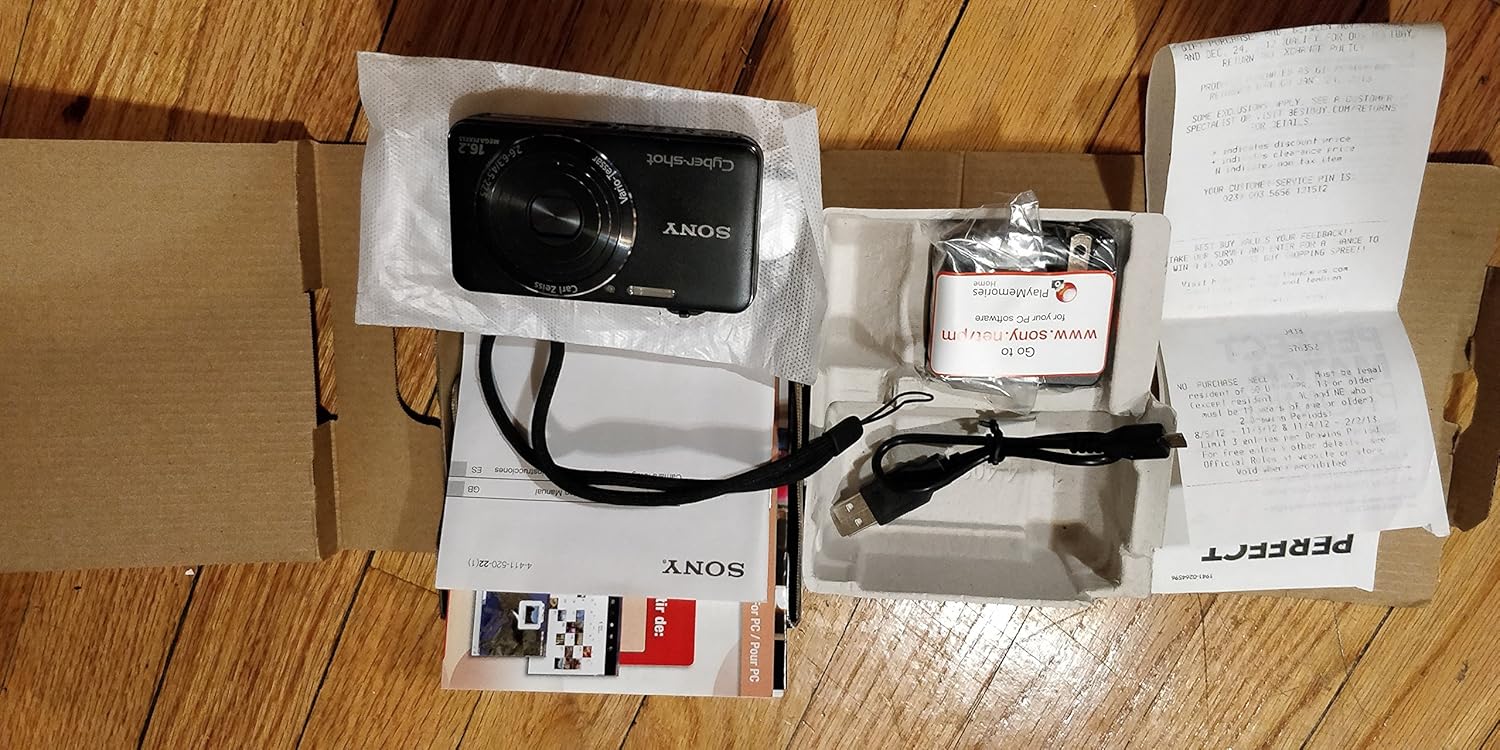
Carefully unpack your camera and ensure all items are present. The standard package contents include:
- دوربین دیجیتال سونی سایبرشات DSC-WX50
- پک باتری قابل شارژ
- آداپتور برق متناوب
- کابل اتصال USB
- بند مچ دست
- Instruction Manuals and Documentation
- HDMI Cable (Built-in Media)

Image: All contents of the Sony Cyber-shot DSC-WX50 package, including the camera, cables, and documentation, laid out.

تصویر: نمای نزدیکتر view of the included accessories, such as the charger and USB cable, within their packaging.
راه اندازی
1. شارژ باتری
Before first use, fully charge the supplied battery pack. Connect the camera to the AC adaptor using the USB cable, then plug the AC adaptor into a wall outlet. The charge lamp will light up during charging and turn off when complete.
۲. قرار دادن باتری و کارت حافظه
Open the battery/memory card cover on the bottom of the camera. Insert the charged battery pack firmly until it locks into place. Insert a compatible memory card (SD/SDHC/SDXC or Memory Stick Duo/Pro Duo/Pro-HG Duo) into the memory card slot until it clicks. Close the cover securely.

تصویر: جلو view of the Sony Cyber-shot DSC-WX50 camera, showing the lens and flash.
3 تنظیمات اولیه
When you turn on the camera for the first time, you will be prompted to set the date, time, and time zone. Follow the on-screen instructions to complete these settings.
کار با دوربین
روشن/خاموش برق
را فشار دهید قدرت دکمه برای روشن یا خاموش کردن دوربین. لنز هنگام روشن شدن باز میشود.
Basic Still Image Shooting (Intelligent Auto Mode)
- دوربین را روشن کنید.
- شماره گیر حالت را روی خودکار هوشمند (green camera icon).
- Frame your subject on the 2.7-inch LCD screen.
- برای فوکوس، دکمه شاتر را تا نیمه فشار دهید. وقتی فوکوس انجام شد، نشانگر فوکوس سبز میشود.
- برای گرفتن عکس، دکمه شاتر را تا انتها فشار دهید.
تصویر: عقب view of the Sony Cyber-shot DSC-WX50, highlighting the 2.7-inch LCD screen and control buttons.
عملکرد بزرگنمایی
Use the zoom lever around the shutter button to adjust the focal length. The camera features 5x optical zoom and Clear Image Zoom for enhanced magnification without significant quality loss.
Video Recording (Full HD 1080/60i)
To record movies, press the dedicated فیلم button. Press it again to stop recording. The camera supports Full HD 1080/60i video in AVCHD format, allowing for high-quality video capture with Optical SteadyShot Active Mode for reduced blur.
Special Shooting Modes and Features
- حالت خودکار برتر: Automatically detects 33 scenes and optimizes settings for dynamic pictures with reduced noise and improved clarity.
- Intelligent Sweep Panorama HR: Capture wide panoramic images by sweeping the camera. The camera stitches multiple frames automatically.
- تصویر ثابت سه بعدی و پانورامای سه بعدی: Create 3D images for viewروی نمایشگرهای سهبعدی سازگار.
- جلوه تصویر: Apply creative filters to your photos, such as Toy Camera, Pop Color, Partial Color, and more.
- محو کردن پسزمینه: Blurs the background to emphasize your subject, similar to DSLR effects.
- حالت پوست نرم: با کاهش ظاهر لکهها و چین و چروکها، عکسهای پرتره را بهبود میبخشد.
- Face Detection & Smile Shutter: Automatically detects faces and can trigger the shutter when a smile is detected.
- عملکرد ضد پلک زدن: Helps prevent photos with subjects blinking by capturing multiple shots.
- درخشش طبیعی: Corrects colors for more lifelike images when using flash.
- تشخیص حرکت: ISO و سرعت شاتر را برای کاهش تاری در سوژههای متحرک تنظیم میکند.
- حالت چند زاویه ای جاروب: Captures 15 images at different angles to create a 3D-like view روی LCD دوربین هنگام کج شدن.
تعمیر و نگهداری
تمیز کردن دوربین
- بدنه دوربین: با یک پارچه نرم و خشک پاک کنید. برای آلودگیهای سرسخت، از پارچهای به آرامی استفاده کنید.ampبا آب یا یک شوینده ملایم آغشته کنید، سپس خشک کنید.
- لنز: از یک برس لنز برای پاک کردن گرد و غبار استفاده کنید، سپس به آرامی با یک پارچه تمیز کننده لنز پاک کنید. از لمس سطح لنز با انگشتان خود خودداری کنید.
- صفحه نمایش LCD: با یک پارچه نرم و خشک به آرامی پاک کنید. از فشار دادن محکم روی صفحه خودداری کنید.
مراقبت از باتری
برای افزایش عمر باتری، از قرار دادن آن در معرض دمای شدید خودداری کنید. باتری را در صورت عدم استفاده در جای خشک و خنک نگهداری کنید. اگر قرار است دوربین برای مدت طولانی استفاده نشود، باتری را خارج کنید.
Memory Card Care
Always format new memory cards in the camera before first use. Avoid removing the memory card while the camera is writing data (indicated by a flashing access lamp) to prevent data corruption.
عیب یابی
اگر با دوربین خود با مشکل مواجه شدید، به راهحلهای رایج زیر مراجعه کنید:
| مشکل | راه حل |
|---|---|
| دوربین روشن نمیشود. |
|
| "Writing to Memory card was incomplete" error. |
|
| تصاویر تار هستند. |
|
| فلاش روشن نمیشود. |
|
For further assistance, please contact Sony customer support.
مشخصات
| ویژگی | جزئیات |
|---|---|
| وضوح هنوز موثر | 16.2 مگاپیکسل |
| فناوری حسگر عکس | CMOS BSI |
| زوم اپتیکال | 5x |
| بزرگنمایی دیجیتال | 20 برابر |
| اندازه صفحه نمایش | 2.7 اینچ |
| نوع نمایشگر | LCD |
| تثبیت تصویر | SteadyShot اپتیکال |
| وضوح تصویر | کیفیت فول اچدی 1080p (1080/60i AVCHD) |
| پشتیبانی می شود File قالب | JPEG (Exif 2.3), 3D: MPF, Video: MPEG-4, AVCHD |
| سازگاری کارت حافظه | SD/SDHC/SDXC، مموری استیک Duo/Pro Duo/Pro-HG Duo |
| قابلیت اتصال | HDMI، USB |
| حداقل فاصله کانونی | 25 میلیمتر |
| حداکثر فاصله کانونی | 125 میلیمتر |
| حداکثر دیافراگم | f/6.3 |
| حداقل سرعت شاتر | 4 ثانیه |
| حداکثر سرعت شاتر | ۱/۴۰۰۰ ثانیه |
| وزن مورد | 0.26 پوند |
گارانتی و پشتیبانی
برای اطلاعات مربوط به گارانتی و پشتیبانی مشتری، لطفاً به مستندات ارائه شده همراه محصول خود مراجعه کنید یا از پشتیبانی رسمی سونی دیدن کنید. webسایت. فاکتور خرید خود را برای موارد گارانتی نگه دارید.
پشتیبانی رسمی سونی: www.sony.com/electronics/support


