1. مقدمه
This manual provides detailed instructions for the installation, operation, and maintenance of your JVC KDR820BT Wireless Bluetooth Dual USB-CD Receiver. Please read this manual thoroughly before using the unit to ensure proper operation and to prevent damage.
The JVC KDR820BT is designed to provide versatile audio playback and communication features in your vehicle. It includes built-in Bluetooth for hands-free calling and audio streaming, dual USB ports for device connectivity, and CD playback capabilities. The unit also features a customizable display with variable color options.
2. محتویات بسته
قبل از شروع نصب، مطمئن شوید که همه موارد در بسته موجود است:
- JVC KDR820BT Head Unit
- Wireless Remote Control (RM-RK52)
- آداپتور بلوتوث USB
- میکروفن سیمی
- سیم کشی
- سخت افزار نصب
- دفترچه راهنمای مالک (این سند)
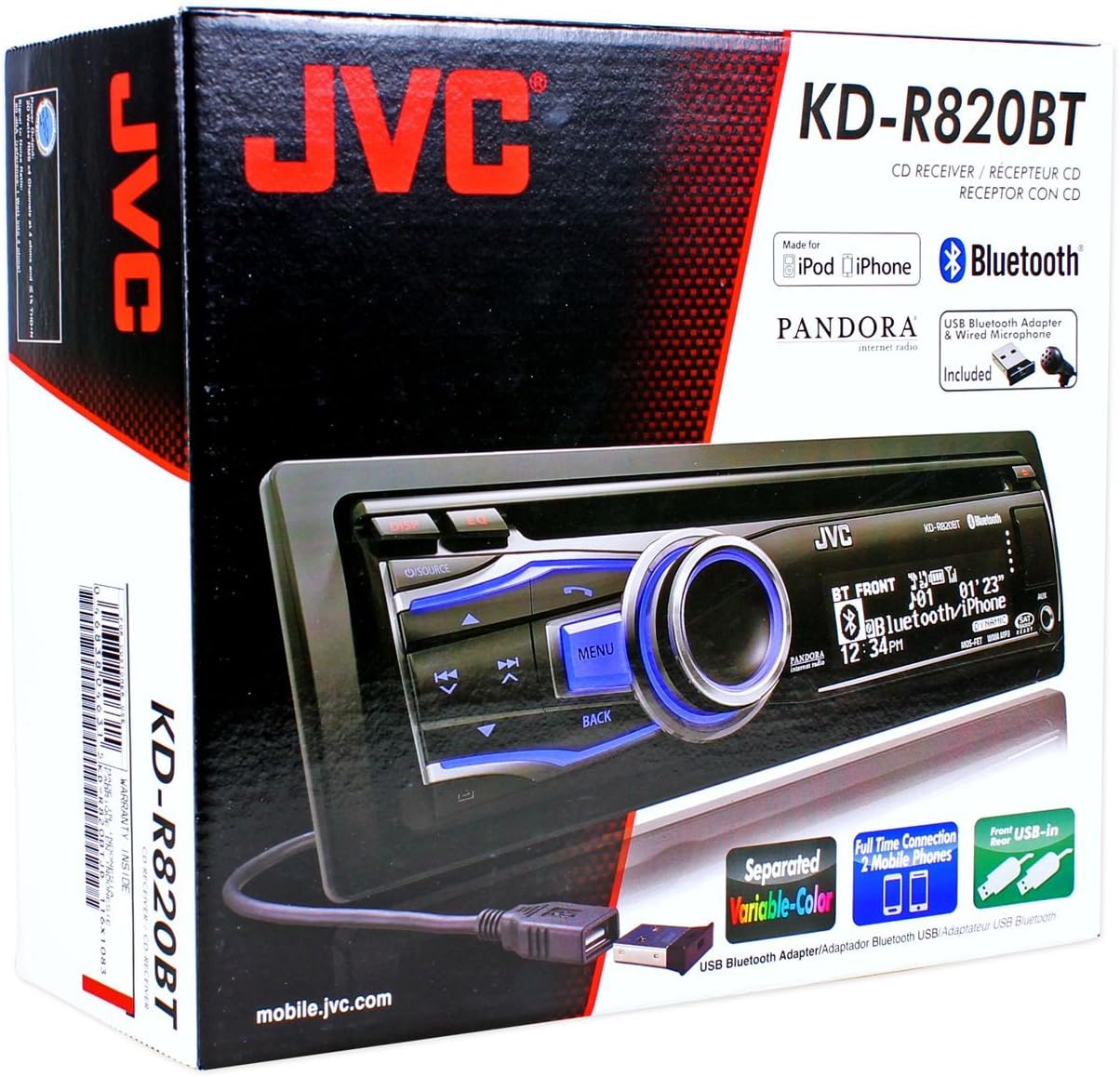
Figure 2.1: JVC KDR820BT Product Packaging. The box illustrates the main unit, remote, USB Bluetooth adapter, and wired microphone.
3. نصب و راه اندازی
Professional installation is recommended. Ensure the vehicle's battery is disconnected before starting installation to prevent electrical damage.
3.1 اتصالات سیم کشی
Connect the wiring harness to the vehicle's electrical system and speakers. Refer to your vehicle's wiring diagram for specific connections.
- سیم زرد: به برق ثابت ۱۲ ولت وصل کنید.
- سیم قرمز: Connect to switched 12V accessory power.
- سیم سیاه: اتصال به زمین شاسی خودرو
- سیم آبی/سفید: به آنتن برق یا ampسرب روشن کن از راه دور فندق.
- سیم بلندگو: به بلندگوهای خودرو وصل شوید (از قطبیت صحیح اطمینان حاصل کنید).
- RCA Pre-out Jacks: برای اتصال خارجی ampتقویتکنندهها (جلو، عقب، ساب ووفر).
- ورودی میکروفون: Connect the supplied wired microphone for hands-free calling.
- پورت های USB: Front USB for general connectivity, Rear USB for additional devices or the Bluetooth adapter.

Figure 3.1: Rear Panel Connections. This image displays the rear of the receiver with its wiring harness, RCA pre-outs, and antenna input.
3.2 نصب کردن واحد
Install the mounting sleeve into the vehicle's dashboard opening. Secure the unit by sliding it into the sleeve until it locks into place. Attach the trim ring.
3.3 Connecting the Bluetooth Adapter
The supplied USB Bluetooth adapter must be connected to one of the USB ports (front or rear) for Bluetooth functionality. For a cleaner installation, the rear USB port is often preferred.
4. راه اندازی اولیه
After installation, reconnect the vehicle battery. The unit will power on. Follow these steps for initial configuration:
- روشن شدن اولیه: را فشار دهید منبع دکمه برای روشن کردن واحد.
- تنظیم ساعت: Access the system menu to set the current time.
- تنظیمات صدا: Adjust basic audio settings such as bass, treble, balance, and fader.
- رنگ نمایشگر: Customize the display and button illumination colors using the variable color settings.
5. دستورالعمل های عملیاتی

شکل ۱: پنل جلویی رویview. This image shows the main controls and display of the JVC KDR820BT.

Figure 5.2: Receiver with Remote Control. The image displays the head unit and the included wireless remote control (RM-RK52).
5.1 کنترل های اساسی
- دکمه روشن/خاموش/منبع: Press to turn on/off or change audio source (FM/AM, CD, USB, Bluetooth Audio, AUX).
- کلید تنظیم صدا: Rotate to adjust volume. Press to mute/pause audio.
- دکمه منو: Access system settings and advanced options.
- دکمه برگشت: Return to the previous menu or display.
- Skip/Seek Buttons: Navigate tracks, radio stations, or menu options.
۴.۴ عملیات رادیویی (AM/FM)
- را فشار دهید منبع to select FM or AM.
- استفاده کنید جستجو کنید buttons to find stations automatically.
- برای تنظیم دستی، دکمه را فشار داده و نگه دارید. جستجو کنید دکمه ها
- To store a preset, tune to the desired station, then press and hold a preset number button (1-6).
5.3 پخش سی دی
- یک سیدی را در شیار دیسک قرار دهید. دستگاه به طور خودکار به منبع سیدی تغییر وضعیت داده و پخش را شروع میکند.
- استفاده کنید پرش کنید دکمه های تغییر آهنگ
- را فشار دهید دستگیره جلد to pause/play.
- را فشار دهید خارج کردن دکمه برای برداشتن سی دی.
5.4 USB Device Playback
- Connect a USB device (flash drive, iPod/iPhone, digital audio player) to either the front or rear USB port.
- را فشار دهید منبع برای انتخاب USB
- استفاده کنید پرش کنید دکمه هایی برای پیمایش آهنگ ها
- را فشار دهید منو button to browse folders and files.
5.5 عملکرد بلوتوث
Ensure the USB Bluetooth adapter is connected to the unit.
۶.۱ جفتسازی دستگاه بلوتوث
- بلوتوث را در دستگاه تلفن همراه خود روشن کنید.
- On the JVC KDR820BT, select the Bluetooth source.
- جستجو برای available devices on your mobile phone. Select "JVC unit" (or similar) from the list.
- Enter the PIN code (usually "0000") if prompted.
- Once paired, the Bluetooth indicator on the receiver will illuminate. The unit supports connecting two phones simultaneously.
۵.۳ تماس بدون دخالت دست
- برقراری تماس: Use your phone's voice dial feature (if supported) or dial directly from your phone. The audio will transfer to the receiver.
- پاسخگویی به تماس: را فشار دهید تلفن button on the receiver when an incoming call is detected.
- پایان دادن به تماس: را فشار دهید تلفن دوباره برای پایان دادن به تماس دکمه بزنید.
- دسترسی به دفترچه تلفن: The unit supports Phone Book Access Profile (PBAP) for transferring contacts.
۴.۳ پخش صوتی بلوتوث
- بلوتوث صوتی را به عنوان منبع انتخاب کنید.
- Play audio from your paired mobile device. The receiver will stream the audio wirelessly.
- استفاده کنید پرش کنید buttons on the receiver to control playback (play/pause, skip track).
- The unit supports Pandora Internet Radio control from an iPhone.
5.6 تنظیمات صدا
- اکولایزر پارامتری سه بانده: Access the sound menu to adjust the equalizer settings for customized audio output.
- ۴ عدد MOS-FET با توان ۵۰ وات Ampزنده تر: Provides powerful audio output.
- TI/Burr-Brown 24-bit DAC: Ensures high-quality digital-to-analog audio conversion.
5.7 تنظیمات نمایش
- Separated Variable Color: Customize the illumination color of the keys and LCD panel from over 30,000 choices. Access this setting through the system menu.
- کنترل روشنایی: Adjust display brightness for day and night viewing.
6. تعمیر و نگهداری
- تمیز کردن واحد: برای پاک کردن پنل جلویی از یک پارچه نرم و خشک استفاده کنید. برای آلودگیهای سرسخت،ampپارچه را با آب بشویید. از پاککنندهها یا حلالهای ساینده خودداری کنید.
- مراقبت از پخش کننده سی دی: Keep the disc slot free of dust and debris. Use only clean, scratch-free CDs.
- برداشتن صفحه صورت: The detachable faceplate can be removed for security. Store it in a protective case.
7 عیب یابی
Review the following common issues and solutions before seeking service.
| مشکل | علت / راه حل احتمالی |
|---|---|
| بدون قدرت | اتصالات سیمکشی برق و اتصال بدنه را بررسی کنید. مطمئن شوید که سوئیچ خودرو روشن است. فیوزهای خودرو را بررسی کنید. |
| صدا نداره | Check speaker wiring. Ensure volume is not muted or too low. Verify the power antenna/remote wire is connected if using an external ampزنده تر |
| Bluetooth echo during calls | Adjust microphone gain settings. Reposition the microphone away from reflective surfaces (e.g., windshield). Reduce the receiver's volume during calls. |
| نمیتوان دستگاه بلوتوث را جفت کرد | Ensure the USB Bluetooth adapter is securely connected. Make sure Bluetooth is enabled on your mobile device and the receiver is in pairing mode. Delete previous pairings from your phone and try again. |
| Unit loses settings after power off | The yellow constant 12V power wire may not be connected correctly or is losing power. This can also occur if the vehicle battery is disconnected. |
| Display text is truncated or difficult to read | The display has limited character space. Some long names may be truncated. There is no option to increase scroll speed for folder/file نام ها |
| Buttons or rotary knob are unresponsive | Ensure the faceplate is securely attached. Clean around the buttons to remove any debris. If the issue persists, it may indicate a hardware malfunction. |
8. مشخصات
| ویژگی | مشخصات |
|---|---|
| شماره مدل | KDR820BT |
| توان خروجی | MOS-FET 50W x 4 (20W RMS x 4) |
| DAC | TI/Burr-Brown 24-bit |
| اکولایزر | 3-Band Parametric iEQ |
| قابلیت اتصال | Bluetooth, Dual USB (Front & Rear), AUX Input |
| ویژگی های بلوتوث | Hands-Free Call, Audio Streaming, Phone Book Access Profile, Text Message Receipt Notification, Connects 2 Phones |
| پخش رسانه | CD, MP3, WMA, WAV |
| نوع نمایشگر | LCD with Separated Variable Color |
| قبلamp جلدtage | 2 ولت |
| اندازه شاسی | Full-DIN |
| ابعاد (W x H x D) | 7.19×2.06×6.25 اینچ (تقریبی) |
| وزن | ۱.۹۷ پوند (تقریبی) |
| خدمات اینترنتی پشتیبانی شده | Pandora Internet Radio |
| روش کنترل | Remote Control, Android (via USB) |
9. گارانتی و پشتیبانی
JVC products are manufactured to high-quality standards. For specific warranty information, please refer to the warranty card included with your product or visit the official JVC webرسید خرید خود را به عنوان مدرک خرید برای درخواستهای گارانتی نگه دارید.
For technical support, service, or inquiries regarding your JVC KDR820BT receiver, please contact JVC customer service or visit their official support channels. Contact information can typically be found on the JVC webسایت یا در بسته بندی محصول