مقدمه
This manual provides detailed instructions for the proper use and maintenance of your Royal DM2070 Electronic Organizer. Please read this manual thoroughly before operating the device to ensure safe and efficient use. Keep this manual for future reference.
اطلاعات ایمنی
- دستگاه را در معرض دمای بسیار بالا، نور مستقیم خورشید یا رطوبت زیاد قرار ندهید.
- از افتادن دستگاه یا قرار دادن آن در معرض ضربه های شدید خودداری کنید.
- خودتان اقدام به جداسازی یا تعمیر دستگاه نکنید. تمام مراحل سرویس را به پرسنل متخصص ارجاع دهید.
- دستگاه را از آب و سایر مایعات دور نگه دارید.
- فقط از نوع باتری مشخص شده برای تعویض استفاده کنید.
محتویات بسته
بررسی کنید که همه اقلام در بسته شما موجود باشد:
- Royal DM2070 Electronic Organizer
- Stylus (if applicable)
- راهنمای شروع سریع
- کارت گارانتی
راه اندازی
1. نصب باتری
The Royal DM2070 requires batteries for operation. Follow these steps to install them:
- پوشش محفظه باتری را در پشت دستگاه پیدا کنید.
- برای باز کردن محفظه، درپوش را بلغزانید یا بلند کنید.
- Insert the required batteries, ensuring correct polarity (+ and -) as indicated inside the compartment.
- درپوش محفظه باتری را به طور ایمن تعویض کنید.
۲. روشن کردن و تنظیمات اولیه
After installing batteries, power on your device and configure basic settings:
- را فشار داده و نگه دارید قدرت را فشار دهید تا صفحه نمایش روشن شود.
- The device may prompt you to set the date and time. Use the navigation buttons or stylus to enter the correct information.
- تنظیمات خود را تأیید کنید تا راهاندازی اولیه تکمیل شود.
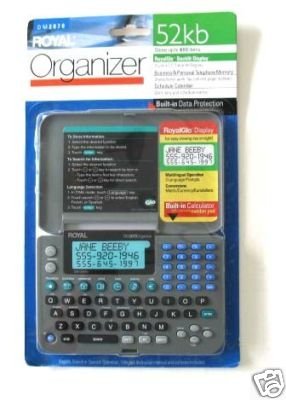
Image: Royal DM2070 Electronic Organizer. This image displays the device's front view, highlighting its screen and keypad, essential for navigation and data entry.
دستورالعمل های عملیاتی
1. ناوبری
The DM2070 features a keypad and potentially a stylus for navigation. Use the arrow keys to move between menu options and press را وارد کنید or a designated selection button to confirm.
2. Entering Data
To enter information such as contacts, appointments, or notes:
- Navigate to the desired application (e.g., 'Contacts', 'Calendar', 'Notes').
- Select 'New Entry' or a similar option.
- Use the alphanumeric keypad to input text. Some models may offer an on-screen keyboard via stylus.
- Save your entry before exiting the application.
۳.۴ استفاده از برنامهها
The DM2070 includes various applications:
- تقویم: View daily, weekly, or monthly schedules. Add and edit appointments.
- مخاطبین: Store names, phone numbers, addresses, and email information.
- یادداشت ها: Create and manage text notes or memos.
- ماشین حساب: محاسبات ریاضی پایه را انجام دهید.
- مبدل ارز: Convert between different currencies (requires manual update of exchange rates on some models).
تعمیر و نگهداری
1. تمیز کردن دستگاه
To keep your DM2070 in optimal condition:
- صفحه را پاک کنید و جasinبا یک پارچه نرم، خشک و بدون پرز.
- برای علائم سرسخت، کمی dampپارچه را با آب بشویید؛ از مواد شیمیایی قوی یا پاککنندههای ساینده خودداری کنید.
- مطمئن شوید که رطوبت وارد منافذ نشود.
2. مراقبت از باتری
- وقتی نشانگر باتری ضعیف ظاهر شد، باتریها را فوراً تعویض کنید.
- اگر قرار است برای مدت طولانی از دستگاه استفاده نشود، باتریها را خارج کنید تا از نشتی جلوگیری شود.
عیب یابی
If you encounter issues with your Royal DM2070, refer to the following common solutions:
| مشکل | علت احتمالی | راه حل |
|---|---|---|
| دستگاه روشن نمی شود. | باتریهای از کار افتاده یا نادرست نصب شدهاند. | با اطمینان از قطبیت صحیح، باتری ها را با باتری های جدید جایگزین کنید. |
| صفحه خالی یا هنگ کرده است. | نقص نرم افزار یا باتری کم. | Try a soft reset (refer to Quick Start Guide for specific button combination) or replace batteries. |
| Data loss. | Battery depletion or improper shutdown. | Ensure batteries are fresh. Always save data before powering off. |
| صفحه کلید پاسخگو نیست. | گرد و غبار/خرده آشغال زیر کلیدها یا مشکل داخلی. | Clean keypad gently. If problem persists, contact support. |
مشخصات
Key technical specifications for the Royal DM2070 Electronic Organizer:
| ویژگی | جزئیات |
|---|---|
| نام تجاری | سلطنتی |
| شماره مدل | DM2070 |
| مواد پوشش | چرم |
| قالب | سازمان دهنده |
| وزن مورد | 181 گرم |
| ابعاد مورد (LxWxH) | 24.4 x 14.5 x 1 سانتی متر |
| مخاطب هدف | بالغ |
گارانتی و پشتیبانی
The Royal DM2070 Electronic Organizer comes with a standard manufacturer's warranty. Please refer to the warranty card included in your package for specific terms and conditions. For technical support, service, or inquiries, please contact Royal customer service through the contact information provided on the warranty card or the official Royal webسایت


