1. مقدمه
This manual provides essential information for the safe and efficient use of your Hama USB 7.1 Surround Sound Card, Model 00051620. Please read these instructions carefully before using the device and keep them for future reference. This external sound card allows you to connect headphones, microphones, or speakers with a 3.5mm jack to your computer or tablet via a USB-A port, enhancing your audio experience with simulated 7.1 surround sound.
2. دستورالعمل های ایمنی
- Do not open the device. Opening the device voids the warranty and may lead to electric shock.
- محصول را از آلودگی، رطوبت و گرمای بیش از حد محافظت کنید.
- از محصول فقط برای هدف مورد نظر خود استفاده کنید.
- محصول را نیندازید و در معرض ضربههای شدید قرار ندهید.
- این محصول را مانند تمام محصولات الکتریکی دور از دسترس کودکان نگهداری کنید.
- مواد بسته بندی را فوراً طبق مقررات محلی دور بیندازید.
3. محتویات بسته
بررسی کنید که بسته شما حاوی موارد زیر باشد:
- 1x Hama USB 7.1 Surround Sound Card (Model 00051620)
- 1x کتابچه راهنمای دستورالعمل
4. محصول تمام شدview
The Hama USB 7.1 Surround Sound Card is a compact audio adapter designed to provide enhanced sound capabilities for your computer or tablet. It features a USB-A connector for easy plug-and-play functionality and includes dedicated ports for audio input and output.
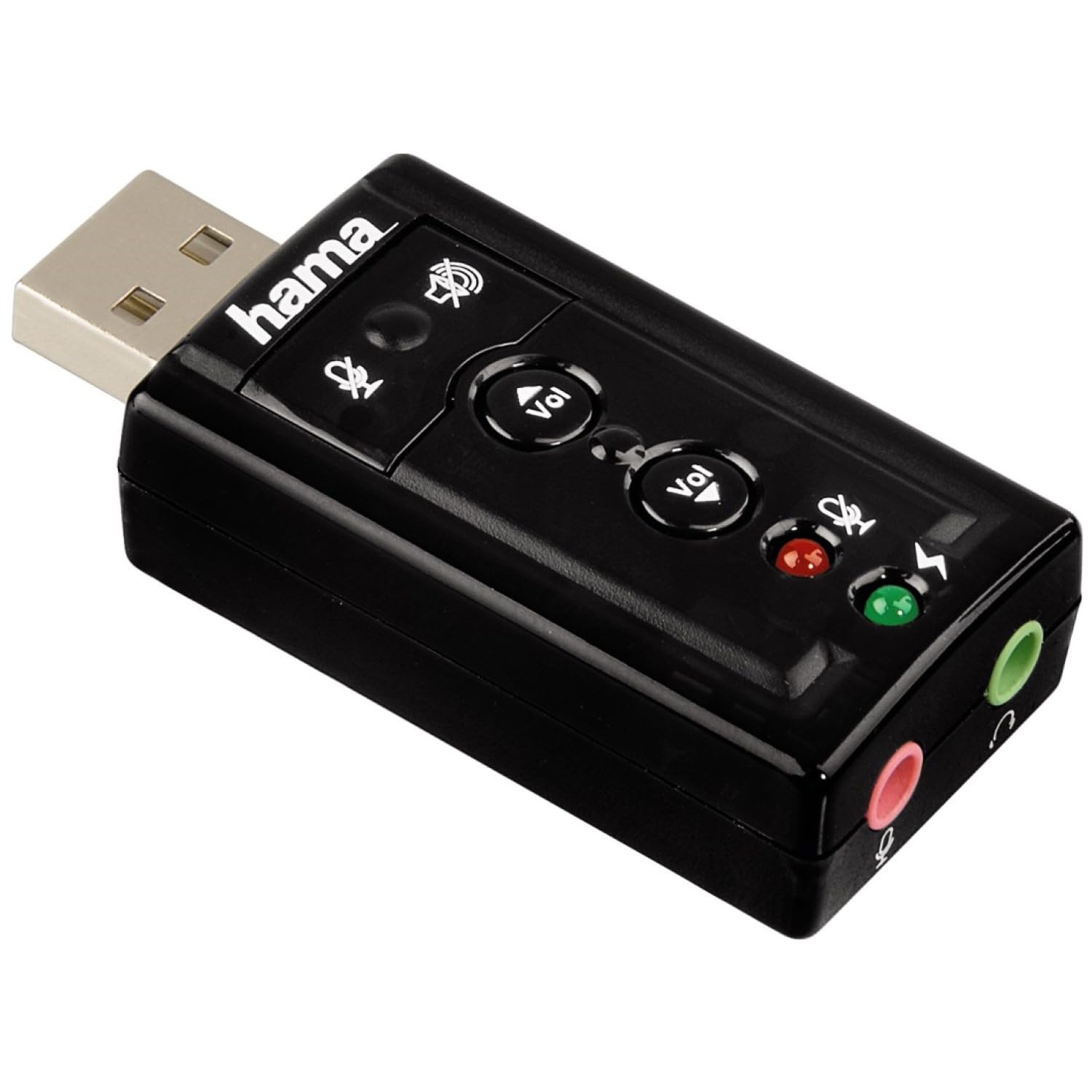
تصویر ۲: بالا view of the Hama USB 7.1 Surround Sound Card, showing the USB-A connector, volume control buttons, and mute indicators.
کنترل ها و پورت ها:
- کانکتور USB-A: For connecting to your computer or tablet.
- دکمه های افزایش / کاهش صدا: میزان صدای خروجی صدا را تنظیم میکند.
- دکمه بیصدا کردن میکروفون: Mutes or unmutes the connected microphone.
- دکمه قطع صدای بلندگو: Mutes or unmutes the audio output to headphones/speakers.
- 3.5mm Microphone Jack (Red): برای اتصال میکروفون خارجی
- 3.5mm Headphone/Speaker Jack (Green): برای اتصال هدفون یا بلندگو.

Image 2: End view of the Hama USB 7.1 Surround Sound Card, highlighting the red microphone input jack and the green headphone/speaker output jack.
5. سیستم مورد نیاز
- Operating System: Windows, macOS, or compatible tablet OS.
- پورت USB-A موجود است.
- Headphones, microphone, or speakers with a 3.5mm jack connector.
6. نصب و راه اندازی
- Connect the Sound Card: Plug the USB-A connector of the Hama USB 7.1 Surround Sound Card into an available USB-A port on your computer or tablet.
- نصب درایور: The device is typically plug-and-play, and your operating system should automatically detect and install the necessary drivers. If prompted, follow the on-screen instructions.
- اتصال دستگاه های صوتی:
- For headphones or speakers, connect the 3.5mm jack into the سبز port on the sound card.
- For a microphone, connect the 3.5mm jack into the قرمز port on the sound card.
- تنظیمات صدا را پیکربندی کنید: Access your operating system's sound settings to ensure the Hama USB 7.1 Surround Sound Card is selected as the default playback and recording device.
- نصب نرم افزار (اختیاری): For advanced features like XeaR-Sound 7.1 surround simulation, 10-band equalizer, and karaoke functions, install the dedicated software. Refer to the manufacturer's website for software downloads and installation instructions.
7. عملیات
Basic Audio Control:
- تنظیم صدا: Use the 'Vol +' and 'Vol -' buttons on the sound card to increase or decrease the output volume.
- Mute Audio Output: Press the speaker mute button to temporarily silence the audio output. Press again to unmute.
- Mute Microphone Input: Press the microphone mute button to temporarily disable microphone input. Press again to enable.
ویژگیهای پیشرفته نرمافزار:
If you have installed the optional software, you can access the following features:
- XeaR-Sound Technology: Enables simulated 7.1 crystal-clear surround sound for stereo speakers or headsets.
- اکولایزر 10 باند: Customize your audio experience with various presets (e.g., Jazz, Rock, Classic) or create your own.
- Additional Sound Effects: Apply various sound effects to your audio.
- Adjustable Room Acoustics: Modify the perceived acoustic environment.
- Karaoke Recording: Record karaoke performances with original voice suppression and tone adjustment capabilities.
8. تعمیر و نگهداری
The Hama USB 7.1 Surround Sound Card requires minimal maintenance.
- دستگاه را فقط با کمی d تمیز کنیدamp، پارچه بدون پرز. از مواد شوینده تهاجمی استفاده نکنید.
- Ensure the USB port and audio jacks are free from dust and debris.
9 عیب یابی
بدون خروجی صدا:
- Ensure the sound card is securely plugged into a USB port.
- Check if your headphones/speakers are correctly connected to the green jack.
- Verify that the speaker mute button on the sound card is not active.
- Confirm that the Hama USB 7.1 Surround Sound Card is selected as the default playback device in your operating system's sound settings.
- Adjust the volume using the sound card's buttons and your computer's volume controls.
میکروفون کار نمی کند:
- Ensure your microphone is correctly connected to the red jack.
- Verify that the microphone mute button on the sound card is not active.
- Confirm that the Hama USB 7.1 Surround Sound Card is selected as the default recording device in your operating system's sound settings.
- تنظیمات حریم خصوصی میکروفون را در سیستم عامل خود بررسی کنید.
مشکلات کیفیت صدا:
- اطمینان حاصل کنید که همه اتصالات امن هستند.
- Try connecting the sound card to a different USB port.
- If using the optional software, check equalizer settings and disable any sound effects that might be causing distortion.
10. مشخصات
| ویژگی | جزئیات |
|---|---|
| نام تجاری | حما |
| شماره مدل | ۱۰۹۱۴ (همچنین با نام ۶۲۸۸۶۴۹ شناخته میشود) |
| رنگ | مشکی |
| رابط | USB A male |
| استاندارد USB | USB 2.0 |
| اتصال بلندگو | 3.5mm female jack |
| اتصال هدفون | 3.5mm female jack |
| کنترل صدا | Yes, with mute function |
| حالت خروجی صدا | احاطه کنید |
| پیکربندی کانال صدای فراگیر | 7.1 (simulated with software) |
| حداکثر Sampنرخ لینگ | 48 کیلوهرتز |
| دستگاه های سازگار | USB (PC, Laptop, Tablets) |
| سازنده | Hama EURL |
11. اطلاعات دفع
Observe the applicable local regulations for the disposal of electronic devices. The product must not be disposed of with normal household waste. Dispose of the product according to the European Directive 2012/19/EU on waste electrical and electronic equipment (WEEE) at a designated collection point for electrical and electronic equipment.
12. گارانتی
Hama GmbH & Co KG provides a limited warranty for this product. For detailed warranty terms and conditions, please refer to the official Hama webبه سایت مراجعه کنید یا با فروشگاه محلی خود تماس بگیرید. مدرک خرید خود را برای موارد گارانتی نگه دارید.
13. پشتیبانی مشتری
If you have any questions about this product or require technical assistance, please contact Hama customer support. You can find contact information on the official Hama webسایت (www.hama.com) or through your local retailer.