1. محصول تمام شدview
The JVC HR-J692U is a 4-head Hi-Fi VCR designed for high-quality video and audio playback and recording. It features advanced capabilities for an enhanced viewتجربه کردن
ویژگی های کلیدی
- 4-Head Hi-Fi Stereo Design: Ensures superior audio and video quality for both playback and recording.
- Super VHS Quasi Playback (SQPB): Allows playback of S-VHS tapes at standard VHS resolution.
- Front AV Inputs: Provides convenient access for connecting external devices such as camcorders or gaming consoles.
- Pro-Cision 19-micron Heads: Delivers clear picture quality, especially in EP (extended-play) mode.
- Express Programming: Simplifies timer recording with a 1-year, 8-event timer.
- کنترل از راه دور تمام عملکرد: Provides complete control over VCR functions.
- Variable Special Effects: Includes variable slow motion, frame advance, and variable speed search.
2. راهنمای راه اندازی
This VCR is designed for easy plug-and-play setup. Follow these steps to connect your unit.
اتصال اولیه
- اتصال برق: Connect the VCR's power cord to a standard electrical outlet.
- Video and Audio Connection: Use RCA cables (yellow for video, white for left audio, red for right audio) to connect the VCR's output jacks to the corresponding input jacks on your television or receiver. Ensure the colors match.
- اتصال آنتن/کابل (اختیاری): If you plan to watch broadcast TV through the VCR, connect your antenna or cable TV line to the VCR's 'Antenna In' jack, then connect the VCR's 'Antenna Out' jack to your TV's 'Antenna In' jack.
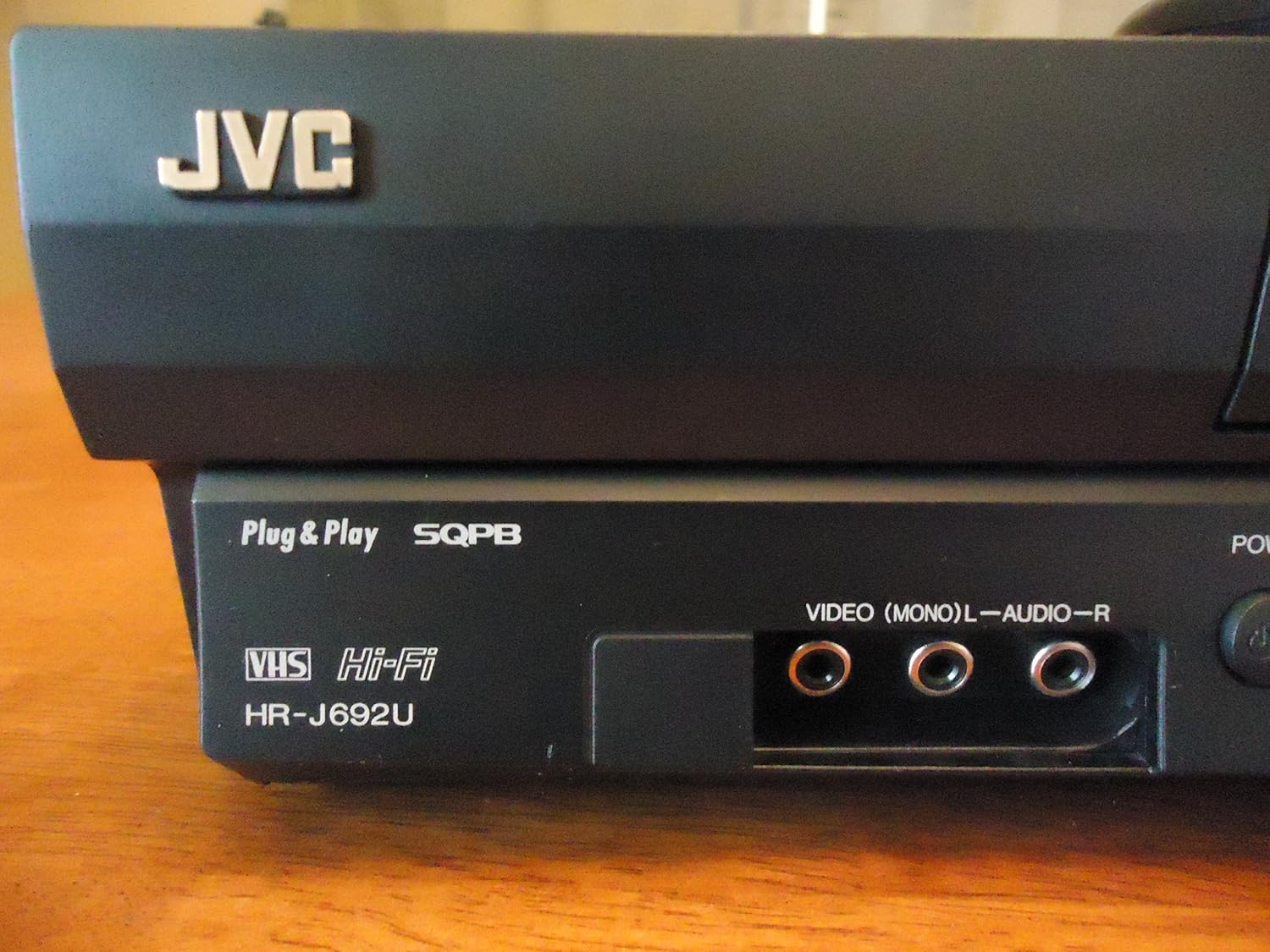
Image: Front panel of the JVC HR-J692U VCR, highlighting the front AV input jacks for easy connection of external devices.
راه اندازی تیونر
The VCR features a PLL frequency-synthesized 181-channel tuner. Use the on-screen menu (accessed via the remote control) to scan for available channels and set the clock.
3. دستورالعمل های عملیاتی
پخش اولیه
- درج نوار: یک کاست VHS را به آرامی در شیار نوار قرار دهید. دستگاه ضبط ویدئو به طور خودکار آن را بارگذاری میکند.
- بازی: را فشار دهید بازی کنید button on the VCR or remote control to begin playback.
- متوقف کردن: را فشار دهید توقف دکمه برای توقف پخش.
- مکث: را فشار دهید مکث button to temporarily freeze the picture. Press again to resume.
- سریع به جلو / عقب: استفاده کنید FF (سریع به جلو) و REW دکمههای (عقب بردن) برای پیمایش در نوار.
- خارج کردن: را فشار دهید بیرون راندن button to remove the tape.
Special Playback Features
- Variable Slow Motion: During playback, use the slow motion controls on the remote to adjust playback speed.
- Frame Advance: Advance the video frame by frame for detailed viewing.
- Variable Speed Search: Quickly scan through content at different speeds.
- Super VHS Quasi Playback (SQPB): The VCR automatically detects and plays S-VHS tapes, converting them to standard VHS resolution for viewing.
در حال ضبط
- ضبط فوری: With a blank tape inserted, press the ضبط دکمه برای شروع ضبط
- Express Programming: Utilize the 1-year/8-event timer for scheduled recordings. Refer to the on-screen menu for detailed programming steps.
Front AV Inputs
The front AV inputs (Video, L-Audio, R-Audio) allow for easy temporary connection of devices like camcorders, video game consoles, or another VCR for dubbing.
کنترل از راه دور
The included full-function remote control provides access to all VCR features, including playback controls, channel selection, timer programming, and menu navigation.

Image: The JVC VCR/TV remote control, illustrating the layout of buttons for comprehensive control.
4. تعمیر و نگهداری
Regular maintenance helps ensure the longevity and optimal performance of your VCR.
- تمیز کردن فضای بیرونی: Wipe the exterior of the VCR with a soft, dry cloth. Avoid using liquid cleaners or abrasive materials.
- تهویه: Ensure the ventilation slots on the VCR are not blocked to prevent overheating.
- مراقبت از نوار چسب: Store VHS tapes in their cases away from direct sunlight, dust, and magnetic fields. Avoid using damaged or moldy tapes, as they can harm the VCR's internal mechanisms.
5 عیب یابی
If you encounter issues with your JVC HR-J692U VCR, refer to the following common troubleshooting tips:
- بدون برق: Check if the power cord is securely plugged into both the VCR and the electrical outlet.
- تصویر/صدا ندارد: Verify that the AV cables are correctly connected to the VCR's output and the TV's input. Ensure your TV is set to the correct input source (e.g., AV1, Video 1).
- Tape Not Playing/Ejecting: Ensure the tape is inserted correctly. If the tape is stuck, try pressing the EJECT button multiple times. Do not force the tape.
- کیفیت تصویر پایین: Check the tape for damage. Ensure the VCR heads are clean (professional cleaning may be required if issues persist). Adjust tracking if necessary using the remote control.
- کنترل از راه دور کار نمی کند: Replace the batteries in the remote control. Ensure there are no obstructions between the remote and the VCR's sensor.
برای مشکلات مداوم، با یک تکنسین خدمات واجد شرایط مشورت کنید.
6. مشخصات
| ویژگی | جزئیات |
|---|---|
| نام تجاری | JVC |
| شماره مدل | HRJ692U |
| وزن مورد | 8 پوند |
| ابعاد محصول | 6.9 x 21.2 x 13.7 اینچ |
| سرها | های-فای چهار سر |
| سازگاری با پخش | VHS, Super VHS Quasi Playback (SQPB) |
| تیونر | PLL Frequency-Synthesized 181-Channel |
| ضبط تایمر | 1-Year/8-Event Express Programming |
| ورودی/خروجی | Front AV Inputs |
| کنترل از راه دور | Full-Function Remote Included |
| باتری های مورد نیاز | 1 CR5 battery (for remote) |
7. گارانتی و پشتیبانی
For information regarding warranty coverage and customer support for your JVC HR-J692U VCR, please refer to the documentation included with your purchase or contact JVC customer service directly.
سلب مسئولیت قانونی
هشدار به مصرفکننده: این گیرنده تلویزیون فقط یک تیونر پخش آنالوگ دارد و به دلیل گذار ایالات متحده به پخش دیجیتال، پس از ۱۷ فوریه ۲۰۰۹ برای دریافت پخشهای هوایی با آنتن به یک دستگاه مبدل نیاز خواهد داشت. تلویزیونهای فقط آنالوگ باید مانند قبل با سرویسهای تلویزیون کابلی و ماهوارهای، کنسولهای بازی، دستگاههای ضبط ویدئو، پخشکنندههای دیویدی و محصولات مشابه کار کنند. برای اطلاعات بیشتر، با کمیسیون ارتباطات فدرال با شماره ۱-۸۸۸-۲۲۵-۵۳۲۲ (TTY: ۱-۸۸۸-۸۳۵-۵۳۲۲) تماس بگیرید یا از وبسایت تلویزیون دیجیتال کمیسیون دیدن کنید. Web سایت در: www.dtv.gov.


