Sarrera
Welcome to the user manual for your TCL FLIP 4 5G (T440W) flip phone. This guide provides essential information to help you get started, understand your device's features, and troubleshoot common issues. Please read this manual thoroughly to ensure proper use and optimal performance of your phone.
Kutxan dagoena
Your TCL FLIP 4 5G package includes the following items:
- Telefonoa
- Bateria
- Kargagailua
Produktua amaituview
The TCL FLIP 4 5G is designed for straightforward communication with modern conveniences. It features a classic flip design with dual displays and large, tactile buttons for ease of use.
Ezaugarri nagusiak:
- Pantaila bikoitza: A 1.77-inch external display for notifications and a 3.2-inch internal display with adjustable text size, colors, and brightness.
- Easy Navigation Keyboard: Large tactile keypad with intuitive shortcut keys for quick access to contacts and messages.
- 5G konektibitatea: Reliable 5G network support for fast communication.
- 5MP kamera: Capture photos and videos of important moments.
- HD ahotsa: Ensures clear call quality.
- Iraupen luzeko bateria: Designed to keep you connected for extended periods.
- Sistema eragilea: Powered by KaiOS.
Gailuaren diseinua:
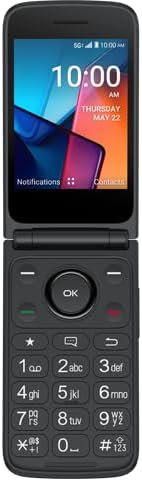
1. irudia: Aurrealdea view of the TCL FLIP 4 5G phone when open, displaying the internal screen and the physical keypad.
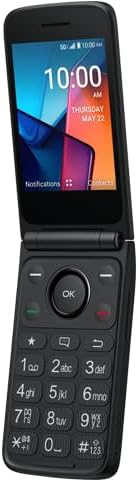
2. irudia: Angelukoa view of the TCL FLIP 4 5G phone in its open position, highlighting the screen and keypad layout.
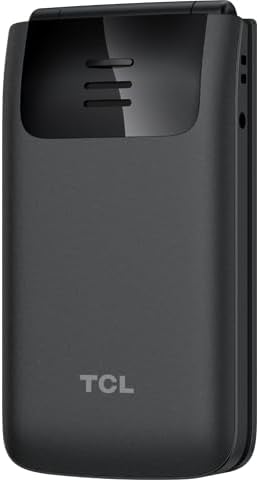
3. irudia: Atzekoa view of the TCL FLIP 4 5G phone when closed, showing the external display, camera, and TCL branding.
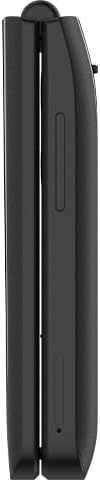
4. irudia: Aldea view of the closed TCL FLIP 4 5G phone, illustrating the device's slim profile eta alboko botoiak.
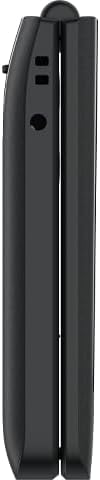
5. irudia: Alde kontrakoa view of the closed TCL FLIP 4 5G phone, showing additional ports or buttons.
Konfigurazioa
1. Installing the Battery and SIM Card:
- Kendu telefonoaren atzeko estalkia astiro-astiro.
- Insert your SIM card(s) into the designated slot(s). Ensure the gold contacts face downwards and the notched corner is correctly aligned.
- Insert the battery into its compartment, aligning the gold contacts on the battery with those in the phone.
- Jarri atzeko estalkia berriro, ondo sakatuz klik egin arte.
2. Telefonoa kargatzea:
- Connect the charger to your phone's charging port.
- Entxufatu kargagailua korronte-hartune batera.
- Allow the phone to charge completely before initial use. The battery indicator on the screen will show charging status.
Zure telefonoa funtzionatzea
1. Piztu/Itzali:
- Pizteko, sakatu eta eutsi pizteko/deia amaitzeko botoia pantaila piztu arte.
- To power off, press and hold the Power/End Call button, then select "Power off" from the options.
2. Deiak egitea:
- Open the phone to access the keypad.
- Markatu nahi duzun telefono zenbakia zenbakizko teklatua erabiliz.
- Press the Green Call button to initiate the call.
- To end a call, press the Red End Call button or close the phone.
3. Sending Messages:
- From the main menu, navigate to "Messages".
- Hautatu "Mezu berria" edo "Mezua sortu".
- Sartu hartzailearen telefono zenbakia edo aukeratu zure kontaktuetatik.
- Idatzi zure mezua teklatua erabiliz.
- Press the "Send" option to transmit the message.
4. Kamera erabiltzea:
- Sartu kameraren aplikaziora menu nagusitik.
- Markatu zure argazkia barneko pantaila erabiliz.
- Press the "OK" button or a designated camera button to capture a photo or start/stop video recording.
- Photos and videos are saved to the phone's gallery.
5. Internet and Applications (KaiOS):
- Your phone runs on KaiOS, providing access to essential applications.
- Navigate through the menu to find apps like Web Browser, Weather, News, and more.
- Use the directional keys and "OK" button to interact with applications.
Mantentzea
- Keep your phone dry. Liquids can damage the device.
- Erabili onartutako kargagailuak eta osagarriak soilik.
- Saihestu muturreko tenperaturak.
- Clean the screen and keypad with a soft, dry cloth.
- Do not attempt to disassemble or repair the phone yourself. Refer to authorized service centers.
Arazoak konpontzea
| Arazoa | Irtenbidea |
|---|---|
| Telefonoa ez da pizten. | Ziurtatu bateria behar bezala instalatuta eta kargatuta dagoela. Konektatu kargagailua eta saiatu berriro. |
| Ezin dira deiak egin edo jaso. | Check if the SIM card is properly inserted and activated. Verify network signal strength. Contact your service provider if issues persist. |
| Deiaren kalitate eskasa. | Move to an area with better network coverage. Ensure the earpiece/microphone is not obstructed. |
| Bateria azkar agortzen da. | Reduce screen brightness, close unused applications, and limit background data usage. |
Zehaztapenak
| Ereduaren izena | TCL Flip 4 5G |
| Elementuaren eredu-zenbakia | T440W |
| Marka | TCL |
| Sistema eragilea | KaiOS |
| Pantailaren tamaina (barnekoa) | 3.2 hazbete |
| Kanpoko pantailaren tamaina | 1.77 hazbete |
| Ebazpena | 480 x 320 |
| Memoria Biltegiratzeko Ahalmena | 32 GB |
| Teknologia Zelularra | 5G |
| Haririk gabeko garraiolaria | T-Mobile |
| Bateria Edukiera | 3000 milioiamp Orduak |
| Elementuaren pisua | 6.4 ontza |
| Kolorea | Grisa |
| Fabrikatzailea | TCL |
Bermea eta Laguntza
For warranty information and customer support, please refer to the documentation provided with your purchase or visit the official TCL support webgunea. Gorde erosketaren egiaztagiria bermearen erreklamazioetarako.


