1. Sarrera
Eskerrik asko erosketagatik.asing the Sofirn SC13 Flashlight and H35R Dual Color Headlamp bundle. This manual provides detailed instructions for the safe and efficient use, setup, operation, and maintenance of your new lighting devices. Please read this manual thoroughly before use and retain it for future reference.
The H35R headlamp is designed for versatility, offering powerful white light and a specialized 660nm deep red light, suitable for various outdoor and indoor activities. The SC13 flashlight provides a compact and reliable illumination source.

Image 1.1: The Sofirn SC13 Flashlight and H35R Headlamp bundle, including the headlamp, a compact flashlight, and two USB-C charging cables.
2. Segurtasun-argibideak
- Begietako segurtasuna: Do not shine the light directly into eyes. The powerful beam can cause temporary vision impairment or permanent eye damage.
- Haurrak: Ez utzi haurren eskura. Produktu hau ez da jostailu bat.
- Beroa: Buruaamp and flashlight may become hot during prolonged use at high output levels. Avoid direct contact with hot surfaces to prevent burns.
- Bateriaren segurtasuna: Use only recommended batteries. Do not disassemble, puncture, or short-circuit the battery. Dispose of batteries properly.
- Kargatzen: Use the provided USB-C cable for charging. Do not attempt to charge with damaged cables or chargers.
- Desmihiztatu: Ez saiatu burua desmuntatzen edo aldatzenamp or flashlight, as this may void the warranty and pose safety risks.
3. Paketearen edukia
Mesedez, egiaztatu paketea elementu hauek dituen:
- Sofirn H35R Dual Color Headlamp
- Sofirn SC13 Flashlight
- Adjustable Headband for H35R
- USB-A to USB-C Charging Cable (for H35R)
- USB-A to USB-C Charging Cable (for SC13)
- Erabiltzailearen eskuliburua

Image 3.1: The complete bundle showing the H35R headlamp, SC13 flashlight, and two USB-C charging cables. The headlamp is also shown with both white and red light activated.
4. Produktua amaitu daview
4.1 Sofirn H35R Headlamp Ezaugarriak
- Kolore bikoitzeko irteera: White light (up to 1500 Lumens) and 660nm Deep Red Light.
- Beam Distantzia: Up to 112 meters for white light.
- Uraren erresistentzia: IPX6 iragazgaitzaren kalifikazioa.
- Iraunkortasuna: Impact resistant.
- Angelu erregulagarria: 180-degree adjustable headlamp gorputza.
- Kargatzen: Built-in USB-C rechargeable port with power indicator.
- Arinak: Weighs approximately 80g (2.82oz).

Image 4.1: The H35R headlamp highlighting its lightweight design (2.82oz) and the ability to adjust the light angle by 180 degrees for optimal illumination.
4.2 Sofirn SC13 Flashlight Features
- Diseinu trinkoa eta eramangarria.
- Reliable illumination for everyday carry.
- USB-C kargagarria.
5. Konfigurazioa
5.1 Hasierako karga
Before first use, fully charge both the H35R headlamp and the SC13 flashlight.
- Locate the hidden USB-C charging port on each device. For the H35R, this is typically under a rubber flap.
- Connect the provided USB-C charging cable to the device and plug the USB-A end into a standard USB power adapter (not included) or a computer USB port.
- The power indicator light will show gorria kargatzean.
- Guztiz kargatuta dagoenean, adierazle-argia piztuko da berdea.
- Disconnect the charging cable and ensure the rubber flap (if present) is securely closed to maintain water resistance.

5.1 irudia: Gertuko planoa view of the H35R headlamp's built-in USB-C charging port. The image illustrates the charging indicator: red for charging and green for a full charge.
5.2 Headband Adjustment (H35R)
The H35R headlamp comes with a high-elastic adjustable strap for comfortable wear.
- Jarri buruaamp zure buruaren gainean.
- Adjust the buckle on the strap to achieve a snug yet comfortable fit. The strap is designed to fit head sizes from 12.6 to 35.4 inches.

Image 5.2: The adjustable strap of the H35R headlamp, demonstrating how to use the buckle to customize the fit for various head sizes.
6. Funtzionamendu-argibideak
6.1 H35R Headlamp Funtzionamendua
The H35R headlamp features a single button for all operations.
- Turn On White Light: Egin klik behin botoian.
- Turn On Red Light: Long press the button from OFF.
- Cycle White Light Modes: When the white light is ON, long press the button to cycle through Moonlight → Low → Medium → High → Turbo. Release the button at the desired mode.
- Cycle Red Light Modes: When the red light is ON, long press the button to cycle through its available modes (e.g., Moonlight Red → Low Red → Medium Red → High Red → Turbo Red). Release the button at the desired mode.
- Itzali: Click the button once from any ON state.
- Switch Between White/Red: From ON, double-click the button to switch between white and red light modes.
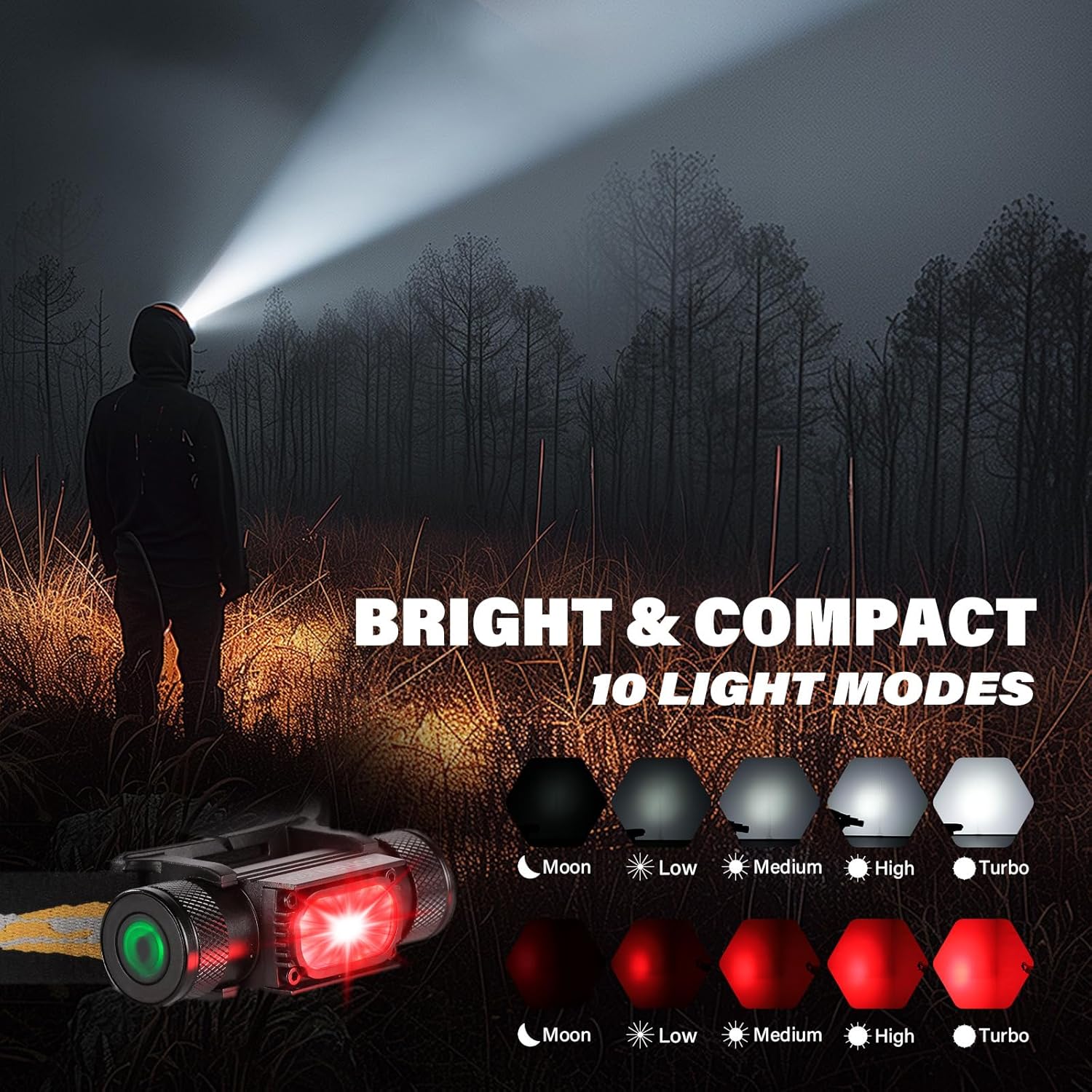
Image 6.1: The H35R headlamp demonstrating its various white light modes (Moon, Low, Medium, High, Turbo) and red light modes (Moon, Low, Medium, High, Turbo). The headlamp is shown emitting a bright white beam.

Image 6.2: A person standing on a path in a forest, illuminated by the 660nm deep red light from the H35R headlamp, demonstrating its night vision-friendly properties.
6.2 SC13 Flashlight Operation
Specific operating instructions for the SC13 flashlight are typically similar to other Sofirn compact flashlights. Generally:
- Piztu/Desaktibatu: Single click the tail switch or side switch (depending on model variant).
- Aldatu moduak: With the light ON, long press the switch to cycle through brightness levels.
- Modu bereziak: Double-click for Turbo, triple-click for Strobe/SOS (may vary).
7. Mantentzea
- Garbiketa: Clean the body of the headlamp and flashlight with a soft, damp oihal. Ez erabili garbitzaile edo disolbatzaile urratzailerik.
- Hariak: Periodically lubricate the threads of the battery cap (if removable) with silicone grease to ensure smooth operation and maintain water resistance.
- O-eraztunak: Check O-rings for wear and tear. Replace if damaged to maintain water resistance.
- Kargatzeko ataka: Keep the USB-C charging port clean and free of debris. Ensure the rubber cover is properly sealed when not charging.
- Biltegiratzea: Store the devices in a cool, dry place when not in use for extended periods. Recharge every 3-6 months to maintain battery health.

Image 7.1: The H35R headlamp shown in a wet environment, highlighting its IPX6 waterproof rating and impact resistance, ensuring durability in challenging conditions.
8. Arazoak
| Arazoa | Kausa posiblea | Irtenbidea |
|---|---|---|
| Argia ez da pizten | Low battery; Lockout mode activated; Loose connections (if applicable) | Charge the battery; Deactivate lockout mode (refer to specific model instructions); Ensure battery cap is tightened. |
| Argia keinuka edo ustekabean itzaltzen da | Low battery; Poor contact; Overheating protection | Charge the battery; Clean contacts; Reduce brightness level to allow cooling. |
| Ezin da kargatu | Faulty cable/charger; Charging port obstructed; Device malfunction | Try a different USB-C cable and charger; Clean the charging port; Contact customer support. |
| Red light not working (H35R) | Incorrect operation; Device malfunction | Ensure you are long-pressing from OFF or double-clicking from white light mode to activate red light. |
9. Zehaztapenak
9.1 Sofirn H35R Headlamp
| Ezaugarri | Zehaztapena |
|---|---|
| Energia iturria | Battery Powered (Internal Rechargeable) |
| Argi iturri mota | LED (zuria eta gorria) |
| Distira zuria | 1500 Lumenseraino |
| Argi Gorriaren uhin-luzera | 660nm Deep Red |
| Uraren Erresistentzia Maila | IPX6 Iragazgaitza |
| Pisua | Gutxi gorabehera. 80g (2.82 oz) |
| Kargatzeko ataka | USB-C |
9.2 Sofirn SC13 Flashlight
| Ezaugarri | Zehaztapena |
|---|---|
| Energia iturria | Battery Powered (Internal Rechargeable) |
| Argi iturri mota | LED |
| Kargatzeko ataka | USB-C |
| Pisua | Approx. 2.82oz (as per image, likely for SC13) |
10. Bermea eta Laguntza
Sofirn products are manufactured to high-quality standards. For specific warranty information, please refer to the warranty card included with your product or visit the official Sofirn website. If you encounter any issues or have questions regarding your SC13 Flashlight or H35R Headlamp, please contact Sofirn customer support for assistance.
Sofirn Customer Support: Please refer to the contact information provided on the product packaging or the official Sofirn webgunea.


