Sarrera
Welcome to your RCA Wave-68 True Wireless Earbuds. This manual provides detailed instructions on how to set up, operate, maintain, and troubleshoot your earbuds to ensure optimal performance and a seamless audio experience. Please read this manual thoroughly before using your device.
Paketearen edukia
- RCA Wave-68 Haririk gabeko Aurikularrak (Ezkerrekoa eta Eskuinekoa)
- Kargatzeko kaxa
- USB kargatzeko kablea
- Erabiltzailearen eskuliburua
Produktua amaituview
Ezagutu zure RCA Wave-68 entzungailuen eta kargatzeko zorroaren osagaiak.

Irudia: The RCA Wave-68 earbuds are shown inside their open charging case. The case features a digital display indicating the battery levels of both the case and individual earbuds.
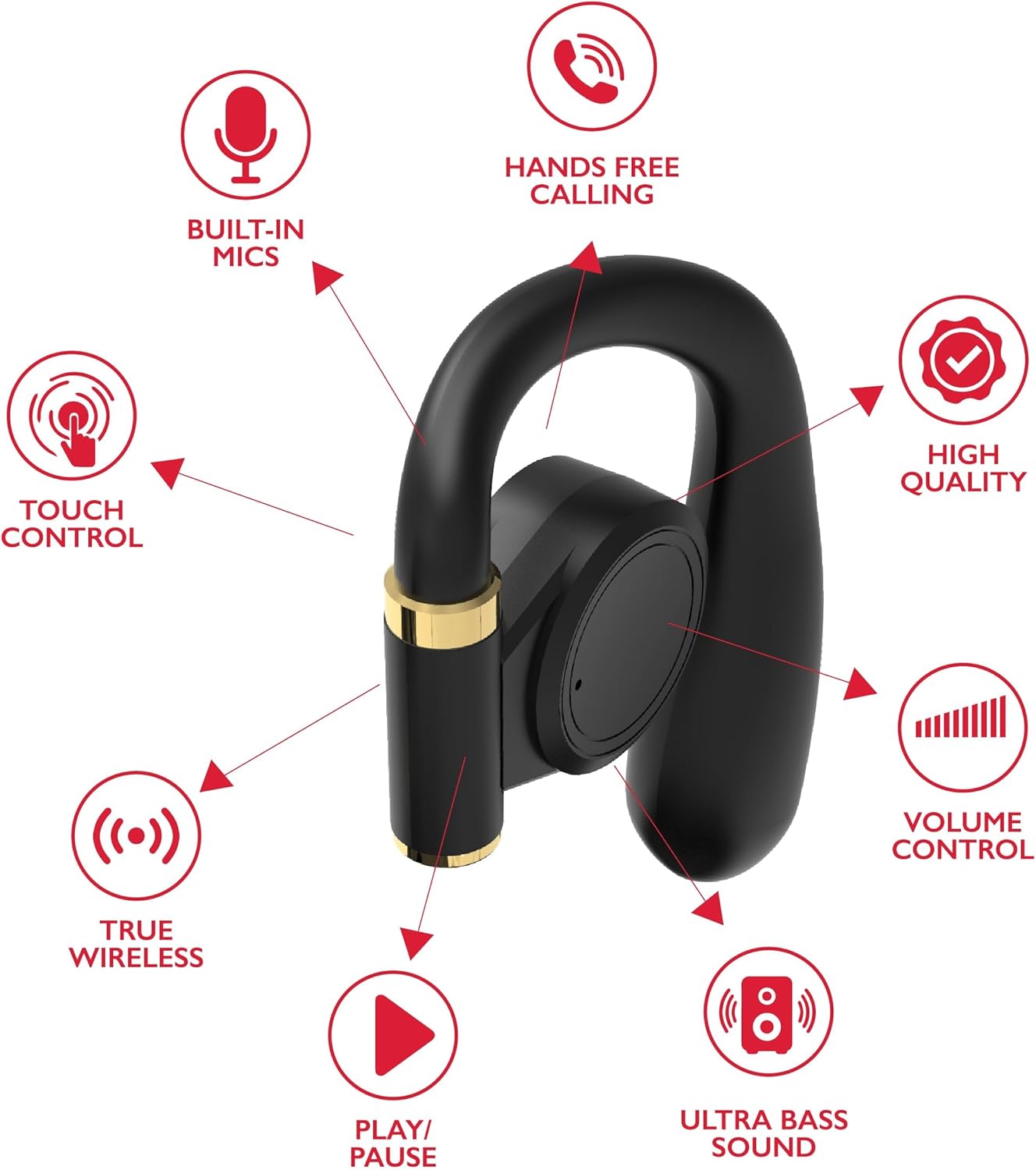
Irudia: A diagram highlights key features of a single RCA Wave-68 earbud, including built-in mics, hands-free calling, touch control, true wireless connectivity, play/pause function, ultra bass sound, volume control, and high-quality audio.
Konfigurazioa
1. Entzungailuak eta zorroa kargatzea
Before first use, fully charge the earbuds and charging case. Place the earbuds into the charging case. Connect the USB charging cable to the charging port on the case and to a power source. The digital display on the case will show the charging status. A full charge provides approximately 20 hours of total playtime with the charging case.
2. Bluetooth parekatzea
- Piztu: Open the charging case. The earbuds will automatically power on and enter pairing mode. You may see a blinking light indicator on the earbuds.
- Aktibatu Bluetootha: Zure gailuan (smartphone-an, tabletan, etab.), gaitu Bluetooth-a.
- Hautatu gailua: Bilatu "RCA Wave-68" in the list of available Bluetooth devices and select it to connect.
- Berrespena: Once connected, the earbuds will indicate successful pairing, and the light indicator may stop blinking or turn off.
If pairing fails, ensure the earbuds are charged and within range of your device. Turn off Bluetooth on other nearby devices to avoid interference.
Funtzionamendu-argibideak
Piztu/Itzali
- Piztu: Ireki kargatzeko zorroa, eta entzungailuak automatikoki piztuko dira. Bestela, sakatu eta eutsi bi entzungailuetako ukipen-kontrol eremua 3 segundoz.
- Itzali: Place the earbuds back into the charging case and close the lid. They will automatically power off. Alternatively, press and hold the touch control area on both earbuds for 5 seconds.
Ukitu Kontrolak
The RCA Wave-68 earbuds feature intuitive touch controls for managing audio playback, calls, and voice assistant functions.
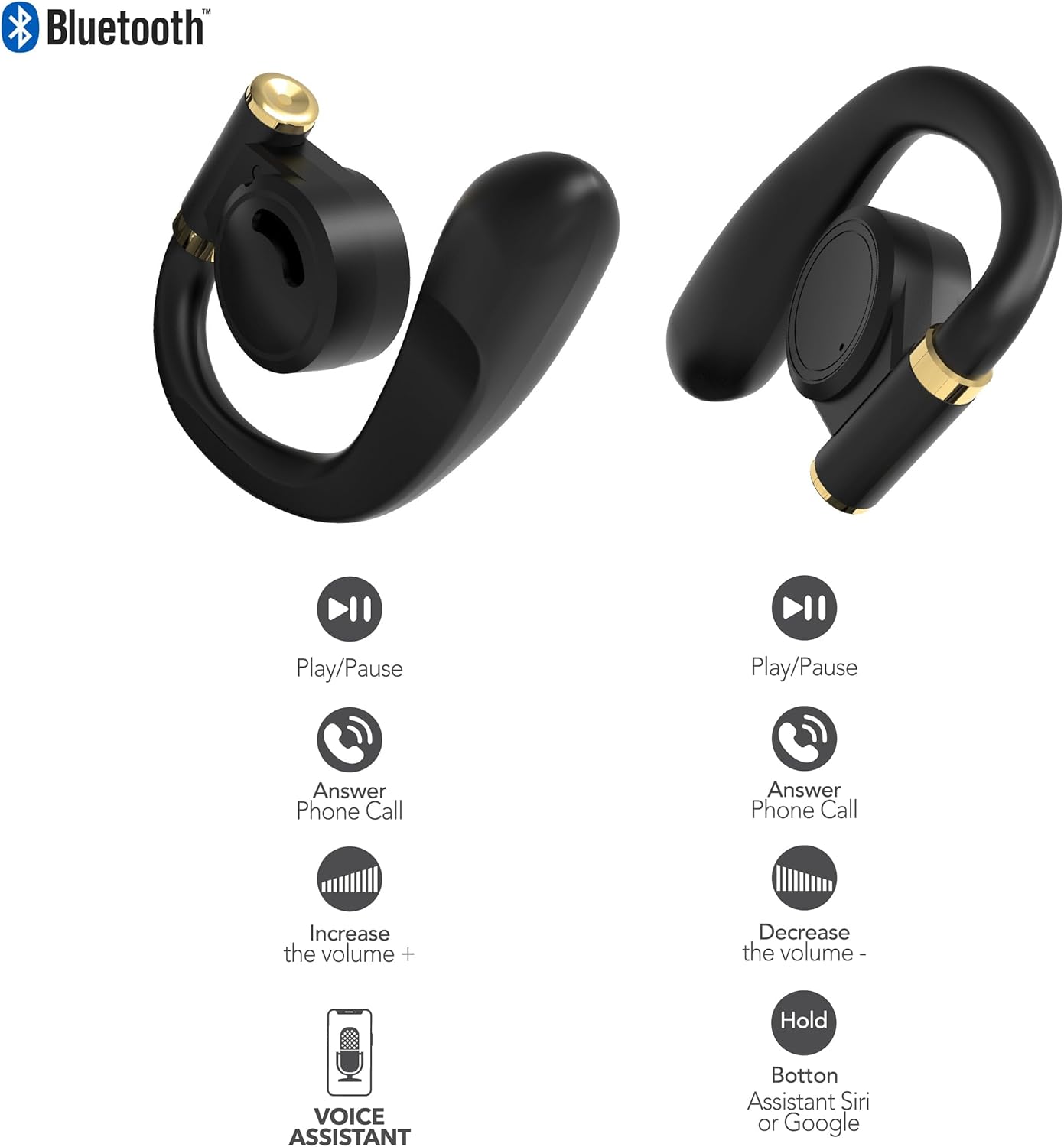
Irudia: This diagram illustrates the touch control functions for both the left and right RCA Wave-68 earbuds, including play/pause, answer phone call, volume increase/decrease, and activating the voice assistant.
- Erreproduzitu/Pausatu: Sakatu bakar batean entzungailu batean.
- Hurrengo ibilbidea: Sakatu birritan eskuineko aurikularra.
- Aurreko pista: Sakatu birritan ezkerreko aurikularra.
- Bolumena igo: Sakatu hiru aldiz eskuineko aurikularra.
- Bolumena jaitsi: Sakatu hiru aldiz ezkerreko aurikularra.
- Deia erantzun/amaitu: Sakatu behin entzungailuetako edozeinetan sarrerako dei batean edo dei aktibo batean zehar.
- Deia baztertu: Sakatu eta eutsi entzungailuetako bat 2 segundoz dei bat jasotzen ari zaren bitartean.
- Aktibatu ahots-laguntzailea (Siri/Google Assistant): Eduki sakatuta aurikularretako bat 3 segundoz.
Gardentasun modua
The Transparency Mode allows you to hear your surroundings while still enjoying your audio. This feature is useful for awareness in environments like busy streets or public transport.
- Gardentasun modua aktibatu/desaktibatu: Consult your device's Bluetooth settings or specific app if available, or refer to the product's quick start guide for a specific touch control gesture if not listed above.
Mantentzea
Garbiketa
Garbiketa erregularrak soinuaren kalitatea eta higienea mantentzen laguntzen du.
- Erabili zapi leun, lehor eta lihorik gabeko bat entzungailuak eta kargatzeko zorroa garbitzeko.
- Ez erabili garbitzaile urratzailerik, alkoholik edo disolbatzaile kimikorik.
- Gently remove any earwax or debris from the earbud tips and speaker mesh using a small, clean brush or cotton swab.
Biltegiratzea
Erabiltzen ez dituzunean, gorde entzungailuak kargatzeko zorroan hautsetik eta kalteetatik babesteko.
- Gorde leku fresko eta lehor batean, muturreko tenperaturetatik urrun.
- Saihestu eguzki-argiaren edo hezetasunaren eraginpean denbora luzez egotea.
Arazoak konpontzea
RCA Wave-68 entzungailuekin arazoak badituzu, jo ezazu honako ohiko irtenbide hauetara:
- Earbuds not powering on automatically: Ensure the charging case is charged. Place earbuds back in the case, close the lid, then open it again. If issues persist, manually power on by pressing and holding the touch control area for 3 seconds.
- Entzungailuak ez dira parekatzen: Make sure both earbuds are fully charged. Turn off Bluetooth on your device, then turn it back on. Forget "RCA Wave-68" from your device's Bluetooth list and attempt to pair again. Ensure no other devices are actively connected to the earbuds.
- Ez dago soinurik entzungailu batetik: Place both earbuds back into the charging case, close the lid, and then take them out again. This often re-syncs them. Check your device's audio balance settings.
- Charging case not displaying battery info/not charging: Ensure the USB cable is securely connected to both the case and the power source. Try a different USB cable or power adapter. Clean the charging port on the case for any debris.
- Bolumen baxua edo soinu-kalitate eskasa: Adjust the volume on both your device and the earbuds. Ensure the earbuds are properly seated in your ears for a good seal. Clean any debris from the earbud speaker mesh.
- Entzungailuak erortzen: Ensure you are using the correct ear tip size for a secure and comfortable fit.
Zehaztapenak
| Ezaugarri | Xehetasuna |
|---|---|
| Ereduaren izena | 68. uhin |
| Marka | RCA |
| Konektibitate Teknologia | Haririk gabeko (Bluetooth) |
| Bluetooth bertsioa | 5.3 |
| Bateriaren iraupena | Gehienez 20 ordu (kargatzeko zorroarekin) |
| Kontrol-metodoa | Ukitu |
| Belarrien Kokatzea | Belarrian |
| Forma-faktorea | Belarrian |
| Materiala | Plastikoa, Silikona |
| Ezaugarri bereziak | Built-In Voice Assistant, Transparency Mode |
| UPC | 850068964468 |
Segurtasun Informazioa
- Ez desmuntatu edo aldatu entzungailuak edo kargatzeko zorroa.
- Saihestu gailua muturreko tenperaturen, hezetasunaren edo likidoen eraginpean jartzea.
- Ez erabili entzungailuak bolumen altuan denbora luzez entzumen-kalteak saihesteko.
- Mantendu haurren eta maskoten eskura.
- Bota ezazu gailua arduraz tokiko araudiaren arabera.
Bermea eta Laguntza
RCA products are designed for reliability and performance. For warranty information or technical support, please refer to the warranty card included in your package or visit the official RCA support webgunea. Gorde erosketaren egiaztagiria bermearen erreklamazioetarako.


