Segurtasun informazio garrantzitsua
Please read all instructions carefully before using the Lexibook Paw Patrol Karaoke CD Player. Keep this manual for future reference.
- Ez jarri unitatea euri edo hezetasunera.
- Ez blokeatu aireztapen-zulorik.
- Erabili fabrikatzaileak zehaztutako eranskinak/osagarriak soilik.
- Disconnect the apparatus during lightning storms or when unused for long periods.
- Ensure proper battery installation and disposal.
Paketearen edukia
Egiaztatu elementu guztiak paketean daudela:
- Lexibook Paw Patrol Karaoke CD Player
- 2 Mikrofonoak
- Elikatze-moldagailua
- Argibide eskuliburua
Produktua amaituview
The Lexibook Paw Patrol Karaoke CD Player is designed for children to enjoy music and sing along with their favorite characters. It features a front-load CD player, two microphones, an LED display, and a headphone jack for private listening.

1. irudia: The Lexibook Paw Patrol Karaoke CD Player, featuring a blue and red design with Paw Patrol characters, and two attached red microphones.
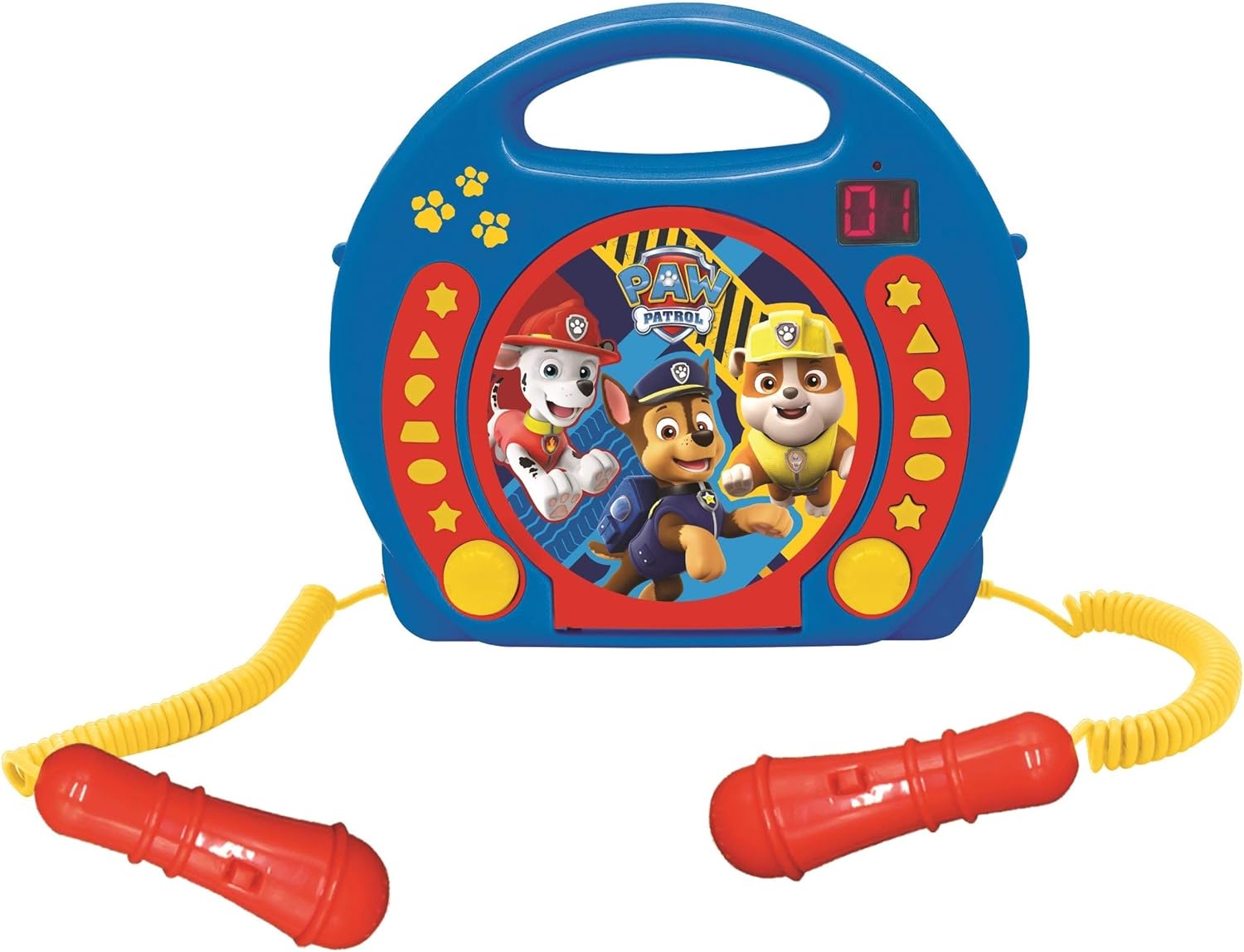
2. irudia: A top-down perspective of the karaoke CD player, showing the central Paw Patrol shield design, control buttons, and the two microphones.
1. bideoa: Produktu bat amaituview video demonstrating the features and design of the Lexibook Paw Patrol Karaoke CD Player.
Konfigurazioa
Elikatze-horniduraren konexioa
- Locate the DC IN jack on the back of the unit.
- Insert the small plug of the provided power adapter into the DC IN jack.
- Konektatu korronte-egokitzailearen beste muturra hormako entxufe estandar batera.
Bateriaren instalazioa
For portable use, the unit requires 4 'C' batteries (not included).
- Aurkitu bateriaren konpartimentua unitatearen behealdean.
- bihurkin bat erabiliz, ireki bateriaren konpartimenduaren estalkia.
- Insert 4 'C' batteries, ensuring correct polarity (+/-).
- Jarri bateriaren konpartimenduaren estalkia eta lotu torlojuarekin.
Funtzionamendu-argibideak
CD erreprodukzioa
- Open the CD compartment cover located on the top of the unit.
- Place a CD onto the spindle with the label side facing up.
- Itxi ondo CDaren konpartimentuaren estalkia.
- Press the 'PLAY/PAUSE' button to start playback.
- Use the 'SKIP' buttons (forward/backward) to navigate between tracks.
- Press the 'STOP' button to end CD playback.
Mikrofonoak erabiltzea
- Ensure the microphones are securely plugged into their respective jacks.
- During CD playback, speak or sing into the microphones.
- Adjust the microphone volume using the dedicated volume control (if available) or the main volume control.
Programazio Funtzioa
The programming function allows you to create a custom playlist of tracks.
- With the CD stopped, press the 'PROGRAM' button.
- Use the 'SKIP' buttons to select the desired track.
- Press 'PROGRAM' again to add the track to the playlist.
- Repeat steps 2 and 3 to add more tracks.
- Press 'PLAY' to start playing your programmed sequence.
Entzungailuen erabilera
- Plug standard 3.5mm headphones (not included) into the headphone jack.
- Egokitu bolumena entzuteko maila eroso batera.
- Note: Using headphones will mute the main speakers.
Mantentzea
- Garbitu unitatea zapi leun eta lehor batekin. Ez erabili garbitzaile edo disolbatzaile urratzailerik.
- Keep the CD compartment free of dust and debris.
- Gorde unitatea leku fresko eta lehor batean erabiltzen ez duzunean.
Arazoak konpontzea
| Arazoa | Irtenbidea |
|---|---|
| Unitatea ez da pizten. | Check power adapter connection or ensure batteries are correctly installed and not depleted. |
| CDak ez du erreproduzitzen. | Ensure the CD is clean, not scratched, and correctly placed in the compartment. Close the compartment lid completely. |
| Microphones are not working. | Verify microphones are securely plugged in. Check microphone volume levels. |
| Soinua distortsionatua edo baxuegia da. | Adjust the main volume control. Ensure the CD is not damaged. |
Zehaztapenak
| Ezaugarri | Xehetasuna |
|---|---|
| Produktuaren neurriak | 10.35 x 3.98 x 8.27 hazbete |
| Elementuaren pisua | 1.63 kilo |
| Fabrikatzaileak Gomendatutako Adina | 3 urtetik gora |
| Pilak | 4 C bateria behar dira (ez dago barne) |
| Ezaugarri Berezia | LED pantaila |
| Kolorea | Urdina / Gorria |
| Dakarten osagaiak | Power adapter, CD player, handle, 2 microphones |
| Argitaratze data | 11ko apirilaren 2023a |
Bermea eta Laguntza
Produktu hau a 2 urteko berme mugatua from the manufacturer, Lexibook.
For technical support, warranty claims, or further assistance, please contact Lexibook customer service. Refer to the product packaging or the official Lexibook webgunea kontaktu-informazio eguneratuena lortzeko.


