1. Sarrera
This manual provides essential information for the safe and effective operation of your Canon PowerShot SX130IS digital camera. Please read it thoroughly before using the camera and keep it for future reference.

1. irudia: Aurrealdea view of the Canon PowerShot SX130IS Digital Camera.
2. Konfigurazioa
2.1. Pilak instalatzea
The PowerShot SX130IS operates on AA-size batteries. For optimal performance and longevity, it is recommended to use rechargeable AA batteries.
- Open the battery compartment cover, typically located on the bottom of the camera.
- Sartu bi AA tamainako pilak, konpartimentuaren barruan adierazten den polaritate zuzena (+/-) ziurtatuz.
- Itxi bateriaren konpartimenduaren estalkia ondo.
2.2. Memoria Txartela sartzea
The camera supports SD, SDHC, and SDXC memory cards (not included). A memory card is required to store photos and videos.
- Ireki memoria txartelaren zirrikituaren estalkia, normalean bateriaren konpartimentuaren ondoan dagoena.
- Sartu memoria txartela etiketa kameraren aurrealdera begira duela, klik egin arte.
- Itxi ondo memoria txartelaren zirrikituaren estalkia.
2.3. Data eta ordua ezartzea
Upon first use or after replacing batteries, you may need to set the date and time.
- Piztu kamera.
- If prompted, follow the on-screen instructions to set the date, time, and time zone.
- Use the directional buttons to navigate and the FUNC.SET/OK button to confirm selections.
3. Kameraren funtzionamendua
3.1. Piztu/Itzali
Sakatu ON/OFF Kameraren goialdean dagoen botoia pizteko edo itzaltzeko. Lentea luzatuko da piztean.
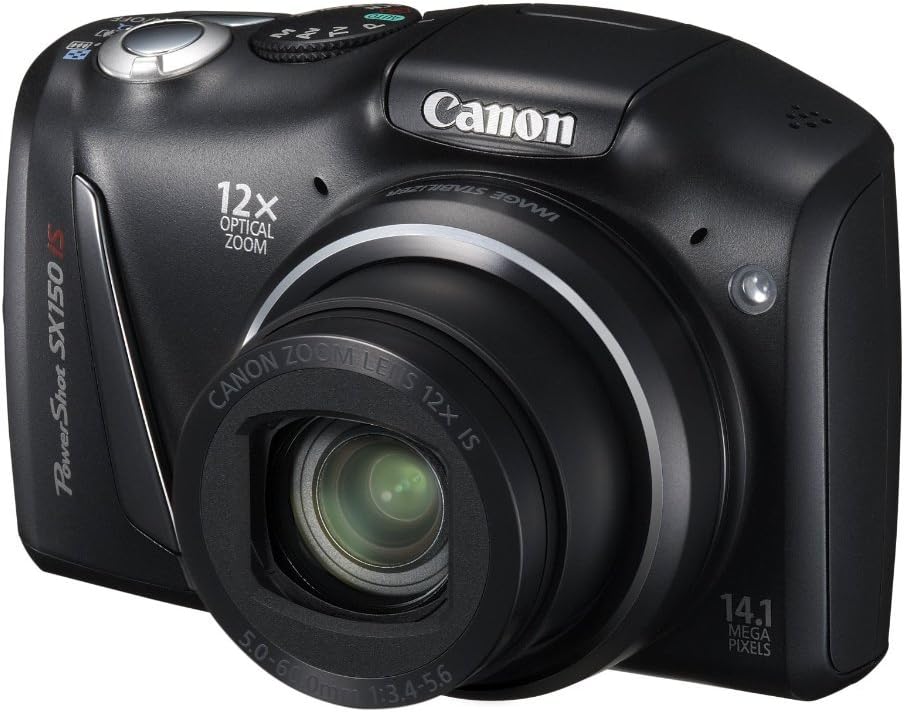
2. irudia: Angeludun view of the camera, highlighting the top controls including the ON/OFF button and mode dial.
3.2. Argazkiak ateratzea
Irudi finko bat ateratzeko:
- Select a shooting mode using the mode dial (e.g., AUTO for automatic settings).
- Markatu zure argazkia 3.0 hazbeteko LCD pantaila erabiliz.
- Sakatu obturadorearen botoia erdiraino fokatzeko. Fokatze-markoa berde bihurtuko da fokatzea lortutakoan.
- Sakatu obturadorearen botoia guztiz argazkia ateratzeko.
3.3. Bideoak grabatzea
The camera can record 720p HD video with stereo sound.
- Turn the mode dial to the movie mode icon (usually a small movie camera symbol).
- Press the movie button (often a red dot or movie camera icon) to start recording.
- Sakatu berriro film botoia grabazioa gelditzeko.
3.4. Zoom optikoa erabiltzea
The camera features a 12x wide-angle optical zoom with Optical Image Stabilizer.
- Use the zoom lever, typically located around the shutter button, to zoom in (telephoto) or zoom out (wide-angle).
- The Optical Image Stabilizer helps reduce blur caused by camera shake, especially at higher zoom levels.
3.5. Flasha erabiltzea
The camera has a built-in pop-up flash for low-light conditions.
- In certain shooting modes, the flash may pop up automatically.
- You can manually activate or deactivate the flash by pressing the flash button (lightning bolt icon) and selecting the desired mode (Auto, On, Off, Slow Synchro).
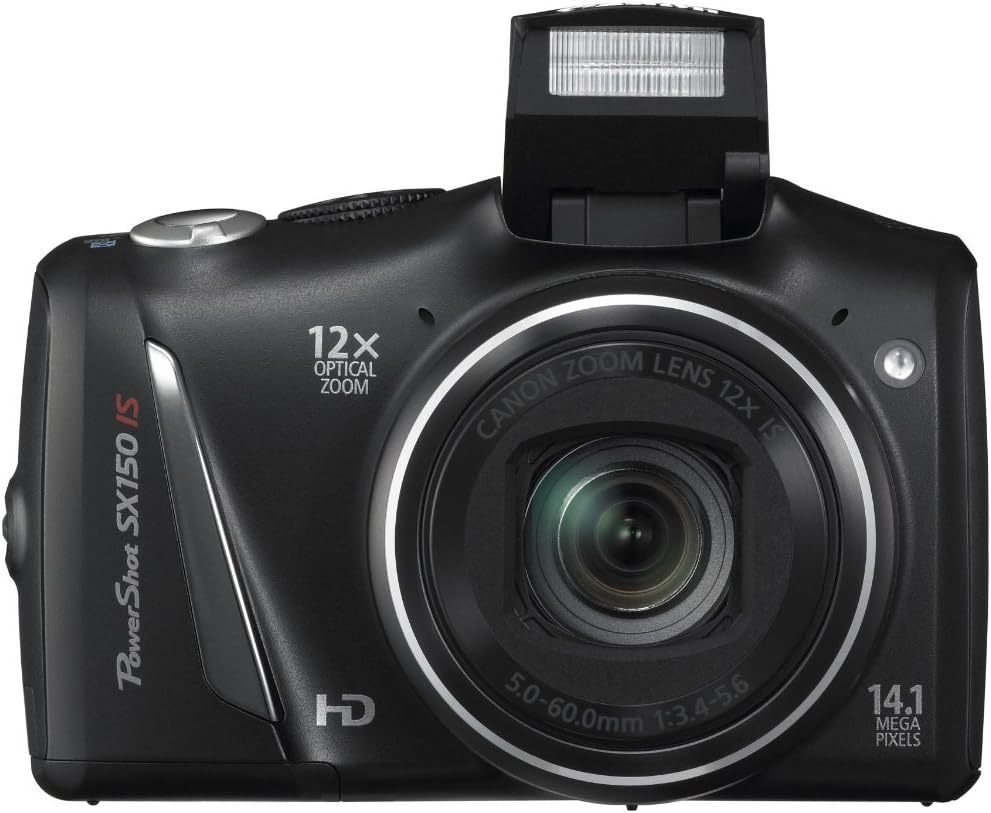
3. irudia: Aurrealdea view of the camera with the pop-up flash extended.
3.6. Scene Modes and Smart AUTO
The PowerShot SX130IS offers various scene modes and an advanced Smart AUTO system to optimize settings for different shooting situations.
- AUTO adimenduna: Automatically selects from 28 predefined shooting situations to ensure optimal image quality.
- Eszena moduak: Includes creative options like Miniature Effect for Movies and Fisheye Effect for artistically distorted stills. Select these via the mode dial or menu.
- Smart Flash Exposure: Analyzes lighting conditions to apply the correct flash, preventing over or underexposed images.
3.7. BerriroviewArgazkiak eta bideoak
To view your captured images and videos:
- Sakatu Erreprodukzioa button (usually an arrow icon).
- Use the directional buttons to scroll through your media.
- Sakatu FUNC.SET/OK botoia view bideo bat edo argazki bat handitu.
4. Mantentzea
4.1. Zaintza orokorra
- Mantendu kamera garbi zapi leun eta lehor batekin garbituz.
- Saihestu kamera muturreko tenperaturen, hezetasunaren edo hautsaren eraginpean jartzea.
- Protect the lens and LCD screen from scratches.
4.2. Bateria zaintzea
- Always use high-quality batteries. Rechargeable batteries are recommended for cost-effectiveness and environmental reasons.
- Kendu bateriak kamera denbora luzez erabiliko ez bada.
5. Arazoak
5.1. "No Memory Card" Error
If this message appears, ensure the memory card is inserted correctly and fully seated in its slot. If the issue persists, try a different compatible memory card.
5.2. Bateriaren iraupen laburra
Battery life can vary significantly based on usage (e.g., frequent flash use, video recording, reviewing images). If you experience consistently short battery life:
- Ensure you are using fresh, high-quality alkaline batteries or fully charged rechargeable batteries.
- Consider using higher capacity rechargeable batteries.
- Reduce flash usage and LCD screen brightness if possible.
5.3. Dust in Lens
If dust appears on images, it may be on the lens. Avoid attempting to clean the internal lens elements yourself. Consult a professional camera service center for cleaning.
5.4. Video Playback Issues
The camera records videos in .mov format. If you encounter issues playing videos on a computer, ensure you have the necessary codecs or a compatible media player installed.
6. Zehaztapenak
| Ezaugarri | Zehaztapena |
|---|---|
| Produktuaren neurriak | 4.45 x 1.81 x 2.87 hazbete |
| Elementuaren pisua | 10.9 ontza |
| Elementuaren eredu-zenbakia | SX130 |
| Pilak | Lithium Metal batteries required (included) |
| Fabrikatzailea | Canon kamerak AEB |
| Hizkuntza | ingelesa |
| Muntaketa bateragarriak | Kanona |
| Aspektu-erlazioa | 16:9 |
| Argazki sentsoreen teknologia | CCD |
| Onartua File Formatua | JPEG, RAW |
| Irudi Egonkortzea | Optikoa |
| Fokuaren Gehienezko Luzera | 336 milimetro |
| Zoom optikoa | 12 x |
| Gehieneko irekiera | 3.5 milimetro |
| ISO gutxieneko hedatua | 80 |
| Neurketaren deskribapena | Anitza, Erdiko haztatua, Spot |
7. Bermea eta Laguntza
Bermeari buruzko informazioa, laguntza teknikoa edo zerbitzu-kontsultak egiteko, jo Canon-en webgune ofizialera. website or contact Canon customer service directly. Keep your purchase receipt as proof of purchase.
8. Produktuen bideoak
Ez dago produktu honen saltzaileen bideo ofizialik eskuragarri une honetan.


