Sissejuhatus
Thank you for choosing the Casio G-Shock GA-110 watch. This manual provides essential information regarding the setup, operation, and maintenance of your new timepiece. Designed for durability and precision, the GA-110 offers a range of features including world time, stopwatch, countdown timer, and multiple alarms, all housed in a robust, water-resistant casing.
Please read this manual carefully to ensure proper use and to maximize the lifespan of your watch. Keep this manual for future reference.
Vaata üleview

Figure 1: The Casio G-Shock GA-110 watch worn on a wrist. This image provides a real-world perspective of the watch's size and appearance, featuring its black resin construction and white dial.
The Casio G-Shock GA-110 features a combination analog and digital display. It is equipped with four buttons for various operations:
- REGULEERI (üleval vasakul): Kasutatakse seaderežiimidesse sisenemiseks ja väljumiseks ning sätete kinnitamiseks.
- REŽIIM (all vasakul): Cycles through different modes (Timekeeping, World Time, Stopwatch, Countdown Timer, Alarm).
- TAGAKÜLG (üleval paremal): Used to scroll backward through settings or increase values.
- EDASI (all paremal): Used to scroll forward through settings or decrease values.

Joonis 2: Detailne esikülg view of the Casio G-Shock GA-110 watch. This image displays the watch's overall design, highlighting the black resin band and case, and the distinctive white analog-digital dial with multiple sub-dials and digital displays.

Joonis 3: Külg view of the Casio G-Shock GA-110 watch. This image illustrates the robust casing and the placement of the ADJUST and MODE buttons on the left side of the watch.
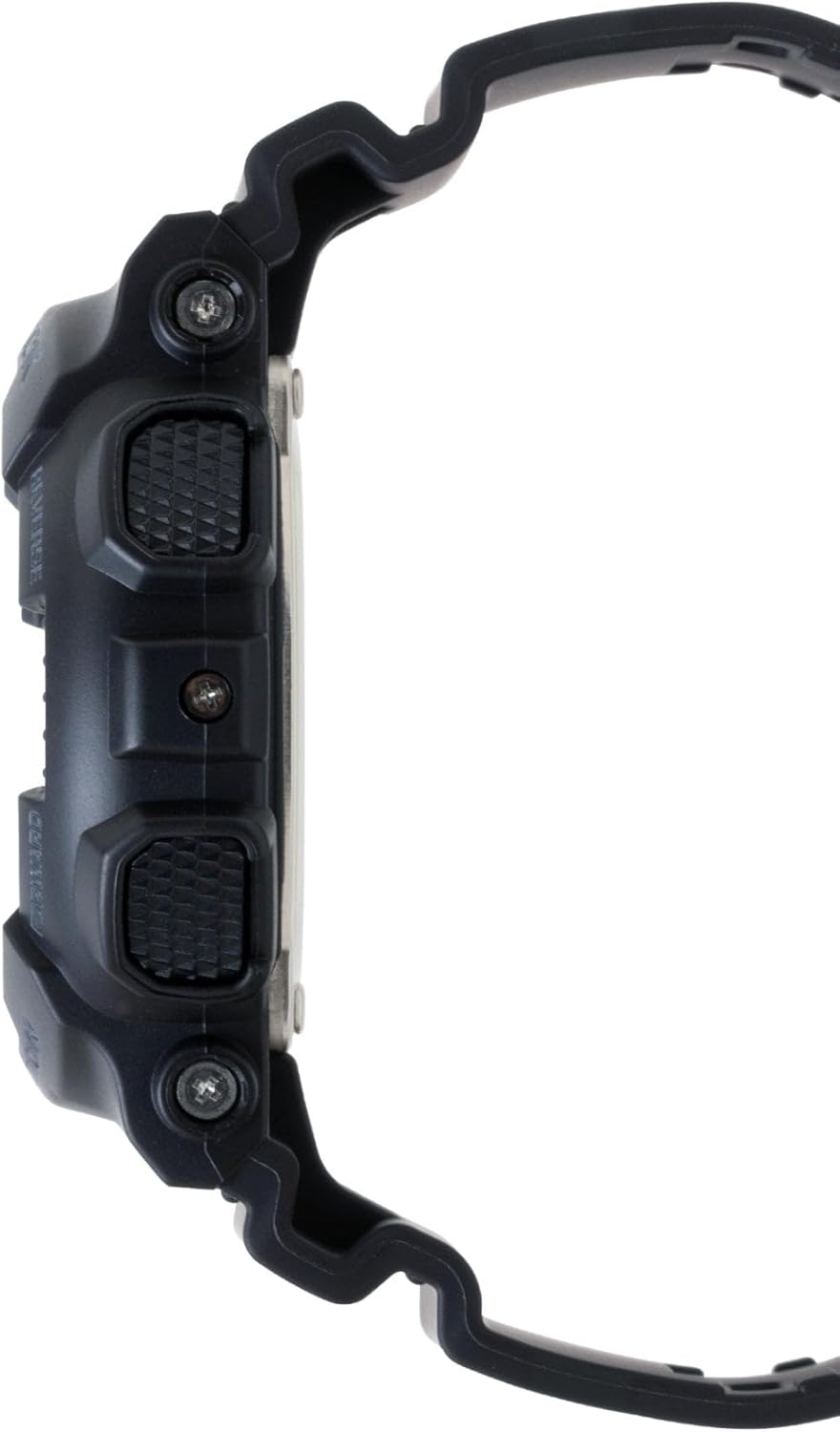
Joonis 4: Vastaskülg view of the Casio G-Shock GA-110 watch. This image shows the placement of the REVERSE and FORWARD buttons on the right side of the watch, along with the textured grip.
Seadistamine
1. Algaja seadistamine
- Ajavõturežiimis hoidke all nuppu REGULEERIDA nuppu, kuni linna kood hakkab vilkuma. See näitab seadistusrežiimi.
- Kasutage PÖÖRD ja EDASI nuppe, et valida soovitud kodulinna kood.
- Vajutage nuppu REŽIIM button to cycle through the settings: City Code → DST (Daylight Saving Time) → 12/24-hour format → Seconds → Hour → Minute → Year → Month → Day → Illumination Duration.
- Kasutage PÖÖRD ja EDASI nuppe, et muuta vilkuvat väärtust.
- Pärast kõigi väärtuste määramist vajutage REGULEERIDA nuppu seadistusrežiimist väljumiseks.
2. Analoogsete osutite reguleerimine
If the analog hands do not match the digital time, you may need to adjust them manually.
- Ajavõturežiimis hoidke all nuppu REGULEERIDA button until the city code flashes.
- Vajutage nuppu REŽIIM button repeatedly until "H.SET" appears on the digital display.
- Kasutage PÖÖRD ja EDASI buttons to move the analog hands to the 12 o'clock position.
- Vajutage nuppu REGULEERIDA button to confirm and exit. The hands will automatically move to match the digital time.
3. Aku teave
The watch is powered by one LR44 battery, which is included and pre-installed. The battery life varies depending on usage of features like the backlight and alarms. When the display becomes dim or functions become erratic, it may be time for a battery replacement. Refer to the Maintenance section for more details.
Kella kasutamine
1. Režiimi navigeerimine
Vajutage nuppu REŽIIM nuppu, et liikuda erinevate režiimide vahel järgmises järjekorras:
Timekeeping Mode → World Time Mode → Stopwatch Mode → Countdown Timer Mode → Alarm Mode
2. Ajavõturežiim
This is the default mode, displaying the current time and date. You can switch between 12-hour and 24-hour formats by pressing the EDASI button in Timekeeping Mode (when not in setting mode).
3. Maailmaaja režiim
Maailmaaja režiimis kasutage PÖÖRD ja EDASI nupud view the current time in 48 cities (29 time zones) around the world. Press the REGULEERIDA button to toggle Daylight Saving Time (DST) on or off for the currently displayed city.
4. Stopperi režiim
The stopwatch measures elapsed time, split times, and two finishes. The measuring capacity is 1/1000 second for the first hour, then 1/10 second for up to 100 hours.
- Vajutage EDASI stopperi käivitamiseks/peatamiseks.
- Vajutage PÖÖRD to reset the stopwatch to zero while it is stopped.
- During measurement, press PÖÖRD Vaheaja salvestamiseks vajutage PÖÖRD again to release the split and continue measurement.
5. Taimeri režiim
The countdown timer can be set from 1 minute to 24 hours. An alarm sounds when the countdown reaches zero.
- Taimeri režiimis hoidke all nuppu REGULEERIDA nuppu, kuni praegune loenduri algusaeg hakkab vilkuma.
- Kasutage REŽIIM button to move the flashing between hours and minutes.
- Kasutage PÖÖRD ja EDASI nuppe, et muuta vilkuvat väärtust.
- Vajutage REGULEERIDA seadistusrežiimist väljumiseks.
- Vajutage EDASI loenduri alustamiseks või peatamiseks.
- Vajutage PÖÖRD to reset the countdown to its start time while it is stopped.
6. Äratuse režiim
The watch has 5 daily alarms (AL1 to AL4, and SNZ for snooze alarm) and an hourly-aja signaal (SIG).
- Häirerežiimis kasutage PÖÖRD ja EDASI buttons to scroll through the alarms (AL1, AL2, AL3, AL4, SNZ, SIG).
- Äratuse seadistamiseks hoidke all nuppu REGULEERIDA button when the desired alarm (e.g., AL1) is displayed. The hour setting will flash.
- Kasutage REŽIIM button to move the flashing between hours and minutes.
- Kasutage PÖÖRD ja EDASI nuppe, et muuta vilkuvat väärtust.
- Vajutage REGULEERIDA seadistusrežiimist väljumiseks.
- Vajutage EDASI to toggle the alarm (and SIG) on or off. An indicator will appear on the display when an alarm or the hourly-ajasignaal on aktiivne.
7. Illumination (LED Light)
Vajutage nuppu PÖÖRD button in any mode (except when setting) to illuminate the display. The illumination duration can be set in Timekeeping Mode settings (refer to Initial Time Setting, step 3).
Hooldus
1. Kella puhastamine
- Pühkige kella regulaarselt pehme kuiva lapiga, et eemaldada mustus ja niiskus.
- For resin bands and cases, a mild soap solution and a soft brush can be used, followed by rinsing with clean water and thorough drying.
- Avoid using harsh chemicals, solvents, or abrasive cleaners, as these can damage the watch's materials.
2. Veekindlus
The GA-110 is water-resistant to 200 meters (20 BAR). This means it is suitable for showering, swimming, and diving. However, please observe the following precautions:
- Ärge vajutage nuppe, kui kell on märg või vee all.
- Avoid exposing the watch to hot water or steam (e.g., hot showers, saunas), as this can compromise the water resistance seals.
- If the watch is exposed to saltwater, rinse it thoroughly with fresh water and dry it completely.
- Have the water resistance seals checked periodically (e.g., every 2-3 years) by an authorized service center, especially after battery replacement.
3. Aku vahetamine
The watch uses one LR44 battery. When the battery runs low, the display may dim or functions may become unreliable. Battery replacement should ideally be performed by an authorized Casio service center or a qualified watch technician to ensure proper sealing and maintain water resistance. Attempting to replace the battery yourself may void the warranty and compromise the watch's water resistance.
Veaotsing
| Probleem | Võimalik põhjus | Lahendus |
|---|---|---|
| Analoogosutid ei näita digitaalset aega. | Käed on valesti joondatud. | Perform analog hand adjustment (refer to Setup section). |
| Digitaalne ekraan on tuhm või tühi. | Aku tühi. | Replace the battery (refer to Maintenance section). |
| Nupud ei reageeri. | Kell võib olla külmunud või aku on väga tühi. | Try pressing all four buttons simultaneously for a few seconds to reset. If unresponsive, replace battery. |
| Aeg on vale. | Incorrect city code, DST setting, or manual adjustment error. | Re-set the Home City, DST, and time settings (refer to Setup section). |
| Kella sees on vett või see muutub uduseks. | Compromised water resistance due to impact, aging seals, or button operation underwater. | Immediately take the watch to an authorized Casio service center for inspection and repair. Do not attempt to dry it yourself. |
Tehnilised andmed
- Mudeli number: GA-110
- Case/Band Material: Vaik
- Kristall: Mineraalne klaas
- Kuva: Analog-Digital
- Liikumine: Kvarts
- Veekindlus: 200 meetrit (20 baari)
- Aku: 1 x LR44 (kaasas)
- Aku eluiga: Approximately 2 years (varies with usage of power-intensive functions)
- Täpsus: ±15 seconds per month (without time signal calibration)
- Watch Dimensions (H×W×D): Ligikaudu 55 × 51.2 × 16.9 mm
- Kaal kaal: Umbes 72 grammi
- Funktsioonid: World Time (48 cities + UTC), 1/1000-second Stopwatch, Countdown Timer, 5 Daily Alarms (1 Snooze Alarm), Hourly Time Signal, Full Auto-calendar, 12/24-hour format, LED light with Afterglow.
Note: Product package dimensions and weight (e.g., 5 x 4.5 x 3.25 inches; 5.6 ounces) refer to the shipping package, not the watch itself.
Garantii teave
Your Casio G-Shock GA-110 watch comes with a Piiratud garantii. The terms and duration of the warranty may vary by region and retailer. Please refer to the warranty card included with your purchase or visit the official Casio webveebisaidilt leiate üksikasjalikku teavet garantiitingimuste, -katete ja -tingimuste kohta.
Hoidke ostutõendit (kviitungit) alles, kuna seda on vaja garantiinõuete korral.
Klienditugi
For further assistance, technical support, or service inquiries, please contact Casio customer support through their official website or the contact information provided in your warranty documentation. You can typically find support resources, FAQs, and service center locations on the official Casio websait: