Sissejuhatus
Welcome to your new LEDLUX SH02753 Smart LED Bulb. This manual provides essential instructions for the safe installation, setup, operation, and maintenance of your Wi-Fi enabled RGB+CCT dimmable smart bulb. Please read this manual thoroughly before use and retain it for future reference.

Image: LEDLUX SH02753 Smart LED Bulbs with app interface.
Ohutusteave
Ohutu töö tagamiseks järgige järgmisi ettevaatusabinõusid:
- Always turn off the power supply before installing or removing the bulb.
- Do not use in fully enclosed luminaires, as this may shorten the bulb's lifespan.
- See pirn on mõeldud ainult siseruumides kasutamiseks.
- Ärge võtke pirni lahti ega muutke seda.
- Hoida eemal veest ja kõrge õhuniiskusega keskkonnast.
- Veenduge voltage of your electrical system matches the bulb's specifications (240V).
Pakendi sisu
Teie pakett peaks sisaldama järgmisi esemeid:
- 2 x LEDLUX SH02753 Smart LED Bulbs (E27, A65, 15W)
- 1 x Kasutusjuhend (käesolev dokument)
Toote spetsifikatsioonid
| Funktsioon | Spetsifikatsioon |
|---|---|
| Kaubamärk | LEDLUX |
| Mudeli number | SH02753 (SH02753X2 for 2-pack) |
| Aluse tüüp | E27 |
| Pirni kuju | A65 (Standard) |
| Energiatarve | 15 vatti |
| Valgusvoog | 1500 lm |
| Värvi temperatuur | 2700K - 6500K (RGB+CCT) |
| Voltage | 240 volti |
| Traadita ühenduse standard | IEEE 802.11 b/g/n (2.4 GHz Wi-Fi) |
| Keskmine eluiga | 30,000 tundi |
| Toote mõõtmed (P x L x K) | 6.5 x 0.03 x 13.5 cm |
| Kauba kaal | 150 g |
| Energiatõhususe klass | F |
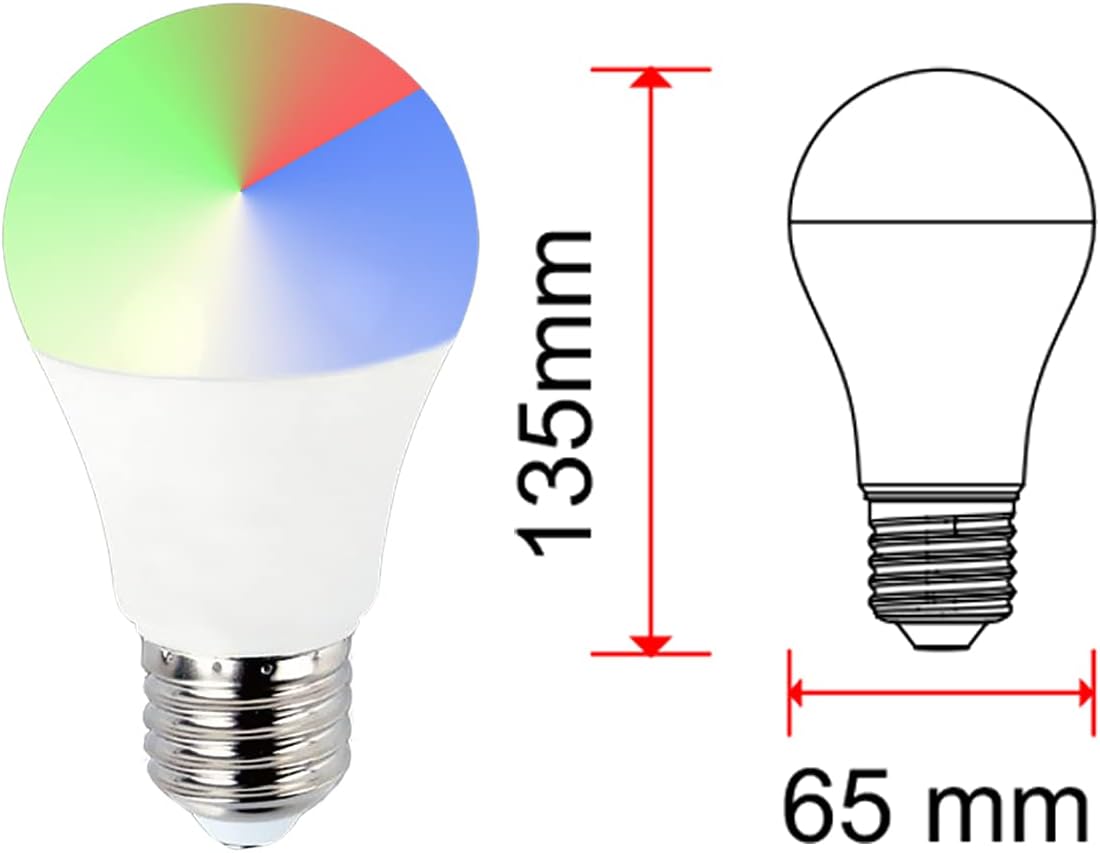
Image: Dimensions of the LEDLUX SH02753 Smart LED Bulb.

Image: Energy Efficiency Label for LEDLUX SH02753. For more details, visit the EPREL andmebaas.
Seadistusjuhend
1. Füüsiline paigaldus
- Ensure the power to the light fixture is turned OFF at the main switch.
- Carefully screw the LEDLUX SH02753 Smart LED Bulb into a standard E27 socket.
- Turn ON the power to the light fixture. The bulb should light up.
2. Rakenduse installimine
The LEDLUX Smart LED Bulb operates with the 'Smart Life' or 'Tuya Smart' application. Download one of these apps to your smartphone or tablet:
- Download Smart Life App: smartapp.tuya.com/smartlife
- Laadige alla Tuya Smart rakendus: smartapp.tuya.com/tuyasmart
Alternatively, scan the QR code on the product packaging or in the image below to download the app.

Image: App download options for Smart Life and Tuya Smart.
3. Seadmete sidumine (Wi-Fi-ühendus)
- Open the Smart Life or Tuya Smart app and register/log in.
- Tap '+' in the top right corner to add a device.
- Valige „Valgustus“ > „Valgusallikas (Wi-Fi)“.
- Ensure your Wi-Fi network is 2.4 GHz. Enter your Wi-Fi password.
- To put the bulb into pairing mode, turn the light switch OFF-ON-OFF-ON-OFF-ON. The bulb should start flashing rapidly. If it doesn't flash, repeat the OFF-ON cycle.
- Confirm in the app that the indicator light is flashing rapidly and proceed with the pairing process.
- Once connected, you can rename the bulb for easier control.

Image: App interface for controlling bulb color and brightness.
4. Häälassistendi integreerimine (Alexa/Google Home)
To control your LEDLUX Smart LED Bulb with voice commands:
- Avage Amazon Alexa või Google Home'i rakendus.
- Navigeeri valikule „Oskused ja mängud” (Alexa) või „Töötab Google'iga” (Google Home).
- Otsi and enable the 'Smart Life' or 'Tuya Smart' skill.
- Link your Smart Life/Tuya Smart account with your voice assistant account.
- Discover devices. Your LEDLUX bulb should now appear and be controllable via voice commands.

Image: Compatibility with Amazon Alexa and Google Assistant.
Kasutusjuhised
Once connected, you can control your smart bulb using the Smart Life/Tuya Smart app or integrated voice assistants.
Basic Control (On/Off, Dimming)
- Rakenduse juhtimine: Tap the bulb icon in the app to turn it on/off. Use the brightness slider to adjust the light intensity.
- Hääljuhtimine: Say "Alexa, turn on [bulb name]" or "Hey Google, dim [bulb name] to 50%."
Color Adjustment (RGB & CCT)
- RGB värvid: In the app, select the 'Color' tab to choose from millions of RGB colors.
- CCT (White Light) Adjustment: Select the 'White' or 'CCT' tab to adjust the color temperature from warm white (2700K) to cool white (6500K).
Scene Modes and Scheduling
- Pre-set Scenes: The app offers various pre-set scenes (e.g., Party, Reading, Sleep) to instantly change the lighting ambiance.
- Kohandatud stseenid: Create your own custom scenes with preferred colors, brightness, and effects.
- Ajakava koostamine: Set schedules for the bulb to turn on/off or change settings at specific times.

Pilt: ntamples of lighting scenes for various activities.
Hooldus
To maintain the performance and longevity of your LEDLUX Smart LED Bulb:
- Enne puhastamist veenduge, et toide on välja lülitatud.
- Pühkige pirni pehme ja kuiva lapiga. Ärge kasutage vedelaid puhastusvahendeid ega abrasiivseid materjale.
- Vältige pirni pikaajalist kokkupuudet äärmuslike temperatuuride või otsese päikesevalgusega.
Veaotsing
If you encounter issues with your LEDLUX Smart LED Bulb, try the following solutions:
- Bulb not connecting to Wi-Fi:
- Ensure your Wi-Fi network is 2.4 GHz. 5 GHz networks are not supported.
- Make sure the bulb is flashing rapidly (OFF-ON cycle 3 times) to enter pairing mode.
- Kontrollige oma WiFi-parooli õigsust.
- Move the bulb closer to your Wi-Fi router during setup.
- Bulb not responding to app/voice commands:
- Kontrollige oma Interneti-ühendust.
- Verify that the bulb is powered on.
- Ensure the Smart Life/Tuya Smart app is updated to the latest version.
- For voice control, confirm the skill is enabled and accounts are linked correctly.
- Bulb flickering:
- Veenduge, et pirn on tihedalt sisse keeratud.
- Check for loose wiring in the fixture (consult a qualified electrician if unsure).
Garantii ja tugi
LEDLUX products are designed for reliability and performance. For specific warranty information, please refer to the documentation provided with your purchase or contact your retailer. For technical support, please visit the manufacturer's website or use the contact information provided on the product packaging.
Täiendavad ressursid
For further information, product updates, or to access digital resources, you may scan the QR code found on the product packaging or visit the dedicated product page:
- Product Information Link: uqr.to/SH02753

Image: LEDLUX SH02753 product packaging with QR code.


