1. Toote lõppview
The TP-Link Archer TX50E is a high-performance AX3000 Wi-Fi 6 Bluetooth 5.3 PCIe Adapter designed for desktop PCs. It leverages the latest Wi-Fi 6 standard to deliver extreme speeds, ultra-low latency, and uninterrupted connectivity, making it suitable for demanding applications like immersive gaming and VR. The adapter features a customized heat sink and gold-plated contactors for enhanced stability and longevity.
Peamised omadused:
- Wi-Fi 6 jõudlus: Delivers speeds up to 2.4 Gbps (2402 Mbps on 5 GHz + 574 Mbps on 2.4 GHz) with 1024-QAM and 160 MHz bandwidth.
- Ülimadal latentsusaeg: Revolutionary OFDMA and MU-MIMO technologies reduce lag for responsive gaming and VR experiences.
- Bluetooth 5.3: Achieves 2× faster speeds and 4× broader coverage than Bluetooth 4.2, enabling seamless connection with various peripherals.
- Lai katvus: Equipped with two high-gain antennas to extend Wi-Fi range.
- Premium ehitus: Features a customized heat sink for efficient thermal dissipation and gold-plated contactors for improved stability and oxidation resistance.
- Täiustatud turvalisus: Toetab WPA3-d, mis on uusim võrguturbestandard, täiustatud võrgukaitse tagamiseks.
2. Pakendi sisu
Veenduge, et pakis on kõik esemed olemas:

Image: TP-Link Archer TX50E retail box showing the adapter and included accessories.
- TP-Link Archer TX50E Wi-Fi 6 Bluetooth 5.3 PCIe Adapter
- Kaks suure võimendusega antenni
- Bluetooth USB kaabel
- Allika CD
- Kiirpaigaldusjuhend
- Madal-Profile Klamber
3. Riistvara paigaldamine
Enne alustamist:
- Veenduge, et teie arvuti on välja lülitatud ja toiteallikast lahti ühendatud.
- Ground yourself to discharge any static electricity before handling components.
- Refer to your computer's manual for specific instructions on opening the case.
Samm-sammuline paigaldamine:
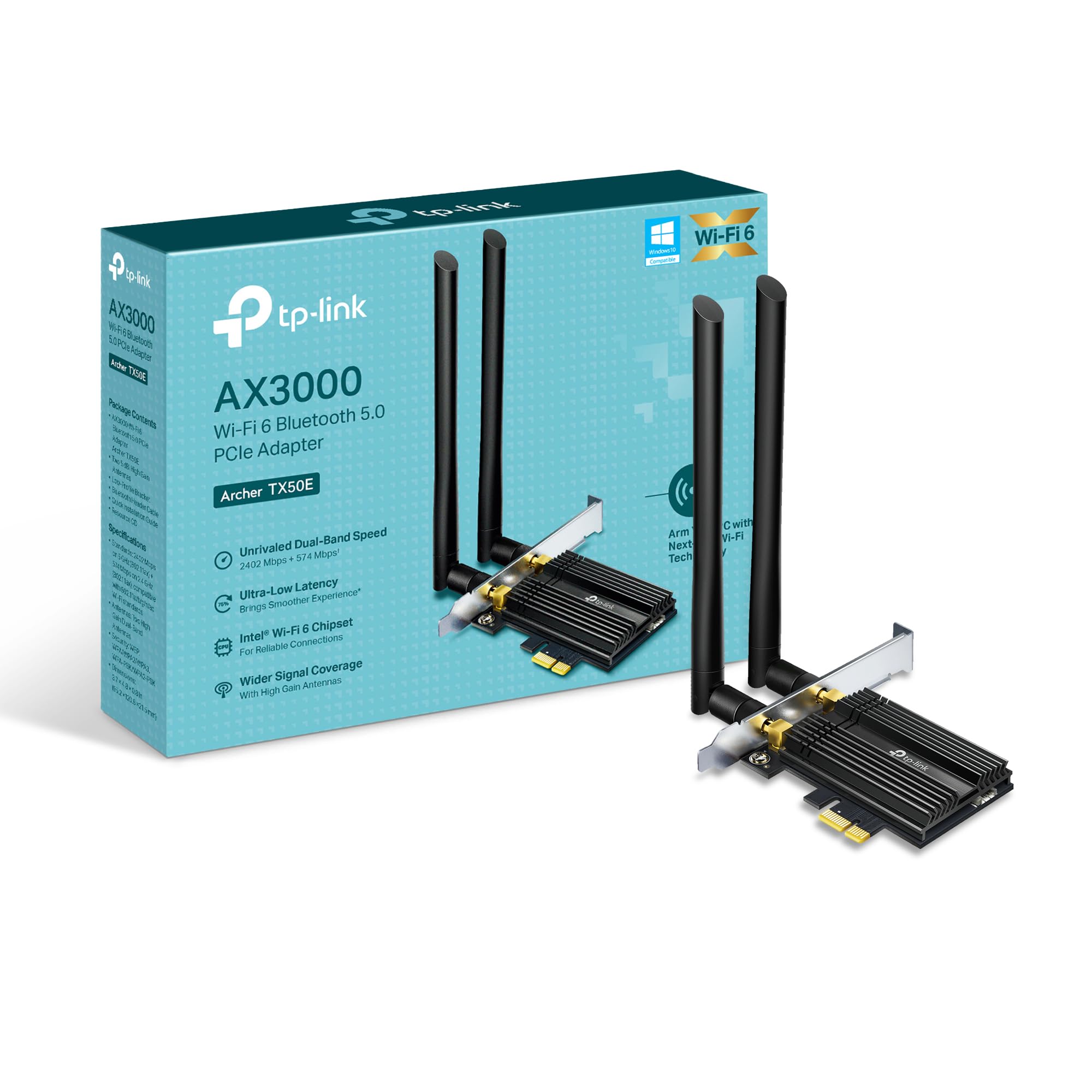
Pilt: Esikülg view of the TP-Link Archer TX50E adapter with antennas.
- Toide välja ja lahti ühendamine: Turn off your computer and unplug the power cable from the wall outlet.
- Avatud arvuti korpus: Emaplaadile ligipääsemiseks eemaldage arvuti korpuse külgpaneel.
- Ühendage Bluetoothi USB-kaabel: Connect the provided Bluetooth USB cable to the adapter's Bluetooth header.
- Locate Slots: Identify an available PCI Express X1 slot on your motherboard and an F_USB connector (usually labeled USB910 or similar).
- Sisestage adapter: Carefully insert the Archer TX50E adapter into the chosen PCIe X1 slot. Ensure it is seated firmly.
- Ühendage USB-kaabel: Connect the other end of the Bluetooth USB cable to the F_USB connector on your motherboard. This connection is essential for Bluetooth functionality.
- Secure Adapter and Antennas: Secure the adapter with a screw to the computer case. Then, connect the two high-gain antennas to the adapter's connectors. Adjust their position for optimal signal reception.
- Sule arvuti korpus: Vaheta arvuti korpuse külgpaneel välja.
- Toide sisse: Plug the power cable back into the wall outlet and turn on your computer.
Visuaalne paigaldusjuhend:
Video: A step-by-step guide demonstrating the physical installation of the TP-Link Archer TX50E PCIe adapter into a desktop computer.
4. Draiveri installimine
After hardware installation, you need to install the Wi-Fi and Bluetooth drivers for the adapter to function correctly. Märkus. ÄRGE käivitage Bluetoothi ja Wi-Fi draiverite installiprogramme samaaegselt.
Step-by-Step Driver Installation:
- Insert CD or Download Drivers: Insert the provided resource CD into your computer's CD/DVD drive. If your computer does not have a CD/DVD drive, download the latest drivers from the official TP-Link website (search for Archer TX50E).
- Run Autorun: Once the CD is inserted, an Autorun window should appear. Click to run `Autorun.exe`. If it doesn't appear, navigate to 'This PC' or 'My Computer', open your CD/DVD drive, and manually run `Autorun.exe`.
- Install Wi-Fi Drivers: In the TP-Link driver installation utility, select the option to install the Wi-Fi drivers. Follow the on-screen instructions to complete the installation. You may need to restart your computer after this step.
- Install Bluetooth Drivers: After the Wi-Fi drivers are installed and your computer has restarted (if prompted), run the `Autorun.exe` again or manually launch the Bluetooth driver installer. Follow the on-screen instructions to complete the Bluetooth driver installation. Another restart may be required.
For a visual guide on driver installation, please refer to the setup video provided in the Hardware Installation section.
5. Kasutusjuhised
Wi-Fi-ga ühenduse loomine:
- After successful driver installation, click the Wi-Fi icon in your system tray (usually in the bottom-right corner of your screen).
- Ilmub saadaolevate traadita võrkude loend. Valige soovitud võrk.
- Klõpsake nuppu „Ühenda” ja sisestage võrgu turvavõti (parool), kui seda küsitakse.
- Teie arvuti peaks nüüd olema WiFi-võrguga ühendatud.
Bluetooth -seadmete sidumine:
- Ensure your Bluetooth device is in pairing mode (refer to your device's manual).
- On your computer, go to 'Settings' > 'Devices' > 'Bluetooth & other devices'.
- Lülitage Bluetooth sisse, kui see pole veel lubatud.
- Klõpsake valikul „Lisa Bluetooth või muu seade” ja valige „Bluetooth”.
- Valige loendist oma seade ja järgige sidumisprotsessi lõpuleviimiseks ekraanil kuvatavaid juhiseid.
6. Veaotsing
If you encounter issues with your Archer TX50E adapter, try the following common troubleshooting steps:
- WiFi-ühendust pole:
- Veenduge, et adapter oleks PCIe-pessa õigesti paigaldatud.
- Veenduge, et antennid on kindlalt ühendatud.
- Check Device Manager to ensure Wi-Fi drivers are installed and the device is recognized without errors.
- Try updating or reinstalling the Wi-Fi drivers.
- Taaskäivitage arvuti ja traadita ruuter.
- Bluetooth ei tööta:
- Confirm the Bluetooth USB cable is properly connected to both the adapter and the motherboard's F_USB header.
- Check Device Manager to ensure Bluetooth drivers are installed and the device is recognized without errors.
- Verify that Bluetooth is enabled in your computer's settings.
- Try updating or reinstalling the Bluetooth drivers.
- Aeglane kiirus või katkendlik ühendus:
- Optimaalse jõudluse tagamiseks veenduge, et teie ruuter toetaks Wi-Fi 6 (802.11ax).
- Adjust the position of the antennas for better signal reception.
- Move your computer closer to the router or reduce obstacles between them.
- Kontrollige häireid muudest elektroonikaseadmetest.
- Värskenda oma ruuteri püsivara.
If these steps do not resolve your issue, please contact TP-Link Technical Support.
7. Tehnilised andmed
| Funktsioon | Spetsifikatsioon |
|---|---|
| Mudel | Archer TX50E |
| Traadita ühenduse standard | Wi-Fi 6 (802.11ax/ac/b/g/n) |
| Bluetoothi versioon | Bluetooth 5.3 |
| Liides | PCI Express |
| Andmeedastuskiirus | Up to 2402 Mbps (5 GHz), 574 Mbps (2.4 GHz) |
| Operatsioonisüsteemi tugi | Windows 11, 10 (64-bit) |
| Turvalisus | WPA3 |
| Mõõdud (P x L x K) | 9.53 x 12.09 x 2.16 cm |
| Kauba kaal | 90.72 g (0.2 naela) |
| Riistvara liides | Bluetooth |
| Ühilduvad seadmed | Lauaarvuti, sülearvuti |
8. Garantii ja tehniline tugi
TP-Link pakub 2-aastane garantii for this product. Additionally, free 24/7 tehniline tugi on valmis teid abistama kõigi teie küsimuste või probleemide korral.
Lisateabe saamiseks külastage TP-Linki ametlikku tugilehte websaidilt või võtke otse ühendust nende klienditeenindusega.


