Sissejuhatus
The Hypertech React Throttle Optimizer is an innovative device designed to enhance your vehicle's throttle response. This Performance version offers customizable control over throttle sensitivity, providing a more engaging driving experience. It features multiple modes tailored for various driving conditions, from spirited performance to fuel economy.
The React system is engineered for ease of use, featuring a simple control knob and a plug-and-play installation process. Its compact design allows for discreet placement, and settings are retained even when the control unit is disconnected.

Image: The Hypertech React Throttle Optimizer control unit, showing the central knob and mode indicators.
Toode läbiview Video
Video: Üleview of the Hypertech React Throttle Optimizer, explaining its features and different versions.
Mis on karbis
Upon opening your Hypertech React package, you should find the following components:
- Pedal module
- Juhtmoodul
- Juhtmestik
- USB kaabel
- Ventilatsiooni kinnitus
- Paigaldusjuhend
- Tõmblukud
- Kleebised
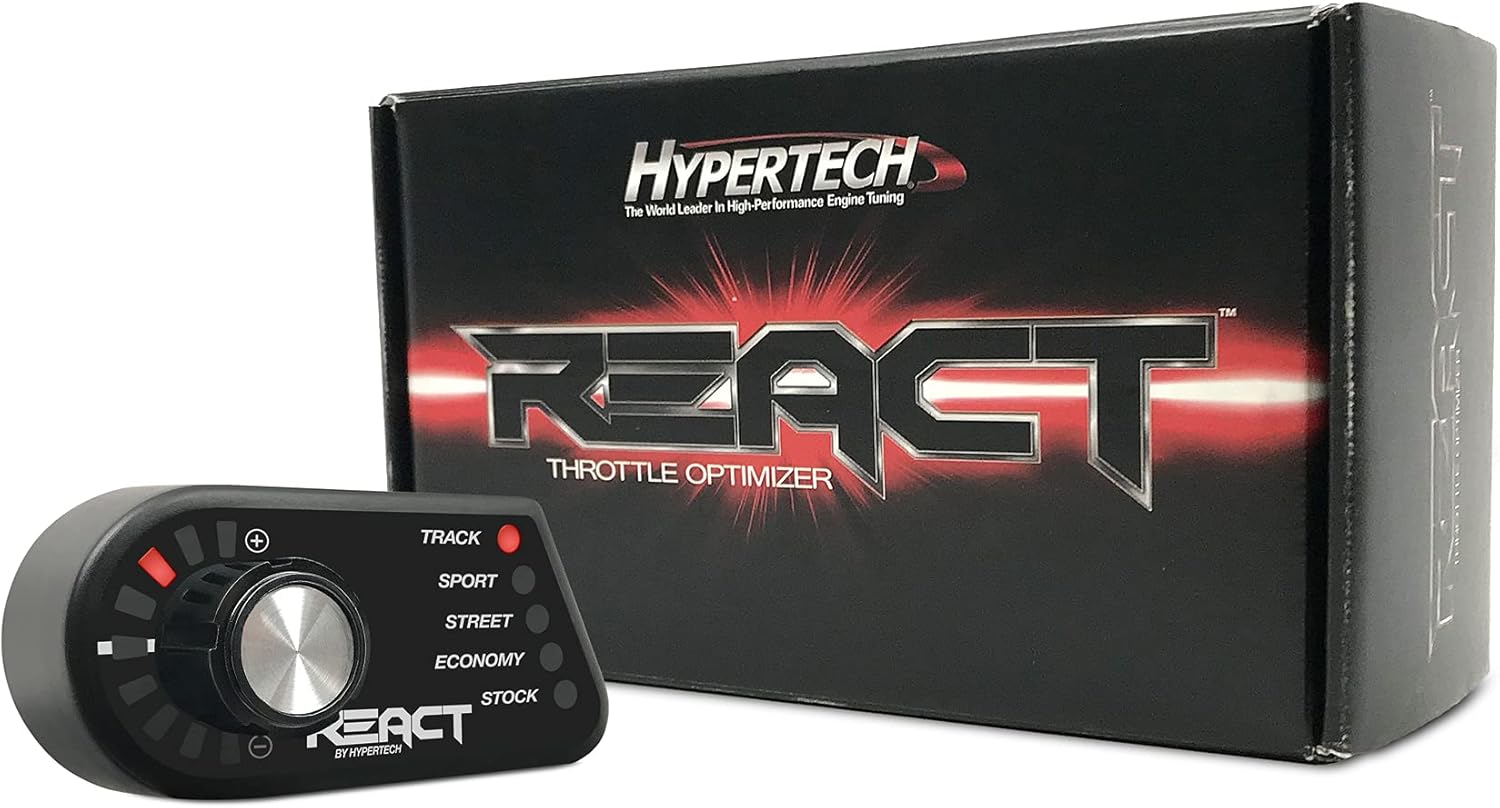
Image: The Hypertech React Throttle Optimizer box displaying the control unit and packaging.
Põhifunktsioonid
- Performance Version: Throttle curves are specifically designed for enthusiasts seeking a more dynamic driving experience.
- Kohandatav juhtimine: Offers full control over your vehicle's throttle response.
- Kohandused lennu ajal: Simple control knob allows switching between modes and adjusting intensity while driving.
- Mitu režiimi: Includes Track, Sport, Street, Economy, and Stock modes.
- Ohutuskaitse: Incorporates multiple levels of safety protection.
- Factory Warranty Safe: Designed not to void your vehicle's factory warranty.
- Lihtne paigaldamine: Features a plug-and-play setup with an automatic setup sequence.
- Internet Updateable: Allows for future software updates.
- Paigaldusvalikud: Includes a magnetic A/C vent mount. A pedestal swivel mount is available separately.
- Sõidukipõhine sobivus: Ensures optimal compatibility and performance for your specific vehicle.
Seadistamine ja installimine
The Hypertech React Throttle Optimizer is designed for a straightforward, plug-and-play installation. No complex wiring or permanent modifications are required. The system consists of two main components: the pedal module (the 'brain' that stores throttle curves) and the control module (the knob unit for adjustments).
Samm-sammuline paigaldamine
- Locate Accelerator Pedal Sensor: Identify the connector on your vehicle's accelerator pedal.
- Disconnect Factory Connector: Carefully disconnect the factory wiring harness from the accelerator pedal sensor.
- Connect Pedal Module: Plug the Hypertech React pedal module's harness inline with the factory accelerator pedal sensor and its disconnected harness. Ensure a secure connection. This module is typically hidden near the pedal.
- Secure Pedal Module: Use the provided zip ties or adhesive Velcro to secure the pedal module away from moving parts and foot traffic.
- Connect Control Module: Connect the control module (the knob unit) to the pedal module using the provided micro USB cable.
- Mount Control Module: Attach the control module to a convenient location using the magnetic A/C vent mount. Ensure it is easily accessible for adjustments but does not obstruct your view or vehicle controls. An optional dash mount is also available for alternative placement.
- Algseadistus: Turn on your vehicle. The React unit will go through an automatic setup sequence, indicated by rotating red lights on the adjustment knob and mode indicators. This process typically occurs once upon initial power-up.

Image: The Hypertech React control unit discreetly mounted on a vehicle's A/C vent.

Image: The magnetic A/C vent mount included with the Hypertech React system.
Kasutusjuhised
The Hypertech React Throttle Optimizer provides intuitive control over your vehicle's throttle response through its simple knob interface.
Mode Selection and Intensity Adjustment
- Režiimide vahetamine: Press the central control knob to cycle through the available driving modes. The active mode will be indicated by an illuminated LED next to its name.
- Intensiivsuse reguleerimine: Rotate the control knob clockwise to increase the throttle intensity within the selected mode, or counter-clockwise to decrease it. The intensity level is shown by the red LED bar on the left side of the unit.
For a new selection to take effect, your pedal position may need to be below a safe threshold (approximately 25%, varying by application).
Esitusrežiimid
The Performance version of the React Throttle Optimizer includes the following modes:
- Rada: Provides the most aggressive throttle response for maximum performance.
- Sport: Offers a heightened throttle response for spirited driving.
- Tänav: A balanced mode for improved daily driving responsiveness.
- Majandus: Reduces throttle sensitivity to promote fuel efficiency.
- Laoseis: Returns the throttle response to your vehicle's factory settings.

Image: The Hypertech React control unit showing the 'Performance' mode options.
Seadete salvestamine
The React system is designed to save your last selected mode and intensity setting. Once you have configured your desired throttle response, you can unplug the control module and store it away. The pedal module will retain the settings, allowing for a clean, uncluttered dashboard.
Valeti režiim
For situations where you want to limit aggressive driving, such as when a valet is parking your vehicle, you can set the React to Majandus mode and turn the intensity all the way down. This will significantly reduce throttle response, preventing unintended acceleration.
Hooldus
The Hypertech React Throttle Optimizer requires minimal maintenance to ensure optimal performance and longevity.
- Puhastamine: Keep the control module clean and free of dust and debris. Use a soft, dry cloth for cleaning. Avoid harsh chemicals or abrasive materials.
- Tarkvaravärskendused: The React unit is internet updateable. Periodically check the Hypertech website for available software updates to ensure you have the latest features and performance enhancements. Updates can typically be performed by connecting the pedal module to a Windows computer via USB.
- Kaabli haldamine: Ensure all cables are securely routed and not pinched or exposed to excessive heat or abrasion.
Veaotsing
If you encounter any issues with your Hypertech React Throttle Optimizer, please refer to the following common problems and solutions:
- Puudub toide/seade ei reageeri:
- Ensure all connections, especially the pedal module and control module USB cable, are securely plugged in.
- Veenduge, et teie sõiduki süüde on sisse lülitatud.
- Check for any visible damage to the cables or connectors.
- Vehicle Enters 'Limp Mode' or Throws a Code:
- This can sometimes occur if the unit experiences an unexpected signal or connection issue.
- Immediately disconnect the React unit from the accelerator pedal.
- Turn the vehicle off, wait a few minutes, then restart. The vehicle should return to normal operation.
- Re-install the unit carefully, ensuring all connections are firm. If the problem persists, contact Hypertech technical support.
- Seadeid ei salvestata:
- Ensure the initial setup sequence has completed successfully.
- If the control module is unplugged, the settings should be retained by the pedal module. If not, try performing a factory reset (refer to the detailed installation guide for specific instructions) or contact support.
- Difficulty Adjusting Intensity/Modes:
- Ensure your foot is off the accelerator pedal when attempting to change modes or adjust intensity, especially when making significant changes.
- The pedal position may need to be below a certain threshold for changes to register.
For further assistance, please refer to the official Hypertech support resources.
Toote spetsifikatsioonid
| Spetsifikatsioon | Detail |
|---|---|
| Kaubamärk | Hüpertehnoloogia |
| Mudel | Reageerige |
| Kauba mudeli number | 101202 |
| Kauba kaal | 13.3 untsi |
| Toote mõõtmed | 8.9 x 5.3 x 3.5 tolli |
| Väline värv | Must |
| Tootja osanumber | 101202 |
| OEM osa number | 101202 |
| ASIN | B07ND7SJ7H |
| Esmakordselt saadaval olev kuupäev | 5. veebruar 2019 |
Garantii ja tugi
For specific warranty information regarding your Hypertech React Throttle Optimizer, please refer to the documentation included with your product or visit the official Hypertech website. Hypertech products are designed with quality and durability in mind, and they stand behind their engineering.
If you require technical assistance, have questions about installation, or need troubleshooting guidance beyond what is provided in this manual, please contact Hypertech customer support directly. Their team of experts can provide personalized assistance.
Võite külastada ka Hypertech Store on Amazon Lisateabe ja ressursside saamiseks toote kohta.


