1. Producto terminadoview
The LEFANT M2 Pro is an advanced robot vacuum and mop designed to provide efficient and comprehensive floor cleaning. It features dToF laser navigation for precise mapping, powerful 6000Pa suction, and a smart 2-in-1 sweeping and mopping function. The device also includes an automatic dust collection station for hands-free maintenance and can be controlled via a dedicated app or voice commands.
Características principales:
- dToF Laser Navigation & PSD Obstacle Avoidance: Maps your home with high precision and detects obstacles in real-time.
- Potencia de succión de 6000 Pa: Effectively removes dust, pet hair, debris, and crumbs from various surfaces.
- Barrido y trapeado 2 en 1: Cleans and mops simultaneously with an electronic water tank for adjustable flow.
- Customized Cleaning & Multi-Floor Mapping: Create up to 3 floor maps, set no-go zones, and customize cleaning schedules via the app.
- 2.5L Automatic Dust Emptying Station: Provides up to 90 days of hands-free dust collection.
- Aplicación inteligente y control por voz: Compatible with Alexa, Google Home, and the Lefant app for convenient control.
2. Contenido del paquete
Antes de la instalación, asegúrese de que todos los elementos estén presentes en el paquete:
- Aspiradora robot x 1
- Automatic Emptying Station x 1
- Soporte para trapeador x 1
- Cable de alimentación x 1
- Manual de usuario x 1
- Bolsas para el polvo x 2
- Paño de fregona lavable x 1
- Filtro HEPA x 4
- Dry Mop Cloth x 1
- Herramienta de limpieza x 1
- Cepillo lateral x 2
- Filter Sponge for Dustbin x 2

3. Guía de configuración
3.1 Colocación inicial y carga
- Place the automatic emptying station against a wall in an open area, ensuring there are no obstacles within 1 meter to either side and 1.5 meters in front.
- Connect the power cable to the station and plug it into a power outlet.
- Place the robot onto the charging contacts of the station to begin initial charging. Ensure the robot is fully charged before its first use.
3.2 Conexión a la aplicación Lefant
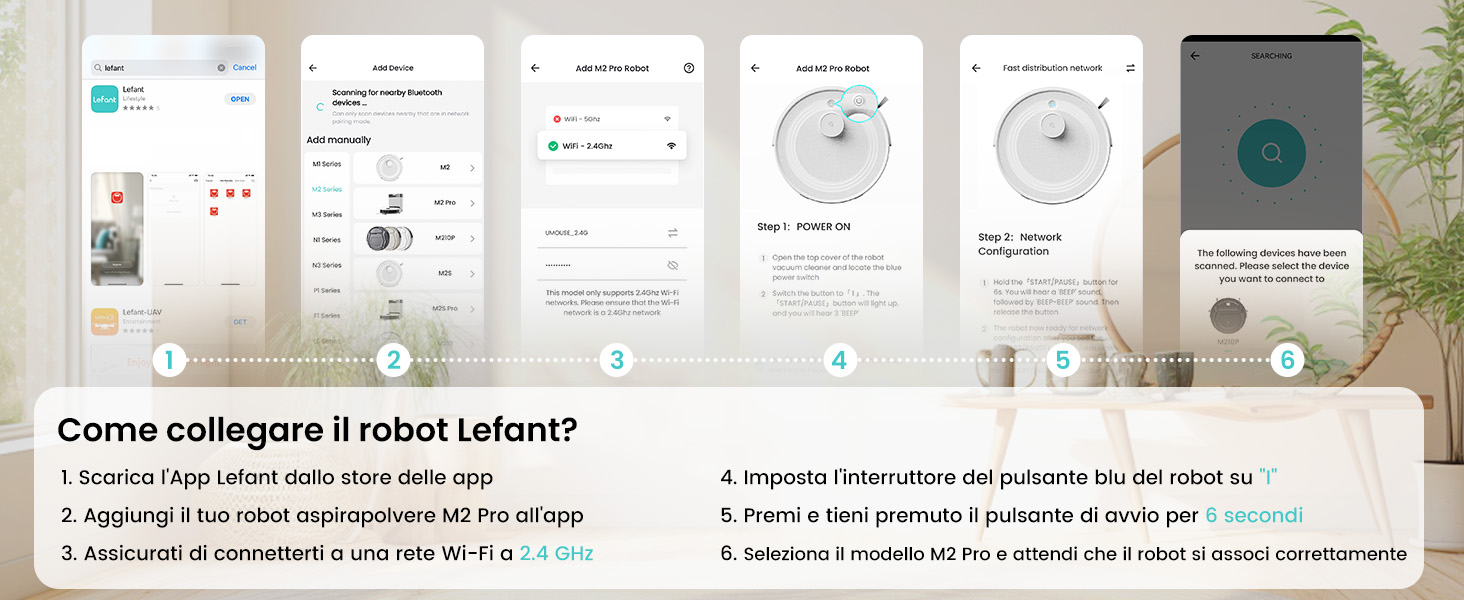
The Lefant app allows for full control and customization of your robot vacuum. Follow these steps to connect:
- Download the 'Lefant' app from your mobile device's app store (App Store for iOS or Google Play Store for Android).
- Abra la aplicación y regístrese o inicie sesión en su cuenta.
- Add your M2 Pro robot vacuum to the app by following the on-screen instructions.
- Ensure your mobile device is connected to a 2.4 GHz Wi-Fi network. The robot only supports 2.4 GHz Wi-Fi.
- Turn on the robot by setting the blue power button to 'I'.
- Press and hold the start button on the robot for 6 seconds until you hear a voice prompt indicating network configuration mode.
- Select the M2 Pro model in the app and wait for the robot to pair successfully.

3.3 Conexión a asistentes de voz (Alexa/Google Home)
For hands-free control, integrate your M2 Pro with Amazon Alexa or Google Home:
- Open the Lefant App. Navigate to Profile > Asistencia de terceros para comandos de voz.
- Registre su cuenta de voz y contraseña dentro de la aplicación Lefant.
- Open the Alexa App (or Google Home App). Go to 'More' > 'Skills & Games' (or 'Works with Google').
- Buscar 'Vida inteligente'.
- Click 'Enable to Use'.
- Seleccione su región e ingrese la cuenta de voz y la contraseña del paso 2.
- Wait for the connection to complete. You can now use voice commands like "Alexa, ask robot to clean."
4. Instrucciones de funcionamiento
4.1 Modos de limpieza
El M2 Pro ofrece varios modos de limpieza para adaptarse a sus necesidades:
- Limpieza automática: El robot navega y limpia de forma inteligente toda tu casa.
- Limpieza de manchas: Se centra en un área sucia específica para una limpieza intensiva.
- Limpieza de bordes: Limpia a lo largo de paredes y bordes de muebles.
- Limpieza programada: Establezca horarios específicos para que el robot limpie automáticamente.
- Limpieza de zonas: Define specific rooms or areas to be cleaned.

4.2 Control de aplicaciones
La aplicación Lefant proporciona un control integral sobre su M2 Pro:
- Iniciar/Pausar limpieza: Iniciar o detener ciclos de limpieza.
- Ajustar la potencia de succión: Choose from multiple suction levels (Low, Medium, High).
- Ajustar el flujo de agua: Control the water output for mopping (Low, Medium, High).
- Establecer zonas prohibidas: Define las áreas que el robot debe evitar.
- View Mapa de limpieza: Monitor the robot's progress and cleaned areas in real-time.
- Programar limpieza: Program daily or weekly cleaning tasks.
- Mapeo de varios pisos: Store maps for up to 3 different floors.

4.3 Control de voz
Once connected to Alexa or Google Home, use simple voice commands:
- "Alexa, pídele al robot que limpie".
- "Alexa, ask robot to recharge."
- "Alexa, pídele al robot que deje de limpiar".

5. Mantenimiento
5.1 Vaciado automático de polvo
The M2 Pro's automatic emptying station collects dust for up to 90 days, minimizing manual intervention. The station uses 2.5L dust bags for hygienic disposal.

5.2 Limpieza del depósito de basura y del filtro
While the automatic station handles most dust, regular inspection and cleaning of the robot's internal dustbin and filters are recommended to maintain optimal performance. The M2 Pro's improved dustbin design ensures 98% debris removal during emptying.

5.3 Mop Cloth and Side Brush Maintenance
- Remove and clean the washable mop cloth after each mopping session.
- Regularly check the side brushes for tangled hair or debris and clean or replace them as needed.
6. Solución de problemas
If you encounter issues with your LEFANT M2 Pro, refer to the following common problems and solutions:
| Problema | Posible causa | Solución |
|---|---|---|
| El robot no arranca ni responde. | Batería baja; Interruptor de encendido apagado; Robot atascado. | Ensure robot is charged; Check power switch; Clear any obstructions. |
| Bajo rendimiento de limpieza. | Cubo de basura lleno; filtros obstruidos; cepillos desgastados. | Vaciar el depósito de basura; limpiar/reemplazar los filtros; limpiar/reemplazar los cepillos. |
| El robot se atasca con frecuencia. | Obstáculos (cables, objetos pequeños); superficies irregulares. | Clear floor of obstacles; Use no-go zones for problematic areas. |
| No se puede conectar a Wi-Fi/Aplicación. | Banda de Wi-Fi incorrecta (no 2.4 GHz); Contraseña incorrecta; El robot no está en modo de emparejamiento. | Ensure 2.4GHz Wi-Fi; Verify password; Re-enter pairing mode (hold start button for 6s). |
| El vaciado automático no funciona. | Dust bag full; Obstruction in emptying duct. | Replace dust bag; Check and clear emptying duct. |
For more detailed troubleshooting, refer to the full user manual or contact customer support.
7. Especificaciones
| Característica | Detalle |
|---|---|
| Marca | LEFANT |
| Nombre del modelo | M2 Pro |
| Color | M2 Pro-black |
| Dimensiones del producto | 32 x 32 x 9.4 cm |
| Peso del artículo | 6.24 kilogramos |
| Capacidad del cubo de basura | 2.5 litros (estación de vaciado automático) |
| Volumentage | 19 voltios |
| Material | Plástico |
| Características especiales | Smart Mapping, dToF Laser Navigation, PSD Obstacle Avoidance, Carpet Boost, App/Voice Control |
| Dispositivos compatibles | Smartphone (2.4GHz Wi-Fi), Alexa, Google Home |
| Superficies recomendadas | Hard floor, Carpet, Parquet, Tiles |
| Tiempo de ejecución máximo | 140 minutos |
8. Garantía y soporte
Los productos LEFANT están diseñados para brindar confiabilidad y rendimiento. Para obtener información sobre la garantía, consulte la documentación incluida con su producto o visite el sitio web oficial de LEFANT. website. If you require technical assistance, have questions about your product, or need to report an issue, please contact LEFANT customer support through the following channels:
- Aplicación Lefant: Acceda a las funciones de soporte directamente dentro de la aplicación.
- Oficial Websitio: Visita www.lefant.com Para preguntas frecuentes, guías de solución de problemas e información de contacto.
- Soporte por correo electrónico: Consulte el embalaje de su producto o el manual oficial. webSitio para la dirección de correo electrónico de soporte dedicada.
Please have your product model number (M2 Pro) and purchase details ready when contacting support to ensure efficient service.


