1. Introducción
This manual provides essential information for the safe and efficient use of your Fujitsu FMVF75K1BA FMV Desktop F 23.8-inch PC. Please read this manual thoroughly before operating the device and retain it for future reference. This desktop PC is designed for general computing tasks, featuring a 23.8-inch Full HD display, an Intel Core i7 processor, 16GB of RAM, and a 512GB storage drive, running Windows 11 Home.
2. Información de seguridad
Tenga en cuenta las siguientes precauciones de seguridad para evitar daños al producto y garantizar la seguridad del usuario:
- Fuente de alimentación: Utilice únicamente el adaptador de corriente incluido con el dispositivo. Asegúrese de que la toma de corriente esté correctamente conectada a tierra.
- Ventilación: Do not block ventilation openings. Maintain adequate space around the PC for proper airflow to prevent overheating.
- Ambiente: Avoid exposing the PC to extreme temperatures, humidity, dust, or direct sunlight. Operate in a stable, dry environment.
- Líquidos y objetos extraños: Keep liquids and foreign objects away from the PC. If liquid enters the device, immediately disconnect power and contact support.
- Servicio: No intente reparar el PC usted mismo. Deje todas las reparaciones a personal técnico cualificado.
- Limpieza: Desconecte el cable de alimentación antes de limpiarlo. Utilice un paño suave y seco. No utilice limpiadores líquidos ni en aerosol.
3. Contenido del paquete
Verifique que todos los artículos estén presentes en el paquete:
- Fujitsu FMVF75K1BA FMV Desktop F 23.8-inch PC
- Adaptador de corriente y cable de alimentación
- Teclado
- Ratón
- Guía de inicio rápido (si está incluida)
- Tarjeta de garantía (si está incluida)
4. Producto terminadoview
The Fujitsu FMVF75K1BA is an all-in-one desktop PC featuring a 23.8-inch display. Key components include the integrated display, CPU, memory, storage, and various input/output ports.
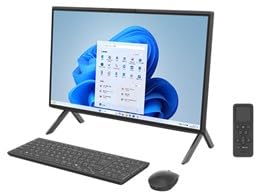
Figura 4.1: Frente view of the Fujitsu FMVF75K1BA FMV Desktop F PC. This image shows the integrated display and the sleek design of the all-in-one unit.
4.1 Panel frontal
- Mostrar: 23.8-inch Full HD (1920x1080) screen.
- Botón de encendido: Located typically on the bottom right or side of the display bezel.
- Webleva: Integrated at the top center of the display.
4.2 Rear/Side Panels
- Puertos USB: For connecting peripherals like keyboard, mouse, external drives.
- Puerto HDMI: For connecting an external monitor or TV.
- Puerto LAN: Para conexión de red cableada.
- Conectores de audio: For headphones, microphone, or external speakers.
- Entrada de energía: Para conectar el adaptador de corriente.
5. Configuración
Siga estos pasos para la configuración inicial:
- Deshacer: Retire con cuidado la PC y todos los accesorios del embalaje.
- Posición: Place the PC on a stable, flat surface with adequate ventilation space around it.
- Conectar el teclado y el ratón: Plug the USB keyboard and mouse into the available USB ports on the PC.
- Conecte la electricidad: Connect the power adapter to the power input port on the PC, then plug the power cord into a grounded electrical outlet.
- Encendido: Presione el botón de encendido para encender la PC.
- Configuración inicial de Windows: Follow the on-screen instructions to complete the Windows 11 Home initial setup, including language, region, network connection, and user account creation.
6. Instrucciones de funcionamiento
6.1 Encendido/Apagado
- Encender: Presione el botón de encendido.
- Para desconectar: Haga clic en el botón Inicio, luego en Encendido y seleccione “Apagar”.
- Para reiniciar: Haga clic en el botón Inicio, luego en Encendido y seleccione "Reiniciar".
- Para dormir: Haga clic en el botón Inicio, luego en Encendido y seleccione “Suspender”.
6.2 Conexión a una red
- Conexión por cable: Connect an Ethernet cable from your router/modem to the LAN port on the PC.
- Conexión inalámbrica (Wi-Fi):
- Haga clic en el icono de Wi-Fi en la barra de tareas.
- Seleccione la red Wi-Fi deseada de la lista.
- Introduzca la clave de seguridad de red (contraseña) si se le solicita.
- Click "Connect". The PC supports IEEE802.11ax (Wi-Fi 6E) for high-speed wireless connectivity.
6.3 Using Microsoft Office + 365
Your PC comes with Microsoft Office + 365. Follow the on-screen instructions upon first launch of any Office application (e.g., Word, Excel) to activate your subscription. An internet connection and a Microsoft account are typically required for activation.
7. Mantenimiento
7.1 Limpieza
- Pantalla: Utilice un paño suave y sin pelusa, especialmente diseñado para dispositivos electrónicos. Para manchas difíciles, limpie ligeramenteampen the cloth with water or a screen cleaner. Do not spray cleaner directly onto the screen.
- Chasis: Wipe the exterior surfaces with a soft, dry cloth. Avoid abrasive materials or harsh chemicals.
- Ventilación: Periodically check and gently clean the ventilation openings to prevent dust buildup, which can impede airflow.
7.2 Actualizaciones de software
Regularly update your Windows operating system and drivers to ensure optimal performance and security. Windows Update typically handles this automatically, but you can manually check by going to Configuración > Actualización de Windows.
7.3 Copia de seguridad de datos
It is highly recommended to regularly back up your important data to an external drive or cloud storage to prevent data loss.
8. Solución de problemas
| Problema | Posible causa | Solución |
|---|---|---|
| La PC no se enciende. | Power cable loose, power outlet issue, power adapter fault. | Revise todas las conexiones eléctricas. Pruebe con otra toma de corriente. Asegúrese de que el adaptador de corriente funcione. |
| No hay visualización en la pantalla. | PC is off, display brightness too low, external monitor not connected (if applicable). | Ensure PC is on. Adjust display brightness. If using an external monitor, check its power and cable connection. |
| No se puede conectar al wifi. | Incorrect password, Wi-Fi adapter off, router issue, out of range. | Verify Wi-Fi password. Check if Wi-Fi is enabled in Windows settings. Restart your router. Move closer to the router. |
| PC is running slow. | Too many programs open, low disk space, malware, outdated drivers. | Close unnecessary applications. Free up disk space. Run a virus scan. Update Windows and drivers. |
9. Especificaciones
| Nombre del modelo | FMVF75K1BA |
| Marca | Fujitsu |
| Mostrar | 23.8 pulgadas, resolución de 1920 x 1080 |
| Procesador | Intel Core i7 |
| RAM | 16 GB |
| Almacenamiento | 512 GB |
| Sistema operativo | Inicio de Windows 11 |
| LAN inalámbrica | IEEE802.11ax (Wi-Fi 6E compatible)/ac/a/b/g/n |
| Puertos | USB, HDMI, LAN, Audio Jacks (specific number and type may vary) |
10. Garantía y soporte
Your Fujitsu FMVF75K1BA PC is covered by a manufacturer's warranty. Please refer to the warranty card included in your package for specific terms and conditions, including the warranty period and coverage details.
For technical support, service, or warranty claims, please contact Fujitsu customer support through their official website or the contact information provided in your warranty documentation. Have your model number (FMVF75K1BA) and serial number ready when contacting support.
Soporte en línea: Visita el soporte oficial de Fujitsu webSitio para conductores, preguntas frecuentes y asistencia adicional.


