1. Introducción
Thank you for choosing the Leadfan Car Radio. This manual provides detailed instructions for the installation, operation, and maintenance of your new 10.1-inch touchscreen stereo replacement for Chevy Silverado and GMC Sierra models manufactured between 2014 and 2018. Please read this manual thoroughly before installation and use to ensure proper function and safety.
Nota importante de compatibilidad:
- This car radio does not support vehicles with premium sound systems (e.g., J.B.L, SO-NY Amplifier, Bose Speakers, OEM camera).
- It is not compatible with vehicles featuring optical fiber audio output.
- If your car's power cord interface has only two cables, this unit is not supported.
Always turn off the car power before connecting any product cables.
2. Información de seguridad
- Asegúrese de que todas las conexiones estén seguras y adecuadamente aisladas para evitar cortocircuitos.
- No opere el dispositivo de una manera que lo distraiga de la conducción.
- Evite exponer la unidad a temperaturas extremas, luz solar directa durante períodos prolongados o humedad excesiva.
- Utilice únicamente cables de alimentación y accesorios especificados.
- Se recomienda la instalación profesional si no está familiarizado con el cableado de audio del automóvil.
3. Contenido del paquete
Verifique que todos los artículos enumerados a continuación estén incluidos en su paquete:
- 10.1-inch Car Radio Unit
- Cámara de respaldo
- Antena GPS
- Microphone (Small)
- Cables USB (x2)
- Cable RCA
- Decodificador de bus CAN
- Cable de alimentación
- Manual de usuario

Figure 3.1: Package contents and unit dimensions. Includes the main unit, backup camera, GPS antenna, microphone, USB cables, RCA cable, Can Bus, power cable, and user manual.
4. Configuración e instalación
This unit is designed for plug-and-play installation for compatible Chevy Silverado and GMC Sierra models (2014-2018). Necessary wiring harnesses are included.
4.1 Preinstalación
- Ensure your vehicle is compatible as per the Introduction section.
- Apague el encendido del vehículo y desconecte el terminal negativo de la batería del automóvil para evitar cortocircuitos eléctricos.
- Retire con cuidado la radio de fábrica y la moldura del tablero. Consulte el manual de servicio de su vehículo para obtener instrucciones específicas sobre cómo retirar la moldura.
4.2 conexiones de cableado
Connect the provided wiring harnesses to the corresponding ports on the new car radio and your vehicle's wiring. Ensure all connections are firm.
- Cable de energía: Conectar al arnés de alimentación del vehículo.
- Cable RCA: Para entrada/salida de audio/video externa.
- Cables USB: For USB devices and wired CarPlay/Android Auto (if applicable).
- Entrada inversa: Connect to the backup camera signal.
- Antena GPS: Móntelo en un lugar despejado. view del cielo.
- Antena de radio: Conectar a la antena de radio del vehículo.
- micrófono: Conecte el micrófono externo para mejorar la calidad de las llamadas.
4.3 Instalación de la cámara de respaldo
The included 1080p high-definition backup camera provides a 170° wide-angle view with night vision. Connect the camera as follows:
- Mount the backup camera at the rear of your vehicle.
- Connect the video cable from the camera to the 'Reverse Input' on the car radio.
- Connect the camera's power cable to your vehicle's reverse light power source (positive and negative). This ensures the camera activates when reverse gear is engaged.

Figure 4.1: Visual comparison of the vehicle dashboard before and after installing the Leadfan car radio.
Figure 4.2: Detailed diagram showing the wiring connections for the backup camera, highlighting HD, wide-angle, waterproof, and night vision features.
4.4 Montaje definitivo
- Carefully place the new car radio into the dashboard opening.
- Secure the unit with screws or clips as per your vehicle's requirements.
- Reinstale cualquier pieza de moldura del tablero que haya retirado.
- Vuelva a conectar el terminal negativo de la batería del automóvil.
5. Instrucciones de funcionamiento
5.1 Power On/Off and Basic Touchscreen Operation
Press the power button to turn the unit on or off. The 10.1-inch HD touchscreen supports intuitive touch gestures for navigation and control. Swipe gestures allow for easy switching between applications.

Figure 5.1: The 10.1-inch HD touchscreen interface, demonstrating touch responsiveness and split-screen capabilities.
5.2 CarPlay y Android Auto inalámbricos
This unit supports wireless CarPlay for iPhone and wireless/wired Android Auto for Android phones, allowing seamless integration of your smartphone's features.
- Asegúrese de que Bluetooth y Wi-Fi estén habilitados en su teléfono inteligente.
- En la radio del coche, seleccione la aplicación CarPlay o Android Auto.
- Follow the on-screen prompts to pair your device. Once connected, you can access navigation, music, calls, and other compatible apps directly from the car radio display.
5.3 Enlace espejo
MirrorLink allows you to mirror your smartphone's screen onto the car radio display. iOS devices support wireless connection, while Android devices support both wireless and wired connections.
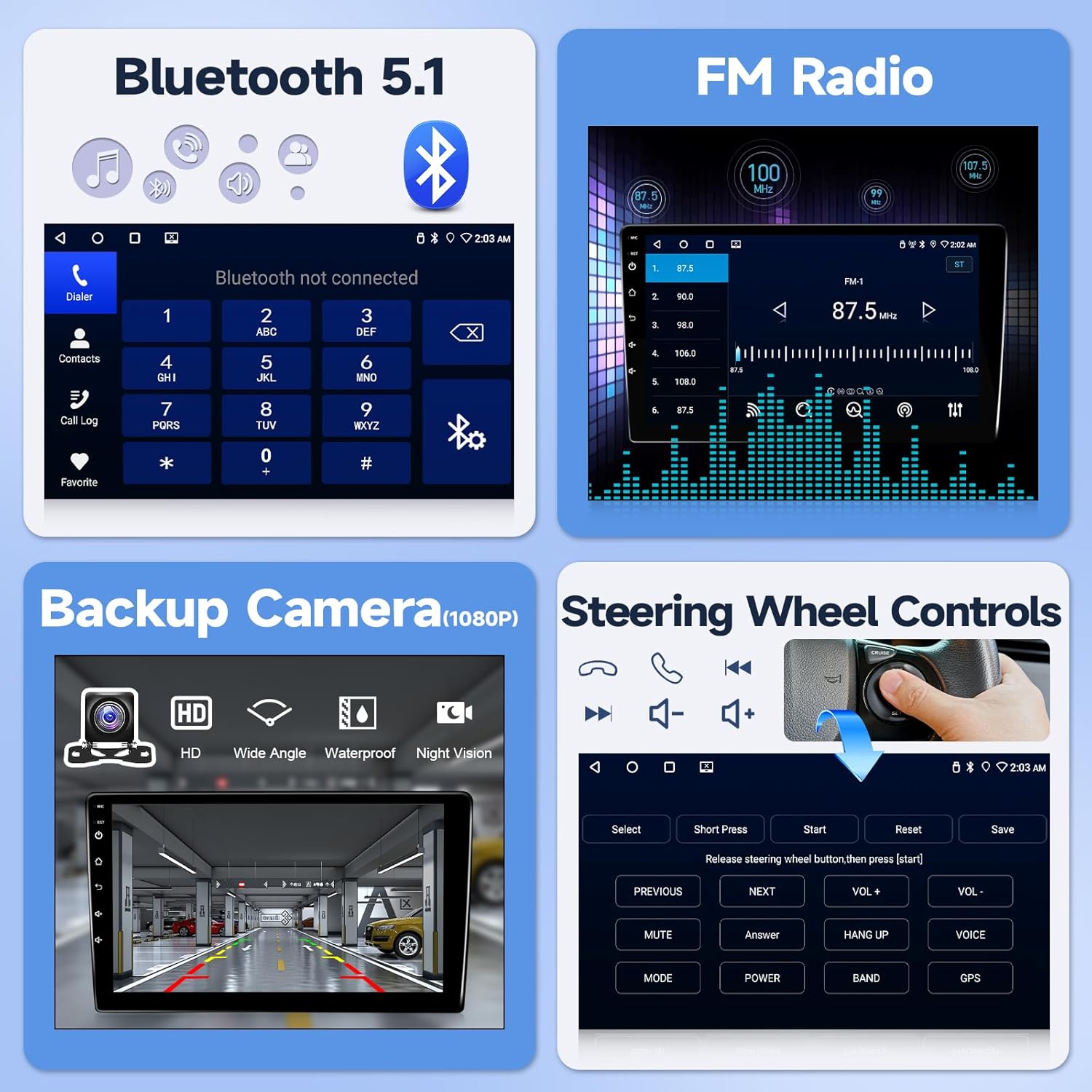
Figure 5.2: Illustration of wireless CarPlay, Android Auto, and MirrorLink functionality, showing how smartphones connect to the car radio.
5.4 bluetooth 5.1
Conecte su teléfono inteligente a través de Bluetooth para realizar llamadas manos libres y transmisión de audio.
- Vaya a la configuración de Bluetooth en la radio del automóvil.
- Habilite Bluetooth en su teléfono inteligente y busque dispositivos disponibles.
- Seleccione la radio del automóvil de la lista y confirme el emparejamiento.
- Una vez emparejado, podrá realizar/recibir llamadas y reproducir música a través de los altavoces del automóvil.
5.5 Navegación GPS
The unit features a built-in GPS navigation system supporting both offline and online maps. The large screen provides clear map routes.
- Asegúrese de que la antena GPS esté correctamente instalada y tenga una vista clara. view del cielo.
- Open the navigation application on the car radio.
- Ingrese su destino para recibir indicaciones paso a paso.
5.6 Radio FM
Access real-time radio programs and save your favorite stations.
- Select the FM Radio application.
- Utilice la función de escaneo para encontrar estaciones disponibles o sintonizar manualmente una frecuencia.
- Guarde las estaciones que escucha con frecuencia para acceder rápidamente.

Figura 5.3: Sobreview of Bluetooth 5.1, FM Radio interface, backup camera display, and steering wheel control learning interface.

Figure 5.4: Displaying GPS navigation with online and offline map options, alongside WiFi connectivity for app downloads and internet access.
5.7 Controles del volante (SWC)
The unit supports steering wheel control functions for a safer driving experience.
- After correct wiring, access the SWC learning interface in the system settings.
- Siga las instrucciones en pantalla para asignar funciones a los botones del volante.
5.8 Función de pantalla dividida
Use two applications simultaneously with the split-screen feature. Swipe gestures allow for easy switching between applications.
6. Funciones terminadasview
- Sistema operativo: Android system with 4-core processor for smooth performance.
- Memoria: 2GB RAM + 32GB ROM for app storage.
- Mostrar: 10.1-inch HD touchscreen (1280x720 resolution).
- Conectividad: Wireless CarPlay, Android Auto, MirrorLink, Bluetooth 5.1, Wi-Fi, USB.
- Navegación: Built-in GPS with support for offline and online maps.
- Audio: FM Radio, EQ settings for customized sound.
- Seguridad: Supports 1080p HD backup camera with 170° wide-angle night vision.
- Control: Compatibilidad con control del volante (SWC).
- Interfaz de usuario: 24 types of customizable UI designs.
7. Solución de problemas
Si encuentra problemas, consulte los siguientes problemas y soluciones comunes:
- Sin energía: Ensure all power cables are securely connected and the vehicle's battery is charged. Check the fuse.
- Sin sonido: Verify speaker connections. Check volume levels and EQ settings. Ensure the mute function is not active.
- Pérdida de señal GPS: Asegúrese de que la antena GPS esté correctamente instalada y tenga un espacio libre de obstrucciones. view del cielo.
- Problemas de conexión Bluetooth/Wi-Fi: Restart both the car radio and your smartphone. Ensure no other devices are interfering with the connection.
- La cámara de respaldo no se muestra: Check the camera's power and video connections. Ensure the reverse trigger wire is correctly connected to the vehicle's reverse light.
- Los controles del volante no funcionan: Verify wiring and ensure the SWC learning process has been completed successfully in the settings.
For further technical assistance, please contact customer support as described in Section 9.
8. Especificaciones
| Característica | Especificación |
|---|---|
| Tamaño de la pantalla | 10.1 pulgadas |
| Sistema operativo | Androide |
| Capacidad de almacenamiento de memoria | 32 GB |
| Tecnología de conectividad | Bluetooth, USB, Wi-Fi |
| Características especiales | Android Auto, Bluetooth, CarPlay, Waterproof (Backup Camera) |
| Tipo de mapa | América del norte |
| Modo de salida de audio | Estéreo |
| Tipo de montaje | Montaje en tablero de instrumentos |
| Peso del artículo | 4.71 libras |
| Dimensiones del paquete | 17.01 x 12.2 x 4.49 pulgadas |
9. Garantía y soporte
This product comes with a standard warranty. Please refer to your purchase documentation for specific warranty terms and duration.
For technical support, installation queries, or troubleshooting assistance, please follow these steps:
- Locate the seller information on your purchase platform (e.g., Amazon).
- Click on the seller's name (e.g., "Nideo").
- Select the option to "Ask a question" or contact the seller directly.
- Provide a detailed description of your issue, including any photos or videos if relevant.
The seller typically offers:
- Política de devolución gratuita de 30 días.
- 12-month replacement for quality issues.
- Lifetime technical support with responses within 24 hours.
- Professional customer service.

Figure 9.1: Visual guide on how to access technical support through the seller's contact options on the purchase platform.


