Introducción
Thank you for choosing the Billboard Soul Advance True Wireless Stereo (TWS) Earbuds. These earbuds are designed to provide a superior audio experience with Active Noise Cancellation (ANC), Environmental Noise Cancellation (ENC), and a comfortable, splash-resistant design. This manual will guide you through the setup, operation, and maintenance of your new earbuds.
Información de seguridad
- No exponga los auriculares ni el estuche de carga a temperaturas extremas ni a la luz solar directa durante períodos prolongados.
- Evite dejar caer o aplicar fuerza excesiva sobre el dispositivo.
- Keep the earbuds and charging case away from water and liquids, except for light splashes as per IPX4 rating. Do not submerge.
- No intente desmontar ni modificar el producto. Esto anulará la garantía.
- Utilice únicamente el cable de carga proporcionado o un equivalente certificado.
- Listening at high volumes for prolonged periods can cause hearing damage. Adjust volume to a safe level.
Contenido del paquete
- Billboard Soul Advance TWS Earbuds (Left and Right)
- Estuche de carga
- Cable de carga USB
- Manual de usuario
Producto terminadoview
Familiarize yourself with the components of your Billboard Soul Advance TWS Earbuds and charging case.
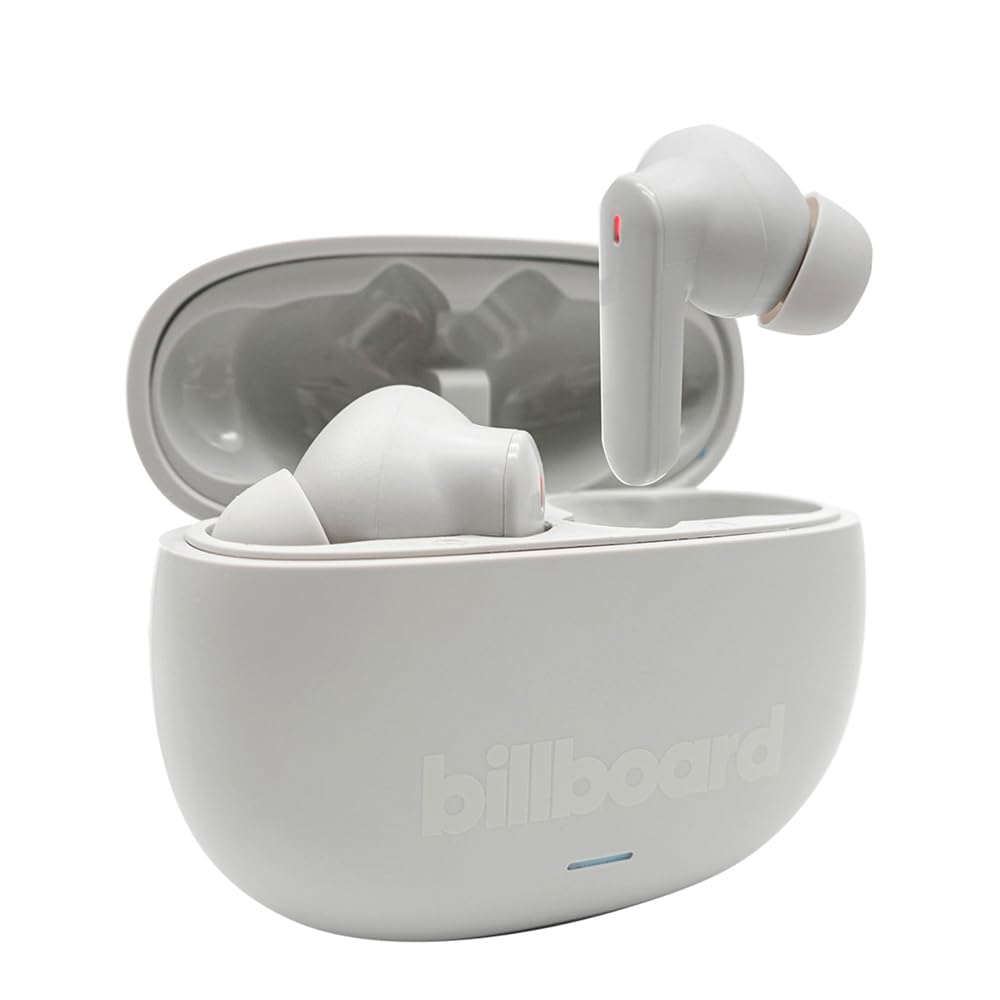
Image: The Billboard Soul Advance TWS Earbuds resting inside their open charging case. The earbuds are grey with red indicator lights visible, and the case is also grey with the 'billboard' logo embossed on the front.

Image: The Billboard Soul Advance TWS Earbuds charging case in a closed position. The case is grey with the 'billboard' logo embossed on the front and a small indicator light at the bottom.
Image: A person holding a single Billboard Soul Advance TWS earbud and the open charging case, demonstrating the compact size and design.
Configuración
1. Carga de los auriculares y el estuche
Antes del primer uso, cargue completamente los auriculares y el estuche de carga.
- Coloque los auriculares en el estuche de carga. Asegúrese de que estén correctamente colocados en sus respectivas ranuras.
- Conecte el cable de carga USB al puerto de carga del estuche y a una fuente de alimentación USB (por ejemplo, computadora, adaptador de pared).
- The indicator light on the case will show charging status. Once fully charged, the indicator will change or turn off. A full charge takes approximately 5 hours for the case and earbuds.
2. Emparejamiento con un dispositivo
To connect your earbuds to a smartphone or other Bluetooth-enabled device:
- Abra el estuche de carga. Los auriculares entrarán automáticamente en modo de emparejamiento, lo cual se indicará mediante luces intermitentes.
- En su dispositivo, vaya a la configuración de Bluetooth y asegúrese de que Bluetooth esté habilitado.
- Buscar available devices and select "Billboard Soul Advance" from the list.
- Una vez conectado, las luces indicadoras de los auriculares dejarán de parpadear.
- Los auriculares se volverán a conectar automáticamente al último dispositivo emparejado cuando se retiren del estuche, si Bluetooth está habilitado en el dispositivo.
Operante
Controles táctiles
The earbuds feature touch-sensitive controls on their outer surface. Specific functions may vary slightly by device or app.
| Acción | Función |
|---|---|
| Un solo toque (izquierda/derecha) | Reproducir / Pausar música, Responder / Finalizar llamada |
| Doble toque (derecha) | Pista siguiente |
| Doble toque (izquierda) | Pista anterior |
| Triple toque (izquierda/derecha) | Activar Asistente de Voz |
| Pulsación larga (izquierda/derecha) | Alternar modo ANC/Transparencia |
| Llamada entrante pulsación larga | Rechazar llamada |
Cancelación activa de ruido (ANC) y cancelación de ruido ambiental (ENC)
The Soul Advance earbuds feature both ANC and ENC for an optimized listening and calling experience.
- Cancelación activa de ruido (ANC): Reduces external ambient noise, allowing for a more immersive audio experience. Activate/deactivate by long-pressing an earbud.
- Cancelación de ruido ambiental (ENC): Utilizes 4 built-in microphones to filter out background noise during calls, ensuring clearer conversations for both you and the listener. This feature is active automatically during calls.

Image: A graphic illustrating the concept of Ultra ANC (Active Noise Cancellation), showing sound waves being blocked by headphones, emphasizing a quiet listening experience.
Mantenimiento
Limpieza
- Limpie suavemente los auriculares y el estuche de carga con un paño suave, seco y sin pelusa.
- No utilice limpiadores abrasivos, alcohol ni disolventes químicos.
- Asegúrese de que los contactos de carga de ambos auriculares y del estuche estén limpios y secos para una carga óptima.
Almacenamiento
Cuando no los utilice, guarde los auriculares en su estuche de carga para protegerlos y mantenerlos cargados.
Solución de problemas
| Problema | Solución |
|---|---|
| Los auriculares no se emparejan | Asegúrate de que los auriculares estén cargados. Apaga y enciende el Bluetooth de tu dispositivo. Olvídalo en la configuración de Bluetooth y vuelve a emparejarlo. |
| Solo funciona un auricular | Place both earbuds back in the case, close it, then open again. Ensure both are charged. |
| Sin sonido | Comprueba el volumen del dispositivo. Asegúrate de que los auriculares estén conectados. Prueba a reproducir otro audio. |
| Problemas de carga | Ensure charging cable is securely connected. Clean charging contacts. Try a different USB port or cable. |
Presupuesto
- Nombre del modelo: Soul Advance
- Tecnología de conectividad: Inalámbrico
- Componentes incluidos: Estación de carga
- Usos específicos: Actividades al aire libre, Deportes
- Tiempo de carga: Aproximadamente 5 horas
- Dispositivos compatibles: Phones, Tablets
- Nivel de resistencia al agua: IPX4 (resistente a salpicaduras)
- Duración media de la batería: 27 horas (con estuche de carga)
- Colocación de la oreja: En la oreja
- Factor de forma: En la oreja
- Control de ruido: Cancelación activa de ruido

Image: A graphic highlighting long battery life, showing headphones with '40H' and earbuds with '42H*' (battery + case), indicating extended usage times.
Vídeos oficiales de productos
Video: Product demonstration video (0:49 duration).
Video: Product feature overview (0:44 duration).
Video: Additional product details (0:44 duration).
Video: Short product highlight (0:24 duration).
Video: Product feature showcase (0:24 duration).
Video: Detailed product review/demonstration (1:57 duration).
Video: Quick product overview (0:34 duration).
Video: Comprehensive product guide (2:00 duration).
Garantía y soporte
Your Billboard Soul Advance TWS Earbuds come with a standard manufacturer's warranty. For detailed warranty information, please refer to the warranty card included in your package or visit the official Billboard website. For technical support or customer service, please contact the retailer or manufacturer directly.
For returns, a 30-day free return policy is available from the purchase date.


