1. Introducción
This manual provides detailed instructions for the installation, operation, and maintenance of your Leadfan 10.1 Inch Android 11 Car Stereo. This system is designed to upgrade the in-car entertainment and navigation experience for compatible Lexus IS series vehicles. Please read this manual thoroughly before installation and use to ensure proper function and safety.

Image 1.1: Leadfan 10.1 Inch Android 11 Car Stereo for Lexus IS250, IS300, IS350 (2006-2012).
2. Producto terminadoview y características clave
The Leadfan Android 11 Car Stereo offers a comprehensive upgrade to your vehicle's infotainment system. Key features include:
- Sistema operativo: Android 11 with 4-Core CPU, 2GB RAM, and 32GB ROM.
- Mostrar: Pantalla táctil IPS de 10.1 pulgadas con resolución de 1024x600.
- Conectividad: Wireless Apple CarPlay, Android Auto, wired/wireless Mirror Link, Bluetooth 5.1, Wi-Fi hotspot.
- Navegación: Built-in GPS module with preloaded offline map data, supporting online navigation apps.
- Audio: FM Radio, 10-band EQ, DSP for enhanced sound.
- Soporte de cámara: Trasero view camera input with 170° viewángulo de ing.
- Control: Steering Wheel Control (SWC) compatibility, voice control.
- Multitarea: Función de pantalla dividida para uso simultáneo de aplicaciones.
- Puertos adicionales: 2 USB ports, AUX audio and video input, external microphone jack.
3. Compatibilidad
This car stereo is specifically designed for the following Lexus IS series models:
- Lexus IS250, IS300, IS350 (2006-2012) without original factory screen.
- Lexus IS250, IS300, IS350 (2006-mid 2009) with original factory screen.
Nota importante: Esta unidad es NO compatible with Lexus IS models from mid-2009 to 2012 that have an original factory screen, factory premium audio systems, or a white climate control frame.

Image 3.1: Visual guide for Lexus IS series compatibility, showing installable and non-installable configurations.
4. Contenido del paquete
Verifique que todos los artículos enumerados a continuación estén incluidos en su paquete:
- 10.1 inch IPS Touchscreen Android Radio Headunit
- Radio Kit Frame for Lexus IS250 IS300 IS350 (2006-2012)
- Cámara de respaldo
- Cable de entrada de cámara de marcha atrás
- Antena GPS
- Cable amplificador de señal WiFi y Bluetooth
- Arnés de alimentación Plug and Play
- Decodificador CanBus
- Micrófono externo
- Manual de usuario
- Cables USB (x2)
- Cable RCA
- Installation Kit (brackets)
- OBD Cable (optional, if included)

Image 4.1: Contents of the product package and main unit dimensions.
5. Guía de instalación (Configuración)
Se recomienda la instalación profesional. Asegúrese de que la batería del vehículo esté desconectada antes de comenzar la instalación. Consulte el manual de servicio de su vehículo para obtener instrucciones específicas sobre el desmontaje del tablero.
5.1 Pasos generales de instalación:
- Retire con cuidado la radio original del automóvil y la moldura del tablero.
- Connect the provided power harness to the car's wiring and the new head unit.
- Connect the GPS antenna, Wi-Fi/Bluetooth antenna, and any other necessary cables (USB, RCA, external microphone).
- If installing the backup camera, route the camera cable to the rear of the vehicle and connect it to the head unit's reverse input. Ensure the camera's power is connected to the vehicle's reverse light circuit.
- Mount the new head unit into the dashboard using the provided installation kit.
- Vuelva a conectar la batería del vehículo y pruebe todas las funciones antes de volver a ensamblar el tablero.

Image 5.1: Comparison of wiring complexity between the Leadfan unit and traditional aftermarket radios.

Imagen 5.2: Example of the integrated installation effect of the Leadfan unit compared to a universal model.
6. Instrucciones de funcionamiento
6.1 Configuración inicial
Upon first power-on, the system may guide you through initial setup steps, including language selection, time zone, and Wi-Fi connection. Follow the on-screen prompts.
6.2 CarPlay y Android Auto inalámbricos
Connect your smartphone wirelessly via Bluetooth and Wi-Fi, or via USB cable, to access Apple CarPlay or Android Auto. This allows for seamless integration of phone functions like navigation, music, calls, and messages directly on the stereo display. Voice control is supported for hands-free operation.
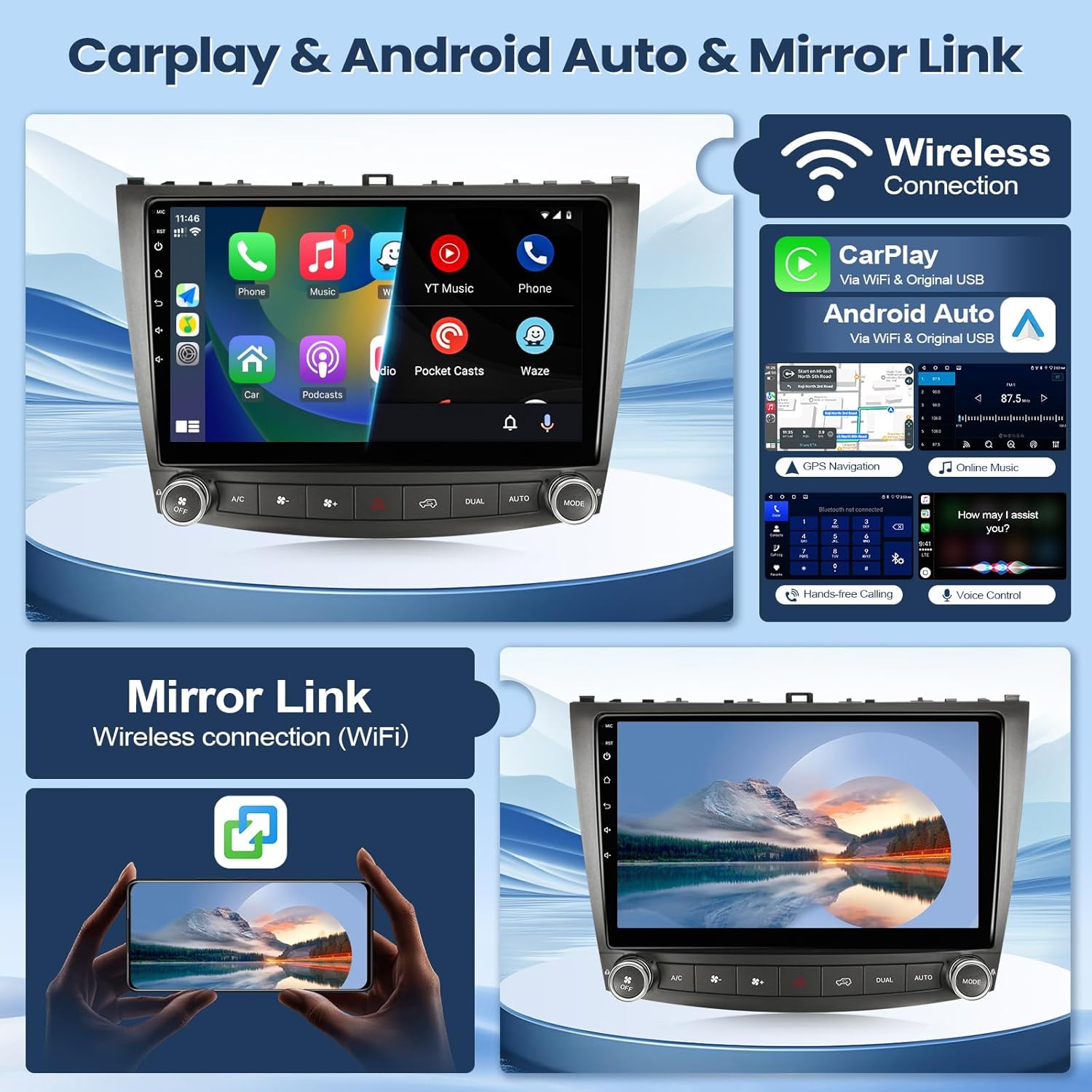
Imagen 6.1: Másview of Wireless CarPlay, Android Auto, and Mirror Link functionalities.
6.3 Navegación GPS y Wi-Fi
The unit features a built-in GPS module with preloaded offline maps. You can also connect to a Wi-Fi hotspot (e.g., from your smartphone) to download online navigation applications and other apps from the Play Store.

Image 6.2: Display of GPS navigation and available Wi-Fi connectivity options.
6.4 bluetooth 5.1
Pair your mobile phone via Bluetooth for hands-free calling and audio streaming. The system supports answering/making calls directly from the unit, with clear audio through the built-in or external microphone.
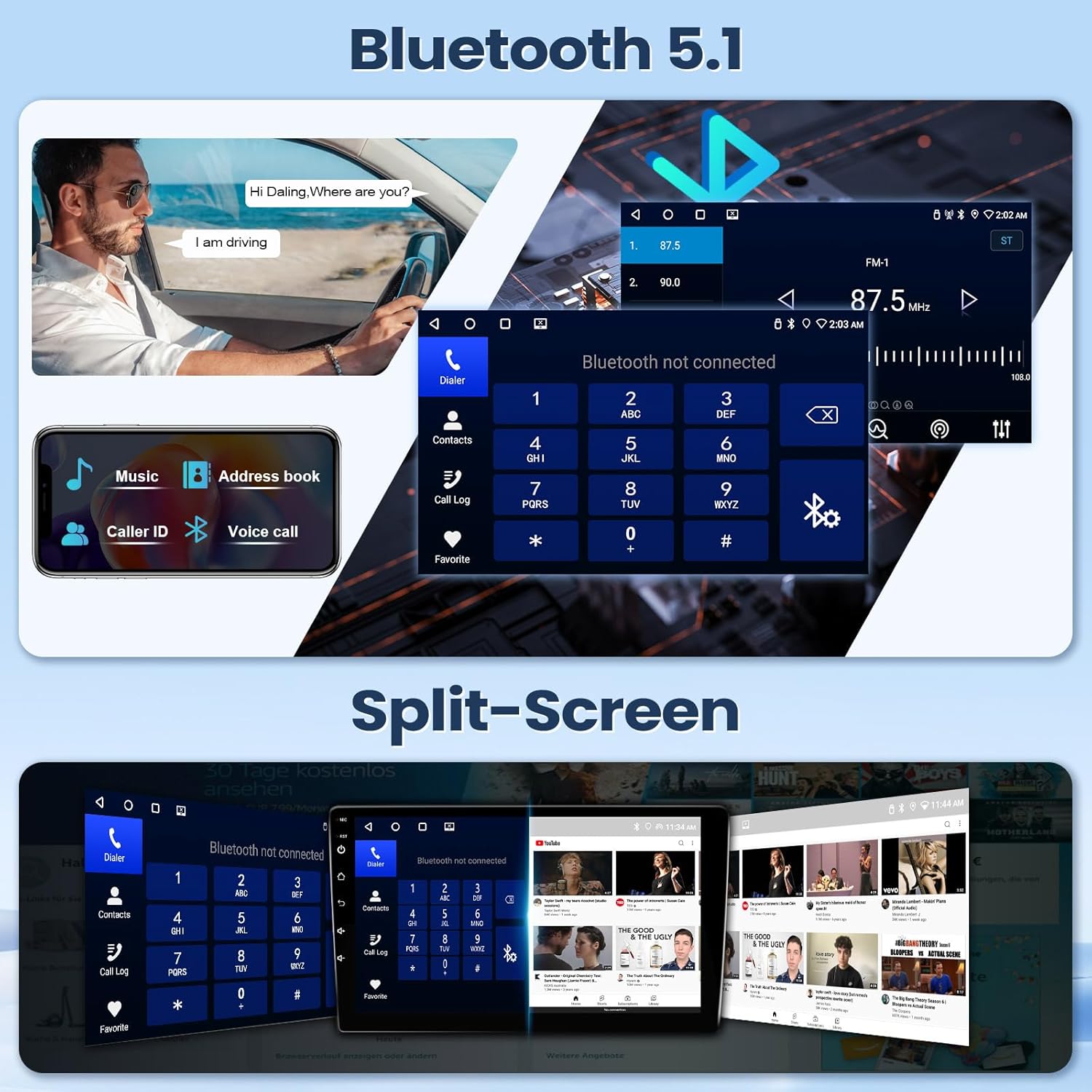
Image 6.3: Bluetooth 5.1 interface for calls and music, alongside the split-screen feature.
6.5 Radio FM
Access FM radio stations with automatic and manual search functions. Save your favorite stations for quick access.

Image 6.4: Audio equalization (EQ) and Digital Sound Processor (DSP) settings, and the FM radio interface.
6.6 Función de pantalla dividida
Utilice la función de pantalla dividida para ejecutar dos aplicaciones simultáneamente, como la navegación en un lado y la reproducción de música en el otro.
6.7 Entrada de cámara de marcha atrás
When the vehicle is shifted into reverse, the system automatically displays the feed from the connected backup camera, providing a wide viewing angle for safer maneuvering.
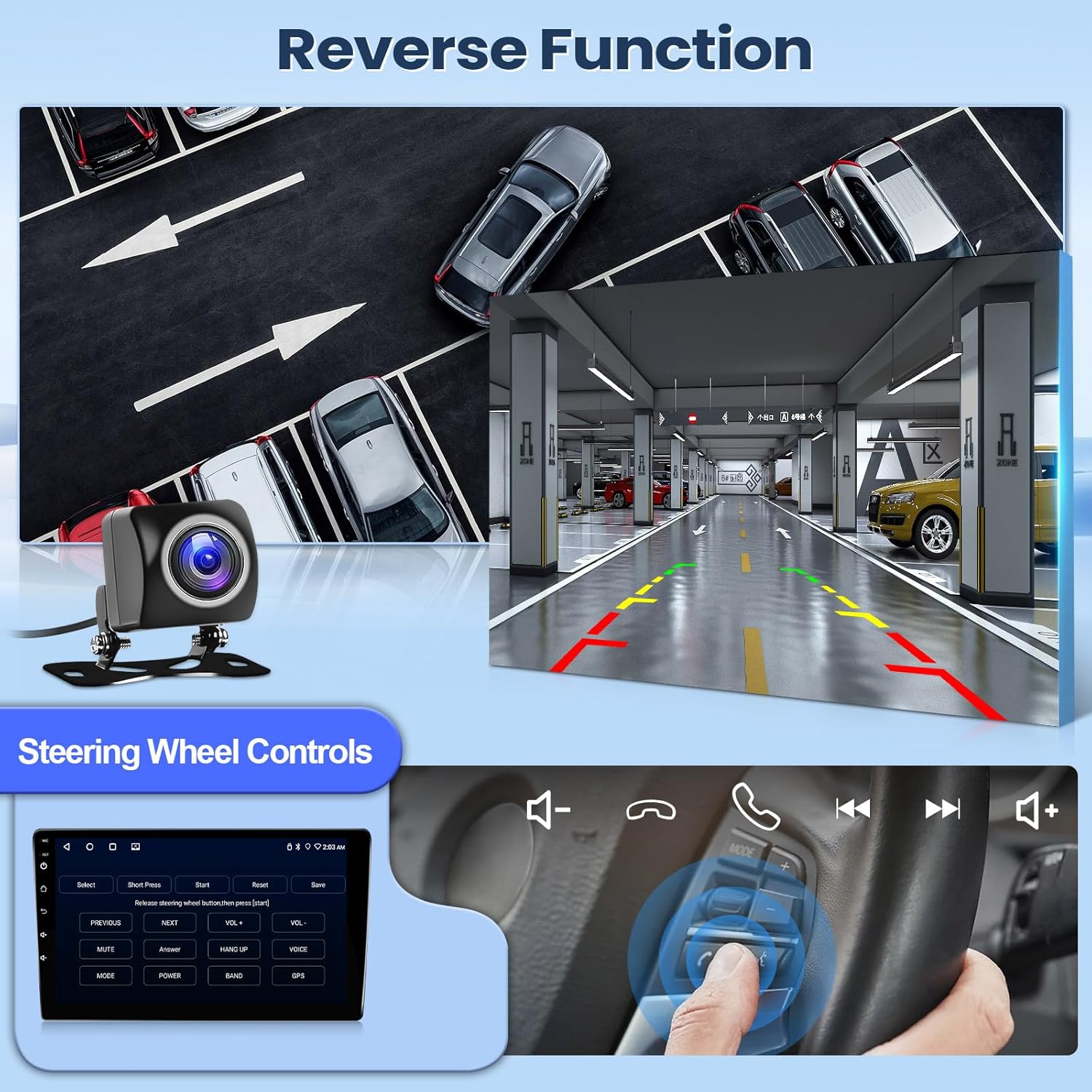
Image 6.5: Demonstration of the reverse camera display and steering wheel control functionality.
6.8 Control del volante (SWC)
La unidad admite la integración con los controles del volante existentes de su vehículo, lo que le permite administrar audio, llamadas y otras funciones sin quitar las manos del volante.
7. Mantenimiento
Para garantizar la longevidad y el rendimiento óptimo del estéreo de su automóvil, siga estas pautas de mantenimiento:
- Limpieza: Utilice un paño suave y seco para limpiar la pantalla y la unidad. Para manchas difíciles, frote ligeramente.ampEnjuague el paño con agua o un limpiador de pantallas. Evite materiales abrasivos o productos químicos agresivos.
- Temperatura: Evite exponer la unidad a temperaturas extremas durante períodos prolongados.
- Actualizaciones de software: Verifique e instale periódicamente las actualizaciones de software disponibles para mejorar el rendimiento y agregar nuevas funciones.
- Conexiones de cable: Asegúrese de que todos los cables estén bien conectados. Las conexiones flojas pueden causar problemas intermitentes.
8. Solución de problemas
Si tiene problemas con el estéreo de su automóvil Leadfan, consulte los siguientes pasos comunes de solución de problemas:
- Sin energía: Revise todas las conexiones eléctricas y los fusibles. Asegúrese de que la batería del vehículo esté cargada.
- Sin sonido: Verifique las conexiones de los altavoces. Compruebe el volumen y la configuración de audio (ecualizador, balance, atenuador). Asegúrese de que la fuente de audio seleccionada sea la correcta.
- La pantalla táctil no responde: Intente reiniciar la unidad. Si el problema persiste, podría ser necesario restablecer la configuración de fábrica (nota: esto borrará los datos del usuario).
- El GPS no funciona: Asegúrese de que la antena GPS esté correctamente instalada y tenga una vista clara. view del cielo. Verifique la configuración del GPS dentro de la unidad.
- Problemas de conexión Bluetooth: Asegúrate de que el Bluetooth esté activado tanto en el estéreo como en tu teléfono. Elimina los emparejamientos anteriores e intenta volver a conectar.
- CarPlay/Android Auto no se conecta: Verify your phone's compatibility and ensure the app is updated. Try both wired and wireless connections. Check USB cable integrity if using a wired connection.
- La cámara de respaldo no se muestra: Revise las conexiones de alimentación y señal de video de la cámara. Asegúrese de que el cable del disparador de reversa esté correctamente conectado al circuito de la luz de reversa del vehículo.
Si estos pasos no resuelven el problema, comuníquese con el servicio de atención al cliente para obtener más ayuda.
9. Especificaciones
| Dimensiones del producto | 11.02 x 4.45 x 14.68 pulgadas |
| Peso del artículo | 3.96 libras (1.8 kilogramos) |
| Número de modelo | 2+32G CarPlay for Lexus 2006-2012 |
| Sistema operativo | Androide 11 |
| UPC | 4 núcleos |
| RAM | 2 GB |
| memoria de sólo lectura | 32 GB |
| Tamaño de pantalla | 10.1 pulgadas (diagonal de pantalla visible: 9" / 23 cm) |
| Resolución de pantalla | Pantalla táctil IPS HD de 1024 x 600 |
| Tecnología de conectividad | Wired (Original USB Cable), Wireless (Bluetooth & Wi-Fi) |
| Versión de Bluetooth | 5.1 |
| Características especiales | Apple CarPlay, Android Auto, Mirrorlink, GPS Module, IP68 AHD backup camera, Steering Wheel Control, Hands-Free Calling, Voice Control, Split-screen, FM, DSP, RDS, AUX, EQ, RAC Audio/Video Output, CanBus, 2 USB ports, External Mic Jack |
| Modo de salida de audio | Estéreo |
| Codificación de vídeo | H.264, H.265/HEVC, MPEG-4, etc. |
10. Garantía y soporte
Leadfan provides professional technical support and high-quality customer service for this product. We offer lifetime technical support.
If you have any questions regarding installation, wiring, operation, or any other aspect of your Leadfan car stereo, please contact customer service or technical support through your purchase platform. Look for the "sold by Leedfan" link and click "ask a question" to reach our support team.


