1. Producto terminadoview
The Nokia G310 5G Smartphone (Model TA-1573) offers lightning-fast 5G connectivity and modern mobile technology. It features a vibrant display for various tasks, a powerful processor for smooth performance, and an advanced camera system for detailed photos. Designed for daily use, it provides a comfortable grip and durable build quality. Enjoy extensive network compatibility, ample storage, a long-lasting battery with quick charging, and a user-friendly interface with regular software updates.
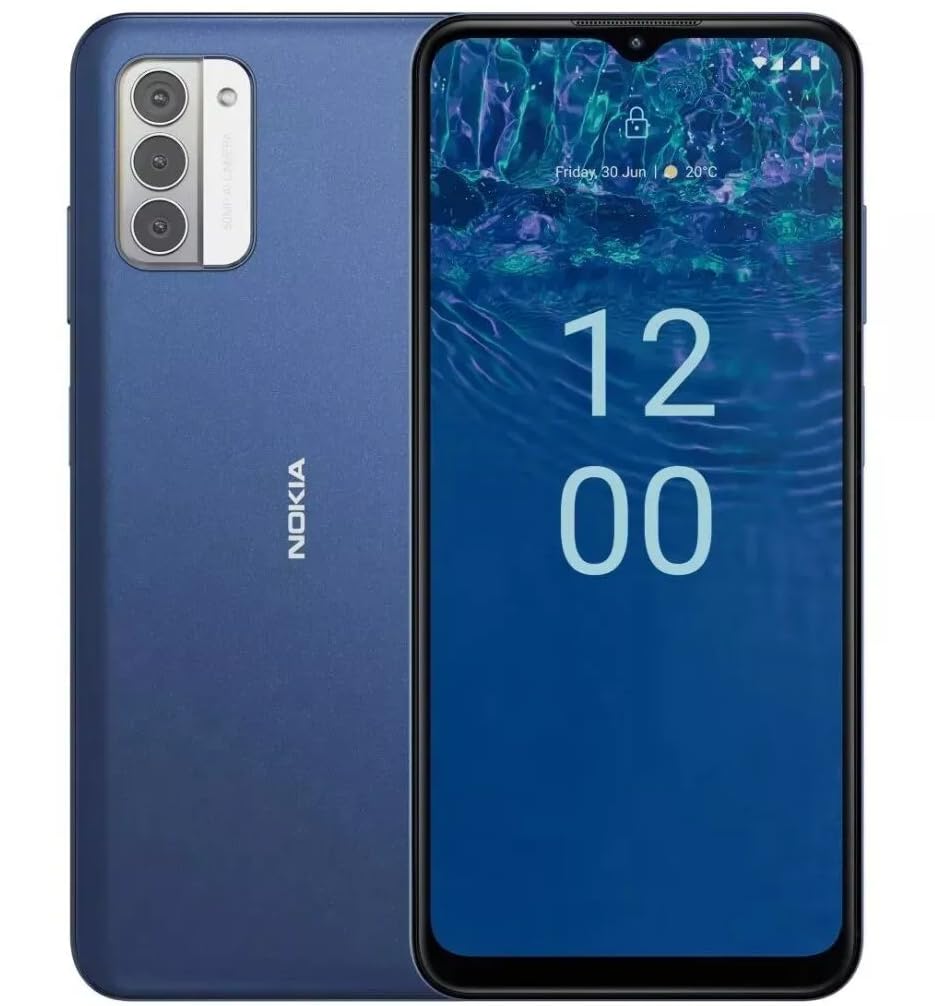
Imagen: Trasera view of the Nokia G310 5G Smartphone, showcasing the triple camera module and Nokia branding.
Características principales
- Conectividad 5G: Experience ultra-fast mobile data speeds and low latency.
- Pantalla vibrante: Large touchscreen display delivers vibrant colors and sharp visuals.
- Rendimiento eficiente: Processor handles everyday tasks smoothly, from browsing to gaming.
- Diseño duradero: Sleek and modern smartphone design with durable construction.
2. Primeros pasos
¿Qué hay en la caja?
- Teléfono inteligente Nokia G310 5G
- Cargador
Instalación de tarjetas SIM y MicroSD
Locate the SIM/MicroSD card tray on the side of your device. Use the provided SIM ejector tool to open the tray. Insert your Nano-SIM card(s) and/or MicroSD card into the designated slots. Ensure the cards are correctly oriented. Gently push the tray back into the device until it clicks into place.
Encendido/apagado
To power on your Nokia G310, press and hold the Power/Fingerprint Sensor button located on the right side of the device until the Nokia logo appears. To power off, press and hold the Power/Fingerprint Sensor button, then select 'Power off' from the options that appear on the screen.
3. Disposición del dispositivo
Botones y puertos físicos
- Botones de volumen: Located on the right side, above the Power/Fingerprint Sensor button, for adjusting media and call volume.
- Power/Fingerprint Sensor Button: Located on the right side, used for powering the device on/off, locking/unlocking the screen, and fingerprint authentication.
- Puerto USB-C: Ubicado en la parte inferior, se utiliza para cargar y transferir datos.
- Conector de audio de 3.5 mm: Ubicado en la parte inferior, para conectar auriculares con cable.
- Vocero: Ubicado en la parte inferior para salida de audio.
- Micrófono: Integrado para llamadas y comandos de voz.
Módulo de cámara
The rear of the device features a multi-lens camera module, including a main camera, along with a flash for low-light photography. The front-facing camera is discreetly placed within a notch at the top of the display.
4. Instrucciones de funcionamiento
Navegación básica
The Nokia G310 operates on the Android operating system, offering an intuitive touchscreen interface. Swipe up from the bottom of the screen to access the app drawer, swipe down from the top for notifications and quick settings, and use gestures or navigation buttons (configurable in settings) to move between apps and screens.
Conectividad
- Datos celulares 5G: The device supports 5G connectivity for ultra-fast mobile data speeds. Ensure your SIM card and plan support 5G.
- Wifi: Conéctate a redes inalámbricas para acceder a internet. Ve a Ajustes > Red e internet > Wi-Fi para administrar las conexiones.
- Bluetooth: Pair with other Bluetooth-enabled devices like headphones or speakers. Go to Settings > Connected devices > Bluetooth.
- GPS: Utilize built-in GPS for location services and navigation.
5. Uso de la cámara
The Nokia G310 features an advanced camera system designed to capture memorable moments. Access the camera app from your home screen or app drawer.
Tomando fotografías
Open the Camera app, frame your shot, and tap the shutter button on the screen to take a picture. The advanced AI camera assists in optimizing settings for various scenes.
Grabación de vídeos
In the Camera app, switch to video mode, then tap the record button to start and stop recording. The phone supports various video resolutions.
Modos de cámara
Explore different camera modes available in the camera app, such as Portrait, Panorama, and Night mode, to enhance your photography experience.
6. Gestión de la batería
Cargando su dispositivo
The Nokia G310 is equipped with a 5000 Milliamp Hours (5000.0 Battery Power Rating) battery. Connect the provided USB-C charger to the port at the bottom of the device. The phone supports quick charging for reduced downtime.
Optimización de la duración de la batería
- Ajuste el brillo de la pantalla a un nivel cómodo.
- Habilite el modo de ahorro de batería cuando la batería esté baja.
- Cierre las aplicaciones no utilizadas que se ejecutan en segundo plano.
- Deshabilite Wi-Fi, Bluetooth o GPS cuando no estén en uso.
7. Especificaciones técnicas
| Número de modelo | TA-1573 |
| Sistema operativo | Androide |
| Modelo de CPU | MediaTek Helio P60T |
| Tecnología celular | 5G |
| Operador inalámbrico | Desbloqueado |
| Capacidad de almacenamiento de memoria | 4 GB |
| Resolución | 1080 x 2340 |
| Entrada de interfaz humana | Pantalla táctil |
| Capacidad de la batería | 5000 miliamp Horas |
| Conector de audio | 3.5 milímetros |
| Color | Azul |
| Fabricante | Nokia |
| Fecha de primera disponibilidad | 31 de enero de 2025 |
8. Solución de problemas
If you encounter issues with your Nokia G310, try the following common troubleshooting steps:
- El dispositivo no responde: Mantenga presionado el botón de encendido durante aproximadamente 10 a 15 segundos para forzar el reinicio.
- Problemas de conectividad: Toggle Wi-Fi or Bluetooth off and on. Restart your device. Check network settings.
- La aplicación no funciona: Borra la caché y los datos de la aplicación en Ajustes > Aplicaciones. Si el problema persiste, desinstala y vuelve a instalar la aplicación.
- La batería se agota rápidamente: Review battery usage in Settings > Battery to identify power-hungry apps. Adjust screen brightness and enable Battery Saver.
- Almacenamiento lleno: Eliminar innecesario files, photos, or apps. Transfer media to a computer or cloud storage. Consider using a MicroSD card for additional storage.
9. Mantenimiento y cuidado
- Limpieza: Utilice un paño suave y sin pelusa para limpiar el dispositivo. Evite productos químicos agresivos o materiales abrasivos.
- Actualizaciones de software: Regularly check for and install software updates to ensure your device runs optimally and has the latest security features. Go to Settings > System > System update.
- Administración de almacenamiento: Repita periódicamenteview your device's storage to free up space and maintain performance.
- Condiciones ambientales: Avoid exposing your device to extreme temperatures, direct sunlight, or excessive moisture.
10. Garantía y soporte
For warranty information, please refer to the warranty card included in your product packaging or visit the official Nokia support website. For further assistance, contact Nokia customer support.


