Introducción
Welcome to the user manual for your INTERPHONE Portable Air Compressor. This device is engineered for convenient and efficient inflation of motorcycle, car, and bike tires, and also features a power bank function for charging your electronic devices. Please read this manual thoroughly before use to ensure safe and optimal performance.
Información importante de seguridad
- Lea siempre y comprenda todas las instrucciones antes de utilizar el dispositivo.
- Mantenga el dispositivo fuera del alcance de los niños y las mascotas.
- No exponga el dispositivo al agua ni a temperaturas extremas.
- Ensure the correct pressure is set for the item being inflated to prevent over-inflation, which can cause damage or injury.
- Utilice el dispositivo en un área bien ventilada.
- No intente desmontar ni reparar el dispositivo usted mismo. Contacte con personal de servicio técnico cualificado para obtener ayuda.
- Deseche el dispositivo y su batería de forma responsable según las regulaciones locales.
Contenido del paquete
Por favor, marque la casilla correspondiente a los siguientes artículos:
- INTERPHONE Portable Air Compressor
- Cable de carga USB-C
- Inflation Nozzles/Adapters (e.g., for bicycle valves, ball needles)
- Manual de usuario
Producto terminadoview
Familiarize yourself with the main components of your INTERPHONE Portable Air Compressor.

Figura 1: Frente View. This image displays the front of the portable air compressor, featuring a large digital display that shows pressure readings in PSI, BAR, and KPA. Below the screen are intuitive control buttons for operation.

Figura 2: Atrás View. La parte trasera view of the device, highlighting the manufacturer's label with model information and the USB-C charging port.
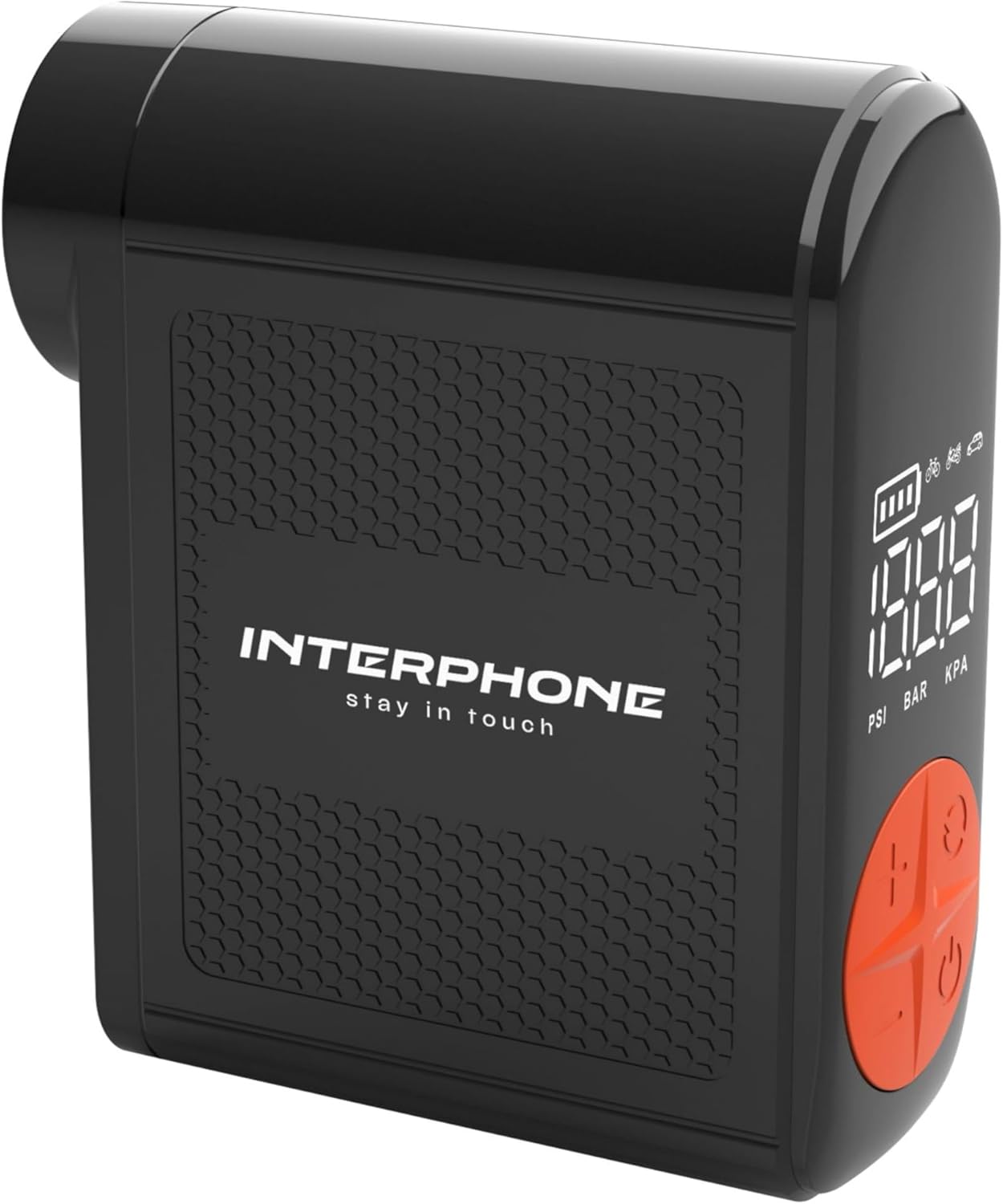
Figura 3: Lado View with Hose. This image shows the side of the compressor where the integrated inflation hose is stored, ready for use.
Configuración
Carga del dispositivo
Before first use, fully charge the portable air compressor. Connect the provided USB-C cable to the charging port on the device and the other end to a suitable USB power adapter (not included). The battery indicator on the digital display will show the charging status. A full charge ensures optimal performance and standby time.
Conexión de la manguera
The device features an integrated inflation hose. Gently pull out the hose from its storage slot on the side of the compressor. Select the appropriate nozzle adapter for your tire valve (e.g., Presta, Schrader) and securely attach it to the end of the hose.
Instrucciones de funcionamiento
Encendido/apagado
Para encender el dispositivo on, press and hold the power button (usually marked with a power symbol) for a few seconds until the display illuminates. To turn the device apagado, press and hold the power button again until the display turns off.
Ajuste de unidades de presión
After powering on, you can cycle through the available pressure units (PSI, BAR, KPA) by briefly pressing the 'M' (Mode) or unit selection button. Select the unit appropriate for your needs.
Configuración de la presión objetivo
Use the '+' and '-' buttons on the control panel to adjust the desired target pressure. The dual backlit display will show the current pressure and the target pressure simultaneously. Refer to your vehicle's manual or tire sidewall for recommended pressure values.
Proceso de inflación
- Securely connect the inflation hose with the correct adapter to the tire valve. Ensure there are no air leaks.
- Once connected, the display will show the current tire pressure.
- Press the start/inflate button (often marked with a play symbol or a circle) to begin the inflation process.
- The compressor will automatically stop when the set target pressure is reached.
- Desconecta con cuidado la manguera de la válvula del neumático.
Función del banco de energía
The INTERPHONE Portable Air Compressor can also function as a power bank. Locate the USB-A output port on the device. Connect your electronic device (e.g., smartphone, tablet) to this port using its charging cable. The compressor will then provide power to charge your device.
Operación de luz LED
The built-in LED light is useful for operating in low-light conditions or as an emergency light. Press the dedicated light button (or a multi-function button, refer to device markings) to turn the LED light on or off.
Mantenimiento
Proper maintenance ensures the longevity and reliability of your air compressor.
- Limpieza: Wipe the device with a soft, dry cloth. Do not use harsh chemicals or abrasive cleaners. Ensure no liquids enter the device.
- Almacenamiento: Store the compressor in a cool, dry place away from direct sunlight and extreme temperatures. Ensure the integrated hose is properly retracted into its slot.
- Cuidado de la batería: For long-term storage, charge the battery to approximately 50-70% every 3-6 months to maintain battery health. Avoid fully discharging the battery frequently.
Solución de problemas
If you encounter issues with your INTERPHONE Portable Air Compressor, refer to the table below for common problems and solutions.
| Problema | Posible causa | Solución |
|---|---|---|
| El dispositivo no se enciende. | Batería baja o agotada. | Cargue completamente el dispositivo utilizando el cable USB-C proporcionado. |
| Air is not inflating or inflating slowly. | Hose not securely connected to valve; incorrect nozzle adapter; hose kinked. | Ensure the hose is tightly screwed onto the tire valve. Check that the correct adapter is used and the hose is not bent. |
| El dispositivo se detiene antes de alcanzar la presión objetivo. | Battery is low; internal safety mechanism (overheat protection). | Recharge the device. If the device feels hot, allow it to cool down for 15-20 minutes before resuming operation. |
| La pantalla muestra un mensaje de error. | Mal funcionamiento interno o error del sensor. | Apague el dispositivo, espere unos segundos y vuelva a encenderlo. Si el error persiste, contacte con atención al cliente. |
Presupuesto
Detailed technical specifications for the INTERPHONE Portable Air Compressor.
| Característica | Especificación |
|---|---|
| Fabricante | Cellularline SpA |
| Marca | Interfono |
| Modelo | BOMBA DE AIRE INTERFAZ 3K |
| Dimensiones del paquete | 18 x 12.1 x 4.1 cm |
| Peso del artículo | 400 gramos |
| Inflation Capacity | Up to 4 motorcycle tyres on a single charge |
| Tiempo de inflación | Less than 4 minutes per tyre |
| Tiempo de espera | Más de 6 meses |
| Unidades de presión | PSI, BAR, KPA |
| Características adicionales | Power bank function, Built-in LED light, Integrated inflation tube, Dual backlit display, Auto-stop function |
Información de garantía y atención al cliente
Este producto incluye una garantía estándar del fabricante. Consulte la tarjeta de garantía incluida en el paquete para conocer los términos y condiciones específicos sobre la cobertura y la duración.
For technical support, service, or any inquiries regarding your INTERPHONE Portable Air Compressor, please visit the official Interphone websitio:


