1. Introducción y másview
This manual provides essential information for the setup, operation, and maintenance of your CHUWI Hi10 X2 Tablet Keyboard with Touchpad. Designed specifically for the CHUWI Hi10 X2 and Hi10 X1 Windows tablets, this 2-in-1 magnetic keyboard transforms your tablet into a versatile laptop, enhancing productivity and convenience.
The keyboard features a magnetic docking interface for seamless connection, eliminating the need for separate charging or Bluetooth pairing. Its ultra-slim and portable design makes it ideal for various uses, from business and education to everyday tasks and gaming.
2. Características del producto
- Magnetic Docking Interface: Designed for CHUWI Hi10 X2 / Hi10 X1 Windows tablets, ensuring easy and stable connection.
- No Charging or Pairing Required: The docking magnetic suction design provides energy efficiency and a faster input response time compared to Bluetooth keyboards.
- Panel táctil integrado: Supports multi-touch gestures for responsive navigation and control.
- Experiencia de escritura mejorada: Features a borderless keyboard with well-spaced keys and optimized key travel for accuracy and comfort.
- Funcionalidad 2 en 1: Transforms your tablet into a versatile laptop instantly, complete with a sturdy stand for optimal viewángulos de ing.
- Ultra Slim and Portable: Lightweight and easy to attach or remove, making it convenient for travel and daily use.

Image: The CHUWI Hi10 X2 Tablet Keyboard provides an enhanced typing experience with its well-spaced keys, designed for comfort and precision.

Image: The high-precision touchpad supports multi-touch gestures for responsive navigation and control.
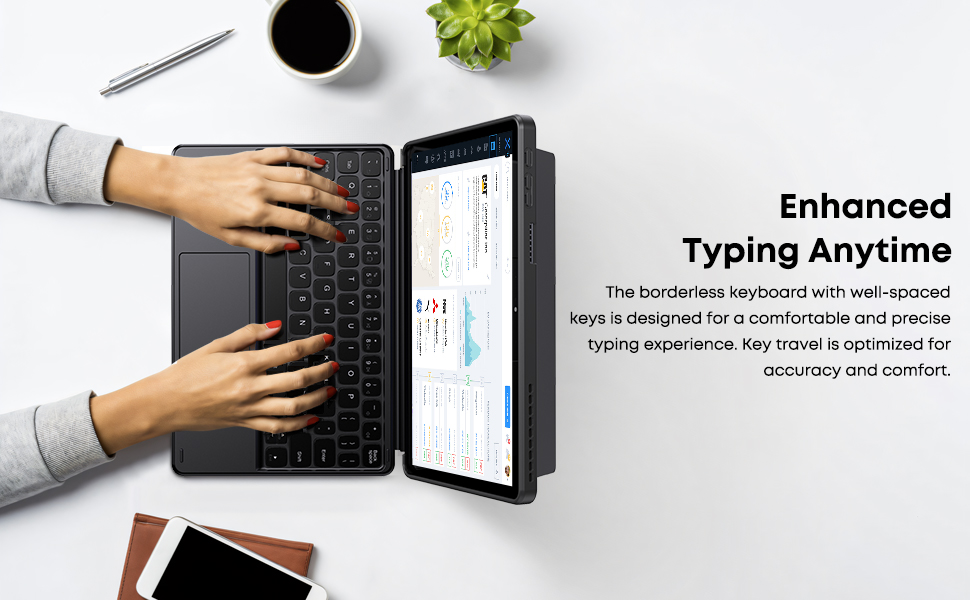
Image: The Smart Keyboard attaches magnetically to the Hi10 X1/X2 tablet, providing instant power and a great typing experience without needing charging or pairing.
3. Configuración
- Colocando el teclado: Align the magnetic docking interface of the keyboard with the corresponding pins on your CHUWI Hi10 X2 or Hi10 X1 tablet. The magnets will guide the keyboard into place, establishing an instant connection.
- Uso del soporte: The keyboard case includes a built-in stand. Fold out the stand from the back of the case to prop up your tablet at a comfortable viewángulo de escritura o escritura.
- Uso inicial: No initial charging or Bluetooth pairing is required for the keyboard to function with your compatible CHUWI tablet once magnetically docked.
Video: This video demonstrates the installation of the CHUWI Hi10 X1 keyboard and showcases the protective case. It illustrates how to attach the tablet to the keyboard and utilize the case's features.
4. Instrucciones de funcionamiento
- Mecanografía: Begin typing immediately after docking your tablet. The keyboard provides a familiar layout for efficient text input.
- Uso del panel táctil: The integrated touchpad supports standard mouse functions and multi-touch gestures.
- Toque con un solo dedo: Click izquierdo.
- Toque con dos dedos: Botón derecho del ratón.
- Desplazamiento con dos dedos: Desplácese hacia arriba o hacia abajo.
- Pellizcar para hacer zoom: Utilice dos dedos para acercar o alejar la imagen.
- Desmontaje del teclado: Gently pull the tablet away from the magnetic docking interface to detach the keyboard.
5. Mantenimiento
- Limpieza: Use a soft, dry, lint-free cloth to clean the keyboard and touchpad surfaces. For stubborn marks, slightly dampEnjuague el paño con agua. Evite productos químicos agresivos o materiales abrasivos.
- Almacenamiento: When not in use, keep the keyboard attached to the tablet to protect the screen and keys. Store in a cool, dry place away from direct sunlight and extreme temperatures.
- Manejo: Avoid placing heavy objects on the keyboard or bending it excessively to prevent damage to the keys or internal components.
6. Solución de problemas
- El teclado no responde:
- Ensure the tablet is correctly docked to the magnetic interface.
- Desconecte y vuelva a conectar el teclado para restablecer la conexión.
- Restart your CHUWI tablet.
- El panel táctil no funciona:
- Check if the touchpad has been accidentally disabled (refer to your tablet's settings for input devices).
- Ensure the touchpad surface is clean and free from obstructions.
- Try detaching and reattaching the keyboard.
- Teclas atascadas o que no responden:
- Clean around the affected keys with a soft, dry brush or compressed air to remove any debris.
- Evite derramar líquidos sobre el teclado.
7. Especificaciones
| Marca: | Chuwi |
| Número de modelo: | CHUWI Hi10 X1 Tablet Keyboard (Compatible with Hi10 X2) |
| Dispositivos compatibles: | Hi10 X1 tablet, Hi10 X2 tablet |
| Tecnología de conectividad: | Magnetic Docking Interface (faster than Bluetooth) |
| Descripción del teclado: | Numeric (Standard QWERTY layout with touchpad) |
| Características especiales: | Foldable, Lightweight, Portable, Integrated Touchpad, Magnetic Connection |
| Color: | Negro |
| Material: | Silicona |
| Peso del artículo: | 9.9 onzas |
| Dimensiones del paquete: | 9.88 x 7.8 x 0.67 pulgadas |
| Componentes incluidos: | Hi10 X1 Tablet Keyboard |
8. Garantía y soporte
Your CHUWI Hi10 X2 Tablet Keyboard is covered by a 1-year service period, valid immediately after purchase. CHUWI is committed to providing high-quality products and excellent service.
For any questions or support needs, CHUWI offers lifetime factory professional support and 24-hour online assistance. Please refer to the contact information provided with your tablet or visit the official CHUWI websitio para más detalles.


