1. Producto terminadoview
The MiBOXER Y3 RGB+CCT Vertical Remote provides comprehensive control over compatible RGB+CCT LED lighting systems. This remote allows for precise adjustments of RGB colors, color temperature (CCT), and brightness. Utilizing 2.4GHz wireless technology, it ensures reliable communication with your lighting devices. Its ergonomic vertical design and intuitive interface are designed for ease of use, enabling users to effortlessly customize lighting for various environments.
Características principales:
- RGB, CCT, and Brightness Control: Adjust colors, color temperature, and brightness with ease.
- Tecnología inalámbrica de 2.4 GHz: Ensures reliable, long-range connectivity.
- Diseño vertical: Ergonomic and easy-to-use layout for quick adjustments.
- Multi-Color and Dimmable: Create customized lighting scenes with vibrant colors and dimming options.
- Compatibilidad versátil: Works with MiBOXER RGB+CCT lighting products.
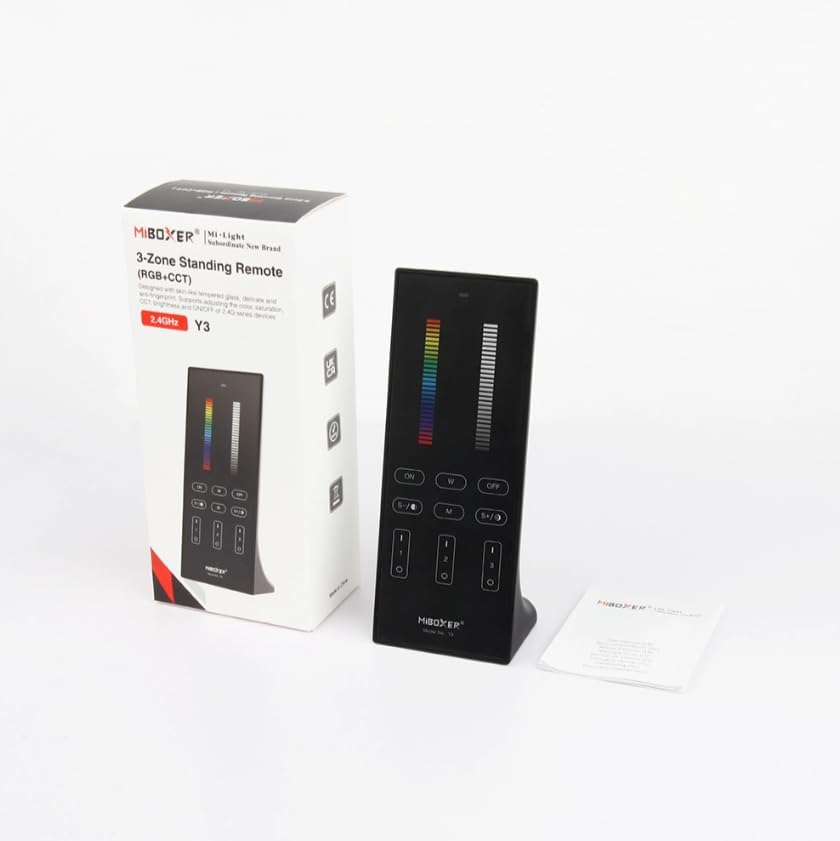
Figure 1: MiBOXER Y3 RGB+CCT Vertical Remote with its retail packaging.
2. Instrucciones de configuración
2.1 Instalación de la batería
The MiBOXER Y3 remote requires two AAA batteries (not included). To install:
- Localice la tapa del compartimiento de la batería en la parte posterior del control remoto.
- Deslice la cubierta hacia abajo para abrirla.
- Inserte dos pilas AAA, asegurándose de la polaridad correcta (+ y -).
- Deslice la cubierta nuevamente en su lugar hasta que haga clic de forma segura.
2.2 Vinculación del control remoto a dispositivos de iluminación
To control your MiBOXER RGB+CCT lighting devices, the remote must be linked to them. This process typically involves a specific sequence of actions on both the remote and the lighting device. Refer to your specific MiBOXER lighting product's manual for detailed linking instructions, as the procedure may vary slightly between different light models. A common linking procedure is as follows:
- Ensure the lighting device is powered off.
- Power on the lighting device.
- Within 3 seconds of powering on the light, press the "Zone ON" button (labeled "I" or "1") on the remote for the desired zone.
- La luz debe parpadear varias veces, indicando que la vinculación se realizó correctamente.
- If linking fails, repeat the process.
To unlink a device from a zone, power on the light and within 3 seconds, press the "Zone ON" button (labeled "I" or "1") five times rapidly for the corresponding zone. The light should flash multiple times to confirm unlinking.
3. Instrucciones de funcionamiento
The MiBOXER Y3 remote features an intuitive layout for controlling various lighting parameters. Familiarize yourself with the buttons and sliders as shown in Figure 2.

Figure 2: MiBOXER Y3 Remote Control button layout and functions.
3.1 Funciones de los botones:
| Botón/Control | Función |
|---|---|
| Luz indicadora | Flashes to confirm button presses. |
| Control deslizante RGB | Slide to select desired RGB color. |
| Control deslizante de brillo | Slide to adjust light brightness (0-100%). |
| Master ON (I/ON) | Enciende todas las luces vinculadas. |
| Master OFF (O/OFF) | Apaga todas las luces vinculadas. |
| White Light (W) | Activates pure white light mode. |
| Speed-/CCT-/Saturation- | Decreases speed in dynamic mode, decreases color temperature (warmer white), or decreases color saturation. |
| Speed+/CCT+/Saturation+ | Increases speed in dynamic mode, increases color temperature (cooler white), or increases color saturation. |
| Dynamic Mode (M) | Cycles through various dynamic lighting effects. Press repeatedly to change effects. |
| Zone ON (1, 2, 3 - "I") | Turns ON lights linked to the specific zone. Used for linking/unlinking. |
| Zone OFF (1, 2, 3 - "O") | Apaga las luces vinculadas a la zona específica. |
3.2 Operación general:
- Encender y apagar las luces: Use the "Master ON" or "Master OFF" buttons for all lights, or "Zone ON" / "Zone OFF" for specific zones.
- Ajuste de color: Slide your finger along the "RGB Slider" to select your desired color.
- Ajuste del brillo: Slide your finger along the "Brightness Slider" to increase or decrease the light intensity.
- Ajuste de la temperatura del color (CCT): In white light mode, use the "CCT-" and "CCT+" buttons to make the white light warmer or cooler.
- Modos dinámicos: Press the "M" button to activate dynamic lighting modes. Use "Speed-" and "Speed+" to adjust the speed of the current dynamic effect.
- Ajuste de saturación: In RGB mode, use "Saturation-" and "Saturation+" to adjust the intensity of the color.
4. Mantenimiento
Proper maintenance ensures the longevity and optimal performance of your MiBOXER Y3 remote.
- Limpieza: Wipe the remote with a soft, dry cloth. Do not use abrasive cleaners, solvents, or wet cloths, as these can damage the surface or internal components.
- Reemplazo de batería: Replace batteries when the indicator light becomes dim or the remote's response becomes inconsistent. Always use new AAA batteries and dispose of old batteries responsibly.
- Almacenamiento: Guarde el control remoto en un lugar fresco y seco, alejado de la luz solar directa y de temperaturas extremas. Si lo va a guardar durante un tiempo prolongado, retire las pilas para evitar fugas.
- Evite la humedad: This remote is not waterproof. Keep it away from water and high humidity environments.
5. Solución de problemas
If you encounter issues with your MiBOXER Y3 remote, refer to the following troubleshooting steps:
| Problema | Posible causa | Solución |
|---|---|---|
| Remote not responding to button presses. | Baterías agotadas o bajas. Control remoto no vinculado a las luces. Fuera de rango. | Reemplace las baterías. Re-link the remote to the lighting devices (refer to Section 2.2). Move closer to the lighting devices. |
| Las luces no cambian de color/brillo. | Modo incorrecto seleccionado. Remote not linked to the specific zone. | Ensure you are in the correct mode (e.g., RGB for color, CCT for white temperature). Verify the remote is linked to the correct zone. |
| Indicator light not flashing. | Baterías agotadas. Fallo interno. | Reemplace las baterías. Si el problema persiste después de reemplazar la batería, comuníquese con el servicio de atención al cliente. |
| Interference with other 2.4GHz devices. | Proximidad a otros dispositivos inalámbricos. | Move the remote or other 2.4GHz devices further apart. |
6. Especificaciones
Technical specifications for the MiBOXER Y3 RGB+CCT Vertical Remote.
| Característica | Detalle |
|---|---|
| Número de modelo | Y3 |
| Marca | MiBOXER |
| Tipo de control | RGB+CCT Vertical Remote |
| Tecnología inalámbrica | 2.4 GHz |
| Fuente de alimentación | 2 pilas AAA (no incluidas) |
| Característica especial | RGB/CCT/brightness dimmable |
| Peso del artículo | 4.8 onzas (aprox. 136 gramos) |
| Dimensiones del paquete | 6.5 x 3 x 2 pulgadas (aprox. 16.5 x 7.6 x 5.1 cm) |


Figure 3: Dimensions of the MiBOXER Y3 Remote Control and its packaging.
7. Garantía y soporte
For warranty information, please refer to the documentation provided with your specific MiBOXER lighting product or contact the retailer where the product was purchased. MiBOXER products typically come with a manufacturer's warranty covering defects in materials and workmanship.
For technical support or further assistance, please visit the official MiBOXER webSitio web o contacte con su departamento de atención al cliente. Los datos de contacto suelen estar disponibles en el empaque del producto o en la página web oficial de la marca.


