1. Introducción
The Canyon DVR40 is a dash camera designed to record driving footage. It features a Sony Starvis 415 sensor for 4K video recording, a 140° wide field of view, and a 3-inch IPS capacitive touchscreen. The device includes a supercapacitor for reliable operation and supports Wi-Fi connectivity for control via a mobile application.

Imagen 1.1: Frente view of the Canyon DVR40 Dash Camera, showing the lens and branding.
2. Contenido del paquete
Verify that all items listed below are present in the product packaging.

Image 2.1: All items included in the Canyon DVR40 Dash Camera package.
- Canyon DVR40 Dash Camera
- Guía de inicio rápido
- Tarjeta de garantía
- Accessories for Cable Installation
- Lector de tarjetas
- Magnetic suction cup holder with a USB Type-C connector
- Car power adapter (2 output connectors USB Type-A)
- Cable USB Type-C (cable length 3.6 m)
- Filtro CPL
- Cloth for screen cleaning
- Estuche textil
3. Producto terminadoview
Familiarize yourself with the main components of the DVR40 dash camera.

Image 3.1: The Canyon DVR40 Dash Camera, highlighting its compact design.
Características principales:
- 4K UltraHD Recording: Captures video at 30 frames per second for clear footage.
- Sony Starvis 415 Sensor: Enhances low-light performance with night vision mode.
- 140° Campo de View: Provides wide coverage of the road.
- 3-inch IPS Capacitive Touchscreen: For direct control and playback.
- Supercondensador: Offers improved durability and temperature resistance compared to traditional batteries.
- Montaje magnético: Facilitates easy installation and removal with integrated power supply.
- Conectividad Wi-Fi: Allows control and footage management via the Canyon Eye mobile application.
- Sensor G: Automatically detects impacts and locks video files para evitar sobrescribir.
4. Configuración
4.1 Montaje de la cámara del tablero
The DVR40 uses a magnetic mount for secure attachment to your vehicle's windshield.
- Limpie el área del parabrisas donde desea montar la cámara.
- Attach the magnetic suction cup holder to the windshield. Ensure it is positioned to provide an unobstructed view del camino.
- Connect the USB Type-C power cable to the magnetic mount.
- Align the dash camera with the magnetic mount. The camera will snap into place, establishing the power connection.

Image 4.1: The magnetic mount with integrated power supply for easy installation.
4.2 Conexión de alimentación
Use the provided car power adapter and USB Type-C cable to power the dash camera.
- Plug the car power adapter into your vehicle's 12V power outlet (cigarette lighter socket).
- Connect the USB Type-C cable from the car power adapter to the magnetic mount.
- Once the vehicle's ignition is turned on, the dash camera will automatically power on and begin recording.
4.3 Initial Setup and MicroSD Card
Before first use, insert a compatible MicroSD card (not included) and format it.
- Insert a high-speed MicroSD card (Class 10 or higher, up to 128GB recommended) into the designated slot on the dash camera.
- Encienda la cámara.
- Access the camera's settings via the touchscreen or the mobile app.
- Locate the "Format SD Card" option and confirm to format the card. This prepares the card for recording and ensures optimal performance.
5. Instrucciones de funcionamiento
5.1 Grabación básica
The DVR40 automatically begins loop recording when powered on.
- Grabación en bucle: The camera records video in segments (e.g., 1, 3, or 5 minutes). When the MicroSD card is full, the oldest unprotected filese sobrescriben.
- Grabación manual: Press the record button on the camera (if available) or use the mobile app to manually start/stop recording.
- Calidad del vídeo: The camera records in 4K UltraHD at 30 frames per second.

Image 5.1: Visual representation of the DVR40's high-quality video capabilities.
5.2 G-Sensor for Accident Recording
The built-in G-Sensor detects sudden impacts or rapid acceleration/deceleration.
- When an event is detected, the current video segment is automatically locked and saved to a protected folder on the MicroSD card.
- These protected files no se sobrescribirán con la grabación en bucle.
- Adjust the G-Sensor sensitivity in the camera settings if needed.

Image 5.2: Illustration of the G-Sensor's function in accident recording.
5.3 Pantalla táctil
The 3-inch IPS capacitive touchscreen allows for direct interaction with the camera.
- Navegue por los menús, ajuste la configuración y vuelva aview comida grabadatage directamente en el dispositivo.
- The IPS display offers wide viewing angles and clear visibility.

Image 5.3: The touch screen display in use on the DVR40.
5.4 Wi-Fi and Mobile Application Control
Connect the DVR40 to your smartphone via Wi-Fi using the Canyon Eye mobile application.
- Download the "Canyon Eye" application from your smartphone's app store.
- Enable Wi-Fi on the DVR40 through its settings menu.
- On your smartphone, connect to the DVR40's Wi-Fi network (SSID and password will be displayed on the camera screen).
- Open the Canyon Eye app. You can now view vivir footage, acceder a videos grabados, cambiar configuraciones y descargar files directamente a tu teléfono.
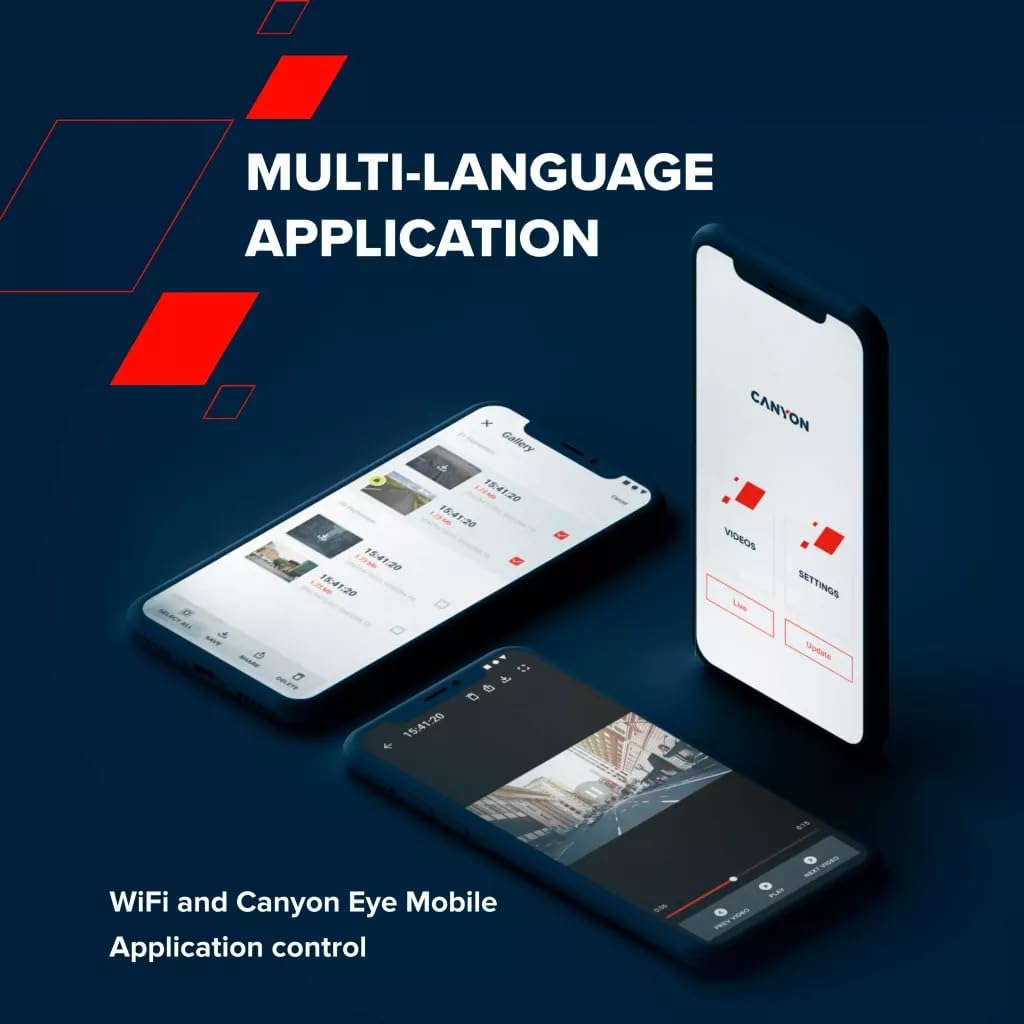
Image 5.4: The Canyon Eye mobile application interface for remote control and file gestión.
6. Mantenimiento
6.1 Supercondensador
The DVR40 is equipped with a supercapacitor instead of a traditional lithium-ion battery.
- Supercapacitors offer enhanced durability and a wider operating temperature range (-30°C to 80°C).
- They are less prone to overheating and have a longer lifespan, making them suitable for automotive environments.
- The supercapacitor provides enough power to safely save the last recording when external power is disconnected.

Image 6.1: The DVR40's supercapacitor ensures reliable operation across a wide temperature range.
6.2 Limpieza y almacenamiento
- Use the provided cleaning cloth to gently wipe the screen and lens. Avoid abrasive materials or chemical cleaners.
- Ensure the camera is clean and dry before storing it.
- When not in use for extended periods, store the camera in a cool, dry place, away from direct sunlight.
7. Solución de problemas
Consulte la siguiente tabla para conocer los problemas más comunes y sus soluciones.
| Problema | Posible causa | Solución |
|---|---|---|
| La cámara no se enciende. | No power supply; faulty cable/adapter. | Check car power adapter connection. Ensure vehicle ignition is on. Try a different USB port or adapter if available. |
| La grabación se detiene inesperadamente. | MicroSD card full or corrupted; low-speed MicroSD card. | Format the MicroSD card. Replace with a high-speed (Class 10 or U3) MicroSD card. |
| Vídeo footage está borrosa o poco clara. | Protective film on lens; dirty lens; windshield obstruction. | Remove any protective film. Clean the camera lens and windshield. Ensure the camera is securely mounted. |
| Problemas de conexión Wi-Fi. | Contraseña de Wi-Fi incorrecta; Wi-Fi de la cámara no habilitado; problemas con la aplicación. | Ensure Wi-Fi is enabled on the camera. Verify the Wi-Fi password. Restart both the camera and smartphone. Reinstall the Canyon Eye app. |
| El sensor G es demasiado sensible/no lo suficientemente sensible. | Configuración de sensibilidad del sensor G. | Adjust the G-Sensor sensitivity level in the camera settings. |
8. Especificaciones
Detailed technical specifications for the Canyon DVR40 Dash Camera.
| Característica | Especificación |
|---|---|
| Marca | CAÑÓN |
| Nombre del modelo | DVR40 |
| Número de modelo | CND-DVR40 |
| Color | Negro |
| Resolución de grabación de vídeo | 2160p (4K UltraHD) |
| Cuadros por segundo | 30 fps (at 4K) |
| Tecnología de sensores ópticos | CMOS (Sony Starvis 415) |
| Tamaño del fotosensor | 1/2.86'' |
| Campo de View | 140° |
| Características especiales | Integrated Supercapacitor, Touch Screen, Night Vision Mode, Wi-Fi, G-Sensor |
| Mostrar | Pantalla táctil capacitiva IPS de 3 pulgadas |
| Tipo de montaje | Montaje magnético |
| Fuente de poder | Car power adapter (USB Type-C) |
| Rango de temperatura de funcionamiento | -30°C a 80°C (debido al supercondensador) |
| Componentes incluidos | Dash Camera, Magnetic Mount, Car Power Adapter, USB-C Cable, Card Reader, CPL Filter, Cleaning Cloth, Textile Case, Quick Start Guide, Warranty Card, Cable Installation Accessories |
| Pilas incluidas | No (uses Supercapacitor) |
9. Información de seguridad
- Do not operate the camera or adjust settings while driving. Always pull over to a safe location.
- Ensure the camera is securely mounted and does not obstruct your view del camino.
- Use only the provided power adapter and cables to prevent damage to the device.
- Do not expose the camera to extreme moisture or liquids.
- Avoid disassembling the device. Refer to qualified service personnel for repairs.
- Mantenga la cámara y los accesorios fuera del alcance de los niños.
10. Garantía y soporte
For warranty information and technical support, please refer to the warranty card included in your package or visit the official Canyon websitio.
Soporte en línea: https://canyon.eu/support/


