
VTimes 2.4 Inches
VTimes Baby Monitor User Manual
Model: 2.4 Inches | Brand: VTimes
Introduction
The VTimes Baby Monitor is designed to provide reliable and secure monitoring of your baby, elderly family members, or pets. Utilizing advanced 2.4GHz FHSS technology, it ensures a private connection without the need for Wi-Fi or complex app setups. This manual provides comprehensive instructions for setting up, operating, and maintaining your baby monitor.
What's in the Box
- Parent unit x 1
- Camera unit x 1
- Power Adapter x 2
- User manual x 1
- Wall-mounting kit x 1

Figure 1: All components included in the VTimes Baby Monitor package.
Setup
The VTimes Baby Monitor is designed for quick and easy setup, offering a "plug and play" experience without the need for Wi-Fi or app pairing.
Initial Connection
- Connect the camera unit to a power outlet using one of the provided power adapters.
- Connect the parent unit to a power outlet using the second power adapter to charge its internal battery.
- Press and hold the power button on the parent unit to turn it on. The units will automatically pair.

Figure 2: Simple plug-and-play setup for the VTimes Baby Monitor.
Placement and Mounting
Position the camera unit in a location that provides a clear view of the monitoring area. The camera can be placed on a flat surface or mounted to a wall using the included wall-mounting kit. Ensure the camera is at least 3 feet (0.9 meters) away from the baby's crib to prevent entanglement with cords.

Figure 3: Optimal placement and features of the VTimes Baby Monitor camera.
For wall mounting, use the provided screws and anchors to secure the camera base to the desired location. Adjust the camera angle manually to achieve the best viewing perspective.
Operating Instructions
Parent Unit Overview
The parent unit features a 2.4-inch LCD screen and intuitive controls for monitoring and adjusting settings.

Figure 4: The parent unit interface, including language settings.
Key Features
- Crystal Clear Audio and Video: Delivers real-time video and clear audio.
- Secure and Private Connection: Uses 2.4GHz FHSS technology, no Wi-Fi or app needed, preventing unauthorized access.
- Smart ECO Mode: Screen goes to sleep to save battery and wakes instantly upon detecting sound.
- Automatic Night Vision: Ensures clear visibility in low-light conditions, automatically activating as brightness changes.
- Two-Way Audio: Allows you to speak to your baby through the monitor.
- Temperature Sensor: Displays the room temperature on the parent unit.
- Lullabies: Play soothing melodies to help your baby sleep.
- 2X Zoom: Zoom in on the video feed for a closer look.
- 1000ft Range: Provides extended coverage for monitoring throughout your home.

Figure 5: Automatic Infrared Night Vision for continuous monitoring.

Figure 6: Voice Activated Mode (VOX) for efficient monitoring and battery saving.
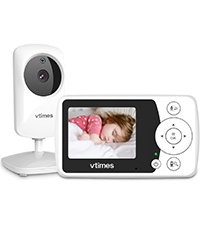


Figure 7: Various feature icons accessible on the parent unit.
Adjusting Settings
Use the directional buttons and the "OK" button on the parent unit to navigate through the menu and adjust settings such as volume, brightness, ECO mode sensitivity, and lullaby selection. The monitor also displays the room temperature, allowing you to ensure a comfortable environment.


Figure 8: Temperature sensor and lullaby features.
Maintenance
To ensure the longevity and optimal performance of your VTimes Baby Monitor, follow these maintenance guidelines:
- Cleaning: Use a soft, dry cloth to clean the camera and parent units. Do not use abrasive cleaners or solvents.
- Battery Care: For the parent unit, ensure it is fully charged before extended use without being plugged in. If storing for a long period, charge the battery periodically to maintain its health.
- Storage: Store the monitor in a cool, dry place away from direct sunlight and extreme temperatures.
Troubleshooting
| Problem | Possible Solution |
|---|---|
| No image/sound on parent unit | Ensure both units are powered on and within range. Check power connections. Re-pair units if necessary (refer to user manual for pairing steps). |
| Poor image quality (e.g., too zoomed in) | Adjust camera placement. Note that the 2.4-inch model may have a fixed zoom. |
| Short battery life on parent unit | Ensure the unit is fully charged. Use ECO mode to conserve battery. Keep plugged in for continuous overnight use. |
| Intermittent signal loss | Reduce distance between units. Minimize obstructions (walls, large furniture). Avoid interference from other 2.4GHz devices. |
Specifications
| Feature | Detail |
|---|---|
| Brand | VTimes |
| Model | 2.4 Inches (B0CZDYF95R) |
| Connectivity Technology | Wireless (2.4GHz FHSS) |
| Screen Size | 2.4" LCD |
| Range | Up to 1000ft (line of sight) |
| Special Features | Lightweight, 2-Way Audio, ECO Mode, Night Vision, Temperature Sensor, Lullabies |
| Power Source | Corded Electric |
| Item Weight | 13.7 ounces |
| Installation Type | Freestanding, Wall Mount |
Warranty and Support
VTimes offers customer support for their products. If you encounter any issues or require assistance, please contact the seller directly through the Amazon product support link. Many customers have reported positive experiences with VTimes' responsive customer service, including replacements and extended guarantees.

Figure 9: How to contact VTimes customer support via Amazon.
Ask a question about this manual
Ask about setup, troubleshooting, compatibility, parts, safety, or missing instructions. Manuals+ will review the question and use this page’s manual context to help answer it.