1. Introducción
Thank you for choosing the Defender Enjoy S200 Portable Bluetooth Speaker. This manual provides essential information for setting up, operating, and maintaining your speaker to ensure optimal performance and longevity. Please read this manual thoroughly before use.
The Defender Enjoy S200 is a versatile portable speaker featuring Bluetooth 5.3 connectivity, True Wireless Stereo (TWS) pairing, an integrated FM radio, and MP3 playback capabilities via USB flash drive or microSD card. It also includes an LED light and supports hands-free calling. Designed for portability, it offers up to 9 hours of playback on a single charge and convenient USB Type-C charging.
2. Producto terminadoview
2.1 Características principales
- Bluetooth 5.3: Para una transmisión de audio inalámbrica estable y eficiente.
- Estéreo inalámbrico verdadero (TWS): Connect two Enjoy S200 speakers for a stereo sound experience.
- Múltiples modos de reproducción: Bluetooth, FM Radio, USB Flash Drive, MicroSD Card (up to 32GB).
- Luz LED integrada: Provides visual ambiance.
- Llamadas manos libres: Micrófono incorporado para llamadas telefónicas.
- Batería de larga duración: Hasta 9 horas de reproducción continua de música.
- Carga USB tipo C: Puerto de carga moderno y cómodo.
- Diseño portátil: Compact and lightweight with a carrying strap.
2.2 Contenido del paquete
- Defender Enjoy S200 Portable Bluetooth Speaker
- Cable de carga tipo C
- Guía de inicio rápido
- Correa de transporte

Image: The Defender Enjoy S200 Portable Bluetooth Speaker, showcasing its compact design and front grille with an illuminated LED ring.

Image: An infographic highlighting key features such as multi-colored LED lighting, True Wireless Stereo (TWS) pairing, Bluetooth 5.3, MP3 player, FM receiver, and hands-free calling.
3. Configuración
3.1 Carga del altavoz
- Locate the Type-C charging port on the back of the speaker.
- Connect the provided Type-C charging cable to the speaker and the other end to a USB power adapter (not included) or a computer's USB port.
- El indicador LED mostrará el estado de carga. Una carga completa suele tardar entre 3 y 4 horas.
- Desconecte el cable una vez que esté completamente cargado.
3.2 Encendido / Apagado
- To power on, slide the ON/OFF switch located on the back of the speaker to the 'ON' position.
- Para apagar, deslice el interruptor de ENCENDIDO/APAGADO a la posición 'APAGADO'.
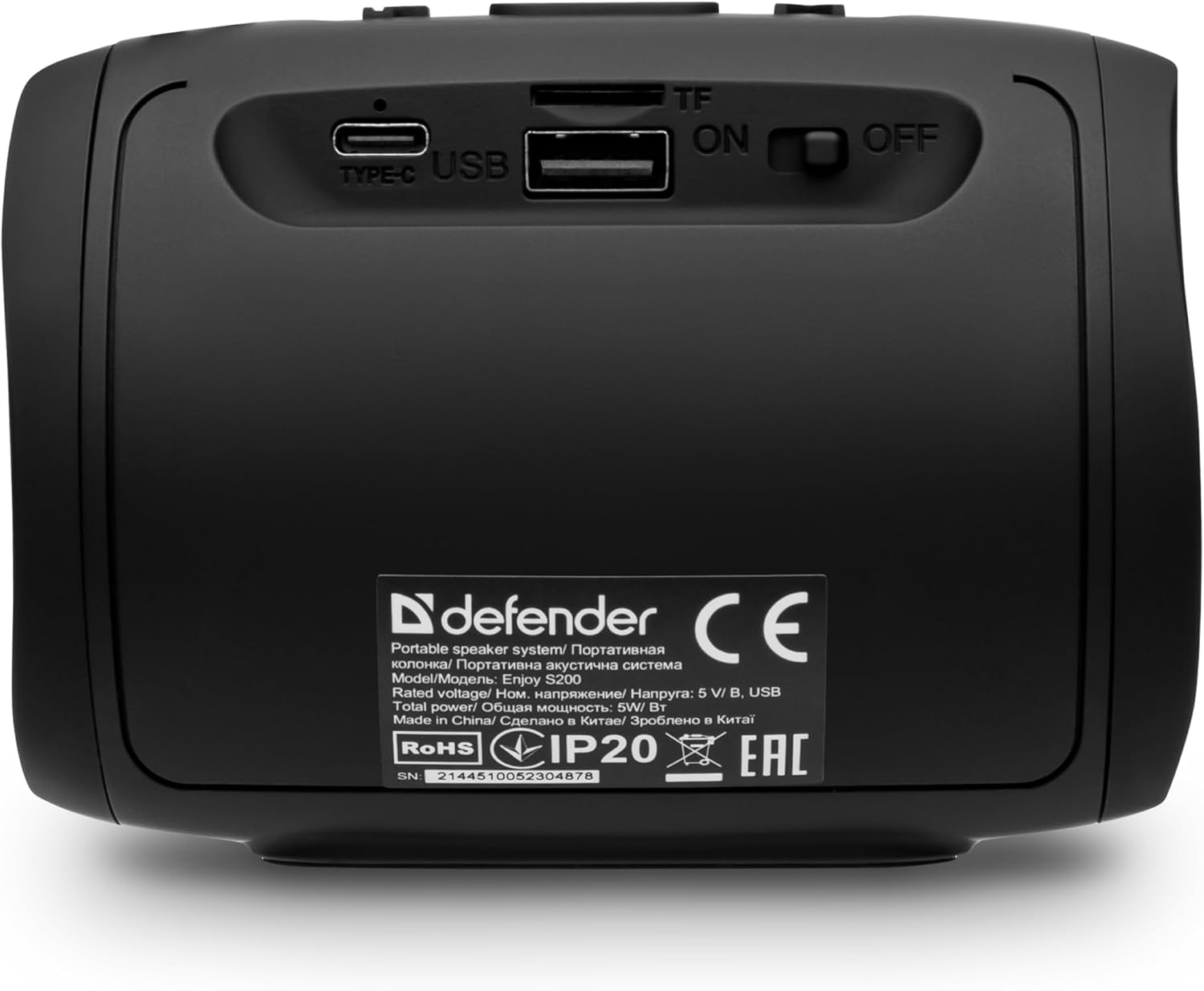
Imagen: Trasera view of the Defender Enjoy S200 speaker, showing the Type-C charging port, USB port, TF (microSD) card slot, and the ON/OFF power switch.
3.3 Emparejamiento Bluetooth
- Asegúrese de que el altavoz esté encendido y en modo de emparejamiento Bluetooth (indicado por un LED parpadeante).
- En tu dispositivo (teléfono inteligente, tableta, etc.), activa el Bluetooth y busca dispositivos disponibles.
- Select "Defender Enjoy S200" from the list of devices.
- Una vez emparejado, el altavoz emitirá un sonido de confirmación y el LED dejará de parpadear.
3.4 Emparejamiento estéreo inalámbrico verdadero (TWS)
To pair two Defender Enjoy S200 speakers for stereo sound:
- Asegúrese de que ambos altavoces estén encendidos y no conectados a ningún dispositivo Bluetooth.
- On one speaker (this will be the primary speaker), press and hold the TWS button (often indicated by a double-arrow icon) until you hear a pairing tone.
- The two speakers will automatically search and connect to each other. A confirmation tone will sound once connected.
- Ahora, conecta tu dispositivo al altavoz principal mediante Bluetooth, como se describe en la sección 3.3. El audio se reproducirá en estéreo por ambos altavoces.

Image: A visual representation of two Defender Enjoy S200 speakers pairing wirelessly to create a True Wireless Stereo system, alongside icons for Bluetooth 5.3, MP3 player, FM receiver, and hands-free calling.
4. Instrucciones de funcionamiento
4.1 Button Functions (Refer to top panel controls)
- Botón de encendido: Long press to power on/off. Short press to play/pause in music mode, or answer/end calls.
- Subir volumen (+): Short press to increase volume. Long press for next track/station.
- Bajar volumen (-): Short press to decrease volume. Long press for previous track/station.
- Botón de modo (M): Short press to switch between Bluetooth, FM Radio, USB, and MicroSD modes.
- Botón de luz LED: Short press to cycle through LED light modes or turn off the LED.
4.2 Reproducción Bluetooth
After successful Bluetooth pairing (Section 3.3), open your music application on your device and begin playback. Use the speaker's volume buttons or your device's volume controls to adjust the audio level.
Modo de radio 4.3 FM
- Press the 'M' (Mode) button until you hear the FM radio prompt.
- Mantenga presionado el botón Reproducir/Pausa para escanear y guardar automáticamente las estaciones de FM disponibles.
- Utilice los botones Subir volumen (+) y Bajar volumen (-) (pulsación prolongada) para navegar entre las estaciones guardadas.
4.4 Reproducción USB/MicroSD
- Insert a USB flash drive or a microSD card (up to 32GB) containing MP3 audio files into the respective port on the back of the speaker.
- Press the 'M' (Mode) button until the speaker automatically switches to USB or MicroSD mode and begins playback.
- Use the speaker's control buttons for play/pause, next track, and previous track.
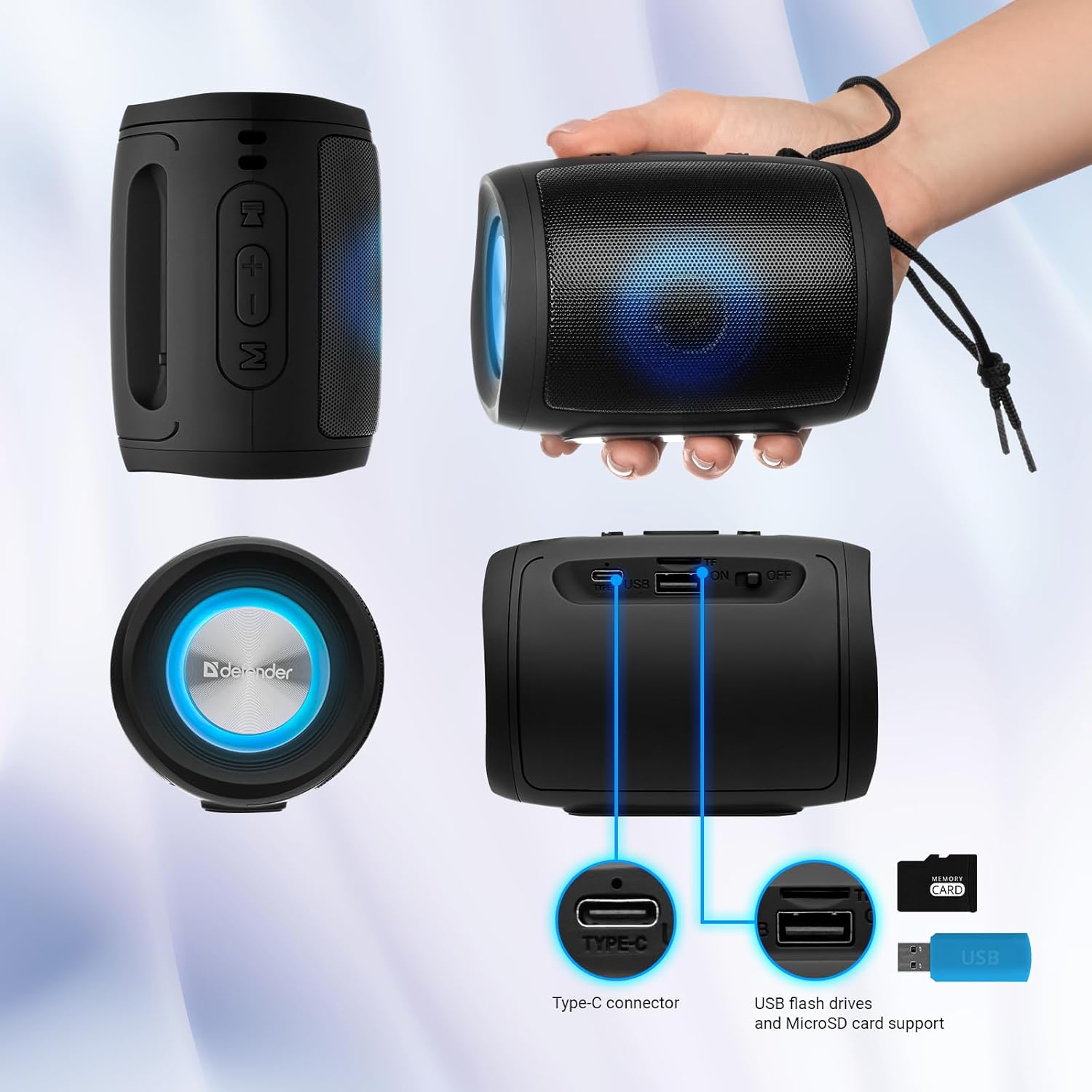
Image: A detailed diagram illustrating the Type-C connector, USB flash drive port, and MicroSD card slot on the Defender Enjoy S200 speaker.
4.5 Llamadas manos libres
When connected to your smartphone via Bluetooth, the speaker's built-in microphone allows for hands-free calls.
- Responder llamada: Presione brevemente el botón Reproducir/Pausar.
- Finalizar llamada: Presione brevemente el botón Reproducir/Pausar.
- Rechazar llamada: Mantenga presionado el botón Reproducir/Pausa.
5. Mantenimiento
- Limpieza: Utilice un paño suave y seco para limpiar la superficie del altavoz. No utilice limpiadores abrasivos ni disolventes.
- Almacenamiento: Guarde el altavoz en un lugar fresco y seco, alejado de la luz solar directa y de temperaturas extremas.
- Resistencia al agua: The speaker has an IP20 rating, meaning it is protected against solid objects larger than 12.5mm but has no protection against water. Avoid exposure to rain, splashes, or immersion in water.
- Cuidado de la batería: Para prolongar la vida útil de la batería, cargue completamente el altavoz antes del primer uso y recárguelo al menos una vez cada tres meses si no lo usa con regularidad.
6. Solución de problemas
- Sin energía: Ensure the speaker is charged. Connect the Type-C cable and allow it to charge for a few minutes before attempting to power on again.
- Sin sonido: Check the volume levels on both the speaker and your connected device. Ensure the speaker is in the correct mode (Bluetooth, FM, USB, MicroSD).
- Problemas de emparejamiento de Bluetooth: Ensure the speaker is in pairing mode. Turn off Bluetooth on your device and turn it back on. Try unpairing and re-pairing the speaker. Move closer to the speaker to ensure you are within the 10-meter range.
- Mala recepción de radio FM: Ensure you are in an area with good signal. The charging cable can sometimes act as an antenna; try connecting it for improved reception.
- USB/MicroSD Not Playing: Asegúrese de que el audio files are in a compatible format (e.g., MP3). Check that the USB drive or microSD card is inserted correctly and is not corrupted.
7. Especificaciones
| Nombre del modelo | Disfruta S200 |
| Número de modelo del artículo | 65200 |
| Marca | Defensor |
| Tecnología de conectividad | Bluetooth 5.3, USB |
| Tecnología de comunicación inalámbrica | Bluetooth, radiofrecuencia |
| Tipo de altavoz | Multimedia |
| Tamaño del altavoz | 2 pulgadas |
| Potencia de salida | 5 vatios |
| Modo de salida de audio | Estéreo |
| Fuente de poder | Funciona con pilas (1 batería de iones de litio incluida) |
| Características especiales | Integrated Microphone, USB Port, Portable Bluetooth, LED Light, FM Radio, MicroSD Card Support, TWS |
| Dimensiones del producto (L x An x Al) | 8 x 11 x 8 cm |
| Peso | 330 gramos |
| Alcance máximo | 10 metros |
| Clasificación IP | IP20 |
8. Garantía y soporte
8.1 Información de garantía
Los detalles específicos de la garantía generalmente se proporcionan con la documentación de compra o en el sitio web oficial del fabricante. website. Please refer to these resources for information regarding warranty coverage and duration.
8.2 Atención al cliente
For technical assistance, troubleshooting beyond this manual, or inquiries about your Defender Enjoy S200 speaker, please contact Defender Global customer support. Contact information can usually be found on the product packaging, the manufacturer's websitio, o su recibo de compra.


