Introducción
The Xiaomi Redmi Pad L83 is a WiFi-only tablet designed for entertainment and productivity. It features a 10.61-inch display, an Octa-Core MediaTek Helio G99 processor, and a large 8000mAh battery. This manual provides essential information to help you set up, operate, and maintain your device.
¿Qué hay en la caja?
Upon unboxing your Xiaomi Redmi Pad, you should find the following items:
- 1 x Xiaomi Redmi Pad L83 Tablet
- 1 x cargador de coche
- 1 x cable USB
Video: Unboxing and First Review of the Xiaomi Redmi Pad. This video demonstrates the contents of the product packaging and initial impressions of the device.
Configuración
- Encendido: Press and hold the Power button located on the top edge of the tablet until the Xiaomi logo appears.
- Configuracion inicial: Siga las instrucciones en pantalla para seleccionar su idioma, región y conectarse a una red Wi-Fi.
- Configuración de la cuenta de Google: Inicia sesión con tu cuenta de Google o crea una nueva para acceder a los servicios de Google y a Play Store.
- Bloqueo de pantalla: Set up a screen lock method (Pattern, PIN, Password, or Face Unlock) for security. Note that Face Unlock is less secure than other methods.
- Actualizaciones de software: Ensure your tablet is running the latest software by checking for updates in the Settings menu.
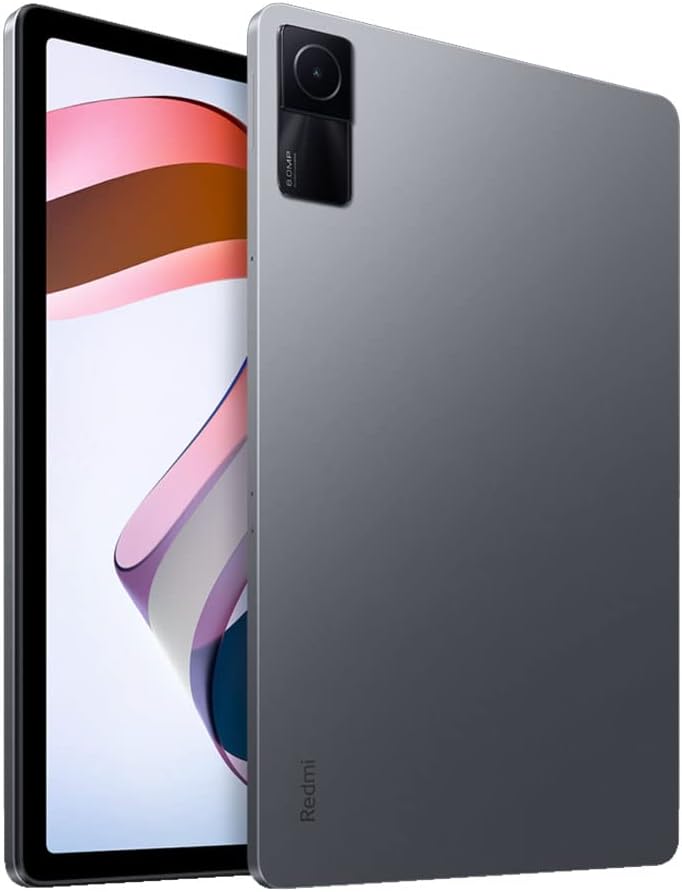
Imagen: Frente view of the Xiaomi Redmi Pad, showing the display and the location of the SIM/microSD card tray on the side.
Instrucciones de funcionamiento
Pantalla y audio
The Redmi Pad features a 10.61-inch IPS display with a resolution of 2000x1200 pixels and a 90Hz refresh rate, offering a smooth visual experience. It supports Dolby Atmos audio through its quad speakers, providing immersive sound for media consumption.
- Mostrar: 10.61-inch, 2000x1200 resolution, 90Hz refresh rate, 400 nits (typ) brightness.
- Audio: Quad speakers with Dolby Atmos support for rich sound.
Vídeo: Una revisión completaview of the Xiaomi Redmi Pad, highlighting its display quality, audio performance, and overall user experience.
Rendimiento y juegos
Powered by the MediaTek Helio G99 Octa-core processor, the Redmi Pad delivers smooth performance for daily tasks and medium-graphic gaming. It is available with 3GB, 4GB, or 6GB of RAM and 64GB or 128GB of storage, expandable via microSD card.
- Procesador: MediaTek Helio G99 Octa-core.
- RAM: 3GB, 4GB, or 6GB options.
- Almacenamiento: 64GB or 128GB, expandable via microSD.
Video: A detailed comparison between the Redmi Pad and Samsung Galaxy Tab S6 Lite 2022, focusing on performance, display, and overall value for money.
Software & Updates
The tablet runs MIUI 13 based on Android 12. Xiaomi promises two major Android updates and three years of security updates, ensuring your device remains up-to-date and secure.
- Sistema operativo: Android 12 with MIUI 13.
- Actualizaciones: Two major Android updates and three years of security updates.
Cámara
The Redmi Pad is equipped with an 8MP rear camera and an 8MP front camera (105° FOV with FocusFrame). Both cameras are suitable for casual photography, video calls, and document scanning.
- Cámara trasera: 8MP, Full HD Video Recording.
- Cámara frontal: 8MP (FOV - 105°), ideal for video calls.

Imagen: Parte posterior view of the Xiaomi Redmi Pad, showcasing the single 8MP rear camera module.
Duración de la batería
With an 8000mAh battery, the Redmi Pad offers extended usage times, making it suitable for long commutes or entertainment sessions. It supports 18W fast charging.
- Capacidad de la batería: 8000 mAh.
- Cargando: Carga rápida de 18W.
Mantenimiento
- Limpieza: Utilice un paño suave y sin pelusa para limpiar la pantalla y el cuerpo. Evite productos químicos agresivos.
- Actualizaciones de software: Compruebe e instale periódicamente las actualizaciones del sistema para garantizar un rendimiento y una seguridad óptimos.
- Administración de almacenamiento: Limpiar periódicamente lo innecesario files and apps to free up storage space and improve device speed.
- Cuidado de la batería: Avoid extreme temperatures and fully draining the battery frequently to prolong its lifespan.
Solución de problemas
- El dispositivo no responde: If the tablet becomes unresponsive, press and hold the Power button for about 10 seconds to force a restart.
- Problemas de conectividad Wi-Fi: Try restarting your Wi-Fi router and the tablet. If the issue persists, forget the network in Wi-Fi settings and reconnect.
- La aplicación se bloquea: Clear the cache and data of the problematic app in Settings > Apps. If it continues, uninstall and reinstall the app.
- Rendimiento lento: Close background apps, clear cache, and ensure sufficient free storage. Consider a factory reset as a last resort (back up your data first).
- Contactar con soporte: For persistent issues, refer to the Xiaomi support websitio o póngase en contacto con el servicio de atención al cliente.
Especificaciones del producto
| Característica | Especificación |
|---|---|
| Marca | Xiaomi |
| Nombre del modelo | Almohadilla Redmi |
| Número de modelo | L83 |
| Tamaño de pantalla | 10.61 pulgadas |
| Resolución de pantalla | 2000x1200 |
| Frecuencia de actualización de la pantalla | 90 Hz |
| Procesador | MediaTek Helio G99 de ocho núcleos (2.2 GHz) |
| Memoria RAM | 4 GB (available in 3GB, 4GB, 6GB variants) |
| Capacidad de almacenamiento | 128 GB (available in 64GB, 128GB variants) |
| Sistema operativo | Android 12 (MIUI 13) |
| Cámara trasera | 8 MP |
| Cámara frontal | 8 MP (campo de visión de 105°) |
| Capacidad de la batería | 8000 mAh |
| Conectividad | Wi-Fi 5, Bluetooth v5.3, USB-C |
| Audio | Altavoces cuádruples, compatible con Dolby Atmos |
Garantía y soporte
The Xiaomi Redmi Pad L83 comes with a limited warranty. For detailed warranty terms and conditions, please refer to the warranty card included in the box or visit the official Xiaomi support websitio.
Para obtener asistencia técnica, asistencia para la resolución de problemas o solicitudes de servicio, comuníquese con el servicio de atención al cliente de Xiaomi a través de sus canales oficiales.